
Performance Analysis: Read-In, Write-Out with Native IO, Pandas, Polars, and Modin
Evaluating Time and Memory Efficiency Across Methods

Background
When it comes to working with tabular data, data science practitioners will kickstart the process in a fast manner with their go-to libraries. During the data crunching process, one might face roadblocks such as
- Memory consumption is too high and subsequently causes the program to crash on a lower-spec machine
- Long processing time which hinders the progress of the projects.
This article elaborates on the options of data analysis libraries particularly looking into time and memory consumption. The goal is to show the tradeoffs between the Native IO method, Polars, Pandas, and Modin libraries. This would inspire you to take a step back and choose the suitable tool that fits your next project.
TLDR:
- For small-size datasets (<5 Mb), opt for Polars instead of Pandas.
- For huge datasets (>5 Mb), use Modin to leverage distributed processing across cores.
- Choose the Native IO method to get the maximum boost both in time and memory perspective in the tradeoff of inconvenience to perform data analysis.
One-Line Explanation of Each Approach/Library
Before proceeding further, a compact elaboration of each of the method/library is presented below.
- Native IO: Python’s built-in read-write operations with
with open("sample.csv", "r") as f:
pass- Polars: Rust-based data analysis library designed for high performance.
- Pandas: Single-threaded comprehensive data analysis library.
- Modin: Data analysis library with distributed computing capabilities.
For a more thorough understanding, kindly check out the link and other resources. This article will assume a foundational understanding of each method as a prerequisite.
Use Case
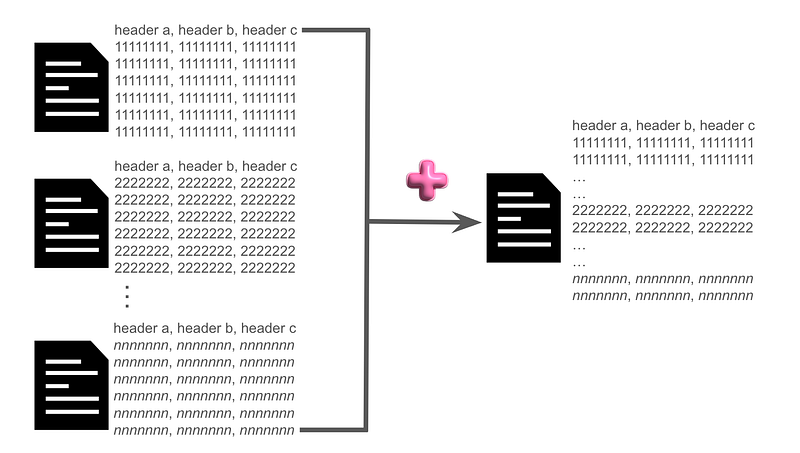
To compare on the same baseline, the use case in this article will focus on the aggregation of data from n multiple files to an output file as shown in the diagram below.
Get Your Hands Dirty
Code is hosted on GitHub while data can be retrieved from the resources below.
- Small-sized data: winequality-red.csv (0.1 Mb~)
- Large-sized data: train_essays_7_prompts_v2.csv (36.5 Mb~)
Dependencies
Dependencies are listed in the requirements.txt.
memory_profiler
line_profiler
pandas
polars
modin[ray]
cchardet
click
distributed
With Python equal to or above version 3.10, install the dependencies with
python -m pip install -r requirements.txtHow to Run
The scripts below contain the two files dedicated to measuring time and memory separately.
Retrieve the guidelines for running the scripts with the following command:
python compare_time.py --help
python compare_memory.py --help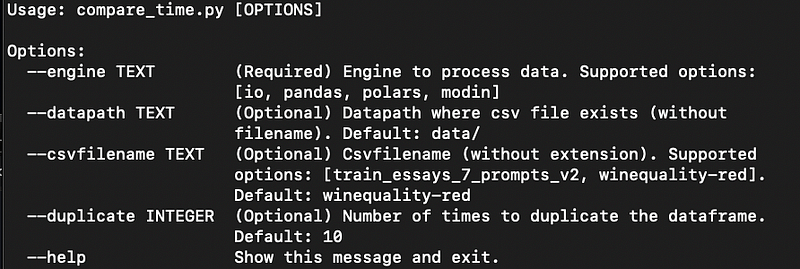
The parameters that can be passed to each script are listed below.
Required:
- engine: Engine to process data. Supported options: [io, pandas, polars, modin].
Optional:
- datapath: Datapath where the CSV file exists (without filename).
- csvfilename: CSV file name (without extension). Supported options: [train_essays_7_prompts_v2, winequality-red].
- duplicate: Number of times to duplicate the dataframe. Default: 10.
Kindly note that the datapath and CSV filename parameters decide where will the file be read from. For example with datapath as data/ and csvfilename as winequality-red, the data file is assumed to be found on <current-path>/data/winequality-red.csv.
The parameter duplicate decides how many times the file will be retrieved and subsequently aggregated.
With everything set, run with
python compare_time.py --engine polars --datapath data/ --csvfilename winequality-red --duplicate 10The simplest manner to run the command is by only specifying the required parameters — engine:
python compare_time.py --engine polarsPerformance Evaluation
The following tests are performed on a server with specifications:
- CPU: Intel i9 with 18 cores and 36 threads
- Memory: 62 Gb
The parameters are fixated to default values with only the changing of files and engine.
Time Consumption
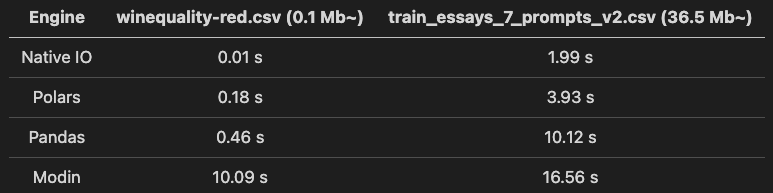
Takeaways from the table above:
- Between Polars and Pandas, Polars is faster than Pandas when processing both files.
- Panda’s processing time increases significantly with the increase of file size while Polars shows a fairly small increment.
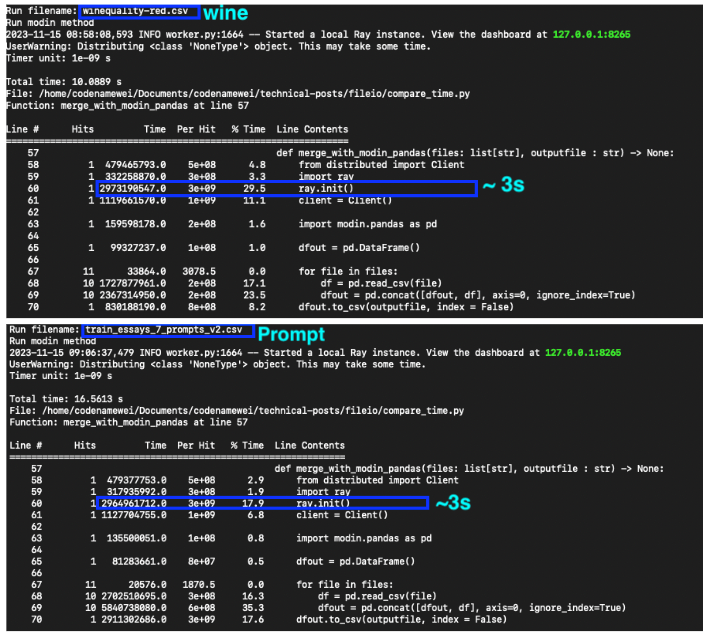
- Modin does not show leverage for small-sized files due to a relatively long initialization time (shown in the diagram below). However, it is worth noting that the time consumed does not increase with the increasing in file sizes.
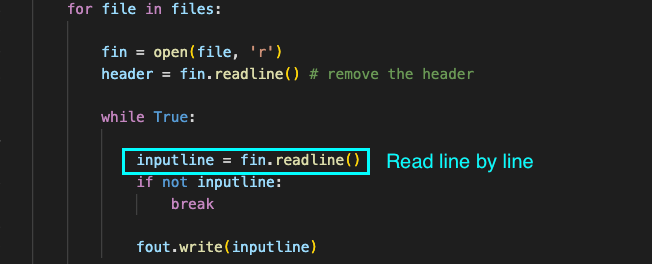
- Native IO methods top the charts with the shortest time even though the content is read line by line during aggregation (shown in the diagram below).
Memory Consumption
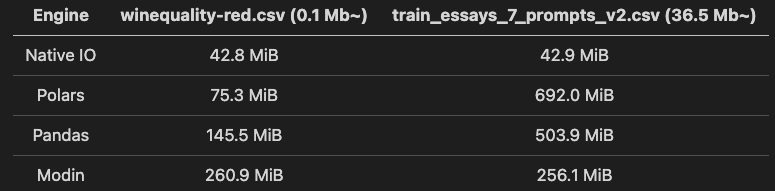
Takeaways from the table above:
- Polars perform slightly worse than Pandas in memory consumption when the file sizes increase.
- Likewise in the measurement of time consumption, Modin consumes relatively more memory for small-sized files. However, Modin does not show increasing memory consumption with the increase in file sizes. It comes as the runner-up with the second smallest memory consumption for large-sized files (which makes it suitable for managing large files).
- The native IO method thrives with the smallest memory consumption unaffected by file sizes.
With both time and memory consumption factored in, the consideration factors for each approach can be summarized as follows
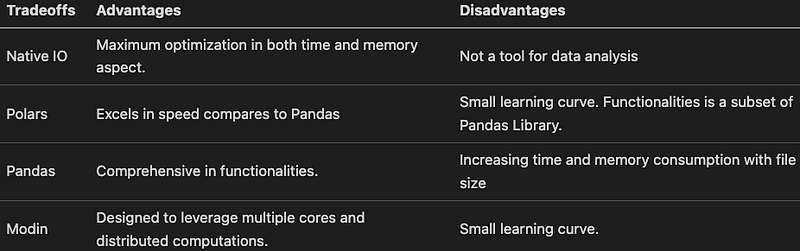
Here are some crucial observations derived from the conducted assessments.
- For small-size datasets (<5 Mb), opt for Polars instead of Pandas. While there are small learning curve due to the changes in syntax, one would get familiar in no time.
- For huge datasets (>5 Mb), use Modin to leverage distributed processing across cores. Similarly, one would have to get used to using the Modin library. Yet, since it is designed with Panda’s existing user base in mind, it should be fairly doable while the gains from doing the switch will be significant.
- Choose the Native IO method to get the maximum efficiency in time and memory. At times, certain use cases rely on read-in and write-out operations heavily without the need for data-crunching processes, thus it is possible to fall back to the basic approach.
This is not the end of it.
As the tests are executed within the scope outlined in this article, kindly consider using the same strategy to get numeric insights on which approaches are suitable for your use case. There is no one-size-fits-all approach, one should prioritize which metric is the most crucial (whether it’s time, memory, or a combination of both)
This is especially important if there is a need to build it once and run it recursively with minimum changes. The building blocks will determine how much time and memory (and these metrics eventually translate to money and resources) will be saved from the entire practice.
Thanks for reading.
Subscribe to DDIntel Here.
Have a unique story to share? Submit to DDIntel here.
Join our creator ecosystem here.
DDIntel captures the more notable pieces from our main site and our popular DDI Medium publication. Check us out for more insightful work from our community.
DDI Official Telegram Channel: https://t.me/+tafUp6ecEys4YjQ1


