
PDF Reader chatbot using langchain and open ai in 15 mins
Creating a PDF reader chatbot using Langchain and OpenAI is now easier than ever, thanks to the power of Large Language Models (LLMs) like GPT 3.5, Llama 2, and Claude. In the past, only data scientists could build AI systems for tasks like recommendations, fuzzy search, OCR, and more. But with accessible LLMs, the barrier to entry has significantly lowered.
In this article, we will be creating a pdf reader chatbot using open ai and langchain. We will be uploading the Budget of India 2023–24 and ask questions to it.
Here is the link to the budget pdf
https://www.indiabudget.gov.in/doc/budget_speech.pdf
Note: I have also made a youtube video explaining the same on my youtube channel.
You can skip reading this blog and directly watch the youtube video here.
What is langchain?
Langchain simplifies the process of connecting and interacting with LLMs. It provides ready-to-use components for common tasks and allows you to build AI bots by chaining these components together.
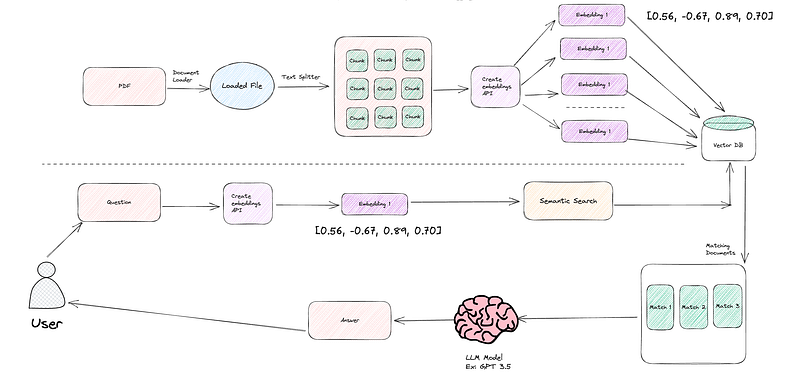
To create our PDF reader chatbot, let’s break down the six essential components you need to understand:
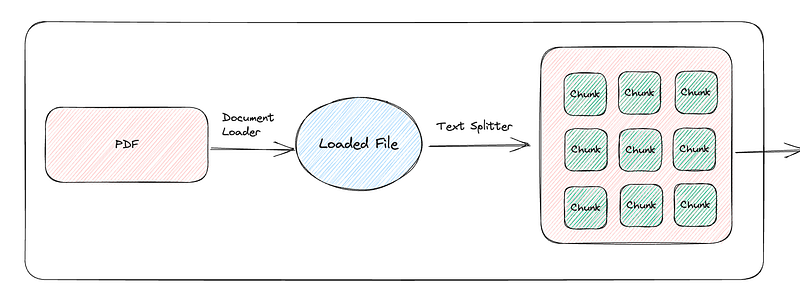
- Document loader — This component handles loading and parsing of various types of documents like CSVs, PDFs, Excel files, and more. It loads the data you want to work with.
- Text Splitter — It helps break down the text content within your documents into manageable pieces, making it easier for the bot to process.
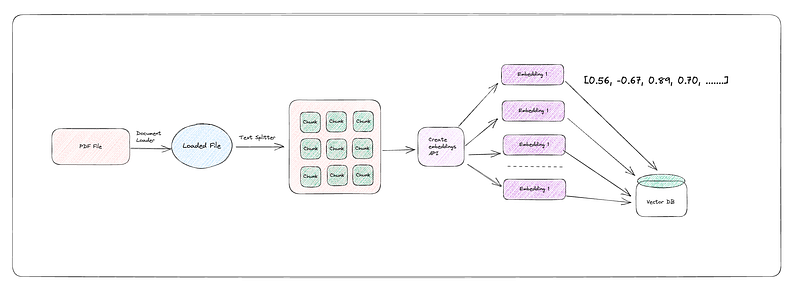
- Embeddings — This is where the magic happens. OpenAI’s Embeddings are powerful tools that allow your bot to understand and work with text data effectively. In simple language it is geo co-ordinates. So instead of storing data, it creates a co-ordinate for it in vector space.
- Vector DB(pinecone, chromadb etc)
- LLM — The core of your chatbot’s intelligence. LLMs like GPT-3.5 or GPT-4 are responsible for generating human-like responses and understanding user queries.
- Chains — Using an LLM in isolation is fine for simple applications, but more complex applications require chaining LLMs — either with each other or with other components.
Let’s now get started with implementing the above flow using langchain
Step 1: Load the pdf
https://js.langchain.com/docs/modules/data_connection/document_loaders/integrations/file_loaders/pdf
Step 2: Split into chunks
We do this because if you have a huge pdf, it would be more optimal to split into small size chunks. Consider this for simplicity as splitting into pages.
So far, with these two steps, we have successfully accomplished loading PDFs and chunking them.
Step 3: Create embeddings and Store in Vector DB
https://js.langchain.com/docs/modules/data_connection/vectorstores/integrations/hnswlib
Step 4: Create a chain to Q&A the vector db and reason the answer using LLM
https://js.langchain.com/docs/modules/chains/popular/chat_vector_db_legacy
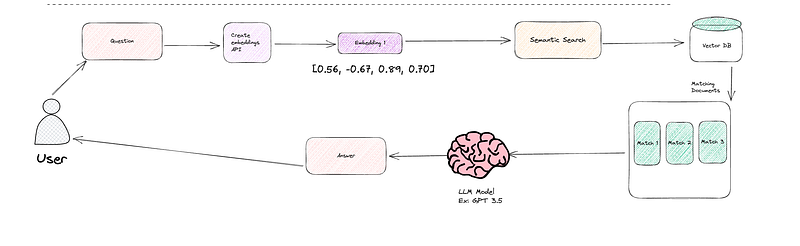
Understanding what happens when a user asks a question to our bot is crucial. Here’s a breakdown of the process:
- Question to Embeddings: When a user poses a question, we first convert that question into embeddings using OpenAI’s powerful embedding tools. These embeddings are like a numerical representation of the question’s meaning.
- Similarity Search with Vector Database: Next, we employ a similarity search in our vector database. This search aims to find chunks or documents that closely match the user’s question. In our case, it’s like searching for answers that best fit the question. We retrieve a couple of these matching documents.
- LLM Model for Natural Language Understanding: Now, it’s time to make sense of these matching documents. We turn to a Language Model like GPT 3.5. This LLM can reason and comprehend the results from the vector database, effectively understanding the context and content of the documents.
To make this happen, we need three key components:
- Vector Store Retriever: This component retrieves embeddings from our vector store. It acts as a bridge between the embeddings and the rest of the process.
- LLM Model (e.g., GPT 3.5): This is the brains behind the operation. The Language Model is responsible for providing clear and natural language responses to the user’s question.
- Chain: The chain connects the dots in this workflow. It links the vector retriever to the LLM and keeps track of the chat history, ensuring a smooth and coherent conversation.
With this our bot is ready and we can ask questions to it.
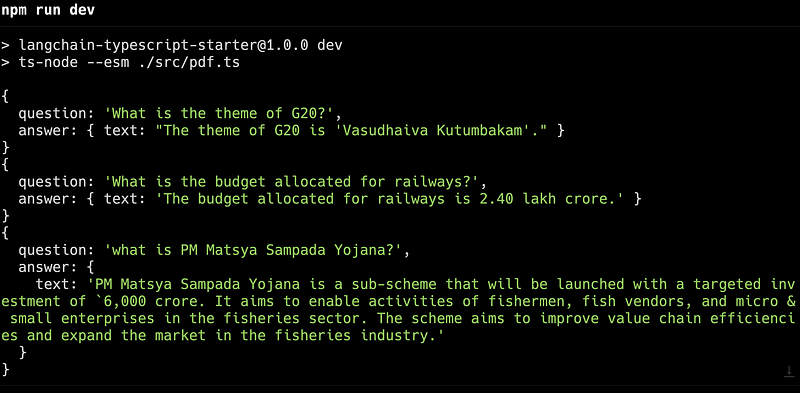
Here is the final code
Conclusion
In this article, we’ve explored how to create a PDF reader chatbot using Langchain, OpenAI, and JavaScript. This technology has the potential to streamline information retrieval and enhance user experiences in various applications, from customer support to document management. With further development and fine-tuning, PDF reader chatbots can become invaluable tools for businesses and individuals alike.
Important Links
- Github: https://github.com/vivek12345/pdf-reader-bot
- Diagrams: https://excalidraw.com/#json=RpwMibPay5HxCCEWdnJ6n,MglTO8wepnEwHD8LlXaV_A
- Langchain: https://js.langchain.com/docs
- Open AI API: https://platform.openai.com/
You can follow me on twitter @VivekNayyar09 for more updates.
Also please don’t forget to like, share and subscribe to the youtube channel local lo baat. Stay safe.


