
Part 2: Building a Complete API in Go to Interact with a P2P Escrow Smart Contract using go-ethereum Client & GoFiber Framework
This is the second part of the two posts in this series
- Part 1: Project Overview, Setup Fiber, Generate Go Binding, Deploy Contract, Add get Escrow & Wallet Logic Address endpoint
- Part 2: Add and Conclude P2P API endpoints
You can fork the codebase here on GitHub as a reference to follow along.
Here is the API Postman Collection Link for you to import.
P2P Order Webhooks
Set USDC Address
In the first part of this article, we deployed a USDC contract, which I mentioned serves as a Mock USDC used as a means of exchange in our P2P system against Fiat. In the production environment, we will change the USDC address to the actual USDC address used on Ethereum or USDT or Dai, whichever Stable currency suits our purpose works.
Just as we have been doing previously, first add a route to set USDC in the api_router.go file.
escrow := api.Group("/escrow")

escrow.Post("/set-usdc-address", controllers.SetUSDCTokenAddress)
In the controller package, create escrow_controllers.go to hold controller methods for Escrow contract-related actions.
package controllers

import (
	"github.com/alofeoluwafemi/go-ethereum-api/pkg/blockchain"
	"github.com/gofiber/fiber/v2"
)

func SetUSDCTokenAddress(c *fiber.Ctx) error {
	conn := blockchain.CurrentConnection
	type Request struct {
		Address string `json:"address"`
	}

	request := new(Request)

	if err := c.BodyParser(request); err != nil {
		return c.Status(fiber.StatusBadRequest).JSON(fiber.Map{
			"status":  "error",
			"message": "Malformed data",
			"data":    err,
		})
	}

	err := conn.SetUSDCAddress(request.Address)

	if err != nil {
		return c.Status(fiber.StatusUnauthorized).JSON(fiber.Map{
			"status":  "error",
			"message": err,
			"data":    nil,
		})
	}

	return c.Status(fiber.StatusOK).JSON(fiber.Map{
		"status": "success",
		"data":   request.Address,
	})
}
And finally, in the blockchain package, add a new file escrow.go and add the following.
package blockchain

import (
	"github.com/alofeoluwafemi/go-ethereum-api/pkg/ethereum"
	"github.com/ethereum/go-ethereum/common"
	"log"
)

var EscrowInstance *Escrow

const (
	EscrowAddress = "0xd27adc3848dE1324AF87e5C235355e4a017Aa1CF"
)

type Escrow struct {
	Address  common.Address
	Instance *ethereum.Escrow
}

func (clientCon ClientConnection) newEscrow(address string) *ethereum.Escrow {
	EscrowInstance = new(Escrow)

	contractAddress := common.HexToAddress(address)

	EscrowInstance.Address = contractAddress

	instance, err := ethereum.NewEscrow(contractAddress, clientCon.Client)
	if err != nil {
		log.Fatalln("Cannot get Factory contract at address ", address, " due to: ", err)
	}

	return instance
}

func (clientCon ClientConnection) SetUSDCAddress(address string) error {

	_, err := getEscrow().SetUsdcTokenAddress(clientCon.trxOpts, common.HexToAddress(address))

	if err != nil {
		log.Printf("Cannot set new USDC token on Escrow due to: %v", err)

		return err
	}

	return nil
}

func getEscrow() *ethereum.Escrow {
	return CurrentConnection.newEscrow(EscrowAddress)
}
This doesn’t need more explanation, since it's the same format we have followed previously. If you have not read Part 1 of this series, I suggest you do.
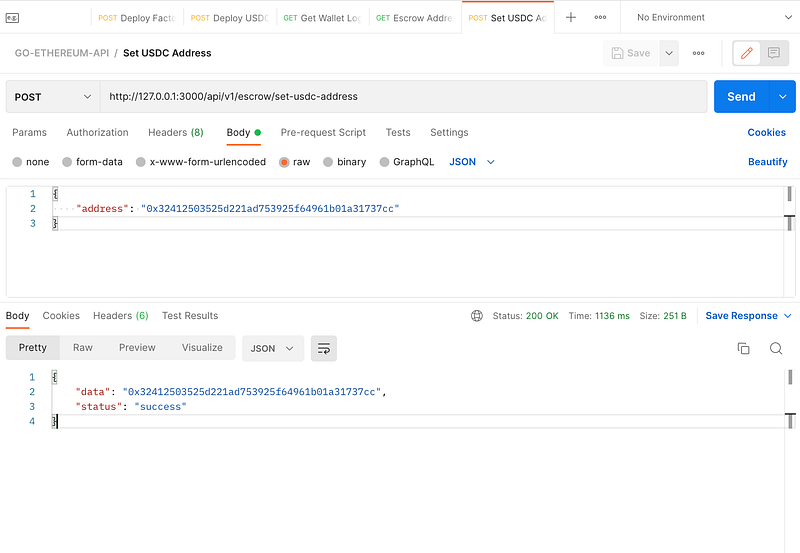
Restart the Fiber server and in Postman make a POST request to http://127.0.0.1:3000/api/v1/escrow/set-usdc-address the Factory contract will be deployed.
Success API Call
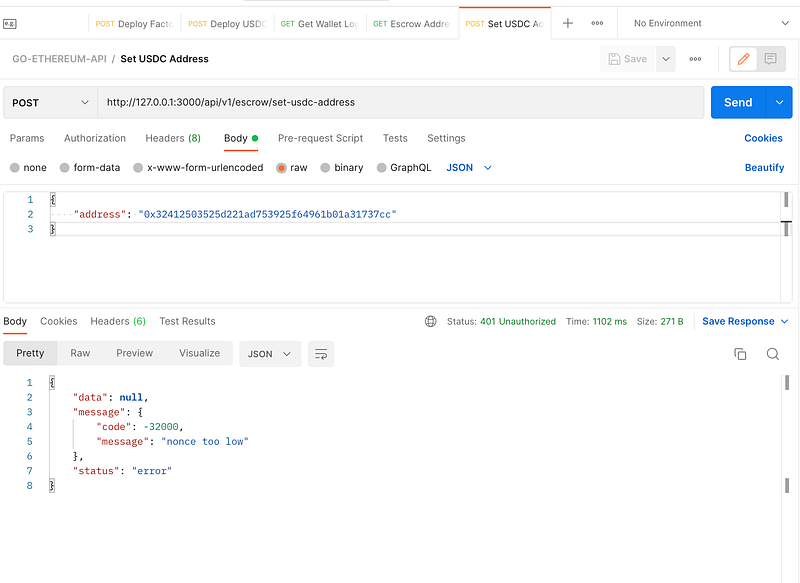
Error API Call
This will happen after you make the second request to the API just immediately which uses the same nonce.
Create Custodian Wallet
The next route we will create will be, /api/v1/factory/new-wallet/:uuid, such that when we make a POST request to this endpoint it calls the function newCustodian on the Factory contract. This will Deploy a Proxy Contract called CustodianWalletProxy that delegates call to CustodianWalletLogic.
To begin with, as usual. Add the route to api_router.go.
api.Post("/factory/new-wallet/:uuid", controllers.NewWallet)Then next the controller, this time inside the factory_controller file.
func NewWallet(c *fiber.Ctx) error {
	conn := blockchain.CurrentConnection
	uuid := c.Params("uuid")

	trx, err := conn.NewWallet(uuid)

	if err != nil {
		return c.Status(fiber.StatusUnauthorized).JSON(fiber.Map{
			"status":  "error",
			"message": err,
			"data":    nil,
		})
	}

	return c.Status(fiber.StatusOK).JSON(fiber.Map{
		"status": "success",
		"hash":   trx.Hash(),
	})
}
As you can see, to create a new wallet, the smart contract requires a unique identifier to save it in a mapping which is accepted in the controller via a URL parameter. And each unique ID cannot be assigned to another user as you would see shortly.
Finally, add the NewWallet method to the blockchain package in factory.go file.
func (clientCon ClientConnection) NewWallet(uuid string) (*types.Transaction, error) {

	trx, err := getFactory().NewCustodian(clientCon.trxOpts, uuid)

	if err != nil {
		log.Printf("Cannot create new wallet: %v", err)

		return new(types.Transaction), err
	}

	return trx, nil
}
Restart the Fiber server as usual and make a POST request to http://127.0.0.1:3000/api/v1/factory/new-wallet/cec3dd14-339a-11ed-a261-0242ac120002 and http://127.0.0.1:3000/api/v1/factory/new-wallet/b93e42b0-33a2-11ed-a261-0242ac120002. This creates an account for each UUID appended at the end of both URLs.
The purpose of creating two accounts is so that when we create an order further down the line we can use both accounts.
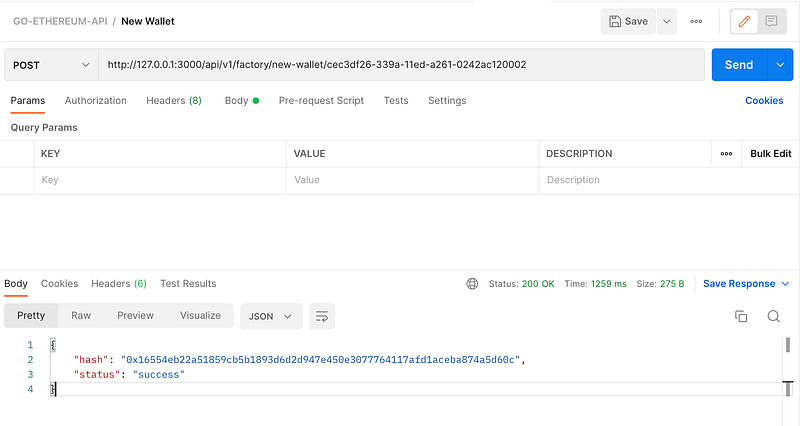
If you retry again with the same UUID, you will get an account to exist error.
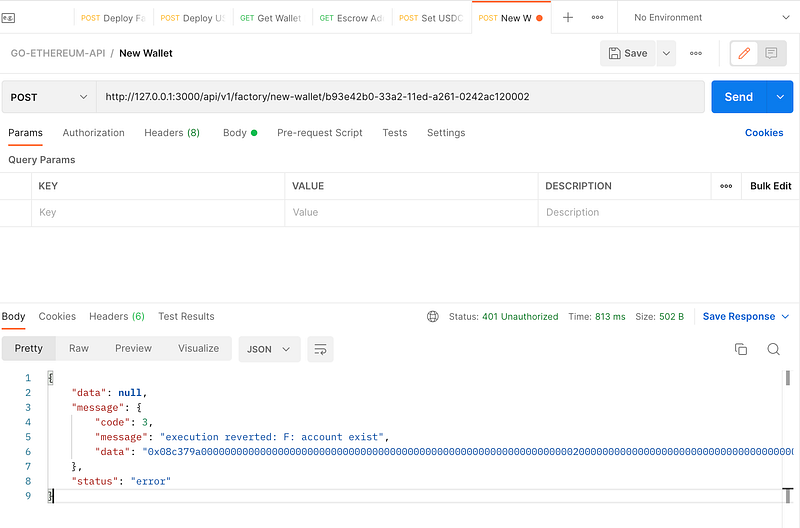
Use UUID to get the wallet address
This will be a no-brainer, add the route to get the wallet address using UUID.
api.Get("/factory/wallet/:uuid", controllers.GetWallet)In the factory_controller.go
func GetWallet(c *fiber.Ctx) error {
	conn := blockchain.CurrentConnection
	uuid := c.Params("uuid")

	address, err := conn.GetAccountByUUID(uuid)

	if err != nil {
		return c.Status(fiber.StatusUnauthorized).JSON(fiber.Map{
			"status":  "error",
			"message": err,
			"data":    nil,
		})
	}

	return c.Status(fiber.StatusOK).JSON(fiber.Map{
		"status": "success",
		"hash":   address.String(),
	})
}
In the blockchain package, add the GetAccountByUUID method to call the contract method.
func (clientCon ClientConnection) GetAccountByUUID(uuid string) (*common.Address, error) {

	address, err := getFactory().Accounts(clientCon.callOpts, uuid)

	if err != nil {
		log.Printf("Cannot get account: %v due to error %v", uuid, err)

		return new(common.Address), err
	}

	return &address, nil
}
Restart the server and using Postman, make a GET request to http://127.0.0.1:3000/api/v1/factory/wallet/b93e42b0-33a2-11ed-a261-0242ac120002. Remember to change the UUID to the one you used earlier on and note both account addresses returned.
In my own case, my two account address returned is
Fix Nonce Too Low Error
Up until now you may have been experiencing a revert error with nonce too low returned. As seen below, it took me a while to realize I’d introduced this problem when setting the nonce as transact options. To fix this simply add the method below and in every method passing clientCon.trxOpts meaning it's a state-changing method, call this to increment the nonce for the next Transaction.
func (clientCon ClientConnection) postTransact() {
	clientCon.trxOpts.Nonce = new(big.Int).SetUint64(clientCon.nonceAt(clientCon.SignerPublicAddress))
}
Usage
func (clientCon ClientConnection) NewWallet(uuid string) (*types.Transaction, error) {

	trx, err := getFactory().NewCustodian(clientCon.trxOpts, uuid)

	if err != nil {
		log.Printf("Cannot create new wallet: %v", err)

		return new(types.Transaction), err
	}

	clientCon.postTransact()

	return trx, nil
}
Fund the Account Addresses with USDC (Mock)
Open Metamask and click on import token, enter the deployed USDC address, and make sure you do that to the wallet address you used the Private key as the deployer account in env. All initial tokens will be assigned to the account, see the image below.
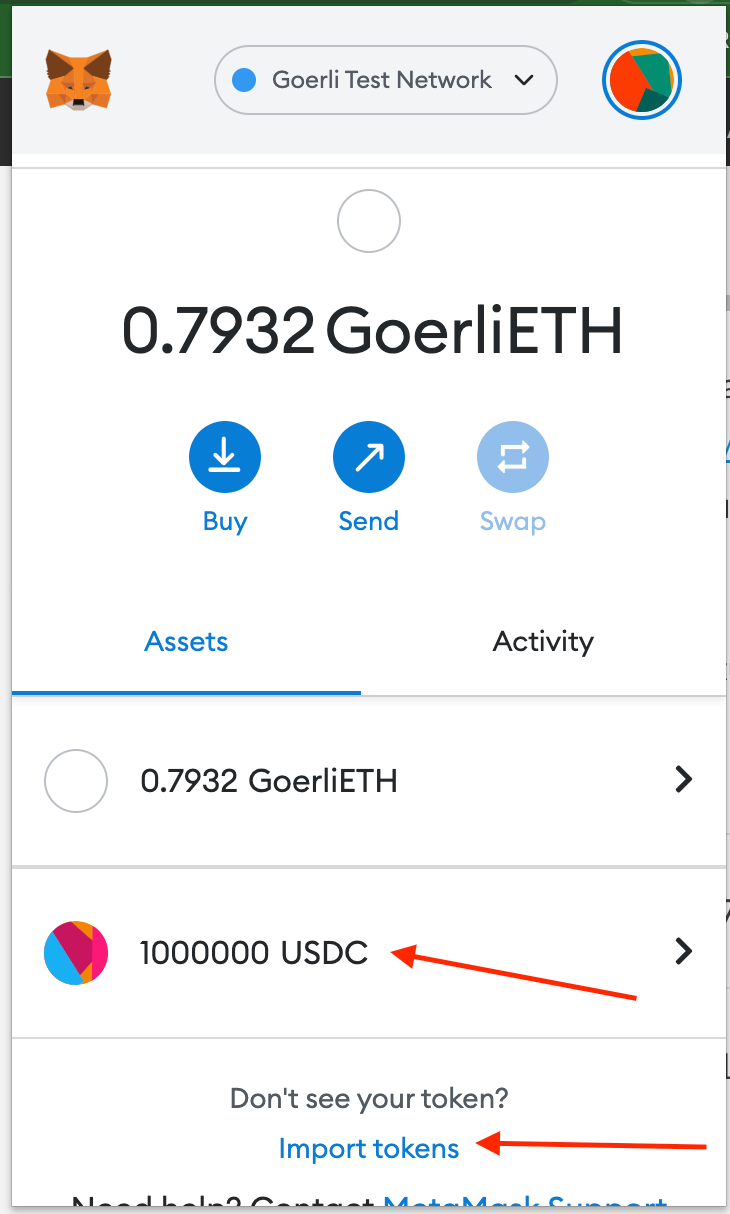
Fund both addresses with 100 USDC using Metamask.
Open P2P Buy Order
The newBuyOrder the function is directly available on the wallet address. Remember each wallet is a smart contract and not an EOA, as you would expect. And our deployer account has the super admin privilege to call methods on it.
This approach is making use of the proxy pattern, such that in the future we can add more features to already deployed wallets by simply upgrading the Wallet Logic, which is never executed on its own but its functions are called via delegatecall using the state of Wallet Proxy which is deployed.
Add Route
Where the :address param is the custodian wallet address opening this trade.
api.Post("/wallet/order/new/:address", controllers.NewBuyOrder)Add Controller Method
func NewBuyOrder(c *fiber.Ctx) error {
	conn := blockchain.CurrentConnection
	request := new(blockchain.Order)
	wallet := c.Params("address")

	blockchain.WalletAddress = wallet

	if err := c.BodyParser(request); err != nil {
		return c.Status(fiber.StatusBadRequest).JSON(fiber.Map{
			"status":  "error",
			"message": "Malformed data",
			"data":    err,
		})
	}

	trx, err := conn.OpenBuyOrder(*request)

	if err != nil {
		return c.Status(fiber.StatusUnauthorized).JSON(fiber.Map{
			"status":  "error",
			"message": err,
			"data":    nil,
		})
	}

	return c.Status(fiber.StatusOK).JSON(fiber.Map{
		"status": "success",
		"data":   trx.Hash(),
	})
}
And finally inside wallet.go in the blockchain package.
func (clientCon ClientConnection) OpenBuyOrder(order Order) (*types.Transaction, error) {

	trx, err := getWalletLogic().NewBuyOrder(
		clientCon.trxOpts,
		common.HexToAddress(order.Seller),
		common.HexToAddress(order.Receiver),
		big.NewInt(order.Amount),
		big.NewInt(order.Rate),
		big.NewInt(order.Fee),
	)

	if err != nil {
		log.Printf("Cannot open order : %v", err)

		return new(types.Transaction), err
	}

	clientCon.postTransact()

	return trx, nil
}
Making a POST request to http://127.0.0.1:3000/api/v1/wallet/order/new/0xC1F07Db647Aa3002c12BbaF8D598F0ef19c4ddd3 using Postman will return the transaction hash.
Remember to substitute the wallet address parameter in the URL with what's applicable to you.
Get Account Total Balance After Open Order
Finally to the last bit!
The Wallet contract has the GetTotalBalance that returns the wallet balance minus the current Open Orders, so once we open the order we don't want them spending and not able to fulfill the order.
Add Route
api.Post("/wallet/balance/:address", controllers.GetWalletUSDCBalance)Add Controller Method
In wallet_controller add
func GetWalletUSDCBalance(c *fiber.Ctx) error {
  conn := blockchain.CurrentConnection
  walletAddress := c.Params("address")

   blockchain.WalletAddress = walletAddress

   balance, err := conn.GetUSDCBalance()

   if err != nil {
      return c.Status(fiber.StatusUnauthorized).JSON(fiber.Map{
         "status":  "error",
         "message": err,
         "data":    nil,
      })
   }


   return c.Status(fiber.StatusOK).JSON(fiber.Map{
      "status": "success",
      "data":   balance,
   })
}
Now add the GetUSDCBalance method in wallet.go inside the blockchain package.
func (clientCon ClientConnection) GetUSDCBalance() (*big.Int, error) {

	balance, err := getWalletLogic().GetTotalBalance(clientCon.callOpts)

	if err != nil {
		log.Printf("Cannot open order : %v", err)

		return new(big.Int), err
	}

	return balance, nil
}
Making a POST request to http://127.0.0.1:3000/api/v1/wallet/balance/0xC1F07Db647Aa3002c12BbaF8D598F0ef19c4ddd3 using Postman. The wallet balance is returned.
Congratulation!! 🎉🎉
Thank you for sticking this far with me, If you enjoyed this article you can support me by Clapping for this post and subscribing to my youtube channel.
New to trading? Try crypto trading bots or copy trading


