
Part 1: Managing Lifespan Events in FastAPI with Redis Example
Handling of the events before and after FastAPI instances serve requests

Background
This article layouts the proper handling of processes
- before the FastAPI server starts serving HTTP requests
- after the FastAPI server is instructed to shut down
While it is possible to initialize variables on the top of a *.py script as shown in the code snippet below, more is needed when the project gets more sophisticated.
from fastapi import FastAPI

app = FastAPI()

items = dict(whisky = 0, coffee = 1)

@app.get("/items/{item_id}")
async def read_items(item_id: str):
    return items[item_id]
Some of the processes that should be handled in the initialization/configuration and clean-up phases are
- Connection to database, message queues
- Logging
For the initialization phases, steps such as loading configurations, starting the connection to databases/message queues, and logging for traceability purposes can be performed.
For the clean-up phases, actions such as closing down the database connection, flushing messages in the message queue, and logging can be performed.
These operations require more than a few lines of code and proper exception handling. Putting these on the top of the main script would not suffice.
Lifespan Events Handling

To handle the two phrases,
- Initialization / Configuration
- Clean up
the block of codes can be initiated as shown below. While the code snippets contain the keyword yield and the decorator asynccontextmanager, the structure of the code is straightforward. The code before the keyword yield will be executed before the start of the server and the code that comes after will be executed after the server is initiated to shut down.
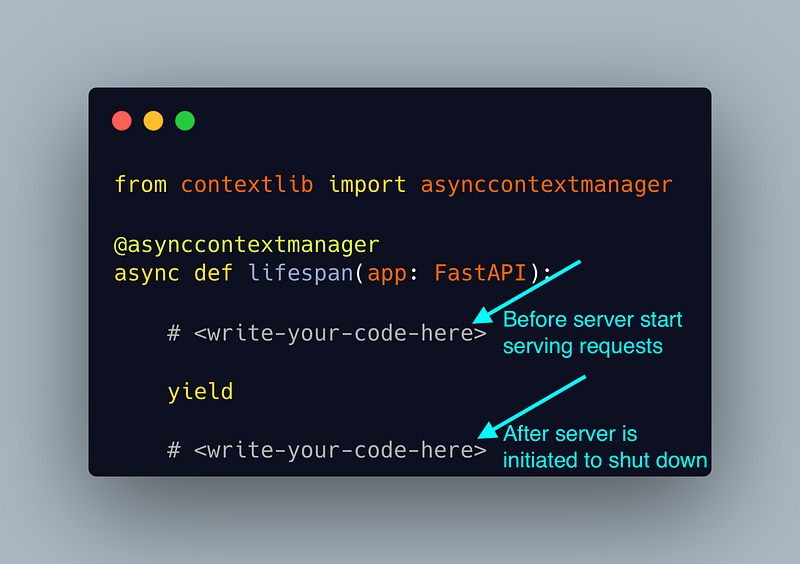
Example of Lifespan Events Handling with Redis Connection
To further illustrate the concept, a sample code interacting with Redis during the two phases is explained. Simply put, Redis is an in-memory data store that allows for fast read and write operations.

This example serves two requests.
- GET /items/{item_name}
- POST /items

As shown in the diagram above, two HTTP requests are served. The GET /items/{item_name}request returns the ID of an item stored in the Redis cache. POST /items writes a key-value pair to the Redis cache where the key is the name of the item and the value is the ID of the item.
The example is tested with Python 3.10 and above. The dependencies of the examples are stated in the file requirements.txt.
fastapi==0.103.2
uvicorn[standard]==0.21.1
redis[hiredis]==5.0.1
Install the dependencies with the following command.
python -m pip install -r requirements.txtTo run this example, a Redis instance has to be started. This example uses Redis in Docker.
docker run -p 6379:6379 -it redis/redis-stack:latest
The image of Redis will be pulled from the Docker registry if it’s not available locally. Once the Redis is up, it is ready to connect on localhost:3306.
Start the server with the command.
uvicorn server:app --port 8000With the Redis cache up and running, the connection to Redis can be observed.

Note that the Redis connection is made when the codes run till before the keyword yield. The key-value pair {"whisky": 0}is added as an initial pair for this example.
@asynccontextmanager
async def lifespan(app: FastAPI):

    # before server start serving request
    redis.start_connection()
    redis.write(key = "whisky", value = 0)

    yield
    # clean up before server shuts down
    redis.close_connection()
Once the server is up, HTTP requests can be made. Use the Swagger doc page localhost:{port}/docsto do a quick test.

To observe the event when the server is instructed to shut down, use Ctrl + C to kill the process. The logs on the terminal demonstrated the closing of the Redis connection before the FastAPI server shut down completely.

Check out the official FastAPI document on this topic.
Stay tuned for the next post on Part 2: Managing Lifespan Events in FastAPI with Machine Learning Example.
Thanks for reading.
Subscribe to DDIntel Here.
Have a unique story to share? Submit to DDIntel here.
Join our creator ecosystem here.
DDIntel captures the more notable pieces from our main site and our popular DDI Medium publication. Check us out for more insightful work from our community.
DDI Official Telegram Channel: https://t.me/+tafUp6ecEys4YjQ1


