
Pandas >> Reshaping Data and Analyze Data
In this article, we will talk about how to reshape data and analyze data using pivot_table, Stack, Unstack, Melt methods.
- Reshape data using pivot()
- Pivot and aggregate data using pivot_table()
- Reshape data using stack() and unstack()
- Reshape data using melt()
- Conclusion
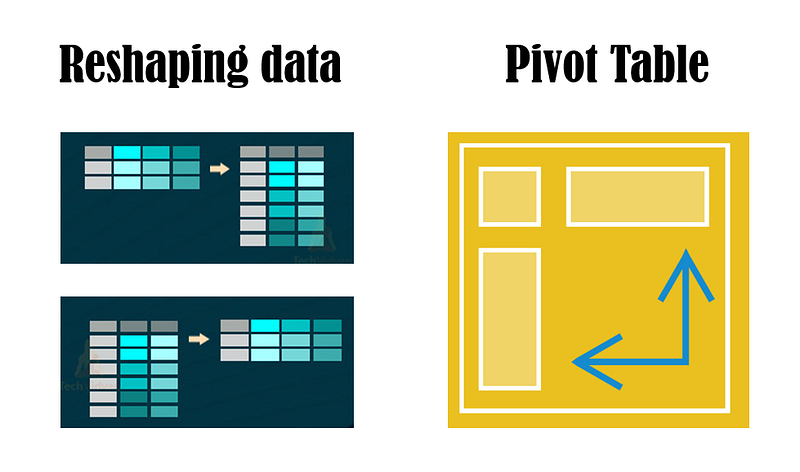
Reshape data using pivot()
When we want to organize the DataFrame by given index and column, we can use the pivot() method of DataFrame.
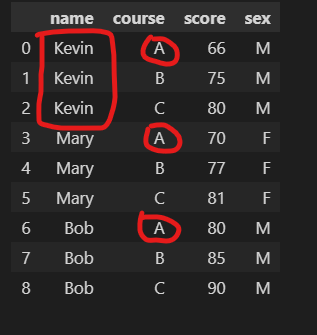
Let’s prepare the data.
As you can see, in order to represent the data in tabular form, the name of the same person and the course appears repeatedly in many rows.
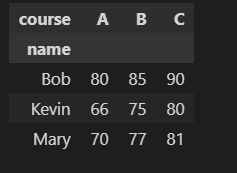
If we want to show the score of each course for each student, we can write the code below.
The index is the vertical axis, and the columns are the horizontal axis, the value will display in each cell.
Pivot and aggregate data using pivot_table()
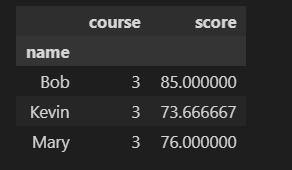
pivot_table can handle duplicate values for a pivoted index/column pair. Specifically, you can give pivot_table a list of aggregation functions using keyword argument aggfunc. The default aggfunc of pivot_table is numpy.mean.
If we want to count the number of courses and the mean scores for each student, we can use the code below.
The index is the vertical axis, and values will be the names of columns, the cell value will be the result of aggregation for each column.
Reshape data using stack() and unstack()
If we want to stack the values of all columns (horizontal) to multiple rows (vertical), we can use the stack() method of DataFrame. For example, we have the DataFrame below. In the DataFrame, all the courses of a student are displayed in the horizontal direction as columns.
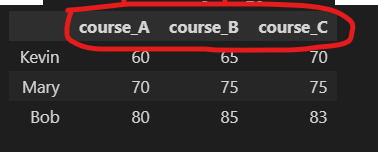
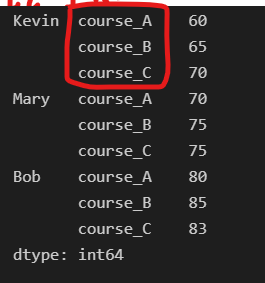
If we want to stack all the columns in the vertical direction as multiple rows, we use the stack() method.
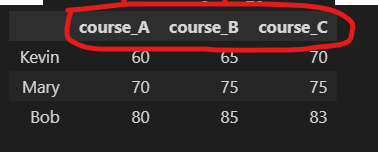
If we want to expand a column to multiple columns, we can use unstack() method. The unstack() method is the inverse operation of the stack() method. For example, if we apply the unstack() operation to the above DataFrame df2 we can get the original DataFrame df.
Reshape data using melt()
If we want to only keep some columns as key items of row and stack other columns into one column, we can use the melt() method of DataFrame. Similarly, let’s prepare the data.
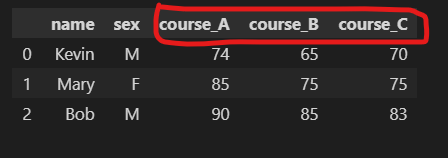
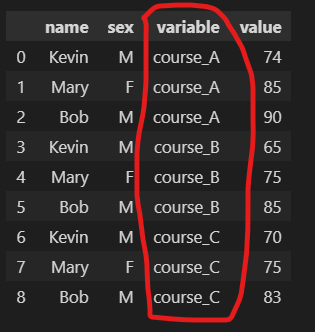
Let’s keep the name and sex column as key items of row and stack course_A, course_B, and course_C into the variable columns.
Conclusion
- pivot(): Reshape DataFrame by given index and column with index as the vertical axis and column as the horizontal axis. Duplicated values are not supported.
- pivot_table(): pivoting data like Excel with aggregation of numeric data.
- stack(): stack multiple columns to one column of multiple rows and insert index.
- unstack(): expand one column of multiple rows to multiple columns
- melt(): stack multiple columns to one column of multiple rows and insert a column named ‘variable’.
Originally published at https://thats-it-code.com on February 7, 2022.


