
Pandas Operations in Python — Series
Pandas is built on top of numpy, provides efficient data structures and data processing tools in Python. It is commonly used together with packages matplotlib, seaborn, statsmodels, scikit-learn for data analysis and visualization.
Pandas
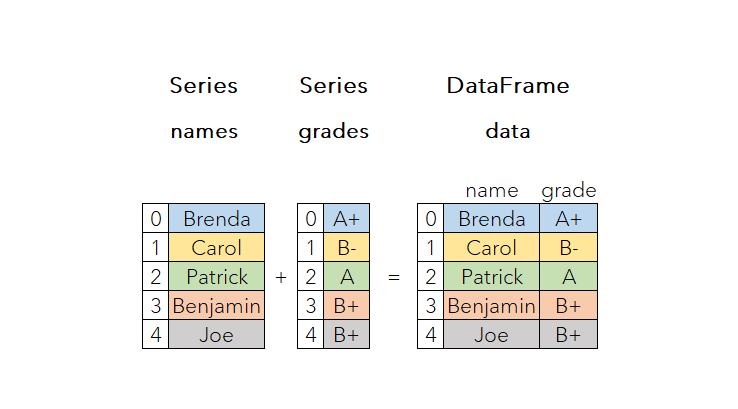
Compared to numpy, pandas mostly deals with tabular data, which allows different data types for each column, while numpy requires a uniform data type. It provides two main data structures: one-dimensional labelled Series and two-dimensional labelled DataFrame.
Pandas is usually imported under the alias “pd”:
import pandas as pdThis article will be introducing the common functions for pandas Series: ∘ Series Creation ∘ Series Values ∘ Series Index ∘ Access Series by Index ∘ Series like a Dictionary ∘ Series like an Array ∘ Boolean Filter ∘ Check for NA ∘ Sorting ∘ Max & Min
Pandas Data Structure - Series
Series is a one-dimensional labelled array, with an index column and a data column.
Series Creation
Syntax: pd.Series(data=None, index=None, dtype=None, name=None, copy=False, fastpath=False)
data: a dictionary, array or any iterable objectindex: optional, default being[0, … len(data)-1]dtype: optional, set data type for output Seriesname: optional string for name of Series
Example 1: index not specified
# using list as data
data = pd.Series([1, 2, 3])
data
>>>
0    1
1    2
2    3
dtype: int64
When using a dictionary for data , the keys will automatically be taken as index, and values as data.
# using dictionary as data
data = pd.Series({'x': 1, 'y': 2, 'z': 3})
data
>>>
x    1
y    2
z    3
dtype: int64
Example 2: specified index
# using list as data
data = pd.Series([1, 2, 3], index=list('abc'))
data
>>>
a    1
b    2
c    3
dtype: int64
When using a dictionary for data , index values have no effect if they match with the dictionary keys. Otherwise the Series will be re-indexed with the given index values, hence getting NaN as a result.
# match
data = pd.Series({'x': 1, 'y': 2, 'z': 3}, index=list('xyz'))
data
>>>
x    1
y    2
z    3
dtype: int64
# no match
data = pd.Series({'x': 1, 'y': 2, 'z': 3}, index=list('abc'))
data
>>>
a NaN
b NaN
c NaN
dtype: float64Series Values
Syntax: series.values returns the values of Series as an array.
data = pd.Series({'x': 1, 'y': 2, 'z': 3})
data.values
>>> array([1, 2, 3], dtype=int64)
Series Index
Syntax: series.index returns the index values as an array.
data = pd.Series({'x': 1, 'y': 2, 'z': 3})
data.index
>>> Index(['x', 'y', 'z'], dtype='object')
Access Series by Index
- Single index value
Syntax: series[index]
data = pd.Series({'x': 1, 'y': 2, 'z': 3})
data["x"]
The program throws a KeyError if index is not in Series:
data = pd.Series({'x': 1, 'y': 2, 'z': 3})
data["a"]
>>> KeyError: 'a'- Multiple index values
Syntax: series[index_list]
Pass in the index values as as list:
data1 = pd.Series({'x': 1, 'y': 2, 'z': 3})
data1[["x", "z"]]
>>>
x    1
z    3
dtype: int64
data2 = pd.Series([1, 2, 3])
data2[[1, 2]]
>>>
1    2
2    3
dtype: int64
Series like a Dictionary
Like a dictionary, Series has similar functions to check if it consists of certain elements, or to update certain elements by index.
- Check whether in index
data = pd.Series({'x': 1, 'y': 2, 'z': 3})'x' in data
>>> True1 in data
>>> False- Check whether in value
1 in data.values
>>> True- Update value by index
data = pd.Series({'x': 1, 'y': 2, 'z': 3})
data['x'] = 5
data
>>>
x    5
y    2
z    3
dtype: int64
If the index was not originally in Series, it will create a new entry for the index and value, just like in dictionary.
data = pd.Series({'x': 1, 'y': 2, 'z': 3})
data['a'] = 0
data
>>>
x    1
y    2
z    3
a    0
dtype: int64
Series like an Array
Using the same Series for the following operations:
data = pd.Series({'x': 1, 'y': 2, 'z': 3})It allows similar operations like numpy.ndarray :
- Query Data Type of Series with
.dtype
data.dtype
>>> dtype('int64')- Shape of Series with
.shape
data.shape
>>> (3, )- Number of elements in Series:
sizeby definition is 1
data.size
>>> 3- Slicing of Series by index position instead of key. The index could be a single index or a a list of indices.
ilocusing the index value would throw a TypeError instead.
data.iloc[0]
>>> 1data.iloc[1]
>>> 2data.iloc[[0, 2]]
>>>
x 1
z 3
dtype: int64data.iloc['x']
>>> TypeError: Cannot index by location index with a non-integer keyBoolean Filter
- Check whether all elements are true
pd.Series([True, False]).all()
>>> Falsepd.Series([True, True]).all()
>>> True- Check whether any element is true
pd.Series([True, False]).any()
>>> True
Both can be applied to check if all/any element satisfies certain conditions.
data = pd.Series([1, 2, 3, 4, 5])
data > 3
>>>
0    False
1    False
2    False
3     True
4     True
dtype: bool
data - 3
>>>
0 -2
1 -1
2 0
3 1
4 2
dtype: int64Hence, we could write boolean filters as follow:
Example 1: Check if any element is greater than 3
(data > 3).any()
>>> True
Example 2: Check if all elements are odd
(data % 2 == 1).all()
>>> False
Check for NA
Sometimes the Series might contain some NA values, such as None or numpy.NaN
- Check if there are any NaNs
pd.Series([1, 2, 3]).hasnans
>>> Falsepd.Series([1, 2, None]).hasnans
>>> Truefrom numpy import NaN
pd.Series([1, 2, NaN]).hasnans
>>> True- Check if values in Series is NA: returns a boolean object with same size
pd.Series([1, 2, None]).isna()
>>>
0    False
1    False
2     True
dtype: bool- Check if values in Series is not NA: returns a boolean object with same size
pd.Series([1, 2, None]).notna()
>>>
0     True
1     True
2    False
dtype: bool- Drop NA: returns a new Series with NAs removed
from numpy import NaN
pd.Series([1, 2, NaN]).dropna()
>>>
0    1.0
1    2.0
dtype: float64- Fill NA: returns a new Series with NAs replaced with specified value
from numpy import NaN
pd.Series([1, 2, NaN]).fillna(0)
>>>
0    1.0
1    2.0
2    0.0
dtype: float64
Sorting
- Sorting by index:
Series.sort_index(ascending=True, ...)
data = pd.Series({'x': 3, 'y': 2, 'z': 1})
data.sort_index()
>>>
z    1
y    2
x    3
dtype: int64
In descending order:
data.sort_index(ascending=False)
>>>
z    1
y    2
x    3
dtype: int64- Sorting by value:
data = pd.Series({'x': 3, 'y': 2, 'z': 1})
data.sort_values()
>>>
z    1
y    2
x    3
dtype: int64
Max & Min
- Position of greatest value:
argmax()
pd.Series([1, 2, 3, 4, 5]).argmax()
>>> 4- Position of smallest value:
argmin()
pd.Series([1, 2, 3, 4, 5]).argmin()
>>> 0
Thanks for reading and stay tuned for more articles on Python!