Pandas Isn’t Enough. Learn These 25 Pandas to SQL Translations to Become a Bilingual Data Scientist
25 common SQL Queries and their corresponding methods in Pandas.

Motivation
SQL and Pandas are both powerful tools for data scientists to work with data.
SQL, as we all know, is a language used to manage and manipulate data in databases. On the other hand, Pandas is a data manipulation and analysis library in Python.
Moreover, SQL is often used to extract data from databases and prepare it for analysis in Python, mostly using Pandas, which provides a wide range of tools and functions for working with tabular data, including data manipulation, analysis, and visualization.
Together, SQL and Pandas can be used to clean, transform, and analyze large datasets, and to create complex data pipelines and models. Therefore, proficiency in both frameworks can be extremely valuable to data scientists.
Therefore, in this blog, I will provide a quick guide to translating the most common Pandas operations to their equivalent SQL queries.
Let’s begin 🚀!
Dataset
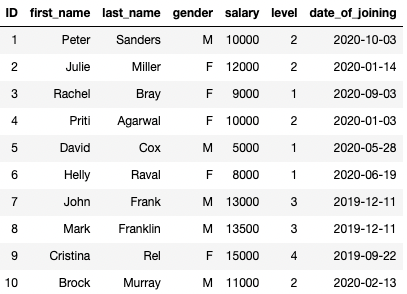
For demonstration purposes, I created a dummy dataset using Faker:
#1 Reading a CSV file
Pandas
CSVs are typically the most prevalent file format to read Pandas DataFrames from. This is done using the pd.read_csv() method in Pandas.
SQL
To create a table in your database, the first step is to create an empty table and define its schema.
The next step is to dump the contents of the CSV file (starting from the second row if the first row is the header) into the table created above.
Output
We get the following output after creating a DataFrame/Table:
#2 Displaying the First 5 (or k) Rows
Pandas
We can use the df.head() method in Pandas.
SQL
In MySQL Syntax, we can use limit after select and specify the number of records we want to display.
#3 Printing the Dimensions
Pandas
The shape attribute of a DataFrame object prints the number of rows and columns.
SQL
We can use the count keyword to print the number of rows.
#4 Printing the Datatype
Pandas
You can print the datatype of all columns using the dtypes argument:
SQL
Here, you can print the datatypes as follows:
#5 Modifying the Datatype of a column
Pandas
Here, we can use the astype() method as follows:
SQL
Use ALTER COLUMN to change the datatype of the column.
The above will permanently modify the datatype of the column in the table. However, if you just wish to do that while filtering, use cast.
#6–11 Filtering the Data
There are various ways to filter dataframe in Pandas.
#6: You can filter on one column as follows:
The above can be translated to SQL as follows:
#7: Furthermore, you can filter on multiple columns as well:
The SQL equivalent of the above filtering is:
#8: You can also filter from a list of values using isin():
To mimic the above, we have in keyword in SQL:
#9: In Pandas, you can also select a particular column using the dot operator.
In SQL, we can specify the required column after select.
#10: If you want to select multiple columns in Pandas, you can do the following:
The same can be done by specifying multiple columns after select in SQL.
#11 You can also filter based on NaN values in Pandas.
The same can be extended to SQL as follows:
#12 We can also perform some complex pattern-based string filtering.
In SQL, we can use the LIKE clause.
#13 You can also search for a substring within a string. For instance, say we want to find all the records in which last_name contains the substring “an”.
In Pandas, we can do the following:
In SQL, we can again use the LIKE clause.
#14–16 Sorting Data
Sorting is another typical operation that Data Scientists use to order their data.
Pandas
Use the df.sort_values() method to sort a DataFrame.
You can also sort on multiple columns:
Lastly, we can specify different criteria (ascending/descending) for different columns too using the ascending parameter.
Here, the list corresponding to ascending indicates that last_name is sorted in descending order and level in ascending order.
SQL
In SQL, we can use order by clause to do so.
Furthermore, by specifying more columns in the order by clause, we can include more columns for sorting criteria:
We can specify different sorting orders for different columns as follows:
#17 Fill NaN values
For this one, I have intentionally removed a couple of values in the salary column. This is the updated DataFrame:
Pandas
In Pandas, we can use the fillna() method to fill NaN values:
SQL
In SQL, however, we can do so using the case statement.
#18–19 Joining Data
Pandas
If you want to merge two DataFrames with a joining key, use the pd.merge() method:
SQL
Another way to join datasets is by concatenating them.
Pandas
Consider the DataFrame below:
In Pandas, you can use the concat() method and pass the DataFrame objects to concatenate as a list/tuple.
SQL
The same can be achieved with UNION (to keep only unique rows) and UNION ALL (to keep all rows) in SQL.
#20 Grouping Data
Pandas
To group a DataFrame and perform aggregations, use the groupby() method in Pandas, as shown below
SQL
In SQL, you can use the group by clause and specify aggregations in the select clause.
And we do see the same outputs!
#21–22 Finding Unique Values
Pandas
To print the distinct values in a column, we can use the unique() method.
To print the number of distinct values, use the nunique() method.
SQL
In SQL, we can use the DISTINCT keyword in select as follows:
To count the number of distinct values in SQL, we can wrap the COUNT aggregator around distinct.
#23 Renaming Column
Pandas
Here, use the df.rename() method, as demonstrated below:
SQL
We can use ALTER TABLE to rename a column:
#24 Deleting Column
Pandas
Use the df.drop() method:
SQL
Similar to renaming, we can use ALTER TABLE and change RENAME to DROP.
#25 Creating a New Column
Say we want to create a new column full_name, which is the concatenation of columns first_name and last_name, with a space in between.
Pandas
We can use a simple assignment operator in Pandas.
SQL
In SQL, the first step is to add a new column:
Next, we set the value using SET in SQL.
Conclusion
Congratulations! You now know the SQL translation of the most common methods in Pandas.
I have tried to cover translations for most of the data scientists use on a regular basis in Pandas. However, I understand I might have missed a few.
Do let me know in the responses.
As always, thanks for reading!