
Out with the Old, In with the Rad: Embracing Radash as the Modern Alternative to Lodash

Before we dive in, let’s ask two questions: Do you know about Radash? Could Radash replace Lodash?
Getting to Know Radash
It’s likely that everyone is familiar with Lodash, a JavaScript utility library that has been around for a whopping 12 years since 2012. It boasts over 58.8k stars on GitHub and more than 52 million weekly downloads on npm.
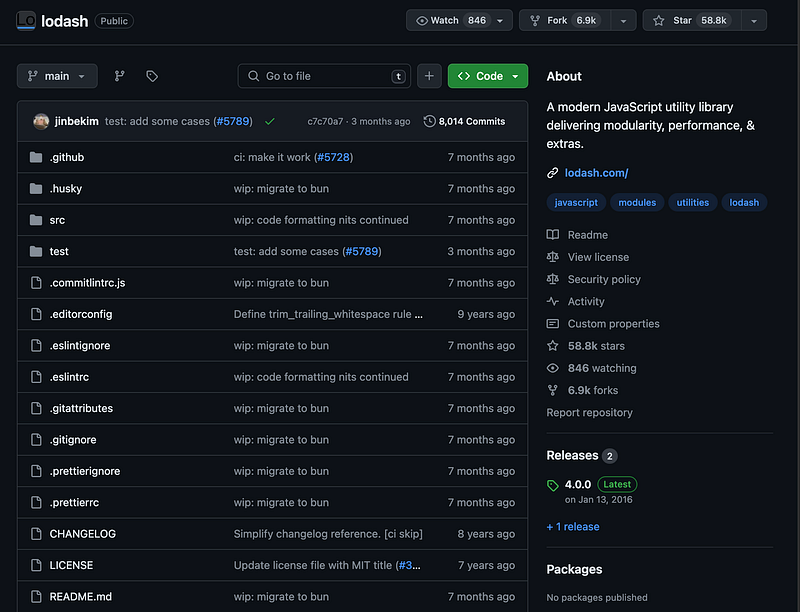
Initially, Lodash performed well, helping developers to write clean and maintainable JavaScript code. However, with no major updates for the latest JavaScript features in recent years, developers started facing challenges when using Lodash. Amidst this backdrop, Radash emerged as a modern solution with features that cater to the latest trends and friendly support for TypeScript, gradually becoming a favorite among developers.
In this article, I will discuss the issues with Lodash in detail and how Radash addresses these issues, thereby answering the questions posed: Could Radash replace Lodash?
The Issues with Lodash
As the JavaScript language continues to evolve and new features are introduced, some functionalities of Lodash have begun to seem less necessary.
Lodash Functions Have Become Outdated
With the introduction of ES6 and subsequent versions, JavaScript has welcomed many new language features, such as optional chaining (?.) and nullish coalescing (??), rendering some of Lodash’s functions redundant.
Before ES6, if you wanted to safely access a nested property of an object, you could use Lodash’s _.get function to avoid potential undefined errors. For example:
// Suppose we have an object and we want to access the `a.b.c` property
const obj = {
  a: {
    b: {
      c: 'Hello'
    }
  }
};
// Using Lodash's _.get to safely get the value
const value = _.get(obj, 'a.b.c', 'Default');
console.log(value);
// Output: 'Hello'
If any intermediate properties in obj are undefined or null, _.get would return the provided default value 'Default' instead of throwing an error.
However, with the introduction of the optional chaining operator ?. in ES6, we can now achieve the same functionality more succinctly, without the need for Lodash:
// Using the optional chaining operator to safely access nested properties
const value = obj?.a?.b?.c || 'Default';
console.log(value);
// Output: 'Hello'
Similarly, functions like .filter, .map, and _.size have also become superfluous. Moreover, in terms of performance, features like optional chaining (?.) far surpass Lodash functions, with the performance of optional chaining being almost twice that of Lodash's _.get function (according to test results from measurethat.net).
Poor Readability of Source Code
To be frank, as developers, you might be able to accept the points mentioned above, but the high learning curve to understand Lodash’s source code might really be where we draw the line.
We shouldn’t have to sift through 15,000 lines of code just to understand how a single-line function works, in order to learn an API.
The Rise of Radash

Radash, this emerging utility library, with its modern design and native TypeScript support, has quickly caught the attention of developers.
Though Radash is a newer product, it has already garnered over 3.4K stars on GitHub, with 121 forks, and more than 62,820 weekly downloads on NPM. You can easily install Radash using NPM or Yarn.
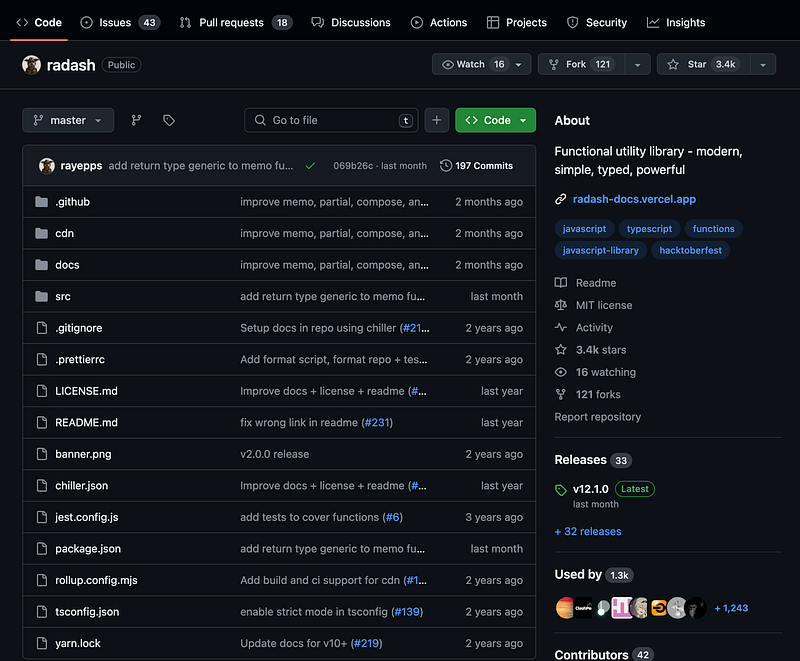
Features of Radash include:
- Zero Dependencies: Radash does not rely on any third-party libraries, making your project more lightweight.
- TypeScript Friendly: Radash is fully written in TypeScript, providing accurate type definitions.
- Modern Functions: Radash eliminates some of the outdated functions from Lodash and introduces many new, practical features.
- Easy to Understand and Maintain: Radash’s source code is easy to comprehend, making it friendly for beginners.
It’s worth a thumbs-up 👍 that the maintenance of the source code really prioritizes understandability for newcomers. In most cases, if you want to use a Radash function but don’t want to install it, you can directly copy it from GitHub.
For example, consider the following source code:
export const unique = <T, K extends string | number | symbol>(
  array: readonly T[],
  toKey?: (item: T) => K
): T[] => {
  const valueMap = array.reduce((acc, item) => {
    const key = toKey ? toKey(item) : (item as any as string | number | symbol)
    if (acc[key]) return acc
    acc[key] = item
    return acc
  }, {} as Record<string | number | symbol, T>)
  return Object.values(valueMap)
}
This defines a generic function named unique, aimed at extracting unique elements from an input array. The function accepts two parameters: a read-only array array of type readonly T[], and an optional mapping function toKey. Many junior developers would likely find this understandable.
Moreover, if your project only needs a unique function, you can simply copy the source code into your own utility file for use.
Currently, Radash offers over 90 practical functions.
Next, we will introduce a few particularly practical functions:
tryit()
The tryit function might be my favorite Radash function. The tryit function can wrap a function and convert it into an error-first function. It's applicable for both asynchronous and synchronous functions.
import {tryit} form "radash"

const [err, user] = await tryit(api.users.userInfo)(userId)
I find it to be the biggest boost to code cleanliness. No more need to fork the control flow to try something. No more need to create a mutable let variable outside of the try block, set it inside, and then check it afterward.
range()
range() can replace the traditional loop. For example, suppose you need to print numbers from 1 to 5. With a traditional for loop, it would look like this:
for (let i = 1; i <= 5; i++){
  console.log(i);
}
However, with Radash’s range() function, you can omit all variable declarations, conditions, and increments.
import { range } from 'radash';

for (const i of range(1, 5)){
  console.log(i);
}
list()
The list() function can dynamically generate a list based on the provided parameters. This function supports 1 to 4 input parameters, including start value, end value, mapping function, and step size.
import { list } from 'radash';

const myList = list(1, 10, (i) => i * 2, 2);
console.log(myList); // Output: [2, 4, 6, 8, 10]
In this example, the list() function creates a list starting at 2, increasing by 2 each time, and ending at 10.
counting()
The counting() function is used to count the number of each type of element in a pseudo-array collection. It takes an array of objects and a callback function that defines the counting criteria.
import { counting } from 'radash';

const items = [
  { category: 'A' },
  { category: 'B' },
  { category: 'A' },
  { category: 'C' }
];

const counts = counting(items, (item) => item.category);
console.log(counts); // Output: { A: 2, B: 1, C: 1 }
In projects, I find myself using counting more often than I would have thought.
In addition to these distinctive methods, there are many other practical methods, such as:
- Throttling (
throttle) and debouncing (debounce) - Type judgment methods, like
isArray,isPromise,isEmpty, etc. - Object manipulation functions like
pick,omit,clone, etc.
In this article, we discussed the reasons for the growing dissatisfaction with Lodash and the inclination towards alternatives like Radash. However, compared to new competitors, Lodash still has a vast user base and is widely used in many large projects.
I’ve already started using it in my projects, and if you encounter any issues, feel free to reach out to me for a discussion 😊
After reading the analysis above, would you choose the modern alternative, Radash, for your new projects?
In Plain English 🚀
Thank you for being a part of the In Plain English community! Before you go:
- Be sure to clap and follow the writer ️👏️️
- Follow us: X | LinkedIn | YouTube | Discord | Newsletter
- Visit our other platforms: Stackademic | CoFeed | Venture | Cubed
- More content at PlainEnglish.io


