avatarcloud & nodejs tutorials

Free AI web copilot to create summaries, insights and extended knowledge, download it at here

2154

Abstract

is faster than <code>npm install</code> as it bypasses certain checks and computations done by the latter. This speed-up is beneficial in CI/CD where build time is critical.</li><li>Clean Slate: <code>npm ci</code> starts by deleting the <code>node_modules</code> directory, providing a clean slate. This ensures that no outdated or irrelevant packages are part of the build, which could happen with <code>npm install</code>.</li></ol><h2 id="09dc">Example: Using npm ci in GitLab CI</h2><p id="8461">Here’s how to use <code>npm ci</code> in a <code>.gitlab-ci.yml</code> file for a Node.js project:</p><div id="3640"><pre><span class="hljs-attr">image:</span> <span class="hljs-string">node:latest</span>

<span class="hljs-attr">cache:</span> <span class="hljs-attr">paths:</span> <span class="hljs-bullet">-</span> <span class="hljs-string">node_modules/</span>

<span class="hljs-attr">stages:</span> <span class="hljs-bullet">-</span> <span class="hljs-string">install</span> <span class="hljs-bullet">-</span> <span class="hljs-string">build</span> <span class="hljs-bullet">-</span> <span class="hljs-string">test</span>

<span class="hljs-attr">install_dependencies:</span> <span class="hljs-attr">stage:</span> <span class="hljs-string">install</span> <span class="hljs-attr">script:</span> <span class="hljs-bullet">-</span> <span class="hljs-string">npm</span> <span class="hljs-string">ci</span> <span class="hljs-attr">artifacts:</span> <span class="hljs-attr">paths:</span> <span class="hljs-bullet">-</span> <span class="hljs-string">node_modules/</span>

<span class="hljs-attr">build_project:</span> <span class="hljs-attr">stage:</span> <span class="hljs-string">build</span> <span class="hljs-attr">script:</span> <span class="hljs-bullet">-</span> <span class="hljs-string">npm</span> <span class="hljs-string">run</span> <span class="hljs-string">build</span>

<span class="hljs-attr">run_tests:</span> <span class="hljs-attr">stage:</span> <span class="hljs-string">test</span> <span class="hljs-attr">script:</span> <span class="hljs-bullet">-</span> <span class="hljs-string">npm</s

Options

pan> <span class="hljs-string">run</span> <span class="hljs-string">test</span></pre></div><p id="dd0c">In this GitLab CI example:</p><ul><li>Image Specification: We use the latest Node.js image.</li><li>Caching: The <code>node_modules</code> directory is cached to speed up subsequent runs.</li><li>Stages: Defined as install, build, and test.</li><li>Install Dependencies: We use <code>npm ci</code> to install dependencies, ensuring consistency and speed.</li><li>Build and Test: Subsequent stages for building and testing the application.</li></ul><h2 id="be97">Best Practices and Considerations</h2><ol><li>Always Commit <code>package-lock.json</code>: Ensure that <code>package-lock.json</code> is always committed to your repository for <code>npm ci</code> to function correctly.</li><li>Regularly Update Dependencies: Regularly update your dependencies to ensure you get the latest security patches and improvements. This can be done in a controlled manner on a development branch using <code>npm install</code>.</li><li>Understand CI/CD Requirements: While <code>npm ci</code> is generally preferable in CI/CD, there may be cases where <code>npm install</code> is more suitable, such as when you intentionally want to test the latest versions of dependencies.</li></ol><h2 id="b20d">Conclusion</h2><p id="402f">Replacing <code>npm install</code> with <code>npm ci</code> in your CI/CD pipelines, especially with platforms like GitLab CI, can lead to more consistent, reliable, and faster builds. This practice is an essential step in optimizing your CI/CD process for Node.js applications.</p><h2 id="80db">Next Steps</h2><ul><li>Implement <code>npm ci</code> in your existing CI/CD pipelines and observe the improvements.</li><li>Keep your <code>package-lock.json</code> file up-to-date with your current development state.</li><li>Continuously monitor and optimize your CI/CD processes for maximum efficiency and reliability.</li></ul><p id="2151">In summary, embracing <code>npm ci</code> in CI/CD pipelines is a best practice for Node.js projects, ensuring stability and efficiency in the software development lifecycle.</p></article></body>

Optimizing CI/CD Pipelines: Why You Should Use npm ci Instead of npm install
Introduction

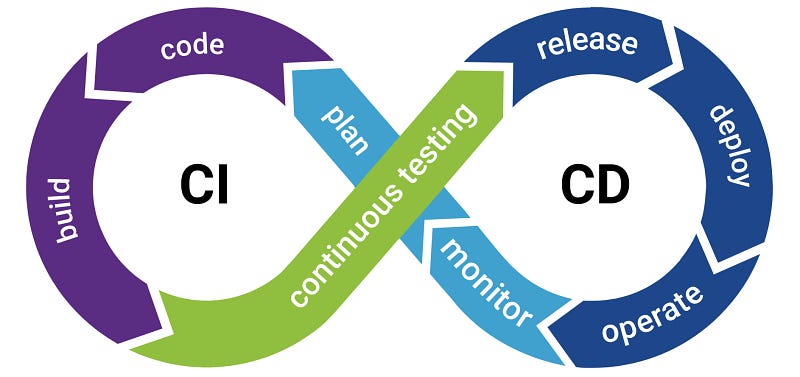
In modern software development, efficient and reliable Continuous Integration/Continuous Deployment (CI/CD) pipelines are crucial. One common but often overlooked aspect is the use of npm install vs. npm ci in Node.js-based projects, particularly within CI/CD processes. This article explains why npm ci is typically a better choice than npm install in CI/CD contexts, with an example using GitLab CI.

Understanding npm install and npm ci

  1. npm install:
  • It is the standard command to install dependencies from the package.json file.
  • It updates the package-lock.json file if it finds discrepancies with package.json.
  • While ensuring that packages meet the version requirements specified, it might install newer versions of dependencies if allowed by the specified version ranges, potentially leading to different versions being installed in different environments.
  1. npm ci (Continuous Integration):
  • Introduced in npm 5.7.0, it’s specifically tailored for CI/CD pipelines.
  • It installs dependencies exactly as specified in package-lock.json, ensuring consistent dependencies across all environments.
  • It’s generally faster than npm install as it skips certain user-oriented features and focuses purely on installing packages at exact versions.

Why Prefer npm ci in CI/CD Pipelines

  1. Consistent Dependencies: Using npm ci ensures that the exact versions of the dependencies are installed as per the package-lock.json file, reducing the chances of introducing bugs due to minor differences in dependencies.
  2. Faster Builds: npm ci is faster than npm install as it bypasses certain checks and computations done by the latter. This speed-up is beneficial in CI/CD where build time is critical.
  3. Clean Slate: npm ci starts by deleting the node_modules directory, providing a clean slate. This ensures that no outdated or irrelevant packages are part of the build, which could happen with npm install.

Example: Using npm ci in GitLab CI

Here’s how to use npm ci in a .gitlab-ci.yml file for a Node.js project:

image: node:latest

cache:
  paths:
    - node_modules/

stages:
  - install
  - build
  - test

install_dependencies:
  stage: install
  script:
    - npm ci
  artifacts:
    paths:
      - node_modules/

build_project:
  stage: build
  script:
    - npm run build

run_tests:
  stage: test
  script:
    - npm run test

In this GitLab CI example:

  • Image Specification: We use the latest Node.js image.
  • Caching: The node_modules directory is cached to speed up subsequent runs.
  • Stages: Defined as install, build, and test.
  • Install Dependencies: We use npm ci to install dependencies, ensuring consistency and speed.
  • Build and Test: Subsequent stages for building and testing the application.

Best Practices and Considerations

  1. Always Commit package-lock.json: Ensure that package-lock.json is always committed to your repository for npm ci to function correctly.
  2. Regularly Update Dependencies: Regularly update your dependencies to ensure you get the latest security patches and improvements. This can be done in a controlled manner on a development branch using npm install.
  3. Understand CI/CD Requirements: While npm ci is generally preferable in CI/CD, there may be cases where npm install is more suitable, such as when you intentionally want to test the latest versions of dependencies.

Conclusion

Replacing npm install with npm ci in your CI/CD pipelines, especially with platforms like GitLab CI, can lead to more consistent, reliable, and faster builds. This practice is an essential step in optimizing your CI/CD process for Node.js applications.

Next Steps

  • Implement npm ci in your existing CI/CD pipelines and observe the improvements.
  • Keep your package-lock.json file up-to-date with your current development state.
  • Continuously monitor and optimize your CI/CD processes for maximum efficiency and reliability.

In summary, embracing npm ci in CI/CD pipelines is a best practice for Node.js projects, ensuring stability and efficiency in the software development lifecycle.

Ci Cd Pipeline
Coding
Optimization
JavaScript
NPM
Recommended from ReadMedium