
Operating System — The Basic Process of Program Execution

A program is actually a series of instructions, so the process of running a program is to execute each instruction step by step, and the CPU is responsible for executing these instructions.
Program Execution Steps
The process of the CPU executing a program is outlined in the follows:
- Step one: The CPU looks at the “program counter” to fetch the memory address where the current instruction is stored. The CPU’s “control unit” then uses the “address bus” to pinpoint the required memory location. It signals the memory to get ready to send data, and once the data is prepped, it’s shuttled over to the CPU through the “data bus.” The CPU, upon receiving this data, stores the incoming instruction into the “instruction register.”
- Step two: The “program counter” increases its value to point to the next instruction. How much it increases by is determined by the CPU’s architecture — for instance, with a 32-bit CPU, instructions are 4 bytes, therefore the program counter jumps ahead by 4 to align with the next instruction’s memory location.
- Step three: The CPU deciphers the instruction that’s currently in the “instruction register,” figuring out what operation is to be performed and what the operands are. If it’s an operation that requires computation, it passes the task to the “arithmetic logic unit” (ALU). If the instruction is about storing or retrieving data, then the “control unit” handles it.
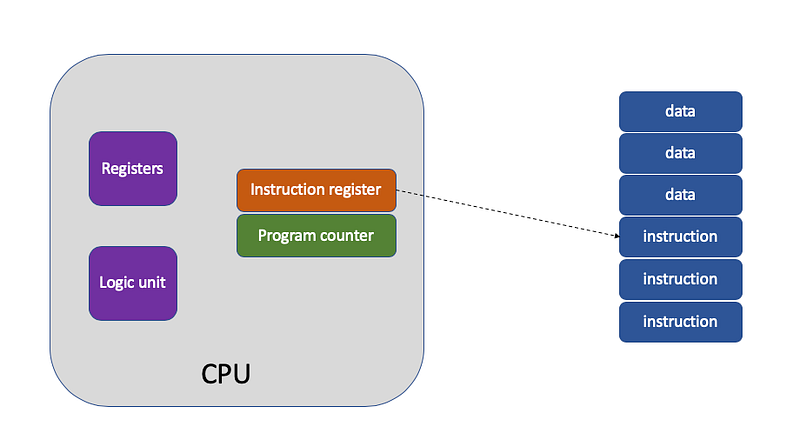
This repetitive process, where the CPU reads an instruction, executes it, and then proceeds to the next, creating a loop until the program is complete, is known as the CPU’s instruction cycle.
The Execution Process of “a = 1 + 2”
The CPU cannot interpret the string “a = 1 + 2” as it is; such strings are simply meant to make the code readable for programmers. In order to get this code to function, it must be converted into an assembly language program. This conversion process is referred to as compilation into assembly code.
Once we have the assembly code, it requires further translation by an assembler into machine code, which is the binary language of 0s and 1s that computers operate with. These strings of machine code are the actual instructions that the CPU can execute.
During the program compilation process, the compiler, by analyzing the code, identifies that 1 and 2 are data. Thus, when the program runs, there will be a specific area in memory allocated to store this data, known as the “data segment”. The positions in the data segment for the data 1 and 2 are as follows:
1is stored at the 0x200 location2is stored at the 0x204 location;
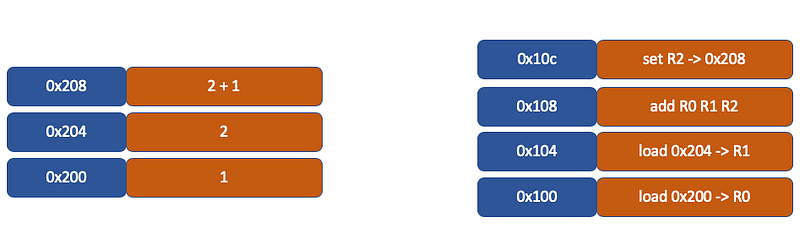
The compiler will translate “a = 1 + 2” into 4 instructions, which are stored in the text segment. As illustrated, these 4 instructions are placed in the region from 0x100 to 0x10c:
- The content at 0x100 is a
loadinstruction that takes the data 1 from address 0x200 and loads it into register R0; - The content at 0x104 is another
loadinstruction that takes the data 2 from address 0x204 and loads it into register R1; - The content at 0x108 is an
addinstruction that adds the data in register R0 to the data in R1, and stores the result in register R2; - The content at 0x10c is a
storeinstruction that takes the data from register R2 and stores it back into the data segment at address 0x208, which is the memory address corresponding to the variable a.
Sample assembly code:
# Assume that 0x200 is the address where the value 1 is stored
# and 0x204 is the address where the value 2 is stored.
# The variable 'a' will be stored at address 0x208.

LOAD R0, 0x200    # Load the value from memory address 0x200 into register R0
LOAD R1, 0x204    # Load the value from memory address 0x204 into register R1
ADD R2, R0, R1    # Add the contents of R0 to R1 and store the result in R2
STORE R2, 0x208   # Store the result from R2 to memory address 0x208 (variable 'a')
CPU Pipelining
During the program compilation phase, compilers create machine-level instructions, a process referred to as instruction encoding. When the CPU runs the program, it reads and interprets these machine-level instructions, a process called instruction decoding.
Most contemporary CPUs execute instructions using a method called pipelining, which involves splitting a task into several subtasks. Consequently, an instruction is commonly divided into four distinct stages, which are collectively termed a four-stage pipeline.
- Fetch: The CPU retrieves the instruction from the memory address specified by the program counter. The process of retrieving instructions through the program counter and the instruction register is orchestrated by the controller.
- Decode: The CPU interprets the instruction, the decoding of instructions is also carried out by the controller.
- Execution: The CPU carries out the instruction. The execution of instructions, whether it involves arithmetic operations, logical operations, data transfers, or conditional branching, is conducted by the arithmetic logic unit, meaning it is processed by the ALU.
- Store: The CPU saves the result of the computation into a register or transfers the register’s content back into memory. This is completed directly within the controller.
These four stages mentioned above are referred to as the Instruction Cycle. The operation of a CPU is a continuous loop of these cycles, repeating over and over again.
Instructions Types
Instructions can be classified into five major categories based on their functionality:
- Data transfer instructions: Such as store/load, which transfer data between registers and memory, and mov, which moves data from one memory address to another.
- Arithmetic instructions: Such as addition, subtraction, multiplication, division, bitwise operations, comparisons, etc. These can process data from at most two registers.
- Jump instructions: Which alter the value of the program counter to achieve the process of jumping to execute an instruction, similar to if-else, switch-case, and function calls in programming.
- Signal instructions: Like the trap instruction that occurs during an interrupt.
- Idle instructions: Such as the nop instruction, after which the CPU idles for one cycle.
Instruction Execution Speed
A CPU’s performance capability is often measured in gigahertz (GHz), for instance, a CPU with a 1 GHz specification. This measurement denotes the clock rate, which corresponds to 1 billion cycles per second. Each cycle is a pulse of electrical signal, fluctuating between high and low levels, and this fluctuation period is called a clock cycle.
Within the span of one clock cycle, a CPU is limited to executing one elementary operation. The greater the clock frequency, the shorter each clock cycle is, which translates to increased operational speed.
Does this mean a CPU can execute one instruction per clock cycle? Not necessarily. The majority of instructions require more than one clock cycle to be executed fully. Different instructions consume different amounts of clock cycles; for example, although both addition and multiplication are single CPU instructions, multiplication typically consumes more clock cycles than addition.
64-bit CPU vs 32-bit CPU
- Larger Address Space: A 64-bit CPU can handle a larger address space, which means it can support more than 4GB of RAM directly, while a 32-bit CPU is limited to addressing a maximum of 4GB of RAM. This larger address space allows for more applications to run simultaneously and for applications to work with larger data sets without running into memory constraints.
- Increased Data Throughput: With a wider data bus, a 64-bit processor can process more data per clock cycle compared to a 32-bit processor. This means that for certain computational tasks, a 64-bit processor can be significantly faster than its 32-bit counterpart.
- Enhanced Performance with 64-bit Applications: Applications that are written specifically for a 64-bit operating system can take advantage of the increased computing power of a 64-bit CPU, performing complex calculations and tasks more efficiently.
- More General-Purpose Registers: 64-bit processors typically have more general-purpose registers, which allows for more local variables to be stored without accessing main memory. This can lead to performance improvements for certain types of programs.


