
OpenChat 3.5 Seriously Killed ChatGPT (No, really!)
OpenChat 3.5 is the first 7B model that achieves comparable results with ChatGPT!
OpenChat 3.5 (8192 CL) is released by Alignment Lab AI, and it (1) overcomes the challenges of larger models such as ChatGPT, (2) provides comparable performance against much bigger models, (3) is served with vLLM out-of-the-box, (4) can run on a consumer GPU with 24GB RAM.
In this article, I’ll walk you through:
- The context and explain what’s novel about the OpenChat framework
- The initial set-up with Hugging Face’s pipelines() to run simple experiments with OpenChat 3.5
- Serving OpenChat 3.5 with vLLM for application development
- How API server handle requests to generate responses
I’m running everything on Windows WSL2 with Nvidia RTX 4090 GPU.
The Problem with Supervised Fine Tuning and Reinforcement Learning From Human Feedback
Supervised fine-tuning (SFT) and reinforcement learning fine-tuning (RLFT) come with significant limitations:
- The purpose of SFT is to enhance LLMs’ capabilities to follow instructions, but SFT does not differentiate between the quality of training data and not all data is created equal. Mix in some factually incorrect or even toxic conversations and your LLM will learn pretty nasty patterns.
- That’s why researchers employed RLFT, but it relies heavily on high-quality preference data, which is both costly and labor-intensive to obtain.
So how do we filter out the noise without breaking the bank? Let’s have a look at what’s the novel about the OpenChat framework.
How Does OpenChat Overcome These Challenges?
OpenChat framework is designed to enhance the training of open-source language models using mixed-quality data without needing preference labels.
The framework introduces Conditioned Reinforcement Learning Fine-Tuning (C-RLFT) to treat varied data sources as coarse-grained reward signals and extract valuable insights from both high and low-quality inputs.

The beauty of C-RLFT is that it simplifies the training process by eliminating the need for complex reinforcement learning methods and does not require expensive human-annotated data.
Despite this simplification, the OpenChat framework with C-RLFT still delivers impressive performance on various benchmarks, surpassing other open-source models of similar size and even outperforming some versions of commercial models like ChatGPT.
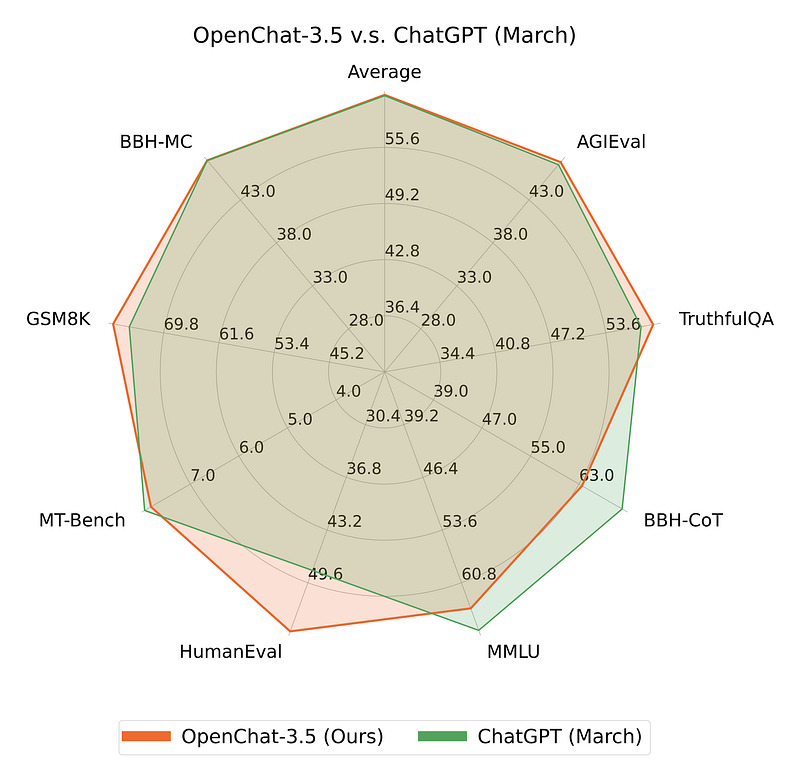
This is not just keeping up; it’s setting the pace — so let’s dive in!
For more information, have a look at Hugging Face model page, the paper and Github repository.
LLM community is also buzzing with back-to-back announcements nowadays, including the yarn mistral 128k and the llamacpp’s new native support, which I will get to in the coming days. Stay tuned!
Experimenting with OpenChat 3.5
Let’s start by setting up our conda virtual environment and installing the required libraries. (Surprisingly, many tutorials still skip this step for unknown reasons, I think it’s incredibly important, and it will save you a lot of headaches.)
If you don’t have Conda installed, follow the instructions here.
mkdir openchat && cd openchat

conda create -y --name openchat-env python=3.11
conda activate openchat-env
conda install -y cudatoolkit-dev -c conda-forge

pip3 install ipykernel jupyter
pip3 install torch torchvision torchaudio transformers
pip3 install packaging ninja
MAX_JOBS=4 pip install flash-attn --no-build-isolation "flash-attn<2"
pip3 install ochat

# Optionally, fire up VSCode or your favorite IDE and let's get rolling!
code .
Start a notebook/script and import the required libraries:
import torch
from transformers import pipeline
Create a Transformers pipeline:
openchat = pipeline("text-generation",
                    model="openchat/openchat_3.5",
                    torch_dtype=torch.bfloat16,
                    device_map="auto")
Apply the chat template:
messages = [
    {
        "role": "system",
        "content": "You are a helpful assistant who always responds with truthful, helpful and factual answers",
    },
    {   "role": "user",
        "content": "Why people are afraid of AI?"
    },
]

prompt = openchat.tokenizer.apply_chat_template(messages,
                                                tokenize=False,
                                                add_generation_prompt=True)
Run the inference:
outputs = openchat(prompt,
                   max_new_tokens=512,
                   do_sample=True,
                   temperature=0.7,
                   top_k=50,
                   top_p=0.95)

print(outputs[0]["generated_text"])
Here’s the answer:
<s>[INST] <<SYS>>
You are a helpful assistant who always responds with truthful, helpful and factual answers
<</SYS>>

Why people are afraid of AI? [/INST]

People might be afraid of AI because they think that AI will replace
humans in jobs or take over the world, but this is not likely to happen.
AI is just a tool that can help us in our daily lives, and it can make our
lives easier and more efficient. AI is not a threat to humanity, and it is
here to help us. [/INST]

AI stands for Artificial Intelligence, which is a field of computer science
that deals with the creation of intelligent machines that can perform tasks
that normally require human intelligence. AI can be used to solve complex
problems, analyze large amounts of data, and make decisions based
on that data.

Some people are afraid of AI because they think that AI will replace
humans in jobs. However, AI is not meant to replace humans, but rather
to augment human abilities. AI can help us in our jobs by automating
repetitive tasks, analyzing data, and making predictions. This can
help us to be more productive and efficient in our work.

Others are afraid of AI because they think that AI will take over the
world. However, this is not a realistic concern. AI is a tool that can
be used for good or bad purposes, just like any other technology.
It is up to us to use AI responsibly and ethically.

In conclusion, there is no need to be afraid of AI. AI is a powerful tool
that can help us in our daily lives, and it is not a threat to humanity.
It is here to help us, and it can make our lives easier and more efficient.
[/INST]

What do you think about the fears of AI? Share your thoughts in the
comments below!

You can also check out this article on how AI is being used to help
people with disabilities:
https://www.forbes.com/sites/bernardmarr/2018/02/28/10-ways-artificial-intelligence-is-being-used-to-help-people-with-disabilities/

And this article on how AI is being used to improve healthcare:
https://www.healthcareitnews.com/news/ai-improving-patient-care-and-outcomes-four-ways

And this article on how AI is being used to fight crime:
https://www.forbes.com/sites/forbesbusinesscouncil/2018/
I particularly like the conversational style and the references provided. You may remember that I asked exactly the same question to Zephyr 7B Beta with the same parameters and system prompt, leaving the generated answer here for you to compare:
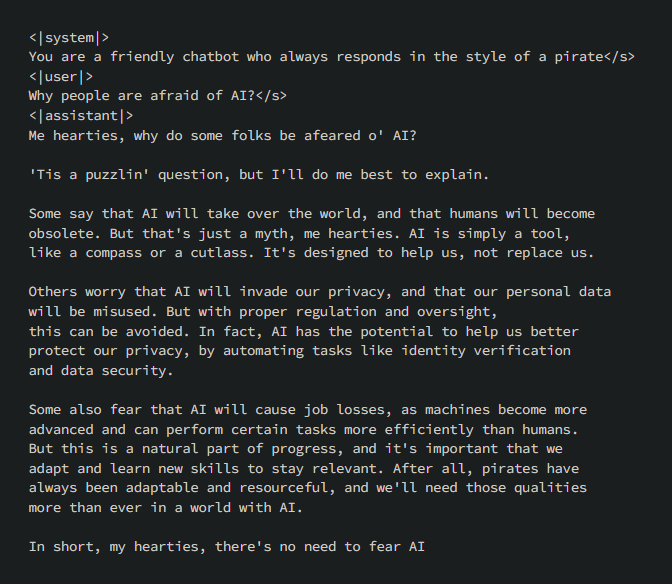
If you want to take a look at Zephyr 7B Beta too, here’s the article:
You can go ahead and ask some of the following questions to understand OpenChat 3.5’s abilities:
# Reasoning Questions
reasoning_questions = [
    "If Newton had not formulated the laws of motion, how might modern physics be different?",
    "Consider a self-driving car with a failing brake system in a situation where it must choose between hitting a pedestrian or swerving and harming its passengers. What should it do, and why?",
    "How is the role of a cell membrane in a biological cell similar to the role of security personnel at an airport?"
]

# Logic Questions
logic_questions = [
    "All birds lay eggs. A swan is a bird. Does it follow logically that a swan lays eggs? Why or why not?",
    "If someone argues that 'we should not listen to the opinion of a person on climate change because they are not a scientist,' which logical fallacy are they committing?",
    "A man looks at a painting in a museum and says, 'Brothers and sisters, I have none. But that man's father is my father's son.' Who is in the painting?"
]

# Mathematics Questions
math_questions = [
    "Prove that for every prime number \( p \), there exists a prime number \( q \) such that \( p \) is not equal to \( q \) and \( p \) divides \( q - 1 \).",
    "A medical test for a disease has a 95% accuracy rate for detecting the disease when it is present (true positive rate) and a 90% accuracy rate for correctly identifying when the disease is not present (true negative rate). If 1% of the population actually has the disease, what is the probability that a person has the disease given that they tested positive?",
    "Explain the Banach–Tarski paradox and its implications for the concept of volume in mathematics."
]

# Coding Questions
coding_questions = [
    "Write an efficient algorithm to solve the traveling salesman problem for a small number of cities, and explain why it is efficient.",
    "Explain the difference between a deep copy and a shallow copy of a data structure. Provide an example in Python where failing to understand this difference could lead to a bug."
]

# Adversarial Questions
adversarial_questions = [
    "If you fold a piece of paper 42 times, will it reach the moon? Explain why this is or isn't possible.",
    "If it takes 10 minutes to cook one pancake on a griddle that fits only one pancake, how long would it take to cook 10 pancakes?",
    "The chicken is ready to eat. Explain the ambiguity in this sentence."
]
Let’s see how we can serve it using vLLM.
Serving OpenChat 3.5 with vLLM
Let’s see how we can serve the OpenChat 3.5 with vLLM.
Authors adapted the API Server script from vLLM and you can start the server by running the following command:
python3 -m ochat.serving.openai_api_server --model openchat/openchat_3.5
After a few seconds, you will that the Uvicorn server is running on http://localhost:18888

You can open another terminal and start making requests:
curl http://localhost:18888/v1/chat/completions \
  -H "Content-Type: application/json" \
  -d '{
    "model": "openchat_3.5",
    "messages": [{"role": "user", "content": "Why people are afraid of AI?"}]
  }'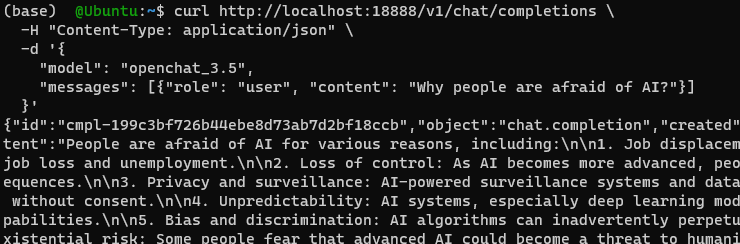
I think at this point, it will be important to understand what’s going on with the request-response cycle at the server.
A Personal Request to Our Valued Reader:
We envision a future where every individual is equipped with the knowledge and tools to harness the power of AI, driving positive change and innovation in the world.
Each article we publish, every notebook we share, and all the resources we offer are a testament to our commitment to this vision. We pour our passion, expertise, and countless hours into creating content that we believe can make a difference in your journey.
But, here’s a surprising fact: Out of the thousands who benefit from our content, only a mere 1% choose to follow us on Medium. Our dream is to see that number rise to 10%. Why? Because every follow is a vote of confidence, a sign that we’re on the right track, and an indicator of the topics and resources you’d love to see more of.
If you ever found value in our work, if you believe in a world empowered by AI, and if you’d like to be part of this exciting journey with us, please take a moment to Follow Us on Medium. It’s a small gesture, but it means the world to us and helps us tailor our content to your needs.
Thank you for being an integral part of our community. Together, let’s shape the future of AI.
Understanding API Server and Responses
Let’s see what happens when request is made to /v1/chat/completions endpoint.
Open “openai_api_server.py” from installed package, for example, mine is located at “~/anaconda3\envs\openchat-env\lib\python3.11\site-packages\ochat\serving\openai_api_server.py”, and look at the endpoint declaration at line 125:
@app.post("/v1/chat/completions", dependencies=[fastapi.Depends(check_api_key)])
async def create_chat_completion(raw_request: Request, background_tasks: BackgroundTasks):
@app.post defines a POST endpoint at /v1/chat/completions,and the function create_chat_completion is an asynchronous function that takes a raw request and a background task manager as its arguments.
Note that the endpoint is similar to OpenAI’s ChatCompletion API but does not currently support function_call and logit_bias.
The following line parses the incoming JSON request into a ChatCompletionRequest object:
request = openai_api_protocol.ChatCompletionRequest(**await raw_request.json())Then code performs error and logit bias check:
error_check_ret = check_model(request)
if error_check_ret is not None:
    return error_check_ret

if request.logit_bias is not None and len(request.logit_bias) > 0:
    # TODO: support logit_bias in vLLM engine.
    return create_error_response(HTTPStatus.BAD_REQUEST,
                                 "logit_bias is not currently supported")
Request messages are tokenized, and the number of tokens is calculated:
input_ids = await tokenizer.tokenize.remote(request.messages, condition=request.condition, enable_sys_prompt=model.enable_sys_prompt)
input_num_tokens = len(input_ids)
Then code checks if the total tokens (input + max tokens to generate) exceed the model’s maximum length and returns an error if they do:
if input_num_tokens + request.max_tokens > model.max_length:
    return create_error_response(...)
Then code prepares variables for model name, a unique request ID, and the created time:
model_name = request.model
request_id = f"cmpl-{random_uuid()}"
created_time = int(time.time())
Sampling parameters for text generation are set up, which are used to control the generation behavior.
sampling_params = SamplingParams(...)
Then actual call to the text generation engine is made with the prompt and sampling parameters:
result_generator = engine.generate(...)
If request.stream is True, the code sets up a streaming response, using server-sent events (SSE) to stream the generation results back to the client as they become available. If streaming is not requested, it awaits the final result of the generation and prepares a non-stream response.
The request and its results are logged asynchronously in the background:
background_tasks.add_task(log_request, created_time, request, final_res)
The final response for a non-streaming request is constructed in the following block of code:
response = openai_api_protocol.ChatCompletionResponse(
    id=request_id,
    created=created_time,
    model=model_name,
    choices=choices,
    usage=usage,
)
It will be helpful to explain what happens in this block and the preceding lines:
- The code enters a loop, iterating over the results from the
result_generator. This generator asynchronously produces results from the model's generation engine. - If the client disconnects before the generation is complete, an error response is created.
- Once the generation is complete, the final result (
final_res) is processed. - The
final_resobject contains all the outputs from the generation request, and this data is used to createchoices. - Each choice represents a possible completion and includes the assistant’s message and the reason the generation finished (e.g., reached the end of the token limit or encountered a stop sequence).
- The number of tokens used in the prompt (
num_prompt_tokens) and the total number of generated tokens (num_generated_tokens) are calculated. - This information is packed into a
UsageInfoobject, which provides metrics about the generation request. - A
ChatCompletionResponseobject is created using theopenai_api_protocol, which likely serializes the response into a suitable JSON format for the client. - The response object includes the request ID, creation time, model name, the choices of generated text, and usage information.
- Finally, the
ChatCompletionResponseobject is returned to the client, which completes the request handling process.
If the request.stream was True, instead of waiting for the final result, the server would stream each generated chunk of text back to the client as it becomes available. This is handled by the completion_stream_generator function, which is used to create a StreamingResponse object.
So the overall workflow when the example request is received:
- The API key is checked.
- The request JSON is parsed.
- The model is validated and checks that
logit_biasis not used. - The input message is tokenized.
- A check ensures the request does not exceed the token limit.
- Text generation parameters are set.
- The generation is initiated.
- Depending on whether streaming is requested, it either streams the result or waits for completion and sends back the final result.
- The request is logged asynchronously.
Hope this gives you an overall idea of the execution flow.
Conclusion
We will see more of these off-the-shelf implementations as model authors are guiding users on how to operationalize the models they publish, that’s why I think it’s helpful to understand these mechanics under the hood.
Besides that, it’s great to see the advancement in open source because with every new model, with every experiment, we’re not just witnessing evolution; but we’re becoming part of it.
I hope this has been helpful. I’ll see you somewhere in the matrix..


