
One Way to Reduce Angular Bundle Size
Fixing this one dumb mistake dropped our bundle size by 3mb
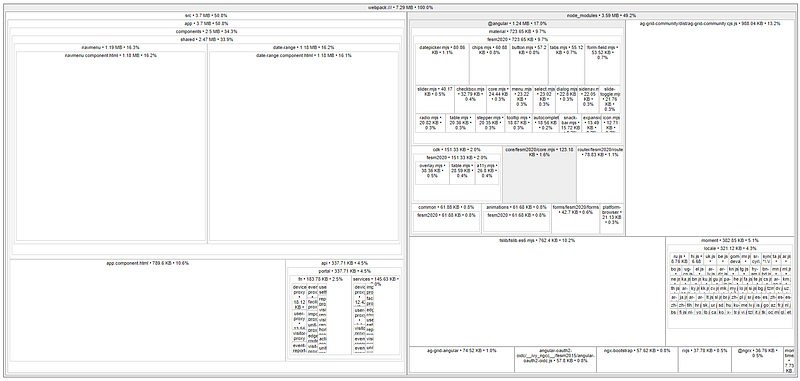
Earlier this month, I was trying to figure out ways to reduce our Angular app’s bundle size, so I used source-map-explorer to figure out where the bundle size was coming from. When I looked at the output above, I was surprised to see that navmenu.component.html and date-range.component.html comprised about 30% of the bundle size or so.
I was wondering why were these template files so large, so my first thought was to ask was this an issue with the way the html was actually written or was this a problem with how the module was loaded into the app?
I also needed to figure out which file exactly I needed to look at. Did I need to look at the html template or at the component file itself?
Well, turns out, the answer was neither. The culprit was actually the .scss files for the two templates. I realized that in both template .scss files, I was importing the root app.component.scss file, which was in turn, importing a couple of large theme files from ag-grid-community.
Here’s the mistake that I was making in both template sass files:

That’s it. The mistake I was making was just one misplaced import statement.
So, all I had to was remove the redundant imports, which took off about 1mb of size from the template files.
I also took a look at our app.component.scss file and realized that we were importing two themes from ag-grid-community .
Really, we were only using the material theme, so the second theme file was just adding unnecessary size to our bundle, so I removed the second theme import, which reduced the bundle size by another 100k or so.
Just by doing these two simple things, I was able to get our bundle size down to around 4.71 mb.
Using source-map-explorer again, the resulting output now looked like this:
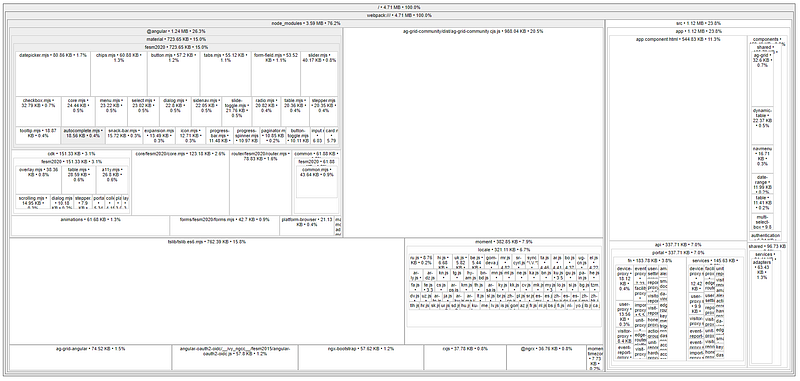
That’s a reduction of almost 3mb just from two simple corrections. To recap, all I had to do was:
- Remove redundant or misplaced
@importstatements - Remove unused css themes


