
One-Stop Toolkit for Fully Automated Algorithmic Trading
Automate your trading with Python and make money while you are asleep

Introducing the ultimate solution for automated trading: the One-Stop Toolkit for Algorithmic Trading. This powerful toolkit combines all the tools you need to create sophisticated trading algorithms and run them in the cloud, while you are sipping margaritas on the Caribbean. All in one easy-to-use package.
With our toolkit, you can easily design, test, and deploy your own trading strategies. Whether you’re a beginner or an experienced trader, our intuitive interface makes it easy to get started.
Our toolkit includes a full suite of tools and features, including:
- Data sourcing and handling
- Customizable backtesting and optimization tools
- Live trading and real-time market data
Don’t waste your time with multiple tools and platforms — get everything you need with the One-Stop Toolkit for Algorithmic Trading. Start automating your trades today and see the results for yourself.
Includes:
1. Data Handling
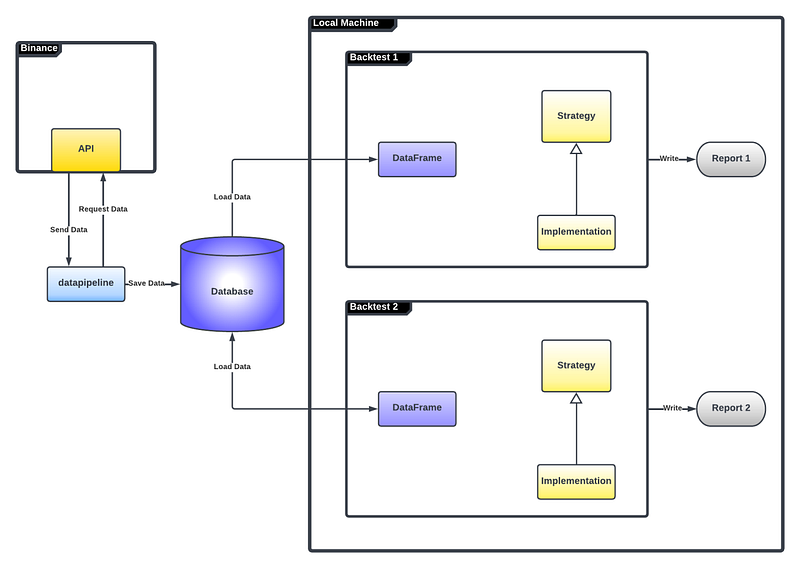
- A DataHandler class that acts as a bridge between your data and a REST client making it easy to communicate with different APIs, retrieve data, and store it in csv format with a unified structure.
- A datapipline module that can easily be adapted to fetch data of your favorite coin and time frame and store it into a csv file.
- A collection of csv files with the data of your favorite coins to improve backtesting speed and enable coding work offline.
2. Backtesting
- The Backtest class serves as a template for backtesting, making it easy to plug in your own strategies and see how they would have fared under different market conditions in the past.
- Two ready-to-use examples for an example strategy and an example portfolio, making it easy to get started with backtesting your own strategies.
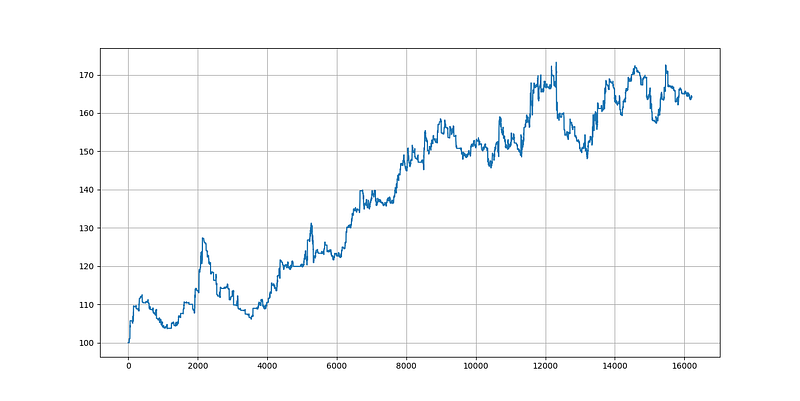
- Backtest reports for the example strategy that provide a comprehensive overview of the strategy’s performance, including plots of the equity curve and important performance metrics for different parameters.
3. Live Trading
- A REST client to deal with Binance API, that you can easily adapt to work with your favorite exchange’s API.
- An abstract Strategy class that serves as a foundation for your strategies, providing a clear structure and a set of guidelines for implementation.
- A a tried and tested trading strategy that serves as a blueprint for your own strategies or as a starting point to build upon.
- A Portfolio class that makes combining your strategies into full cohesive, well-balanced portfolios as easy as one-two-three.
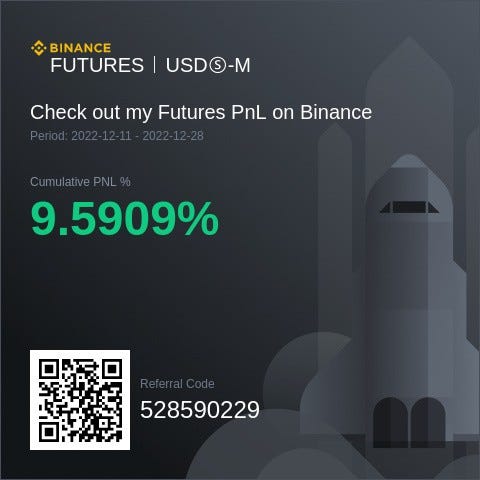
Note! This public repository does not contain my full set of proprietary trading strategies. It only contains one of the strategies which make up my portfolio to serve as an example for users. My full portfolio consists of a diversified collection of strategies to maximize risk adjusted returns.
Usage
Writing a Strategy
Our example is a strategy that bets on the continuation of an ongoing trend. If the market is in an up-trend, and certain criteria are met, the strategy enters a long trade to profit from the continuation of the up-trend. In the same way, we enter a short trade if the market is in an ongoing down-trend.
Whilst the abstract strategy class is in the bot/src/ directory, the actual implementation of a particular strategy is in the bot/src/strategies/ directory.
So, to implement our trend continuation strategy, we create a new file in the bot/src/strategies/ directory. In our case it is called ContinuationTrade.py. In this file we implement the trade logic in a class that inherits from Strategy.
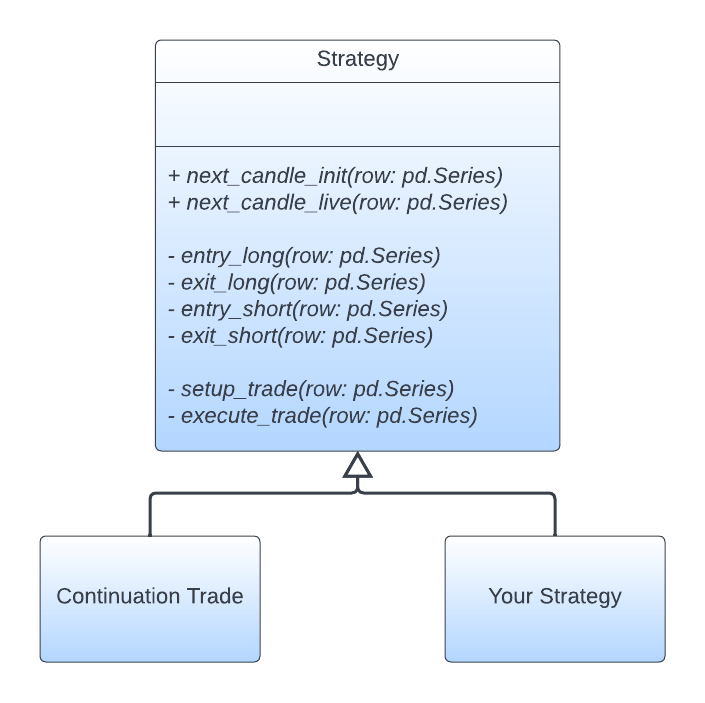
The Strategy base class has a total of eight abstract methods that we have to implement in our child class.
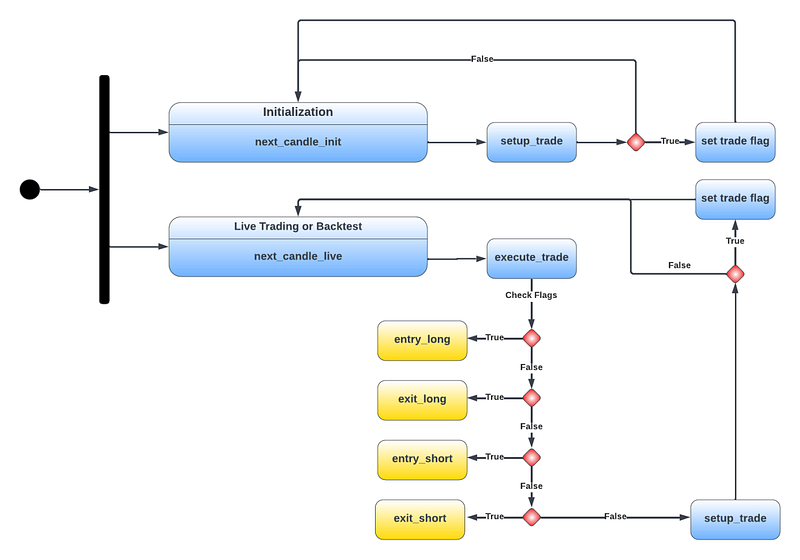
The next_candle_init and next_candle_live methods give a public interface for our backtest and live trading modules to distinguish between initialization, backtesting, and live trading.
If we are initializing a strategy for live trading, we call the next_candle_init method.
def  next_candle_init(self, row: pd.Series) -> None
    """Initializes the strategy by iterating through historical data
    without executing trades.

    Parameters
    ----------
    row : pd.Series
    Row of historical data.
    """

    self._setup_trade(row):
This method calls the setup_trade methods.
The setup_trade method checks if a trade set up has been triggered with the recent candle, and if yes, sets the trigger flag for a long or a short set up to True.
If we are not trading live, we record the current equity in every step to evaluate the equity curve later on.
If we are trading live or running a backtest, we call the next_candle_live method.
def  next_candle_live(self, row: pd.Series) -> None
    """Checks for valid trade set ups with new live data and execute live
    trades.
    Parameters
    ----------
    row : pd.Series
    Row of live data.
    """

    self._execute_trade(row)
    self._setup_trade(row):
This method calls both the execute_trade method to generate trading signals, and the setup_trade method to detect new set ups.
The execute_trade method checks if a new trigger has been set or if there is an existing position and calls the entry_long, entry_short, exit_long, or exit_short method respectively.
If entry_long or entry_short is being called some more conditions such as a sufficient reward/risk ratio are being checked. If those conditions are satisfied a trade is being entered on exchange via our RESTClient object for live trading, or recorded without actual execution for backtesting.
If exit_long or exit_short is being called the current trade is being closed on exchange via our RESTClient object for live trading, or recorded without actual execution for backtestinssembling a Full Portfolio for Live Trading.
Assembling a Full Portfolio for Live Trading
To assemble your portfolio, define your tradable assets in Assets.py. Import them into the live.py module like this:
from  src.Assets  import  btc_cont_live, eth_cont_live, sol_cont_live,
                          doge_cont_live
and define the markets you want to trade in the main function
if  __name__ == '__main__'

    markets = [btc_cont_live, eth_cont_live, sol_cont_live, doge_cont_live]

    portfolio = initialize_portfolio(markets, live=True)

    trade(portfolio):
As straight forward as can be.
Writing Backtests: Single Strategies and Full Portfolios
Single Strategy Backtest
To set up a new backtest for an individual strategy, you will create a new .py file in the bot/back_tests/ directory with the name of your backtest.
You can copy paste the code from the exisiting backtest_continuation_trade.py module. In this module, we backtest the continuation trade strategy. For this we import the ContinuationTrade class like this:
from src.strategies.ContinuationTrade import ContinuationTradeYou will replace this import line with the module and class of your own strategy. You can also change the preset list of markets and adjust the set of risk levels, leverage sizes, and reward/risk ratios if the predefined ones do not fit your particular use case.
markets = [btc_cont, eth_cont, sol_cont, doge_contrisk_samples = [0.001, 0.005 , 0.01, 0.05, 0.1, 0.2]leverage_samples = [1 , 3, 5, 10]risk_reward = [2.0, 3.0]]If you want to trade markets that are not included in the current code, make sure to define them in the Assets.py module and import them.
The last step is to loop through all markets and run the backtests. Here you have to change the second argument “ContinuationTrade” to be your strategy.
for market in markets
    bt.run(ec, ContinuationTrade, market, risk_samples,
           leverage_samples, risk_reward, Timeframes):
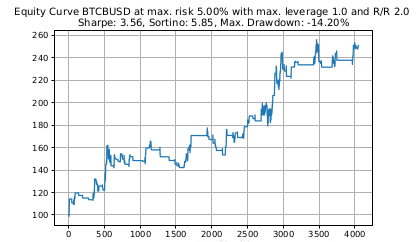
The Backtest object will also save a report of you backtest in the bot/back_tests/backtest_reports/ directory including equity curves and important performance metrics such as Sharpe ratio, Sortino ratio, and maximum draw down of your test run.
Full Portfolio Backtest
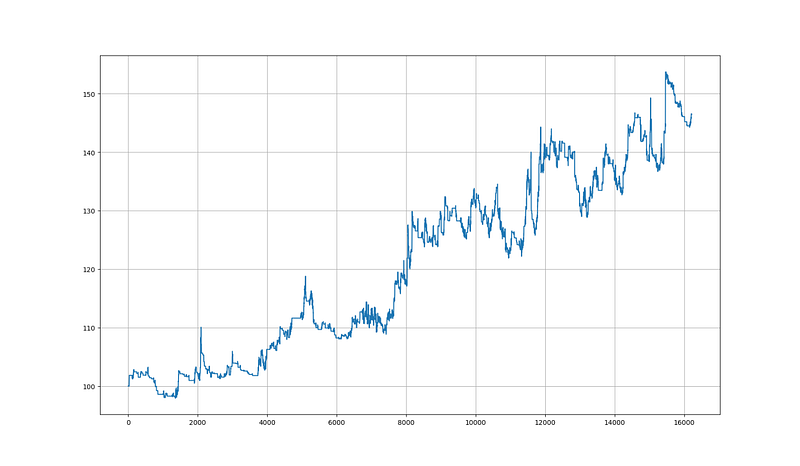
Setting up a full portfolio backtest works almost the same way as setting up a portfolio for live trading, which has been explained above.
To assemble your portfolio, define your tradable assets in Assets.py. Import them into the backtest_portfolio.py module like this:
from src.Assets import btc_cont, eth_cont, sol_cont, doge_contand define the markets you want to trade in the main function
if __name__ == '__main__':

    markets = [btc_cont, eth_cont, sol_cont, doge_cont]

    portfolio = initialize_portfolio(markets, live=False)
The only difference to setting up a live trading portfolio is that we set the live parameter to False when initializing the portfolio and not calling the trade function that initiates the scheduler for live trading.
Getting Data
In Assets.py instantiate an object representing your asset. For a continuation trade on Bitcoin we do it like this:
btc_cont = Asset(ContinuationTrade, 'Continuation_Trade', 'BTCBUSD'
                 (58434.0, '2021-02-21 19:00:00+00:00'),
                 (57465.0, '2021-02-21 18:00:00+00:00'),
                 datetime(2021, 2, 21, 20, 0, 0, 0), 100,
                 Timeframes.ONE_HOUR.value, 0.1, 1.0, 2.0, 3)
In the datapipline.py module we define the tickers we are interested in.
busd_markets = ['BTCBUSD', 'ETHBUSD', 'SOLBUSD', 'DOGEBUSD']In our case we are interested in the BUSD futures for $BTC, $ETH, $SOL, and $DOGE. If you are interested in other coins you can find out their ticker on your exchange’s website and replace them in the list above. Make sure to also adapt the classes in the RESTClient.py module if you are using another exchange.
Now we only need to run
Python3 datapipeline.pin the terminal from the bot directory and it will load the requested data from the Binance futures API into csv files located in the bot/database/datasets/ directory.
By default, the time frames 1d, 1h, and 4h are implemented but if you are interested in other time frames you can easily extend the Enum
class Timeframes(Enum):
    ONE_HOUR = '1h'
    FOUR_HOURS = '4h'
    ONE_DAY = '1d'
in Assets.py.
If, for example, you wanted to add the 5m time frame, you would simply add the line
FIVE_MINUTES = '5min the Enum in Assets.py and the lines
download(market, Timeframes.FIVE_MINUTES.value, timedelta(minutes=4999))
print(Timeframes.FIVE_MINUTES.value + ' done! \n')
The timedelta this way since we can at most request 1000 data entries at a time from the Binance API. By default it is 500 data entries, but by explicitly requesting 1000 we can reduce the number of requests and therefore the time it takes to download our data.
Unit Tests
To run the included unit tests execute
pytest -v -k "test_ms or test_data_fetch_current"This does not all the included unit tests, but the remainder needs you to set up a Telegram bot. You will need to set up a Telegram bot before you start trading live so the algorithm can send you messages to your phone upon entering and exiting trades.
License
See the LICENSE.txt file for license rights and limitations (GNU GPLv3).


