
On DevOps — 17. Everything about Versioning: Important but Mostly Ignored Questions, Best Practice, and Version Propagation in Multiple Environments

Versions, Versions
We all know a thing or two about versioning already.
If you are a Windows user, you probably know Windows 7, 8, and 10.
If you use a mac, you probably are familiar with macOS 10.14, 10.15, or the latest 11 (maybe you know them by the code instead of a number like macOS Mojave, Catalina, and the Big Sur.)
Apparently, people like to put a number to the software. Why is this important?
Versions: Contracts
A version is basically like a contract: it assures you, if you use this version number, if it behaves like this today, it will continue behaving like this in the foreseeable future.
For example, when you are using an API api_add{2,3}, it returns 5. You always expect it to return 5, and you expect it to return the number 5, not a string “5”. If one day, the maintainer of that API changed the API without letting you know, and somehow it returned a string “5” instead, it might break your code which relies on that API and assumes the return result to be an integer, not a string.
That’s why you need versioning.
We develop software so that other people can use it. Maybe it’s the end customers who are using it. Maybe it’s another piece of software that will call your software. When others are using your software, they expect it to behave steadily. They don’t want to get the result as number 5 today and as a string “5” tomorrow. Or worse, getting 6 instead of 5 the day after tomorrow.
In the days of microservice architecture, this is becoming more and more important, because of the dependencies between services.
Versions: a Mechanism to Rollback
Software fails. Deployment fails.
It’s not a question of “if,” but “when.”
It’s what Murphy’s law taught us:
Anything that can go wrong will go wrong.
You don’t really want your deployments in the production environment serving millions of users to fail, though.
When you bring a change in the production environment (aka, a deployment), it might actually fail, no matter how unlikely it is, because it is a “change,” and by nature, “change” is not stable.
When it fails, you want to be able to quickly recover to the previous working state, aka, the previous “version.”
It’s like you are running Windows 10 now, and you want to upgrade to Windows 11, but somehow the upgrade fails, so you need to fall back to Windows 10 again. The version number “10” provides you a place to fall back to: you know exactly where, or which version, to rollback to.
Imagine if you don’t have versions.
You just did a deployment, but you brought down the production environment. You are in a hurry to recover it back to normal, but you don’t even know what the previous state was. You tried to search the commit hash from the previous deployment job’s log; then, you try to figure out which docker image ID corresponds to that state of code. Only then can you know where to fall back. When you are under pressure, you make mistakes. When you do complicated tasks, you make mistakes. You definitely don’t want to make any mistake in critical situations like this.
Versions make deployment and rollback much simpler.
Source Code Versioning: Git Tags
When we think about versioning, we usually first think about Git tags. The source code management system is where you store your source code, and when you think about adding versions to your software, you normally think about adding versions to your source code first.
A “tag” in git most-likely is checksummed (there are lightweight tags which are an exception) and contains information like the tagger name, email, date, and message. But you can think of it as a “label” that is associated with a specific commit. Or think of it as a pointer to a specific commit. And this label/pointer can serve as the version of your source code.
Tagging in Git is quite simple because you can do so with merely one command or at the click of a button. However, there are a few important yet not frequently mentioned questions to answer before creating versions for your source code:
Where to Tag
You checked out a new branch to develop a feature. Now that you have finished the feature and ready to release it, you want to create a version for your source code. Where exactly should you create this tag: in the feature branch on the latest commit? Or merge the feature branch first into master, then create a tag in the master branch?
Of course, there is no right or wrong when creating tags: you can create tags however you like. But the “right” place to version your source code is in the master branch rather than in the feature branch, and this is because the tag is associated with the commit.
Imagine the current master has version “v1”.
You checked out a new branch based on it and did a new feature. It’s a big feature, so it took you quite a few hours or even days to develop it, but it’s finally done, and you are ready to version it as “v2” in the feature branch, then you merge it into master.
But before you merge, someone else in the team did a quick bug fix and tagged it as “v1.1” and merged it into master already.
In this case, if you use tag “v2”, it doesn’t contain the bug fix done in “v1.1”, although based on the number, you would think “v2” should contain “v1.1”.
This is because the tag is associated with a specific commit, and since you tagged “v2” on the commit in your feature branch, it doesn’t include the commit which is tagged as “v1.1” with the bug fix. The following image demonstrates this scenario:
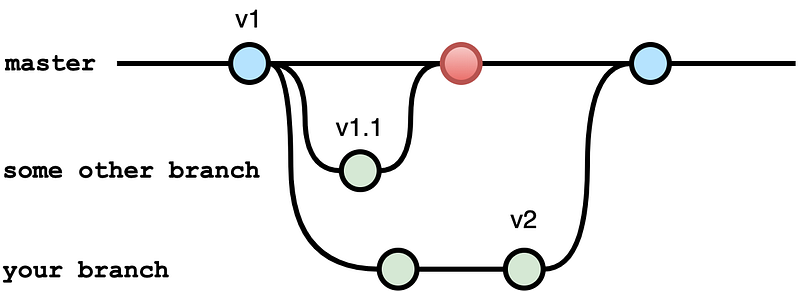
You don’t want this type of behavior in the production environment.
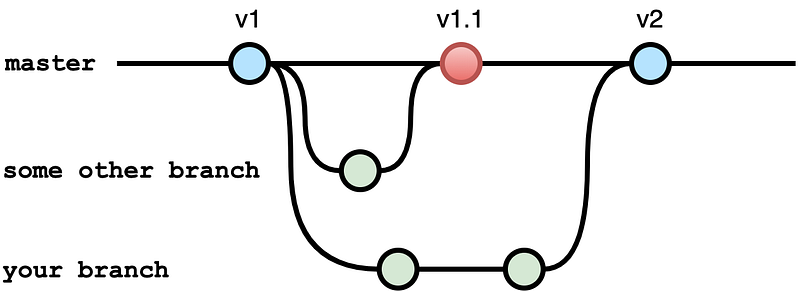
By tagging in the master branch, you mitigate this issue because the tag is associated with the commit. Now the “v2” tag is created after merging your feature branch into the master branch, so the commit where “v2” is tagged now contains changes done before your merge, as shown in the following image:
How to Tag
Should you tag on every commit in the master branch? In this case, maybe even automatically with the help of CI tools? Or, should you only tag commits that you think are worth tagging?
There is no right or wrong; it’s more of a philosophical question than a software engineering question.
If you decide to tag every commit in the master branch, some automation tools could help bump the version for you. For example, if you manage a lot of microservices, it might worth it to use this way to get rid of the hassle of version number management.
If you decide to do the release with tagging manually, that’s perfectly fine too. In fact, if what you build is more of a library, a command-line tool, rather than a web service, maybe this way is better because you get more flexibility with manual tagging: at least you don’t have to create a new tag just because you fixed a typo in the readme file.
Include Version in the Code
Sometimes, it makes sense to include the version in the code itself and generate a Git tag based on that.
You will see this pattern the most in command-line tools: when you run something like kubectl version, you get the version of the tool you are using. The version is built into the software, and the version is in the source code management system, too.
When creating a new tag, you can automate your CI pipeline so that in the pull request, you include the version update in your source code, then the pipeline picks it up and creates the git tag based on that automatically.
You don’t want to do this for every single piece of software, though. Sometimes it makes sense for the server to be able to return the version that is running; other times, maybe it’s not needed.
Semantic Versioning (SemVer)
SemVer follows this format: MAJOR.MINOR.PATCH, where major, minor, and patch are a number. You increase each segment separately when:
- MAJOR version: when you make incompatible API changes.
- MINOR version: when you add functionality in a backward-compatible manner.
- PATCH version: when you make backward-compatible bug fixes.
Although you can literally use anything as a version number (or a text), it’s highly recommended to use SemVer, because SemVer is self-explanatory.
When you are currently running version 1.6.3, for example, and you upgrade to 1.6.4, you will know for sure there are no functionality changes, only bug fixes, so it’s best to upgrade.
If you are upgrading to 1.7.0, you know your other services which depend on this software could still work, although the new version 1.7.0 might have introduced some new features you don’t use yet.
You know for sure, if you upgrade to version 2.0.0, there is a chance that things would break.
Although using code names like the “Big Sur” as a version tag is cool, SemVer is more useful because it literally means the number in the version tells you something useful semantically.
Single Source of Truth: Version for Artifacts
We have covered a lot regarding the source code versioning because you want to use that as a single source of truth across all artifacts you have for that service.
For example, if your source code has one version, and you build a docker image based on that version but give the docker image a different tag, things might be confusing. Technically, you can still figure out which docker image tag corresponds to which source code tag, but that’s a bit unnecessary because you can re-use the same version tag for both the source code and the docker image. Doing so will eliminate a lot of unnecessary operational overhead.
If you are using helm charts, each helm chart has its own version as the version of the chart artifact itself. But helm chart also has another version called appVersion, which you can set to the same value as the docker image tag or the source code tag. Using the source code version tag for all other version tags is the simplest way to keep it clean.
In general, it’s best practice to use the same tag for everything because it’s just easy to do that. But best practice is only best practice; it isn’t an ironclad rule that you must follow.
Version Propagation
Now that we have versions defined for the source code and made sure all artifacts have the same version tag, we are going to tackle perhaps the biggest problem in big projects that have multiple environments: version propagation.
When you deployed version A into the development environment, you trigger your CI pipelines to run some tests. After tests have passed, it’s time to deploy this version into another environment, say, the staging environment. How do you tell the staging environment the version which has passed the tests in the development environment?
This is the problem of version propagation.
Generally, there are two ways to do this.
Automation
One is in a fully automated manner, most likely in the following order:
- git merge into master
- git tag version generated
- build docker image/update helm chart with the same version tag
- deploy this version into the development environment
- run tests in the development environment
- when tests passed, trigger deployment of this version in the staging environment
Using this manner, you can automate all the way to production deployment.
Partially Manual
However, in some cases, you don’t always want to deploy every single version all the way to production.
Maybe you developed version 1.0.1 and deployed it to staging, everything works fine, but you don’t want to deploy to production just yet.
Or, maybe you need some manual approval or some manual tests before deploying to production.
In this case, you can separate deployment pipelines for different environments and trigger the deployment in a specific environment manually, with a version as input for the pipeline job.
A Possible Way
There might be another pattern (or anti-pattern, depending on how you look at it) which is to use some prefix or suffix, like:
- deploying 1.0.1 in dev, and run test
- if the tests passed, tag it as 1.0.1-staging (the suffix means it has passed tests in the development environment and ready to be deployed into the staging environment)
- when manual approval passed, trigger the staging environment deployment pipeline, which gets the latest tag with the “-staging” suffix and deploy.
It works well because it saves you from entering which version to deploy since it can find it out based on the suffix. Still, you also lose some flexibility because what if you don’t want to deploy the latest version that is ready to be deployed in the staging environment, but rather, a particular one?
There is no one right answer to version propagation that could fit in every project. And not all projects can achieve 100% automation regarding continuous deployment. Understanding each method, even invent some other methods, and pick the best that suits your situation.
Summary
Versions: you gotta know when to use them, you gotta know how to use them.


