
TECHNO-TRASH
Old Techies Never Die…
They just get promoted into management
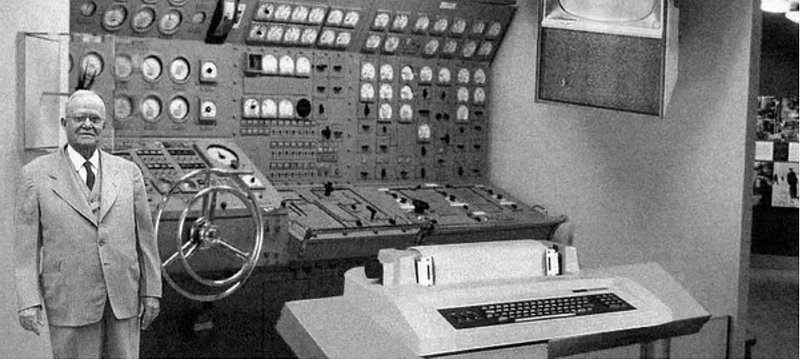
It’s hard to believe I once called myself a “techie.” It appealed to me partly because I hated the idea of being a marketer, selling stuff that people didn’t need. I could step back into the shadows and fix stuff for folks. But long before I actually joined the technology world, I touched some very early tech. I never got to “drive” the monster shown above, but I saw a lot.
Technology is a very broad field, encompassing people with masters degrees in computer science and MBAs in systems analysis, then there were the hangers-on like myself. Coming at technology with a literature degree, I was easily the most talkative and literary geek in my department. Eventually, I found out I was also the oldest.
In my last cubicle-bound job, where I actually got in my car and drove into work every day, I was surrounded by some pretty weird people — network specialists, help desk techs who installed programs on people’s computers and trouble-shooted (trouble-shot?) problems, sometimes getting in trouble for being too fresh with clients or too hostile. And there were specialists who handled all sorts of issues. You may not be aware of this, but by this time in history, there were actually no more “problems” or “trouble”; there were only issues. A little bit of NewSpeak applied to the Information Technology world.
Most of the time, we ignored each other as we handled calls from clients or got yelled at by management, but during quiet periods, somebody would say something about the old computers they used to work with back in the eighties or nineties. That’s when I would reach into my word-hoard of useless information and tell them about The Early Days. The Seventies.
When I graduated college with my shiny new English degree in 1972, I got a job as a proofreader and manuscript typist with Silver Burdett Co., a book publisher. They had acquired what was then the latest in word processing equipment, called Word/One. The system consisted of a bulky keyboard terminal as big as an end table, and an equally klunky printer. A special telephone line connected to a Bell System¹ modem and acoustic coupler connected the terminal to a mainframe computer that did all the word processing, at the blistering speed of 300 bits per second. Compare that to today’s Wi-Fi at up to a billion bits per second. WordOne chugged along like that old guy sitting in an old horse-drawn wagon who went around saying “Pep’ridge Fahm remembers.”
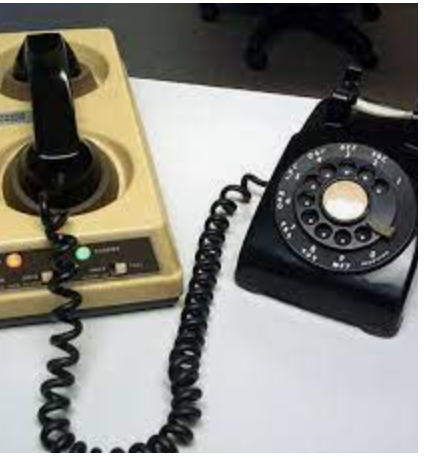
Besides being slow, the modem/coupler was incredibly unreliable.
An acoustic coupler is the crudest of ways to connect to a remote computer. I suppose you could find a cruder way, but this is a family tech article. The device relies on sound that is converted to bits and bytes, by emitting a computer tone that can be understood by a computer via a phone speaker. The coupler listens for a sound like somebody trying to imitate a snake; a low hiss from back in the throat, only this particular hiss had a tone hidden in it, and when a connection is established, keystrokes can be sent to the computer. The bottom line with this device is that it was about as reliable as getting a six-year old to clean his room, because phone lines are meant for people’s voices, not precise signals. So it failed a lot.
Word/One’s terminal operated much like an ordinary typewriter, except that it was massive. You sat in the corner surrounded by the keyboard and printer, and typed your document, where the keystrokes would (hopefully) be stored on the remote computer containing all the smarts. To revise it, you used what is known as a line editor. After typing in — or inputting your document, to use the proper computery term — you created a special printout marked with numbers for each line of text. After doing the usual markups, circling typos, etc., you returned to your WordOne and started at the very last line number. issued a command containing a line number followed by the offending typo, followed by what you wanted to change it to. It looked something like this:
328;teh;the
The semicolon was the character that it used to separate one element from another. If your mistake included an improperly placed semicolon, well then, my friend, you spent time figuring out how to fool it into making your correction, like:
1033; the best;;the best;
If you were lucky it wouldn’t come out with an ungodly tangle of semicolons. Bottom line: don’t make any mistakes involving semicolons.
And why did you have to start at the end? When you made a change to the text, it would likely shift the line numbers, so that your printout would only be useful from the beginning up to the point where you changed it. A far cry from the GUI editors of today, where you just move your cursor or click your mouse, and correct it. Le voilà! Mouse?? This was long before rodents entered the computer field.
My second run-in with dial-up technology was in the eighties in a computer lab at Rutgers University’s School of Library and Information Science, where I was getting a masters. I had to solve a series of computing problems using Basic — no, not Visual Basic, ye olde BASIC, the wizened grandma of VB. The system lived on a mainframe somewhere on campus that you connected to via a modem, using an acoustic coupler (which by now we sometimes called an “acrostic cupola”² and then started typing madly while it still ran.
Since it was subjected to all the variations in noise that telephones of the time had, It inevitably failed. If you complained to the Technology Gods who serviced such equipment, they would tell you, “The telephone network was never designed to be used for digital signals blah blah blah.” Most of the time the conversation between your terminal and the mainframe ended in a “line drop.” What that meant is that the code that you so furiously typed out while you muttered “oh-please-oh-please-oh-please!!” was gone. Pfft. Descended into the bit bucket. Then, optionally you could emit your own series of sounds, like “Ah shhhhhhhhhhhhhhhhh” or “fucketedy fucketedy fuck!!” After an afternoon of this BS I decided to buy my first computer — an Osborne One.
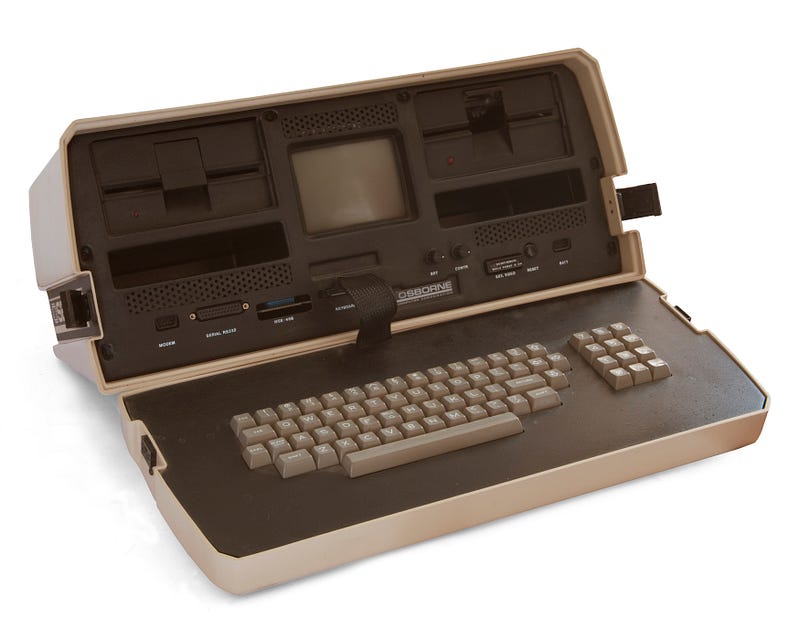
The Osborne One was one of the first “luggable” computers, about as heavy as a sewing machine. It ran on an operating system called CP/M, and came with a packet of goodies — Supercalc, CBASIC (compiled) and MBASIC (interpreted), and WordStar, all for under $1,000. I think the floppy disk that it used could fit up to 64 kilobytes — about the size of the RAM in the first IBM personal computer. I wrote out the BASIC programs assigned to me, and in short order got them working.
I used my Osborne for other grad school work, using the lovely little word processor, WordStar. It had a place you could add commands that would run when you started the program, which was cool, but the storage space was only hundreds of characters! So I spent time deciding which command to fill the buffer with. I wrote more than one paper with that handy little program.³ I ran a patch program that let you add special commands in the application via assembler. First lessons in super-detail, because if you got it wrong by even one byte, it crashed. I built a crude little accounting system for a course in statistics at Rutgers. The screen was exactly 80 columns wide, so it had a built-in sideways scroller so you could see what you had. I built a crude accounting system in Supercalc, and felt incredibly empowered.
This was a good eight or ten years before Windows first became the oxygen that everyone breathed — in The Before Times.
I went to at least one Osborne user group meeting and met all these other happy geeks with their luggables. One guy claimed his computer fell down a flight of stairs, but then booted up fine afterward. Sounded more like the tale of an idiot, but never mind that. The Osborne really was built like a tank. The keyboard was manufactured by Oak: Now why on earth do I remember that? No idea. At the user group meetings I met people with far more computing experience than me, but I felt like a member of weird fraternity.
Modems stuck around for quite a while, before high-speed WiFi took over. In the mid eighties I worked as a trainer for WILSONLINE, the online database system for the H.W. Wilson Co, a hoary old company that served libraries around the world. By this time I had acquired my M.L.S. from Rutgers, a requirement if you wanted to be accepted at Wilson. As a member of Wilson’s Computer Services Department, my fellow trainers and I were regarded as a bunch of barbarian librarians, with their new-fangled computers and their fancy technical terms. Wilson’s computing power came from an IBM 4350), and the WILSONLINE system was written in PL/1 and ran on CICS (“kicks”) in pseudo-conversational mode. More about Wilson in a future article.
We trainers went to libraries all over the country and gave an all-day training class to research staffs, and we each got a little portable terminal that fit into what was about the size of a camera case that came with a shoulder strap, and used photosensitive paper that you inserted on a roll. There was no screen. It printed at 300 baud. You could watch the print travel back and forth on the paper, back and forth — back and forth — You are getting sleepy —
WILSONLINE remembers.

___________________________ 1. This was before the breakup of AT&T, when if you needed a modem, you rented it from Ma Bell.
2. Didn’t make it run any faster, but it was fun to say.
3. Staring at the bloated, multilayered monstrosity that is Microsoft Word, I sometimes long for dirt-simple editors like WordStar.


