avatarTeri Radichel

Free AI web copilot to create summaries, insights and extended knowledge, download it at here

5613

Abstract

ges-1.readmedium.com/v2/resize:fit:800/1*8y1ZthK1jjJjZ1ZoOFbZdA.png"><figcaption></figcaption></figure><h2 id="58cd">Global Session Policies</h2><p id="9f94">Okta defines Global session policies as follows:</p><blockquote id="28db"><p>Global session policies supply the context necessary for the user to advance to the next authentication step once they have been identified by Okta. They also specify actions to take, such as allowing access, prompting for a challenge, and setting the time before prompting for another challenge.</p></blockquote><p id="3258">You can add a global session policy by navigating to Security > <b>Global Session Policy </b>on the Okta admin dashboard. Click Add policy.</p><figure id="f3d6"><img src="https://cdn-images-1.readmedium.com/v2/resize:fit:800/1*GfOjx8wVnsRTt-35Qg9VJQ.png"><figcaption></figcaption></figure><p id="ce2e">Here I see a number of options, the first one being related to networking. It looks like I’ll have to set up my networks first and then I can specify which networks are allowed.</p><figure id="3171"><img src="https://cdn-images-1.readmedium.com/v2/resize:fit:800/1*RhtjHpZB26xaEiXZ7wAodA.png"><figcaption></figcaption></figure><p id="a5a3">Also note that the organization has a default rule. If you add multiple rules you’ll need to understand how they all work together. Does one override the other? Or does the user get the broadest available access based on all the rules? Test this out to make sure it works the way you expect.</p><p id="2bfd">Based on this statement in the documentation the first policy that matches may apply but its not clear.</p><blockquote id="b673"><p>As a best practice, restrictive rules should be placed at the top of the <b>Priority</b> list. Beyond that, you can create combinations of conditions for multiple scenarios; there isn’t a limit to the number of rules your policies can have.</p></blockquote><h2 id="2260">Be careful not to lock yourself out!</h2><p id="d4db">What if you lock yourself out of your account by creating a network rule that is too restrictive? I don’t see information here about being able to bypass the rule in any way or any indication that any particular account can bypass the rule. Make sure you have access to the IP addresses used in this configuration and understand when they change.</p><h2 id="0cef">Authentication policies</h2><p id="cfa0">The global session policies apply to logging into your Okta account as a whole. Authentication policies apply to specific applications in your account. Now, this is confusing me at the moment because I added Azure and AWS as applications in my account. I do’t see AWS in the application list here, I only see Okta apps and az login. The documentation is a bit light on this section. I’ll may revisit this later, potentially after contacting support.</p><p id="9673">Once again we can specify IP restrictions for authentication policy rules based on network zones we have defined in our account.</p><figure id="d8a1"><img src="https://cdn-images-1.readmedium.com/v2/resize:fit:800/1*htsox7vzqHKmpNYcQvVYwA.png"><figcaption></figcaption></figure><h2 id="3ce0">Network Zones</h2><p id="04bc">You can define a network zone in a number of different ways in Okta. Here’s the list from the documentation.</p><figure id="1d24"><img src="https://cdn-images-1.readmedium.com/v2/resize:fit:800/1*W1d_T7E7NHihS7_9oCsu_Q.png"><figcaption></figcaption></figure><div id="6366" class="link-block"> <a href="https://help.okta.com/oie/en-us/Content/Topics/Security/network/about-network-zones.htm"> <div> <div> <h2>About network zones</h2> <div><h3>undefined</h3></div> <div><p>undefined</p></div> </div> <div> <div style="background-image: url(https://miro.readmedium.com/v2/resize:fit:320/)"></div> </div> </div> </a> </div><p id="0047">Here’s what the screen looks like to add an IP Zone. It lists your current IP address so you can add it as a gateway easily.</p><p id="cda8">Additionally, it’s easy to block IP here without creating additional rules.</p><figure id="673d"><img src="https://cdn-images-1.readmedium.com/v2/resize:fit:800/1*Fgv1eBzhWxQCyy3LL6ZX9g.png"><figcaption></figcaption></figure><p id="cbce">I’m not going to go into every detail about Okta networking as you can read that in the Okta documentation, but they key point here would be to restrict access to Okta and especially the admin dashboard to your private network — and test it!</p><h2 id="deec">Networking between an AWS account and Okta</h2><p id="4e0b">Here’s another point that surprises me. I can’t find any indication that Okta works with AWS PrivateLink. That AWS PrivateLink service allows a vendor to set up an endpoint, and when customers can connect to that endpoint. all the traffic remains on the AWS backbone if the customer initiates the request on AWS to the endpoint. It never traverses the Internet.</p><p id="2641">For example, a customer might want to operate on a workstation in AWS. If they visit an endpoint from the workstation in AWS then the traffic would not traverse the Internet. Also, when a customer is interacting with the Okta API, they may want to maintain that connection on the AWS backbone and avoid having that traffic traverse the Internet.</p><div id="d7dd" class="link-block"> <a href="https://aws.amazon.com/blogs/apn/enabling-new-saas-strategies-with-aws-privatelink/"> <div> <div> <h2>Enabling New SaaS Str

Options

ategies with AWS PrivateLink</h2> <div><h3>undefined</h3></div> <div><p>undefined</p></div> </div> <div> <div style="background-image: url(https://miro.readmedium.com/v2/resize:fit:320/0*dVCno8c6R1teUeCd)"></div> </div> </div> </a> </div><p id="79de">What about integration between Okta and the AWS IdP? Would we expect that to remain on a private network? Recall how SAML works.</p><p id="4a4e">As this image from Okta shows, the interaction occurs between the Service Provider and the user’s browser, and also the IdP and the user’s browser. The Service Provider and the IdP do not directly communicate as you can see below.</p><figure id="46b2"><img src="https://cdn-images-1.readmedium.com/v2/resize:fit:800/0*w4FOnE-xAIcnFtRk.png"><figcaption></figcaption></figure><div id="2c06" class="link-block"> <a href="https://developer.okta.com/docs/concepts/saml/#planning-for-saml"> <div> <div> <h2>SAML</h2> <div><h3>Traditionally, enterprise applications are deployed and run within the company network. To obtain information about…</h3></div> <div><p>developer.okta.com</p></div> </div> <div> <div style="background-image: url(https://miro.readmedium.com/v2/resize:fit:320/0*mvNWQEQFlRt9s_yn)"></div> </div> </div> </a> </div><p id="38a9">Therefore it doesn’t make sense to use an AWS PrivateLink connection for authentication from Okta to the IdP. However, the users could be interacting with the IdP over a private network using AWS Direct Connect or a VPN, and if the users workstation was on AWS, or as we will see if an organization is streaming logs from Okta to their SIEM, they could have a Private Link connection between that workstation and Okta, if it was offered.</p><p id="b356">I did find the Okta domain names here for those who need to allow access to Okta from private networks.</p><div id="c6af" class="link-block"> <a href="https://help.okta.com/oie/en-us/Content/Topics/Security/ip-address-allow-listing.htm"> <div> <div> <h2>Okta IP address allow listing | Okta</h2> <div><h3>undefined</h3></div> <div><p>undefined</p></div> </div> <div> <div style="background-image: url(https://miro.readmedium.com/v2/resize:fit:320/)"></div> </div> </div> </a> </div><p id="2b82">Aha. There’s the Mapbox API again. I wrote about how Mapbox is used in the Ubiquiti console here. Hopefully, Okta has very carefully reviewed this integration for any security gaps.</p><div id="4544" class="link-block"> <a href="https://readmedium.com/assessing-supply-chains-the-people-8c2475372344"> <div> <div> <h2>Assessing Supply Chains ~ The People</h2> <div><h3>When assessing potential products include a review of executives, technical staff, investors, and board of directors</h3></div> <div><p>medium.com</p></div> </div> <div> <div style="background-image: url(https://miro.readmedium.com/v2/resize:fit:320/1*FMtG7d2nUvFi8TxKpDfOoQ.png)"></div> </div> </div> </a> </div><p id="5995">The thing about the Okta network zones is that they appear to be enforced at application layer of the OSI model (layer 7) and some attacks can occur at lower layers. It does not appear that you can create a true network layer firewall ruleset with Okta (as is the case with most SaaS providers), but at least there is network support to restrict IP addresses, which some SaaS providers do not offer at all.</p><p id="4712">In the next post we’ll look at Okta IAM options.</p><p id="ee2f">Follow for updates.</p><p id="4a3a">Teri Radichel | <i>© <a href="https://2ndsightlab.com/?source=post_page---------------------------">2nd Sight Lab</a> 2023</i></p><div id="8b5f"><pre><span class="hljs-section">About Teri Radichel:

⭐️ Author: Cybersecurity Books
⭐️ Presentations: Presentations by Teri Radichel
⭐️ Recognition: SANS Award, AWS Security Hero, IANS Faculty
⭐️ Certifications: SANS ~ GSE 240
⭐️ Education: BA Business, Master of Software Engineering, Master of Infosec
⭐️ Company: Penetration Tests, Assessments, Phone Consulting ~ 2nd Sight Lab</pre></div><div id="caae"><pre><span class="hljs-section">Need Help With Cybersecurity, Cloud, or Application Security?
~~~~~~~~~~~~~~~~~~~~~~~~~~~~~~~~~~~~~~~~~~~~~~~~~~~~~~~~~~~~~</span>
🔒 Request a penetration test or security assessment
🔒 Schedule a consulting call
🔒 Cybersecurity Speaker for Presentation</pre></div><div id="5a42"><pre>Follow <span class="hljs-keyword">for</span> more stories like <span class="hljs-keyword">this</span>:

❤️ Sign Up my Medium Email List ❤️ Twitter: <span class="hljs-meta">@teriradichel</span> ❤️ LinkedIn: https:<span class="hljs-comment">//www.linkedin.com/in/teriradichel</span> ❤️ Mastodon: <span class="hljs-meta">@teriradichel</span><span class="hljs-meta">@infosec</span>.exchange ❤️ Facebook: 2nd Sight Lab ❤️ YouTube: @2ndsightlab</pre></div><figure id="faf5"><img src="https://cdn-images-1.readmedium.com/v2/resize:fit:800/0*H9Ew1KCl-29nZiPR.jpeg"><figcaption></figcaption></figure></article></body>

Okta Networking

ACM.162 How to limit network access and thereby limit possible attacks on our Okta User Directory

~~~~~~~~~~~~~~~~~~~~~~~~~~~~~~~~~~~~~~~~~~~~~~~~~~~~~~~

⚙️ Check out my series on Automating Cybersecurity Metrics | Code.

🔒 Related Stories: Okta Security | IAM | Network Security

💻 Free Content on Jobs in Cybersecurity | ✉️ Sign up for the Email List

~~~~~~~~~~~~~~~~~~~~~~~~~~~~~~~~~~~~~~~~~~~~~~~~~~~~~~~

In the last post we considered how Okta protects our data.

In the upcoming posts we will look at what type of security controls we can configure to access to our systems and data. I’m going to start with networking.

What can an attacker do with network access to our Okta and AWS resources?

There are a number of attacks that can be dramatically reduced by limiting access to Okta systems to private networks.
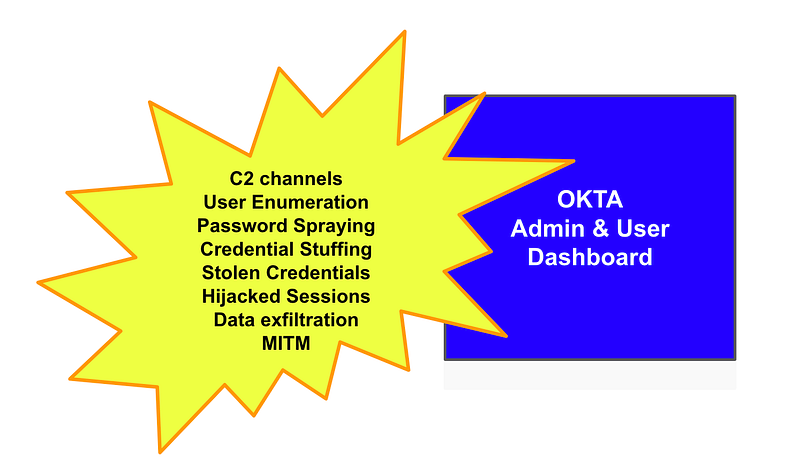
If the Okta dashboards for administrators and users are available to anyone on the Internet, the attackers can attempt a number of attacks on that dashboard.

For example:

  • They can search for credentials available the breaches tracked by haveibeenpwned.com and try to use it at Okta and see if any of them work.
  • An attacker might find a vulnerability in the Okta application and establish a connection to maintain a C2 channel or exfiltrate data.
  • An attacker can try to guess user names and passwords by entering them one after another until they find one that works.
  • An attacker could intercept traffic through a misconfigured network device or malware on a user’s laptop or phone and then or hijack the user’s session, using it to do whatever the user is allowed to do.
  • An attacker might try to show a user a fake login page, steal the credentials, and then try to use them an the real Okta dashboard.
  • An attacker might use a smishing (SMS) attack like the ones used in the Oktapus breach to trick a user into letting an attacker access their credentials.

In all of the above cases, let’s say an attacker attempts to make some kind of request to Okta systems but we have a network control in place that blocks their IP address. In that case, it doesn’t matter if they have your user name, password, and MFA device. They still can’t get into the system. In fact, if we have the systems only accessible on private networks, the attacker can’t even get to the dashboard at all, or interact with our AWS account resources that integrate with Okta.

What type of networking controls does Okta offer?

Head over to the Okta Identity Engine and check the menu and you’ll see something called Network zones.
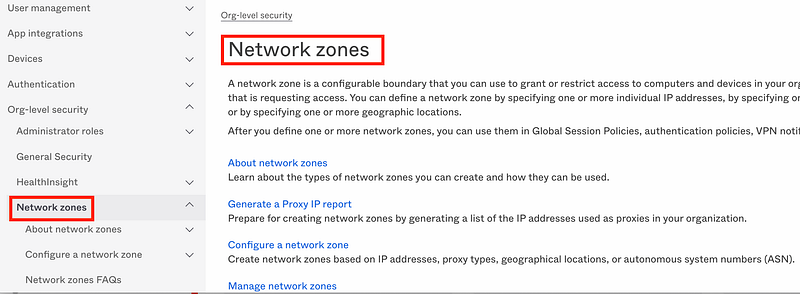
Here’s how Okta defines a network zone:

A network zone is a configurable boundary that you can use to grant or restrict access to computers and devices in your organization based on the IP address that is requesting access.

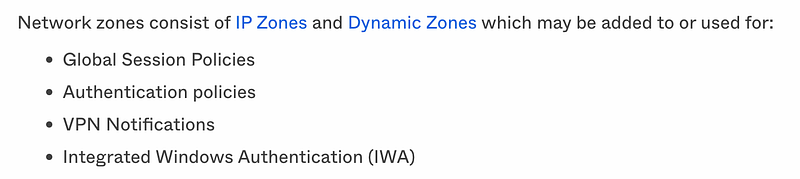
That’s great! So what can we block access using network zones? Here’s the list from the documentation. Right off the top I am not going to use Windows Authentication. I’m also not going to get into VPN usage at the moment. So let’s check out the first two bullet points.
Global Session Policies

Okta defines Global session policies as follows:

Global session policies supply the context necessary for the user to advance to the next authentication step once they have been identified by Okta. They also specify actions to take, such as allowing access, prompting for a challenge, and setting the time before prompting for another challenge.

You can add a global session policy by navigating to Security > Global Session Policy on the Okta admin dashboard. Click Add policy.
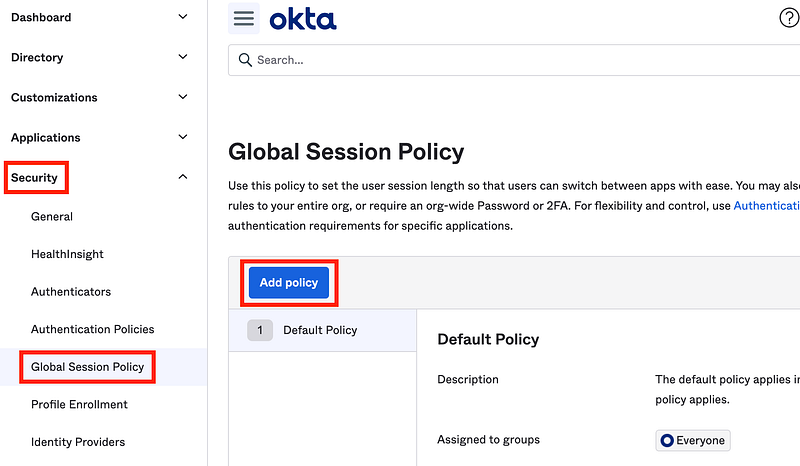
Here I see a number of options, the first one being related to networking. It looks like I’ll have to set up my networks first and then I can specify which networks are allowed.
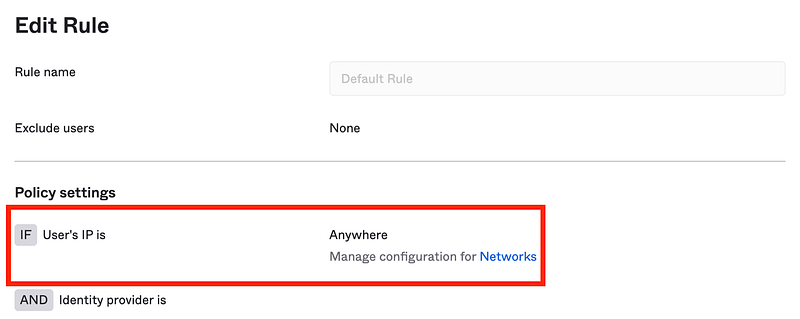
Also note that the organization has a default rule. If you add multiple rules you’ll need to understand how they all work together. Does one override the other? Or does the user get the broadest available access based on all the rules? Test this out to make sure it works the way you expect.

Based on this statement in the documentation the first policy that matches may apply but its not clear.

As a best practice, restrictive rules should be placed at the top of the Priority list. Beyond that, you can create combinations of conditions for multiple scenarios; there isn’t a limit to the number of rules your policies can have.

Be careful not to lock yourself out!

What if you lock yourself out of your account by creating a network rule that is too restrictive? I don’t see information here about being able to bypass the rule in any way or any indication that any particular account can bypass the rule. Make sure you have access to the IP addresses used in this configuration and understand when they change.

Authentication policies

The global session policies apply to logging into your Okta account as a whole. Authentication policies apply to specific applications in your account. Now, this is confusing me at the moment because I added Azure and AWS as applications in my account. I do’t see AWS in the application list here, I only see Okta apps and az login. The documentation is a bit light on this section. I’ll may revisit this later, potentially after contacting support.

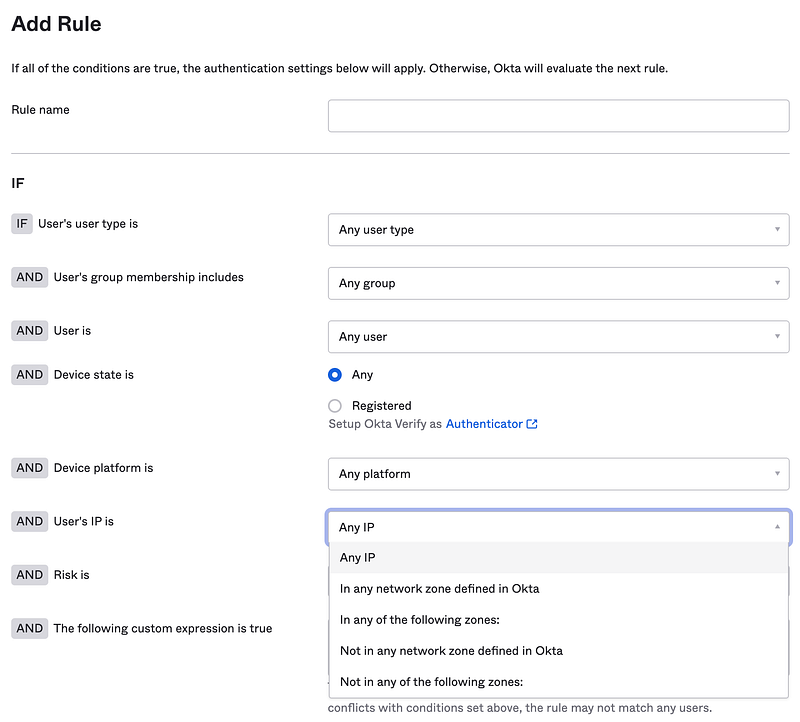
Once again we can specify IP restrictions for authentication policy rules based on network zones we have defined in our account.
Network Zones

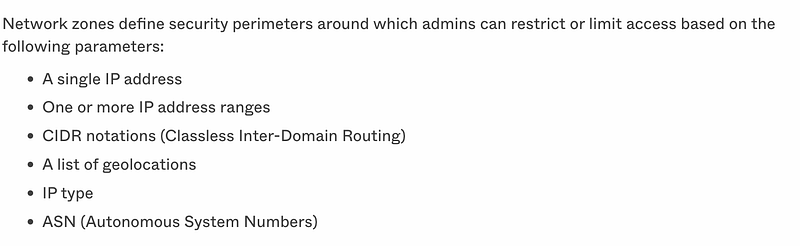
You can define a network zone in a number of different ways in Okta. Here’s the list from the documentation.
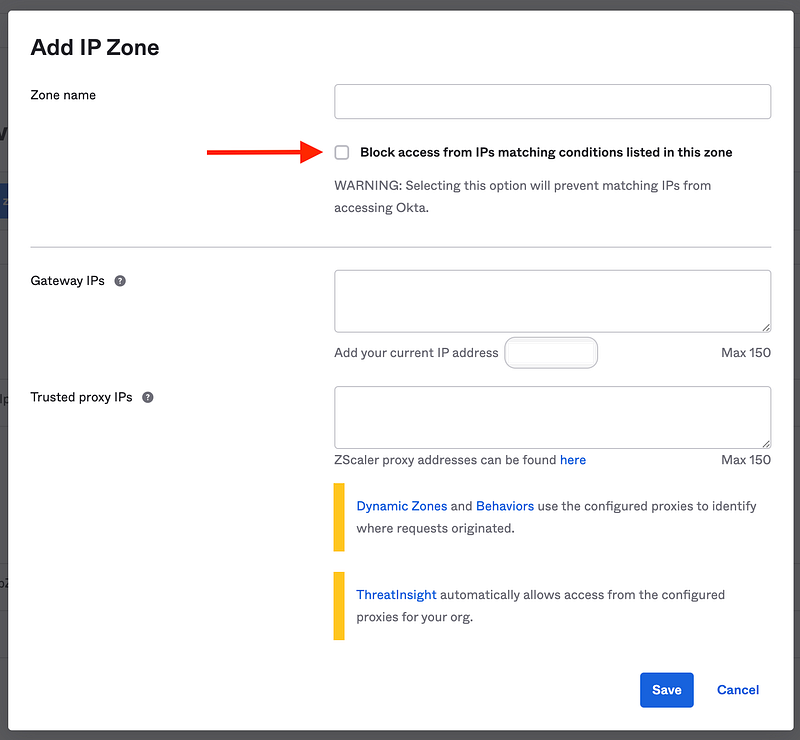
Here’s what the screen looks like to add an IP Zone. It lists your current IP address so you can add it as a gateway easily.

Additionally, it’s easy to block IP here without creating additional rules.
I’m not going to go into every detail about Okta networking as you can read that in the Okta documentation, but they key point here would be to restrict access to Okta and especially the admin dashboard to your private network — and test it!

Networking between an AWS account and Okta

Here’s another point that surprises me. I can’t find any indication that Okta works with AWS PrivateLink. That AWS PrivateLink service allows a vendor to set up an endpoint, and when customers can connect to that endpoint. all the traffic remains on the AWS backbone if the customer initiates the request on AWS to the endpoint. It never traverses the Internet.

For example, a customer might want to operate on a workstation in AWS. If they visit an endpoint from the workstation in AWS then the traffic would not traverse the Internet. Also, when a customer is interacting with the Okta API, they may want to maintain that connection on the AWS backbone and avoid having that traffic traverse the Internet.

What about integration between Okta and the AWS IdP? Would we expect that to remain on a private network? Recall how SAML works.

As this image from Okta shows, the interaction occurs between the Service Provider and the user’s browser, and also the IdP and the user’s browser. The Service Provider and the IdP do not directly communicate as you can see below.
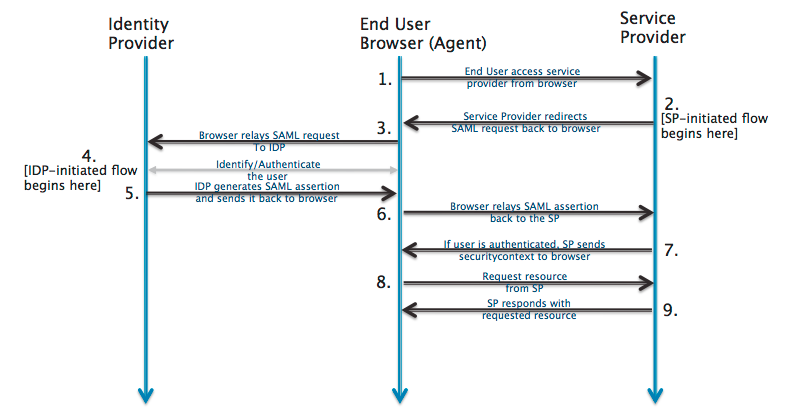
Therefore it doesn’t make sense to use an AWS PrivateLink connection for authentication from Okta to the IdP. However, the users could be interacting with the IdP over a private network using AWS Direct Connect or a VPN, and if the users workstation was on AWS, or as we will see if an organization is streaming logs from Okta to their SIEM, they could have a Private Link connection between that workstation and Okta, if it was offered.

I did find the Okta domain names here for those who need to allow access to Okta from private networks.

Aha. There’s the Mapbox API again. I wrote about how Mapbox is used in the Ubiquiti console here. Hopefully, Okta has very carefully reviewed this integration for any security gaps.

The thing about the Okta network zones is that they appear to be enforced at application layer of the OSI model (layer 7) and some attacks can occur at lower layers. It does not appear that you can create a true network layer firewall ruleset with Okta (as is the case with most SaaS providers), but at least there is network support to restrict IP addresses, which some SaaS providers do not offer at all.

In the next post we’ll look at Okta IAM options.

Follow for updates.

Teri Radichel | © 2nd Sight Lab 2023

About Teri Radichel:
~~~~~~~~~~~~~~~~~~~~
⭐️ Author: Cybersecurity Books
⭐️ Presentations: Presentations by Teri Radichel
⭐️ Recognition: SANS Award, AWS Security Hero, IANS Faculty
⭐️ Certifications: SANS ~ GSE 240
⭐️ Education: BA Business, Master of Software Engineering, Master of Infosec
⭐️ Company: Penetration Tests, Assessments, Phone Consulting ~ 2nd Sight Lab
Need Help With Cybersecurity, Cloud, or Application Security?
~~~~~~~~~~~~~~~~~~~~~~~~~~~~~~~~~~~~~~~~~~~~~~~~~~~~~~~~~~~~~
🔒 Request a penetration test or security assessment
🔒 Schedule a consulting call
🔒 Cybersecurity Speaker for Presentation
Follow for more stories like this:
~~~~~~~~~~~~~~~~~~~~~~~~~~~~~~~~~~~~~~~~~~~~~~~~~~~~~~~~~~~~~ 
❤️ Sign Up my Medium Email List
❤️ Twitter: @teriradichel
❤️ LinkedIn: https://www.linkedin.com/in/teriradichel
❤️ Mastodon: @teriradichel@infosec.exchange
❤️ Facebook: 2nd Sight Lab
❤️ YouTube: @2ndsightlab

Okta
Networking
Network Security
Network Zones
Cloud Security
Recommended from ReadMedium