
Obsidian Properties: Everything You Need to Know About
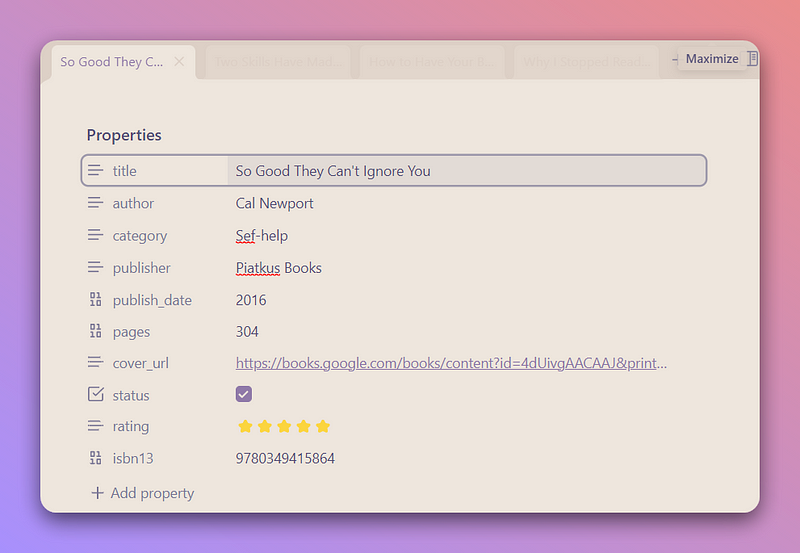
Obsidian has launched the properties feature for the public with the latest update. This is only available on the desktop app. The mobile app doesn’t currently support properties. You will need to wait a bit for that.
Properties are not an entirely new thing. They are a powered-up way to add metadata to your notes.
Forget the complexities of YAML. While the metadata still uses YAML format, it is easier than ever. You can edit metadata on the note itself. You no longer need to understand YAML. And you don’t run the risk of breaking the syntaxes.
The new properties feature can make your Obsidian experience somewhat similar to using Notion
In this article, we’ll explore what properties are and what you can do with them.
Using Properties Feature
To view your properties, go to Editor> Display> Properties in Document. Right there, choose the option to make the properties visible.
Let’s create a new note and see how it works.
By default, the note will not have any properties. It’s an empty note. To add properties to your notes, you will need to use the command palette or the assigned hotkey.

If you edit in source mode, a sidebar will open with the option to add properties. But if you edit in live preview mode, the properties will be shown in the editor itself.
Default properties
By default, you can have properties.
- aliases: Alias is an alternative name to a note that you can use to refer to it
- cssclasses: This helps to apply the custom CSS to style individual notes
- tags: This property will show all the tags used in your vault. It makes it way easy to add tags to your notes.
Custom properties
Besides the 3 default properties, you can add as many properties as you want. The different available property types are:
- Text
- List
- Number
- Checkbox
- Date
- Date & Time

The one I really liked was the ability to link to other notes in metadata. It will also render the ingoing and outgoing links of both letters. Cool, Right?
Another thing you can do if you don’t want to see all the properties in your notes is hide them from settings and view them on the sidebar when you feel it's necessary to.
Here’s why I think Obsidian Properties is such a great addition towards a better Obsidian Experience:
- Easy to use: Else, you would have to add metadata in YAML frontmatter which can be pretty ineffective. It’s easy to mess up with the syntaxes. Properties are more dynamic and interactive.
- Makes your note more consistent: With properties and a visual way to add metadata, you will have more consistency in the metadata of your notes. Adding and editing property values is easier. You are able to see all the previously used metadata in your notes. Such as while adding tags, you will access all tags in your vault. You just pick the right one and ‘Enter’.
Few More Things
Properties feature is not yet fully implemented in Obsidian mobile. And for people thinking will they be able to replace Notion’s feature, the answer is No. Notion offers a lot more advanced functionality and Obsidian is not quite there yet.
If you enjoyed the article, make sure you subscribe to ObsidianNinja.


