
Obsidian Co-Pilot: The Best ChatGPT Integration For Obsidian
Manage your knowledge like never before with seamless AI Integration
ChatGPT has taken the world by storm. Its usefulness is unmatched especially when it comes to learning and brainstorming.
With over 100 million users and unparalleled usefulness, it has been the hottest topic for a few months.
In this article, I’m excited to talk about a new way to integrate ChatGPT inside Obsidian(our favorite tool).
Until now, integrating ChatGPT in Obsidian has been a challenge. While there were some tools available like Text Generator, Ava, ChatGPT MD, GPT-3 Notes, and more, they lacked the full integration and the ease of use that ChatGPT offers.
But with the plugins that we’ll discuss in this article, you can get the ChatGPT interface and experience directly within Obsidian.
With these plugins, you’ll no longer have to switch between Obsidian and your web browser to work with ChatGPT. This will greatly improve your workflow and productivity, helping you stay on track and focused.
Plus, it’s just more fun to use Obsidian when everything is in one place.
So if you are ready to take your Obsidian experience to the next level, let’s dive in.
Obsidian Co-Pilot
The plugin is currently in beta. It is not available in the plugin library. Therefore you will have to install it manually.
Here’s how you can install it manually:
- Go to the latest release section in GitHub
- Download main.js, manifest.json, and styles.css files
- Move them inside your vault under .obsidian/plugins/co-pilot/
- Enable the plugin through settings>community plugins
How to Setup Obsidian Co-pilot
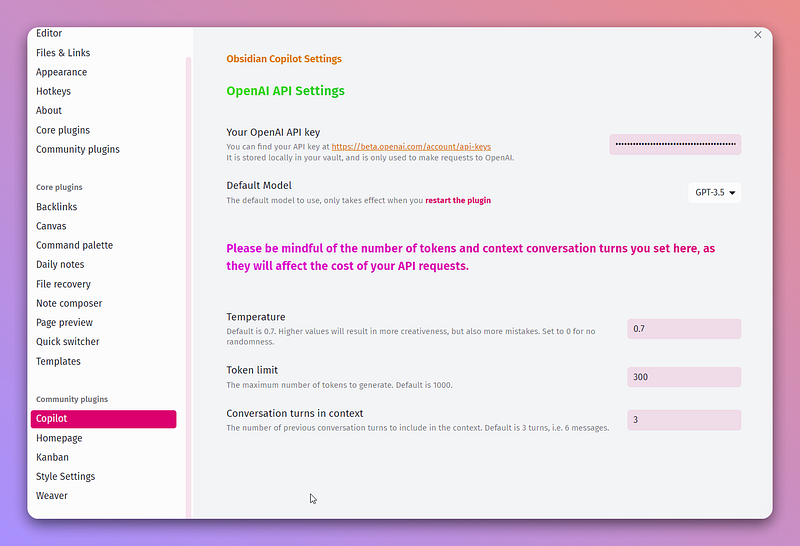
The first thing you need to do is get API keys from OpenAI. You probably already have an OpenAI account. So all you need to do is go to the API page and generate new API Keys and add it to the plugin’s options.
You have the option to select the GPT model. If you have access to GPT-4, you can select it from the dropdown. Else, you have to stick with GPT-3.5.
You can also change different parameters for chat such as temperature, token limit, and conversations in context.
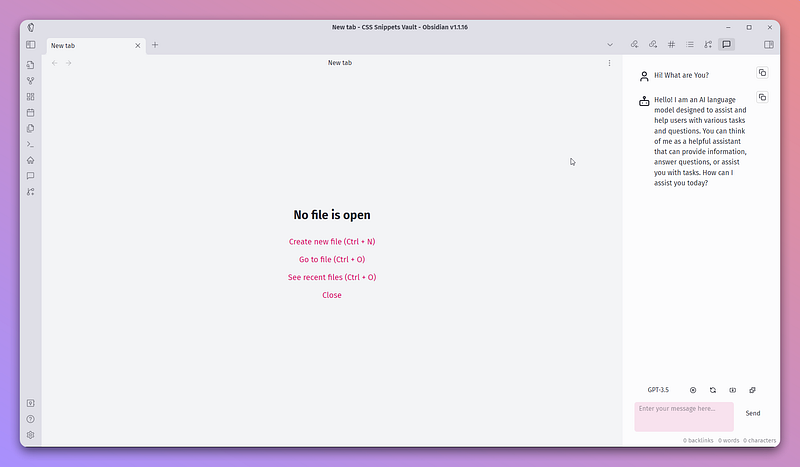
Now to start using Co-Pilot, you can either toggle the chat window from the command palette or the ribbon icon.
This will open the chat window in the right sidebar.
Features of Obsidian Co-Pilot
- Chat Right inside Obsidian: You no longer have to switch to your browser to use ChatGPT
- GPT-4 Access: If you have access to API keys for GPT-4, you can select GPT-4 model without a usage limit.
- Easily copy messages: This feature allows you to copy your prompts as well as the individual responses from AI in just one click.
- Save entire conversation as a note: Not only saving individual messages, you can save the entire conversations as a markdown note.
- Talk to your past notes: This feature allows you to use the context of currently open note and have a conversation based on it.
I really liked this plugin because of the ability to save notes with one-click, copy messages, and use my notes as context.
Another equally good plugin is Obsidian Weaver.
Obsidian Weaver
Another plugin similar to Copilot is Weaver. Similar, but I found it works better. My experience is better with Weaver than with co-pilot.
You need to set up Obsidian Weaver the same way you set up co-pilot. Get the files from GitHub's recent releases.
Move the downloaded inside your vault and add the API key inside the plugins option.
Features of Obsidian Weaver
- Easily Copy messages: Just like Copilot, you can copy messages with one click to add them to your notes.
- Choose from 3 models: GPT-4, GPT-3.5 turbo, and GPT-3.5 turbo -0301
- Automatically save your entire notes: Unlike Co-Pilot, you don’t have to save your notes manually. All of your notes are saved to the specified folder
- Access your notes in chat windows: It saves your notes in markdown. But you can also access them through the chat window. This greatly improves your experience when re-visiting your old chats.
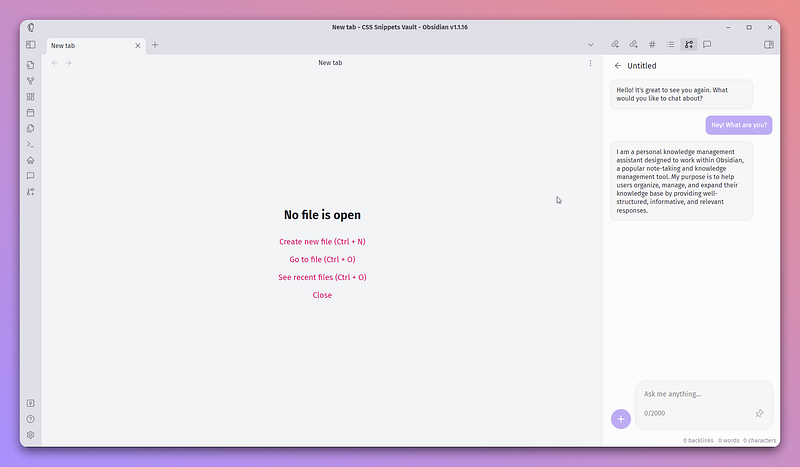
Difference between Co-Pilot and Weaver
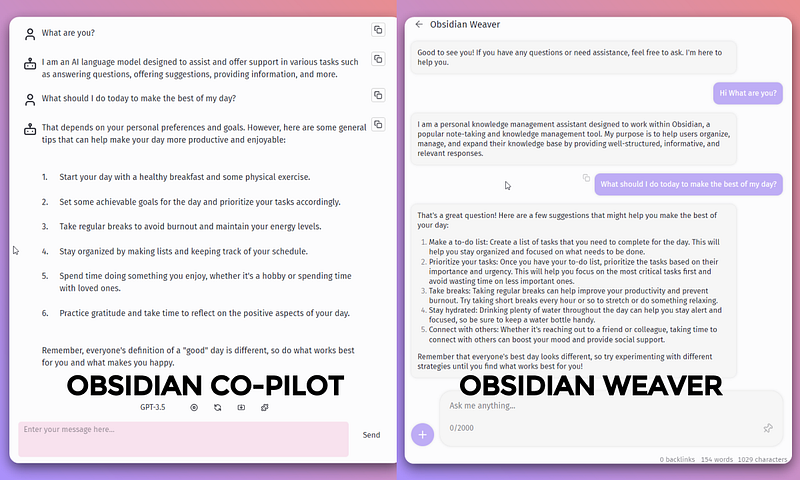
After using both of these plugins, I’m sticking with Weaver. Here’s how they both differ from one another.
- Co-Pilot is fast. Weaver takes a little time to generate a response
- Weaver gets better results that Co-Pilot(Got more generic response while using co-pilot)
- Weaver saves chat automatically and you can access them again in the chat window while the co-pilot doesn’t.
- Weaver supports using longer notes as context better than Co-Pilot.
- Weaver has a better interface(if that matters to you)
To get more tips on getting most out of obsidian, subscribe to Obsidian Ninja.
Join Medium Today
Thanks for reading! For more great stories like this, consider becoming a Medium member using my affiliate link. As a member, you’ll get exclusive access to top-tier content, personalized recommendations, and many other benefits. Plus, you’ll be supporting my work. Don’t miss out on the opportunity to enhance your reading experience and join the Vibrant Medium community today.


