avatarVladimir Topolev

Free AI web copilot to create summaries, insights and extended knowledge, download it at here

7656

Abstract

<span class="hljs-keyword">const</span> <span class="hljs-title function_">playSideEffectCallback</span> = (<span class="hljs-params"></span>) => { globalPlayMediaManager.<span class="hljs-title function_">playPlayer</span>(playerIdRef.<span class="hljs-property">current</span>); };

<span class="hljs-keyword">return</span> { playSideEffectCallback }; };</pre></div><p id="e479">Please note that this hook returns a function <code>playSideEffectCallback</code> that needs to be triggered when the media player is about to start playing. This callback will inform any other active players to stop playing.</p><p id="82b2">The final step is to integrate this hook with any media player in this way:</p><div id="3730"><pre><span class="hljs-keyword">const</span> <span class="hljs-title function_">VideoPlayer</span> = (<span class="hljs-params">props: VideoHTMLAttributes<HTMLVideoElement></span>) => { <span class="hljs-keyword">const</span> playerRef = useRef<<span class="hljs-title class_">HTMLVideoElement</span>>(<span class="hljs-literal">null</span>);

<span class="hljs-keyword">const</span> { playSideEffectCallback } = <span class="hljs-title function_">useSinglePlayerPlaying</span>({ <span class="hljs-attr">stop</span>: <span class="hljs-function">() =></span> { <span class="hljs-keyword">if</span> (playerRef.<span class="hljs-property">current</span>) { playerRef.<span class="hljs-property">current</span>.<span class="hljs-title function_">pause</span>(); } } });

<span class="hljs-title function_">useEffect</span>(<span class="hljs-function">() =></span> { <span class="hljs-keyword">if</span> (playerRef.<span class="hljs-property">current</span>) { playerRef.<span class="hljs-property">current</span>.<span class="hljs-title function_">addEventListener</span>(<span class="hljs-string">"playing"</span>, <span class="hljs-function">() =></span> { <span class="hljs-title function_">playSideEffectCallback</span>(); }); } }, []);

<span class="hljs-keyword">return</span> <span class="language-xml"><span class="hljs-tag"><<span class="hljs-name">video</span> {<span class="hljs-attr">...props</span>} <span class="hljs-attr">ref</span>=<span class="hljs-string">{playerRef}</span> /></span></span>; };</pre></div><p id="7c37">Initially, we obtain a reference to a video HTML element, which grants us access to the player API. We need to pass <code>stop</code> method in <code>useSinglePlayerPlaying</code> hook and invoke <code>playSideEffectCallback</code> in the listener of the player when the video starts playing. That is it. Feel free to experiment with this implementation in the sandbox below. Try playing the first video and then the second one without pausing the first.</p> <figure id="052a"> <div> <div> <img class="ratio" src="http://placehold.it/16x9"> <iframe class="" src="https://cdn.embedly.com/widgets/media.html?src=https%3A%2F%2Fcodesandbox.io%2Fembed%2Fsingle-video-playing-react-hooks-ukg8o9&amp;display_name=CodeSandbox&amp;url=https%3A%2F%2Fcodesandbox.io%2Fs%2Fukg8o9&amp;image=https%3A%2F%2Fcodesandbox.io%2Fapi%2Fv1%2Fsandboxes%2Fukg8o9%2Fscreenshot.png&amp;key=a19fcc184b9711e1b4764040d3dc5c07&amp;type=text%2Fhtml&amp;schema=codesandbox" allowfullscreen="" frameborder="0" height="500" width="1000"> </div> </div> </figure></iframe></div></div></figure><p id="d88d">You can also check out the entire code on CodeSandbox.</p><h1 id="5d93">2. useInsideScreenPlayerPlaying</h1><p id="a623">Here we should know <a href="https://developer.mozilla.org/en-US/docs/Web/API/Intersection_Observer_API"><i>Intersection Observer API</i></a>, but in general, the approach will be the same. The difference only is that we should pass as arguments to a new hook two methods that manage <code>stop/play</code> of player and of course a reference to the HTML element where the video is inside.</p><p id="021c">Firstly, let’s implement the Subject interface which requires two methods for registering and unregistering video players. Additionally, we need to create a private field <code>observer</code>and initialize an instance of <i>IntersectionObserver</i>. This instance will be responsible for subscribing and unsubscribing HTML elements that are being monitored for their position on the screen. It’s important to note that when a player is removed from the React Tree, it must also be unsubscribed from the <i>IntersectionObserver</i>.</p><div id="e282"><pre><span class="hljs-keyword">type</span> <span class="hljs-title class_">PlayerItem</span> = { <span class="hljs-attr">id</span>: <span class="hljs-built_in">string</span>; <span class="hljs-attr">playerContainer</span>: <span class="hljs-title class_">Element</span>; <span class="hljs-attr">controls</span>: { <span class="hljs-attr">stop</span>: <span class="hljs-function">() =></span> <span class="hljs-built_in">void</span>; <span class="hljs-attr">play</span>: <span class="hljs-function">() =></span> <span class="hljs-built_in">void</span> }; };

<span class="hljs-keyword">class</span> <span class="hljs-title class_">GlobalInsideScreenPlayerPlayingManager</span> { <span class="hljs-attr">players</span>: <span class="hljs-title class_">Array</span><<span class="hljs-title class_">PlayerItem</span>> = []; observer = <span class="hljs-keyword">new</span> <span class="hljs-title class_">IntersectionObserver</span>(<span class="hljs-function">(<span class="hljs-params">entries</span>) =></span> { <span class="hljs-comment">// we will define implementation later</span> });

<span class="hljs-title function_">registerPlayer</span>(<span class="hljs-params">player: PlayerItem</span>) { <span class="hljs-variable language_">this</span>.<span class="hljs-property">players</span>.<span class="hljs-title function_">push</span>(player); }

<span class="hljs-title function_">removePlayer</span>(<span class="hljs-params">id: <span class="hljs-built_in">string</span></span>) { <span class="hljs-keyword">const</span> removingPlayer = <span class="hljs-variable language_">this</span>.<span class="hljs-property">players</span>.<span class="hljs-title function_">find</span>(<span class="hljs-function">(<span class="hljs-params">player</span>) =></span> player.<span class="hljs-property">id</span> === id); <span class="hljs-keyword">if</span> (removingPlayer && removingPlayer.<span class="hljs-property">playerContainer</span>) { <span class="hljs-variable language_">this</span>.<span class="hljs-property">observer</span>.<span class="hljs-title function_">unobserve</span>(removingPlayer.<span class="hljs-property">playerContainer</span>); } <span class="hljs-variable language_">this</span>.<span class="hljs-property">players</span> = <span class="hljs-variable language_">this</span>.<span class="hljs-property">players</span>.<span class="hljs-title function_">filter</span>(<span class="hljs-function">(<span class="hljs-params">player</span>) =></span> player.<span class="hljs-property">id</span> === id); } }</pre></div><p id="c7d5">We also should implement a method <code>notify</code> in <i>Observer Pattern</i>, but the name convention for this method will be the same as we did in Chapter 1 — <code>playPlayer</code>. In this method, we should keep the currently active player in the private field of class <code>activePlayer</code>:</p><div id="b405"><pre><span class="hljs-keyword">class</span> <span class="hljs-title class_">Gl

Options

obalInsideScreenPlayerPlayingManager</span> { <span class="hljs-comment">// code is skipped because of brevity</span> <span class="hljs-attr">activePlayer</span>: <span class="hljs-title class_">PlayerItem</span> | <span class="hljs-literal">null</span> = <span class="hljs-literal">null</span>;

<span class="hljs-title function_">playPlayer</span>(<span class="hljs-params">id: <span class="hljs-built_in">string</span></span>) { <span class="hljs-keyword">const</span> activePlayer = <span class="hljs-variable language_">this</span>.<span class="hljs-property">players</span>.<span class="hljs-title function_">find</span>(<span class="hljs-function">(<span class="hljs-params">player</span>) =></span> player.<span class="hljs-property">id</span> === id); <span class="hljs-keyword">if</span> (activePlayer) { <span class="hljs-variable language_">this</span>.<span class="hljs-property">activePlayer</span> = activePlayer; <span class="hljs-variable language_">this</span>.<span class="hljs-property">observer</span>.<span class="hljs-title function_">observe</span>(activePlayer.<span class="hljs-property">playerContainer</span>); } } }</pre></div><p id="61c5">Let’s implement a handler for <i>IntersectionObserver</i> that will determine whether to pause or continue playing a video based on the position of the player on the screen. If the player is on the screen, it should continue playing, but if it is outside the screen, it should be stopped:</p><div id="f3ae"><pre><span class="hljs-keyword">class</span> <span class="hljs-title class_">GlobalInsideScreenPlayerPlayingManager</span> { observer = new IntersectionObserver((entries) => { <span class="hljs-keyword">if</span> ( <span class="hljs-keyword">this</span>.activePlayer && entries[<span class="hljs-number">0</span>].target === <span class="hljs-keyword">this</span>.activePlayer.playerContainer ) { <span class="hljs-keyword">if</span> (entries[<span class="hljs-number">0</span>].isIntersecting) { <span class="hljs-keyword">this</span>.activePlayer.controls.play(); } <span class="hljs-keyword">if</span> (!entries[<span class="hljs-number">0</span>].isIntersecting) { <span class="hljs-keyword">this</span>.activePlayer.controls.stop(); } } }); }</pre></div><p id="ee91">It’s time to create our hook, and approach absolutely the same as we did in chapter 1:</p><div id="2e7f"><pre><span class="hljs-keyword">const</span> globalInsideScreenPlayerPlayingManager = <span class="hljs-keyword">new</span> <span class="hljs-title class_">GlobalInsideScreenPlayerPlayingManager</span>();

<span class="hljs-keyword">const</span> <span class="hljs-title function_">useInsideScreenPlayerPlaying</span> = (<span class="hljs-params">{ playerContainerRef, controls }: { playerContainerRef: RefObject<Element | <span class="hljs-literal">null</span>>; controls: { play: () => <span class="hljs-keyword">void</span>; stop: () => <span class="hljs-keyword">void</span>; }; }</span>) => { <span class="hljs-keyword">const</span> playerIdRef = <span class="hljs-title function_">useRef</span>(<span class="hljs-title function_">uuid</span>());

<span class="hljs-title function_">useEffect</span>(<span class="hljs-function">() =></span> { <span class="hljs-keyword">if</span> (playerContainerRef?.<span class="hljs-property">current</span>) { globalInsideScreenPlayerPlayingManager.<span class="hljs-title function_">registerPlayer</span>({ <span class="hljs-attr">id</span>: playerIdRef.<span class="hljs-property">current</span>, <span class="hljs-attr">playerContainer</span>: playerContainerRef.<span class="hljs-property">current</span>, controls }); }

<span class="hljs-keyword">return</span> <span class="hljs-function">() =&gt;</span>
  globalInsideScreenPlayerPlayingManager.<span class="hljs-title function_">removePlayer</span>(playerIdRef.<span class="hljs-property">current</span>);

}, []);

<span class="hljs-keyword">return</span> { <span class="hljs-attr">playSideEffect</span>: <span class="hljs-function">() =></span> globalInsideScreenPlayerPlayingManager.<span class="hljs-title function_">playPlayer</span>(playerIdRef.<span class="hljs-property">current</span>) }; };</pre></div><p id="80b1">Let’s integrate this hook with out custom player:</p><div id="d7bb"><pre><span class="hljs-keyword">const</span> <span class="hljs-title function_">VideoPlayer</span> = (<span class="hljs-params">props: VideoHTMLAttributes<HTMLVideoElement></span>) => { <span class="hljs-keyword">const</span> playerRef = useRef<<span class="hljs-title class_">HTMLVideoElement</span>>(<span class="hljs-literal">null</span>);

<span class="hljs-keyword">const</span> { playSideEffect } = <span class="hljs-title function_">useInsideScreenPlayerPlaying</span>({ <span class="hljs-attr">playerContainerRef</span>: playerRef, <span class="hljs-attr">controls</span>: { <span class="hljs-attr">play</span>: <span class="hljs-function">() =></span> { <span class="hljs-keyword">if</span> (playerRef.<span class="hljs-property">current</span>) { playerRef.<span class="hljs-property">current</span>.<span class="hljs-title function_">play</span>(); } }, <span class="hljs-attr">stop</span>: <span class="hljs-function">() =></span> { <span class="hljs-keyword">if</span> (playerRef.<span class="hljs-property">current</span>) { playerRef.<span class="hljs-property">current</span>.<span class="hljs-title function_">pause</span>(); } } } });

<span class="hljs-title function_">useEffect</span>(<span class="hljs-function">() =></span> { <span class="hljs-keyword">if</span> (playerRef.<span class="hljs-property">current</span>) { playerRef.<span class="hljs-property">current</span>.<span class="hljs-title function_">addEventListener</span>(<span class="hljs-string">"playing"</span>, <span class="hljs-function">() =></span> { <span class="hljs-title function_">playSideEffect</span>(); }); } }, []);

<span class="hljs-keyword">return</span> <span class="language-xml"><span class="hljs-tag"><<span class="hljs-name">video</span> {<span class="hljs-attr">...props</span>} <span class="hljs-attr">ref</span>=<span class="hljs-string">{playerRef}</span> /></span></span>; };</pre></div><p id="aa55">Here you may play around with CodeSandbox of this implementation. Try to start playing any video and scroll down/up and see what will happen.</p> <figure id="8538"> <div> <div> <img class="ratio" src="http://placehold.it/16x9"> <iframe class="" src="https://cdn.embedly.com/widgets/media.html?src=https%3A%2F%2Fcodesandbox.io%2Fembed%2Funmute-outside-video-un8cck%3Ffile%3D%2Fsrc%2Fcomponents%2FVideo.tsx%3A0-853&amp;display_name=CodeSandbox&amp;url=https%3A%2F%2Fcodesandbox.io%2Fs%2Fun8cck&amp;image=https%3A%2F%2Fcodesandbox.io%2Fapi%2Fv1%2Fsandboxes%2Fun8cck%2Fscreenshot.png&amp;key=a19fcc184b9711e1b4764040d3dc5c07&amp;type=text%2Fhtml&amp;schema=codesandbox" allowfullscreen="" frameborder="0" height="500" width="1000"> </div> </div> </figure></iframe></div></div></figure><p id="9ab1">You can view the complete code in CodeSandbox as well.</p><p id="f000">And that’s a wrap! Thank you for taking the time to read this article. I would greatly appreciate any feedback you may have.</p></article></body>

Leveraging Observer Pattern with ReactJS Hooks for Video and Audio Management on a Single Web Page

Discover how to improve media component interactions in ReactJS using the Observer Pattern and custom hooks. Enhance user experience while maintaining a modular and scalable codebase.
Photo by Christian Wiediger on Unsplash

Prerequisites

Let’s first talk about the problems we aim to solve. Nowadays, it’s common for websites to incorporate multiple media components on a single page such as videos and audio. As a result, there are several obstacles that we’ll need to overcome:

1 Could you imagine what chaos could ensue if a user played one video and didn’t stop it before starting another? To avoid such situations, we require a mechanism that automatically stops any previously playing media when a new one is started. We will develop an easily integrated useSinglePlayerPlaying react hook.

2 Imagine a website with an endless scroll of posts, some of which may have videos or audio that play inline. Users could potentially watch one video and continue scrolling to another post without pausing the first one. In this scenario, would it be logical to pause the video when it goes off-screen and resume playing it if the user scrolls back up to it? We will develop special useInsideScreenPlayerPlaying react hook.

Both hooks are based on the Observer Pattern. Let’s take a brief look at this pattern.

Observer pattern

The Observer Pattern establishes a “one-to-many” relationship between objects where any change in the subject automatically notifies multiple objects (observers). This allows for efficient and flexible communication between objects without the need for direct coupling between those components.

The diagram illustrates the central concept of this pattern.
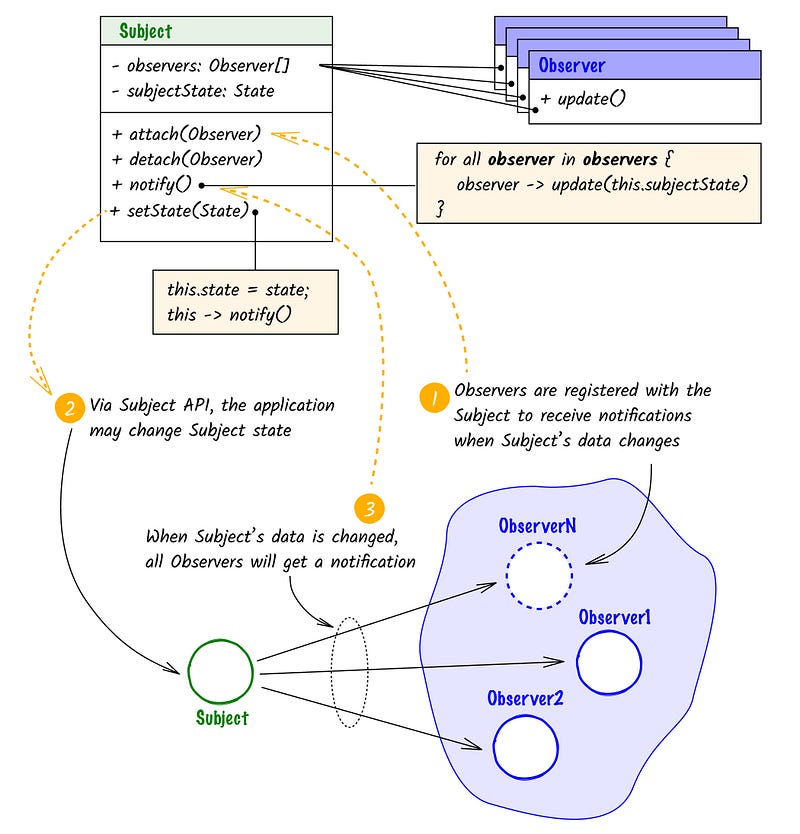
Picture 1 — Observer Pattern diagram

1. useSinglePlayerPlaying hook

We can now begin our first task by implementing the Subject interface. This will involve adding the ability to register and remove media players. Each player should have a unique identifier, and we need to register a function that enables us to stop playing media content for a specific player.

export type PlayerControlsType = { stop: () => void };

class GlobalPlayMediaManager {
  players: Array<{ id: string; playerControls: PlayerControlsType }> = [];

  registerPlayer(id: string, playerControls: PlayerControlsType) {
    this.players = [...this.players, { id, playerControls }];
  }

  removePlayer(id: string) {
    this.players = this.players.filter((player) => player.id === id);
  }
}

Please note that you are not required to use the same naming conventions for the methods attach/detach shown in Picture 1. You are free to choose more relevant names that relate to your specific task. In this instance, since we are working with media players, it would be more appropriate to use methods with names registerPlayer/removePlayer.

According to picture 1, we also should implement two methods setState and notify , but again, it is not necessary strictly to follow the same name conventions of the origin pattern. In our case, we will develop one method playPlayer where we go through all registered players and stop all of them, excluding only the player that is supposed to play as the last one:

class GlobalPlayMediaManager {
   // skipped for brevity, see code above
   playPlayer(id: string) {
    this.players.forEach((player) => {
      if (player.id !== id) {
        player.playerControls.stop();
      }
    });
  }
}

It appears that we have successfully implemented the Subject interface, and now we need to integrate it into our ReactJS hook. Initially, when our player is added to the React Tree, we must register it with the implemented Subject. Additionally, we should ensure that we unregister it when the component is unmounted:

import { v4 as uuid4 } from 'uuid';

const globalPlayMediaManager = new GlobalPlayMediaManager();

export const useSinglePlayerPlaying = (playerControls: PlayerControlsType) => {
  const playerIdRef = useRef(uuid4());

  useEffect(() => {
    globalPlayMediaManager.registerPlayer(playerIdRef.current, playerControls);
    return () => {
      globalPlayMediaManager.removePlayer(playerIdRef.current);
    };
  }, []);

  const playSideEffectCallback = () => {
    globalPlayMediaManager.playPlayer(playerIdRef.current);
  };

  return { playSideEffectCallback };
};

Please note that this hook returns a function playSideEffectCallback that needs to be triggered when the media player is about to start playing. This callback will inform any other active players to stop playing.

The final step is to integrate this hook with any media player in this way:

const VideoPlayer = (props: VideoHTMLAttributes<HTMLVideoElement>) => {
  const playerRef = useRef<HTMLVideoElement>(null);

  const { playSideEffectCallback } = useSinglePlayerPlaying({
    stop: () => {
      if (playerRef.current) {
        playerRef.current.pause();
      }
    }
  });

  useEffect(() => {
    if (playerRef.current) {
      playerRef.current.addEventListener("playing", () => {
        playSideEffectCallback();
      });
    }
  }, []);

  return <video {...props} ref={playerRef} />;
};

Initially, we obtain a reference to a video HTML element, which grants us access to the player API. We need to pass stop method in useSinglePlayerPlaying hook and invoke playSideEffectCallback in the listener of the player when the video starts playing. That is it. Feel free to experiment with this implementation in the sandbox below. Try playing the first video and then the second one without pausing the first.

You can also check out the entire code on CodeSandbox.

2. useInsideScreenPlayerPlaying

Here we should know Intersection Observer API, but in general, the approach will be the same. The difference only is that we should pass as arguments to a new hook two methods that manage stop/play of player and of course a reference to the HTML element where the video is inside.

Firstly, let’s implement the Subject interface which requires two methods for registering and unregistering video players. Additionally, we need to create a private field observerand initialize an instance of IntersectionObserver. This instance will be responsible for subscribing and unsubscribing HTML elements that are being monitored for their position on the screen. It’s important to note that when a player is removed from the React Tree, it must also be unsubscribed from the IntersectionObserver.

type PlayerItem = {
  id: string;
  playerContainer: Element;
  controls: { stop: () => void; play: () => void };
};

class GlobalInsideScreenPlayerPlayingManager {
  players: Array<PlayerItem> = [];
  observer = new IntersectionObserver((entries) => {
    // we will define implementation later
  });

  registerPlayer(player: PlayerItem) {
    this.players.push(player);
  }

  removePlayer(id: string) {
    const removingPlayer = this.players.find((player) => player.id === id);
    if (removingPlayer && removingPlayer.playerContainer) {
      this.observer.unobserve(removingPlayer.playerContainer);
    }
    this.players = this.players.filter((player) => player.id === id);
  }
}

We also should implement a method notify in Observer Pattern, but the name convention for this method will be the same as we did in Chapter 1 — playPlayer. In this method, we should keep the currently active player in the private field of class activePlayer:

class GlobalInsideScreenPlayerPlayingManager {
  // code is skipped because of brevity
  activePlayer: PlayerItem | null = null;
  

  playPlayer(id: string) {
    const activePlayer = this.players.find((player) => player.id === id);
    if (activePlayer) {
      this.activePlayer = activePlayer;
      this.observer.observe(activePlayer.playerContainer);
    }
  }
}

Let’s implement a handler for IntersectionObserver that will determine whether to pause or continue playing a video based on the position of the player on the screen. If the player is on the screen, it should continue playing, but if it is outside the screen, it should be stopped:

class GlobalInsideScreenPlayerPlayingManager {
  observer = new IntersectionObserver((entries) => {
    if (
      this.activePlayer &&
      entries[0].target === this.activePlayer.playerContainer
    ) {
      if (entries[0].isIntersecting) {
        this.activePlayer.controls.play();
      }
      if (!entries[0].isIntersecting) {
        this.activePlayer.controls.stop();
      }
    }
  });
}

It’s time to create our hook, and approach absolutely the same as we did in chapter 1:

const globalInsideScreenPlayerPlayingManager = new GlobalInsideScreenPlayerPlayingManager();

const useInsideScreenPlayerPlaying = ({
  playerContainerRef,
  controls
}: {
  playerContainerRef: RefObject<Element | null>;
  controls: {
    play: () => void;
    stop: () => void;
  };
}) => {
  const playerIdRef = useRef(uuid());

  useEffect(() => {
    if (playerContainerRef?.current) {
      globalInsideScreenPlayerPlayingManager.registerPlayer({
        id: playerIdRef.current,
        playerContainer: playerContainerRef.current,
        controls
      });
    }

    return () =>
      globalInsideScreenPlayerPlayingManager.removePlayer(playerIdRef.current);
  }, []);

  return {
    playSideEffect: () =>
      globalInsideScreenPlayerPlayingManager.playPlayer(playerIdRef.current)
  };
};

Let’s integrate this hook with out custom player:

const VideoPlayer = (props: VideoHTMLAttributes<HTMLVideoElement>) => {
  const playerRef = useRef<HTMLVideoElement>(null);

  const { playSideEffect } = useInsideScreenPlayerPlaying({
    playerContainerRef: playerRef,
    controls: {
      play: () => {
        if (playerRef.current) {
          playerRef.current.play();
        }
      },
      stop: () => {
        if (playerRef.current) {
          playerRef.current.pause();
        }
      }
    }
  });

  useEffect(() => {
    if (playerRef.current) {
      playerRef.current.addEventListener("playing", () => {
        playSideEffect();
      });
    }
  }, []);

  return <video {...props} ref={playerRef} />;
};

Here you may play around with CodeSandbox of this implementation. Try to start playing any video and scroll down/up and see what will happen.

You can view the complete code in CodeSandbox as well.

And that’s a wrap! Thank you for taking the time to read this article. I would greatly appreciate any feedback you may have.

Reactjs
Patterns
Observer Pattern
Videos
Js
Recommended from ReadMedium