The website content introduces a Notion template specifically designed for Medium writers to organize and track their articles, complete with tags for Top Writer status and customization options.
Abstract
The author of the content, a prolific Medium writer with 50 articles, has created a Notion template to manage their extensive body of work. This template allows for a comprehensive view of all articles, including images and keywords, and comes preloaded with 74 tags eligible for Medium's Top Writer status. The template is customizable, enabling users to add personal touches such as favorite publications, tags, headers, and icons. The author provides a tutorial video and recommends making a duplicate of the template to avoid accidental changes. Notion is praised for its versatility and user-friendliness, with the author using it for various tasks beyond article management. The template was initially developed for personal use but was later shared with the community after realizing its potential benefit to others. The author encourages feedback and offers a subscription link for readers interested in supporting their work or joining Medium.
Opinions
The author values the ability to see all their Medium articles in one place, including visual and thematic elements.
They believe in the practicality of Notion as a powerful and somewhat user-friendly database management tool, especially for the average person.
The author suggests that Notion, despite its $48 annual cost, is a worthwhile investment, although a free version with limited functionality is available.
They emphasize the ease of customizing the template to suit individual needs and preferences.
The author is community-oriented, having created the template to fulfill a need they saw in their own experience and among peers in a boot camp.
They are open to engagement and support, providing a link for readers to subscribe to their Medium content and another to offer monetary support via Ko-fi.
The author promotes the benefits of a Medium membership, highlighting the support it provides to writers and the access it grants to all stories on the platform.
Notion Template for Storing Your Medium Articles!
Link inside!
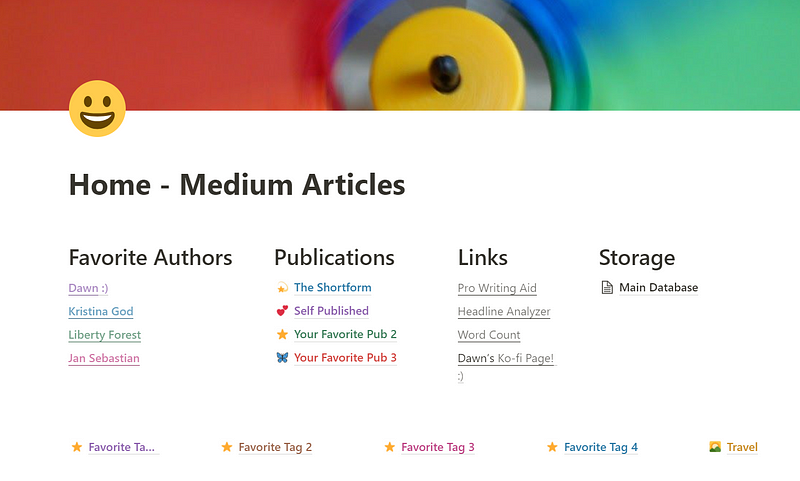
I have a lot of articles.
I have a lot of articles and I just started writing on Medium! 49 of them, to be exact. Errrr, make that 50 with this one! And the number is growing every day.
I wanted a way to have them all in front of me at once, so I could see what I’d done. (Including the pictures and keywords!) I spent some time asking around and searching the web, and didn’t find a workable solution.
So I made one :)
I present to you my very basic template for storing Medium articles in Notion.
It’s got the 74 tags that are eligible for Top Writer status already plugged in, with the ability to add your own.
You can easily customize your favorite pubs and tags — I show you how in the video above. And if you want a different header or icon? You can do that too!
You can get the Notion Template here!
I recommend creating a clean copy of the template when you first get it. Having been a new user of Notion at one time, I’ve completely messed up templates more than once. I still do sometimes! 😅
Notion is a database management system for your average person. It’s powerful and (somewhat) user friendly. Coming in at $48 for an entire year, it’s a wonderful investment. You can use the free version with limited functionality.
I use it for everything from grocery lists to my DND campaign. And most recently, Medium articles!
Here’s a great tutorial on the most recent version of Notion!
I created this for myself at first, then realized others might search for a solution just like I did! I asked my fellow boot campers in Kristina God’s February cohort, and they showed great interest.
So here you have it! A template designed by a Medium writer for Medium writers :) I’ve made it as simple as possible, but if you run into a problem, just drop me a note here.
😊 Want to know whenever I publish anything? Here you go!