
Notion — Learning the Program #2
Creating and Linking Pages

I am currently learning a new program. It’s called Notion, and it is a planner, to-do list, calendar, whatever floats your boat type of web-based program that will get you better organized with all the stuff you do.
However, I’ve come upon an interesting thing that’s just happened. It is early days, and in the course I’m taking, the instructor is teaching us how to link to another page within your program.
Like, I’m thinking about a page I call Habits. I’ve sub-titled the page New Ones and Old Ones. It’s a page within my main page. So, there it sits, and I can add all the good habits I want to do every day.
To create a new page in Notion, the command is /p.
The thing with habits is that once you are automatically doing them every day, you don’t really need to be reminded about them. Maybe I should limit my list of habits to five or ten. Drinking three glasses of water is on that list because I don’t always remember. As I become accustomed to drinking three glasses of water a day, I can take that one off my list.
The thing is, is that my cup holds 16 ounces. Also, I can count that one cup of coffee I have every morning as part of my water intake. So, three glasses will do it for me. I don’t have to drink eight glasses anymore, seeing as how I am 68 years old. Officially, it is 7.1 cups, so seven glasses of water, and I’m good to go. I wonder if I drink more water, my wrinkles might go away a little.
What I want to do is to link my Habits page to another page. It’s supposed to be a square bracket, square bracket sort of command, which I’m thinking is [], the keys next to P on the keyboard.
Except, it’s not working. This is like trying to tie my shoes for the first time. Obviously, I’m missing something here because it won’t work. The thing about Notions is it is a program that people use on Macs and on PCs. I’ve got a PC, and I’m not sure what the instructor is working on right now. He has both operating systems on his computer. Or at least showing on his monitor. How that happens, I’m not sure. It is way past my comprehension of new-fangled computerize. However, I am anything but patient. At least, I try to be.
The other thing is, like pretty much any other program, this one will be updated periodically — consequently, stuff changes. Also, I have to remember that if there is one way to do something, there are three other ways that work just as well.
Eureka! That means I found it in ancient Greek. This is why the city of Eureka, California, is called that because the first of the 49er gold miners who found gold there hollered Eureka!
In any case, to create a link from one page to another in Notion, you highlight the text you want to be a clickable link, and a tiny menu appears above the text. You choose Link, and a display of all the other pages in your Notion Dashboard appears. You pick one, and you’re good to go. The instructor said that he uses this all the time. It is useful as they build new videos or lessons and want to allow all the team members to see the updates. I’m not going to have team members, but I can see where it would be useful if you’ve got more than one person working on a project.
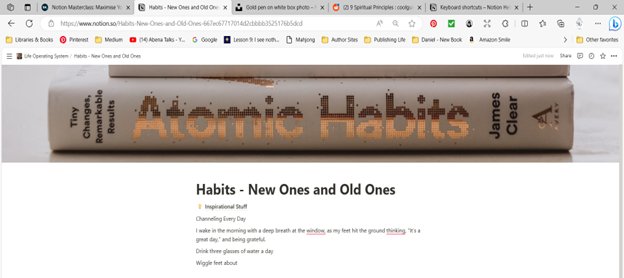
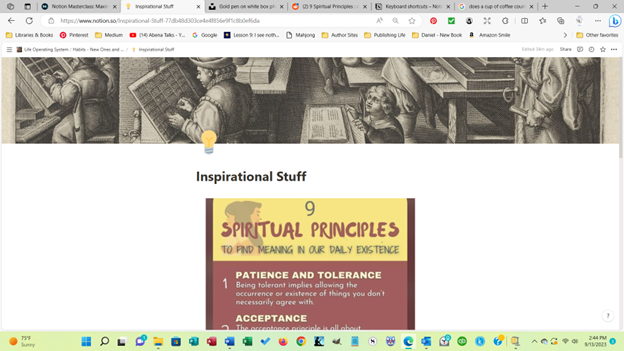
So, the illustrations above are screenprints I made from Notion showing two pages. The first one is my Habits Page. It links to another page I call Inspirational Stuff on the second screenshot. I went to r/coolguides on Reddit to copy the graphic onto my page.
A crucial command to know about with any program you learn is the Undo button. With Notion, you use a ctrl Z. I have come to use it a lot in the last few days.
Another thing I learned yesterday is that on whatever page I am in with Notion, I can create a cover and/or icons or Emojis. They have an internal collection to use, or you can go to Unsplash to snag something else or use your own images.
So, that’s enough for the second article about learning Notion.
Here are the links you might like to look at.
Notion — where you can get it on the web. /rCoolGuides at Reddit
Commands I learned: Undo — ctrl z New Page — /p Bold — /b Italicize — /i
Thanks so much for reading. Let me know if you decide to get Notion, too.
It’s free for individuals and costs some for groups. Please clap, comment, follow, and subscribe.


