avatarRukshan Pramoditha

Free AI web copilot to create summaries, insights and extended knowledge, download it at here

4204

Abstract

class="hljs-attribute">activation</span>=<span class="hljs-string">'relu'</span>)) <span class="hljs-built_in">..</span>.</pre></div><p id="e330">Here, the noise is added between the input layer and the first hidden layer. If this is not clear to you, defining the input layer explicitly makes this clear for you.</p><div id="da10"><pre><span class="hljs-keyword">from</span> tensorflow.keras.layers <span class="hljs-keyword">import</span> InputLayer</pre></div><div id="0e0f"><pre><span class="hljs-attribute">model</span> <span class="hljs-operator">=</span> Sequential()</pre></div><div id="0edf"><pre>model.<span class="hljs-built_in">add</span>(InputLayer(input_shape=(784,))) model.<span class="hljs-built_in">add</span>(GaussianNoise(0.1)) model.<span class="hljs-built_in">add</span>(Dense(512, <span class="hljs-attribute">activation</span>=<span class="hljs-string">'relu'</span>)) <span class="hljs-built_in">..</span>.</pre></div><ul><li><b>Example 2:</b> Adding noise to a hidden layer of an MLP.</li></ul><div id="e87b"><pre><span class="hljs-keyword">from</span> tensorflow.keras.models <span class="hljs-keyword">import</span> Sequential <span class="hljs-keyword">from</span> tensorflow.keras.layers <span class="hljs-keyword">import</span> Dense <span class="hljs-keyword">from</span> tensorflow.keras.layers <span class="hljs-keyword">import</span> GaussianNoise</pre></div><div id="208b"><pre><span class="hljs-attribute">model</span> <span class="hljs-operator">=</span> Sequential()</pre></div><div id="189c"><pre>model.<span class="hljs-built_in">add</span>(Dense(512, input_shape=(784,), <span class="hljs-attribute">activation</span>=<span class="hljs-string">'relu'</span>)) model.<span class="hljs-built_in">add</span>(GaussianNoise(0.1)) model.<span class="hljs-built_in">add</span>(Dense(256, <span class="hljs-attribute">activation</span>=<span class="hljs-string">'relu'</span>)) <span class="hljs-built_in">..</span>.</pre></div><p id="c59e">Here, we add noise between the first and second hidden layers. That’s actually right after the first hidden layer. Because the activation is also defined in the first hidden layer as a parameter, we add noise to the <b><i>activated output</i></b> of the first hidden layer.</p><p id="f13b">When we add noise in this way, there is a problem. The problem is that the output values of that hidden layer will not be kept in a certain range because of the added noise. To overcome this problem, we can apply activation to that layer after adding noise in the following way. <a href="https://rukshanpramoditha.medium.com/3-amazing-benefits-of-activation-functions-in-neural-networks-22b17b91a46e#8ceb">The activation function in the hidden layer is responsible to keep the output values of that hidden layer in a certain range</a>.</p><div id="4e0a"><pre><span class="hljs-keyword">from</span> tensorflow.keras.layers <span class="hljs-keyword">import</span> Activation</pre></div><div id="ef41"><pre><span class="hljs-attribute">model</span> <span class="hljs-operator">=</span> Sequential()</pre></div><div id="48f4"><pre>model.<span class="hljs-built_in">add</span>(Dense(512, input_shape=(784,))) model.<span class="hljs-built_in">add</span>(GaussianNoise(0.1)) model.<span class="hljs-built_in">add</span>(Activation(<span class="hljs-string">'relu'</span>)) model.<span class="hljs-built_in">add</span>(Dense(256, <span class="hljs-attribute">activation</span>=<span class="hljs-string">'relu'</span>)) <span class="hljs-built_in">..</span>.</pre></div><ul><li><b>Example 3:</b> Adding noise to a pooling layer of a CNN.</li></ul><div id="be19"><pre><span class="hljs-keyword">from</span> tensorflow.keras.models <span class="hljs-keyword">import</span> Sequential <span class="hljs-keyword">from</span> tensorflow.keras.layers <span class="hljs-keyword">import</span> Conv2D, MaxPooling2D <span class="hljs-keyword">from</span> tensorflow.keras.layers <span class="hljs-keyword">import</span> GaussianNoise</pre></div><div id="adbf"><pre><span class="hljs-attribute">model</span> <span class="hljs-operator">=</span> Sequential()</pre></div><div id="0f49"><pre>model.<span class="hljs-built_in">add</span>(Conv2D(16, (3,3), <sp

Options

an class="hljs-attribute">activation</span>=<span class="hljs-string">"relu"</span>)) model.<span class="hljs-built_in">add</span>(MaxPooling2D()) model.<span class="hljs-built_in">add</span>(GaussianNoise(0.1)) model.<span class="hljs-built_in">add</span>(Conv2D(32, (3,3), <span class="hljs-attribute">activation</span>=<span class="hljs-string">"relu"</span>)) model.<span class="hljs-built_in">add</span>(MaxPooling2D()) <span class="hljs-built_in">..</span>.</pre></div><p id="e93a">Here, we add noise to the first pooling layer of the CNN model.</p><ul><li><b>Example 4:</b> Adding noise to the output layer of an MLP.</li></ul><div id="7aea"><pre><span class="hljs-keyword">from</span> tensorflow.keras.models <span class="hljs-keyword">import</span> Sequential <span class="hljs-keyword">from</span> tensorflow.keras.layers <span class="hljs-keyword">import</span> Dense <span class="hljs-keyword">from</span> tensorflow.keras.layers <span class="hljs-keyword">import</span> GaussianNoise <span class="hljs-keyword">from</span> tensorflow.keras.layers <span class="hljs-keyword">import</span> Activation</pre></div><div id="06d5"><pre><span class="hljs-attribute">model</span> <span class="hljs-operator">=</span> Sequential()</pre></div><div id="8f8f"><pre>model.<span class="hljs-built_in">add</span>(Dense(512, input_shape=(784,), <span class="hljs-attribute">activation</span>=<span class="hljs-string">'relu'</span>)) model.<span class="hljs-built_in">add</span>(Dense(256, <span class="hljs-attribute">activation</span>=<span class="hljs-string">'relu'</span>)) model.<span class="hljs-built_in">add</span>(Dense(10)) model.<span class="hljs-built_in">add</span>(GaussianNoise(0.1)) model.<span class="hljs-built_in">add</span>(Activation(<span class="hljs-string">'softmax'</span>))</pre></div><p id="4f62">Here, we apply activation to the output layer after adding the noise to it.</p><blockquote id="1d0e"><p><b>Note:</b> Adding noise will not alter the output shape of each layer.</p></blockquote><p id="d7d1">This is the end of today’s post.</p><p id="a405"><b>Please let me know if you’ve any questions or feedback.</b></p><p id="e633"><i>I hope you enjoyed reading this article. If you’d like to support me as a writer, kindly consider <a href="https://rukshanpramoditha.medium.com/membership"><b>signing up for a membership</b></a> to get unlimited access to Medium. It only costs $5 per month and I will receive a portion of your membership fee.</i></p><div id="7940" class="link-block"> <a href="https://rukshanpramoditha.medium.com/membership"> <div> <div> <h2>Join Medium with my referral link - Rukshan Pramoditha</h2> <div><h3>Read every story from Rukshan Pramoditha (and thousands of other writers on Medium). Your membership fee directly…</h3></div> <div><p>rukshanpramoditha.medium.com</p></div> </div> <div> <div style="background-image: url(https://miro.readmedium.com/v2/resize:fit:320/0*LXQ7viX6QyHRQdyr)"></div> </div> </div> </a> </div><p id="bc98">Thank you so much for your continuous support! See you in the next article. Happy learning to everyone!</p><h2 id="e6f4">Read next (Recommended)</h2><ul><li><a href="https://rukshanpramoditha.medium.com/regularization-methods-for-neural-networks-introduction-326bce8077b3">Overview of Regularization Techniques for Neural Networks</a></li><li><a href="https://rukshanpramoditha.medium.com/how-to-apply-l1-and-l2-regularization-techniques-to-keras-models-da6249d8a469">Apply <b><i>L1 and L2 Regularization</i></b> to Keras Models</a></li><li><a href="https://rukshanpramoditha.medium.com/how-dropout-regularization-mitigates-overfitting-in-neural-networks-9dcc3e7102ff">Use <b><i>Dropout Regularization</i></b> in Neural Networks</a></li><li><a href="https://rukshanpramoditha.medium.com/using-early-stopping-to-reduce-overfitting-in-neural-networks-7f58180caf5b">Using <b><i>Early Stopping</i></b> to Reduce Overfitting in Neural Networks</a></li></ul><p id="56bc"><a href="undefined">Rukshan Pramoditha</a> <b>2022–07–26</b></p></article></body>

Noise Regularization of Neural Networks

Neural Networks and Deep Learning Course: Part 26

Image by Annette Meyer from Pixabay

Adding noise is a regularization technique that falls under the category of “Other methods” in neural network regularization techniques.
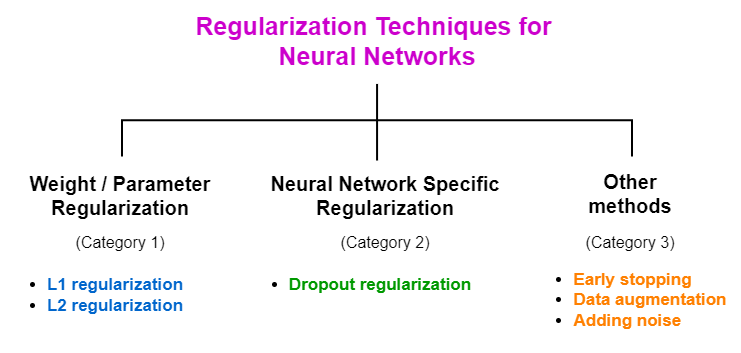
Overview of regularization techniques (Image by author, made with draw.io)

Here, we expand the training data by generating new data. We take each training instance one by one and create different versions of them by adding a small amount of noise to the original training instances. That results in the following benefits.

  • By expanding the training data, we increase the size of the training dataset. Training a neural network model on a large dataset increases the performance of the model.
  • By adding noise to the data, the model will not solely capture noise in the training data and will generalize well on new unseen data. That results in reducing overfitting.

Note: More specially, noise regularization is effective in reducing overfitting in neural networks when training the model with a small dataset.

In a neural network mindset, adding noise to the training instances is considered as adding noise to the input layer of the network because the input layer holds the training data. Just like we add noise to the input layer, we can also add noise to the hidden layers and the output layer. In case of adding noise to the hidden layers, we implicitly add noise to the weights or activations (if any). In case of adding noise to the output layer, we implicitly add noise to the final output.

The major challenge here is deciding where (input/hidden/output layers) to add noise in the network. That can be addressed by using experience or observing results by trying different network configurations. That also differs from problem to problem.

Implement noise regularization in Keras

Defining noise

In Keras, noise is defined as a layer called the GaussianNoise layer.

from tensorflow.keras.layers import GaussianNoise
noise_layer = GaussianNoise(stddev=0.1)

The noise always has a zero mean and we need to specify a value for the standard deviation as a hyperparameter.

After defining the noise as a layer, we need to add it to the model. Here are some examples of adding noise to Keras models.

Examples of adding noise to Keras models

  • Example 1: Adding noise to the input layer of an MLP.
from tensorflow.keras.models import Sequential
from tensorflow.keras.layers import Dense
from tensorflow.keras.layers import GaussianNoise
model = Sequential()
model.add(GaussianNoise(0.1, input_shape=(784,)))
model.add(Dense(512, activation='relu'))
...

Here, the noise is added between the input layer and the first hidden layer. If this is not clear to you, defining the input layer explicitly makes this clear for you.

from tensorflow.keras.layers import InputLayer
model = Sequential()
model.add(InputLayer(input_shape=(784,)))
model.add(GaussianNoise(0.1))
model.add(Dense(512, activation='relu'))
...
  • Example 2: Adding noise to a hidden layer of an MLP.
from tensorflow.keras.models import Sequential
from tensorflow.keras.layers import Dense
from tensorflow.keras.layers import GaussianNoise
model = Sequential()
model.add(Dense(512, input_shape=(784,), activation='relu'))
model.add(GaussianNoise(0.1))
model.add(Dense(256, activation='relu'))
...

Here, we add noise between the first and second hidden layers. That’s actually right after the first hidden layer. Because the activation is also defined in the first hidden layer as a parameter, we add noise to the activated output of the first hidden layer.

When we add noise in this way, there is a problem. The problem is that the output values of that hidden layer will not be kept in a certain range because of the added noise. To overcome this problem, we can apply activation to that layer after adding noise in the following way. The activation function in the hidden layer is responsible to keep the output values of that hidden layer in a certain range.

from tensorflow.keras.layers import Activation
model = Sequential()
model.add(Dense(512, input_shape=(784,)))
model.add(GaussianNoise(0.1))
model.add(Activation('relu'))
model.add(Dense(256, activation='relu'))
...
  • Example 3: Adding noise to a pooling layer of a CNN.
from tensorflow.keras.models import Sequential
from tensorflow.keras.layers import Conv2D, MaxPooling2D
from tensorflow.keras.layers import GaussianNoise
model = Sequential()
model.add(Conv2D(16, (3,3), activation="relu"))
model.add(MaxPooling2D())
model.add(GaussianNoise(0.1))
model.add(Conv2D(32, (3,3), activation="relu"))
model.add(MaxPooling2D())
...

Here, we add noise to the first pooling layer of the CNN model.

  • Example 4: Adding noise to the output layer of an MLP.
from tensorflow.keras.models import Sequential
from tensorflow.keras.layers import Dense
from tensorflow.keras.layers import GaussianNoise
from tensorflow.keras.layers import Activation
model = Sequential()
model.add(Dense(512, input_shape=(784,), activation='relu'))
model.add(Dense(256, activation='relu'))
model.add(Dense(10))
model.add(GaussianNoise(0.1))
model.add(Activation('softmax'))

Here, we apply activation to the output layer after adding the noise to it.

Note: Adding noise will not alter the output shape of each layer.

This is the end of today’s post.

Please let me know if you’ve any questions or feedback.

I hope you enjoyed reading this article. If you’d like to support me as a writer, kindly consider signing up for a membership to get unlimited access to Medium. It only costs $5 per month and I will receive a portion of your membership fee.

Thank you so much for your continuous support! See you in the next article. Happy learning to everyone!

Read next (Recommended)

Rukshan Pramoditha 2022–07–26

Artificial Intelligence
Regularization
Neural Networks
Deep Learning
Overfitting
Recommended from ReadMedium