avatarYvonneDev

Free AI web copilot to create summaries, insights and extended knowledge, download it at here

2557

Abstract

s-anywhere.herokuapp.com</p><p id="db52"><b>2.</b>Then I try to abandon it to try another one <a href="https://api.allorigins.win/raw?url="><b>https://api.allorigins.win/raw?url=</b></a></p><figure id="6911"><img src="https://cdn-images-1.readmedium.com/v2/resize:fit:800/1*cDU1FtZfu_S9RQ6nQ2C-Hw.png"><figcaption></figcaption></figure><p id="6668">And it works and faster than herokuapp one.</p><p id="9012">If you’d like to try this proxy <a href="https://allorigins.win/">here</a></p><p id="9b3a"><b>3.Another way is setting the</b> <b>fetch mode:</b></p><figure id="b5a0"><img src="https://cdn-images-1.readmedium.com/v2/resize:fit:800/1*T4yFAvQh3Y8BMdWY_91ILQ.png"><figcaption></figcaption></figure><p id="f9e8">When you browsing the MDN about <a href="https://developer.mozilla.org/en-US/docs/Web/API/Fetch_API/Using_Fetch">using fetch</a>, it’s clear to explain the setting.</p><div id="30df"><pre><span class="hljs-comment">// Example POST method implementation:</span> <span class="hljs-keyword">async</span> <span class="hljs-keyword">function</span> <span class="hljs-title function_">postData</span>(<span class="hljs-params">url = <span class="hljs-string">''</span>, data = {}</span>) { <span class="hljs-comment">// Default options are marked with *</span> <span class="hljs-keyword">const</span> response = <span class="hljs-keyword">await</span> <span class="hljs-title function_">fetch</span>(url, { <span class="hljs-attr">method</span>: <span class="hljs-string">'POST'</span>, <span class="hljs-comment">// *GET, POST, PUT, DELETE, etc.</span> <span class="hljs-attr">mode</span>: <span class="hljs-string">'cors'</span>, <span class="hljs-comment">// no-cors, *cors, same-origin</span> <span class="hljs-attr">cache</span>: <span class="hljs-string">'no-cache'</span>, <span class="hljs-comment">// *default, no-cache, reload, force-cache, only-if-cached</span> <span class="hljs-attr">credentials</span>: <span class="hljs-string">'same-origin'</span>, <span class="hljs-comment">// include, *same-origin, omit</span> <span class="hljs-attr">headers</span>: { <span class="hljs-string">'Content-Type'</span>: <span class="hljs-string">'application/json'</span> <span class="hljs-comment">// 'Content-Type': 'application/x-www-form-urlencoded',</span> }, <span class="hljs-attr">redirect</span>: <span class="hljs-string">'follow'</span>, <span class="hljs-comment">// manual, *follow, error</span> <span class="hljs-attr">referrerPolicy</span>: <span class="hljs-string">'no-referrer'</

Options

span>, <span class="hljs-comment">// no-referrer, *no-referrer-when-downgrade, origin, origin-when-cross-origin, same-origin, strict-origin, strict-origin-when-cross-origin, unsafe-url</span> <span class="hljs-attr">body</span>: <span class="hljs-title class_">JSON</span>.<span class="hljs-title function_">stringify</span>(data) <span class="hljs-comment">// body data type must match "Content-Type" header</span> }); <span class="hljs-keyword">return</span> response.<span class="hljs-title function_">json</span>(); <span class="hljs-comment">// parses JSON response into native JavaScript objects</span> }

<span class="hljs-title function_">postData</span>(<span class="hljs-string">'https://example.com/answer'</span>, { <span class="hljs-attr">answer</span>: <span class="hljs-number">42</span> }) .<span class="hljs-title function_">then</span>(<span class="hljs-function"><span class="hljs-params">data</span> =></span> { <span class="hljs-variable language_">console</span>.<span class="hljs-title function_">log</span>(data); <span class="hljs-comment">// JSON data parsed by data.json() call</span> });</pre></div><p id="46c1">The expected CORS header on the node:</p><div id="3260"><pre>res.setHeader('Access-Control-Allow-Origin', 'whatever.com:<span class="hljs-number">9000</span>'); res.setHeader('Access-Control-Allow-Headers', 'Content-Type'); res.setHeader('Access-Control-Allow-Credentials', true); <span class="hljs-comment">// you probably dont want this one unless there is auth/cookies involved</span> res.setHeader('Access-Control-Allow-Methods', 'GET,PATCH,POST,PUT,DELETE');</pre></div><p id="e877">another related article in the <a href="https://www.freecodecamp.org/news/access-control-allow-origin-header-explained/">freecodecamp</a></p><p id="c9c6"><b>4.Another chrome way :</b></p><p id="65f1">there are options in google extension about it, such as cross domain-cors and allow cors:access-control-allow-origin.</p><figure id="dac9"><img src="https://cdn-images-1.readmedium.com/v2/resize:fit:800/1*6fQ-L2H9xw3Hq60iEpjLdA.png"><figcaption></figcaption></figure><figure id="c905"><img src="https://cdn-images-1.readmedium.com/v2/resize:fit:800/1*-G5PEd5-sdYHlOWSu5UBUg.png"><figcaption></figcaption></figure><p id="8698">Just by adding to chrome, it’s easier to control which site you want to allow it.</p><p id="7bb4">And also can <b>build your own proxy </b>to fix it, but I’ll just skip it here.</p><p id="f655">👉Follow me for more useful web development content! love sharing🥰</p></article></body>

No ‘Access-Control-Allow-Origin’ header is present on the requested resource when fetching API

Photo by Jonathan Cooper on Unsplash

It’s always been blocked sometimes when did not match the HTML request policy.

When I am fetching data with API, something wrong happened again and again. Here is how I fixed it in four ways quickly.

original fetching:
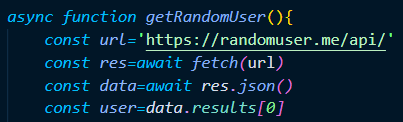
When the first several time executes, it works and somehow it pops up the access error.

Why does this happen?

when the user sends the request to API, the server feels like not safe to send data back to the client not qualified. The origin should be the site trusted which should declare in the header.

Get to know more about Access-control-allow-origin.

So I try to use a proxy to fix it first.

1. The first proxy popular is https://cors-anywhere.herokuapp.com/
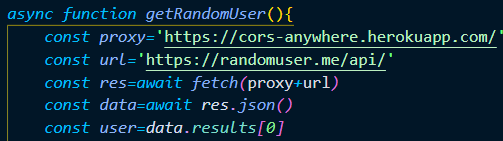
And something wrong happens again later. And response slow with this proxy.

GET https://cors-anywhere.herokuapp.com/https://randomuser.me/api/ 429 (Too Many Requests)

This is the error 429 too many requests.

It seems like this is the problem of cors-anywhere.herokuapp.com

2.Then I try to abandon it to try another one https://api.allorigins.win/raw?url=
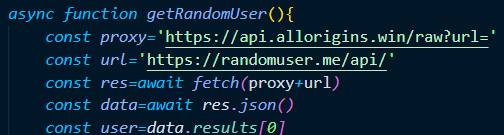
And it works and faster than herokuapp one.

If you’d like to try this proxy here

3.Another way is setting the fetch mode:
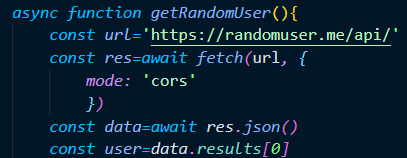
When you browsing the MDN about using fetch, it’s clear to explain the setting.

// Example POST method implementation:
async function postData(url = '', data = {}) {
  // Default options are marked with *
  const response = await fetch(url, {
    method: 'POST', // *GET, POST, PUT, DELETE, etc.
    mode: 'cors', // no-cors, *cors, same-origin
    cache: 'no-cache', // *default, no-cache, reload, force-cache, only-if-cached
    credentials: 'same-origin', // include, *same-origin, omit
    headers: {
      'Content-Type': 'application/json'
      // 'Content-Type': 'application/x-www-form-urlencoded',
    },
    redirect: 'follow', // manual, *follow, error
    referrerPolicy: 'no-referrer', // no-referrer, *no-referrer-when-downgrade, origin, origin-when-cross-origin, same-origin, strict-origin, strict-origin-when-cross-origin, unsafe-url
    body: JSON.stringify(data) // body data type must match "Content-Type" header
  });
  return response.json(); // parses JSON response into native JavaScript objects
}

postData('https://example.com/answer', { answer: 42 })
  .then(data => {
    console.log(data); // JSON data parsed by `data.json()` call
  });

The expected CORS header on the node:

res.setHeader('Access-Control-Allow-Origin', 'whatever.com:9000');
res.setHeader('Access-Control-Allow-Headers', 'Content-Type');
res.setHeader('Access-Control-Allow-Credentials', true); // you probably dont want this one unless there is auth/cookies involved
res.setHeader('Access-Control-Allow-Methods', 'GET,PATCH,POST,PUT,DELETE');

another related article in the freecodecamp

4.Another chrome way :

there are options in google extension about it, such as cross domain-cors and allow cors:access-control-allow-origin.
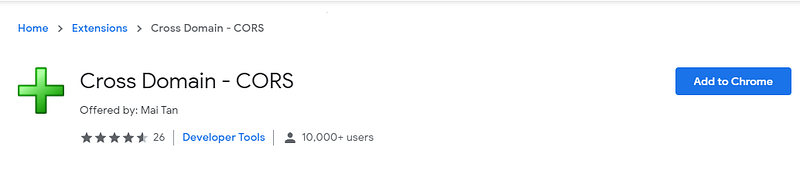

Just by adding to chrome, it’s easier to control which site you want to allow it.

And also can build your own proxy to fix it, but I’ll just skip it here.

👉Follow me for more useful web development content! love sharing🥰

Access Control
JavaScript
Fetch Api
Error Handling
Web Development
Recommended from ReadMedium
