Free AI web copilot to create summaries, insights and extended knowledge, download it at here
1447
Abstract
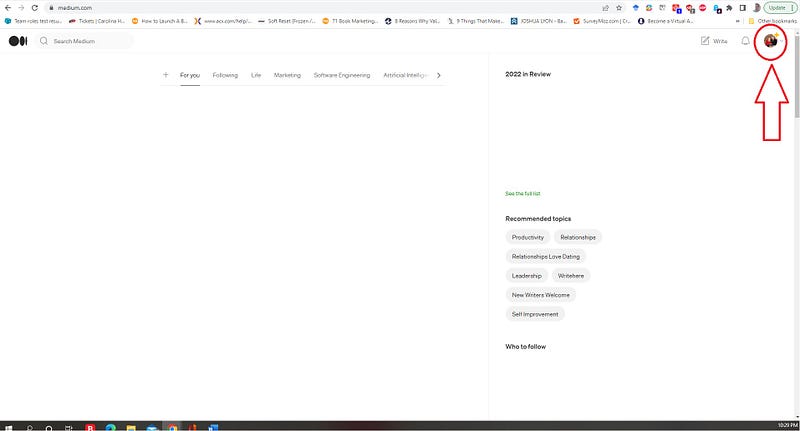
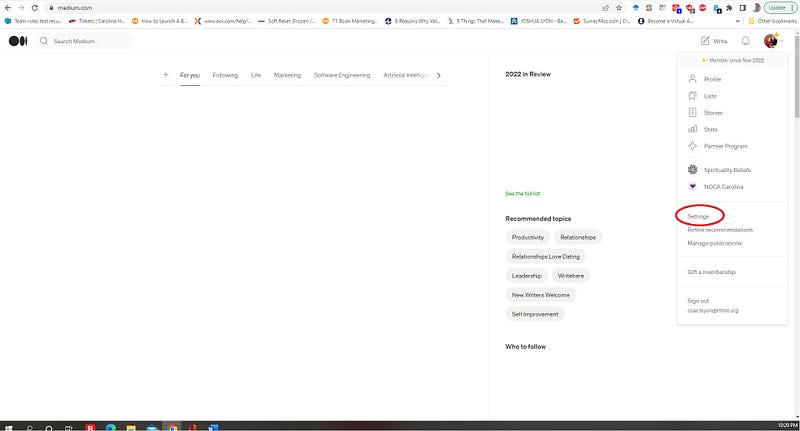
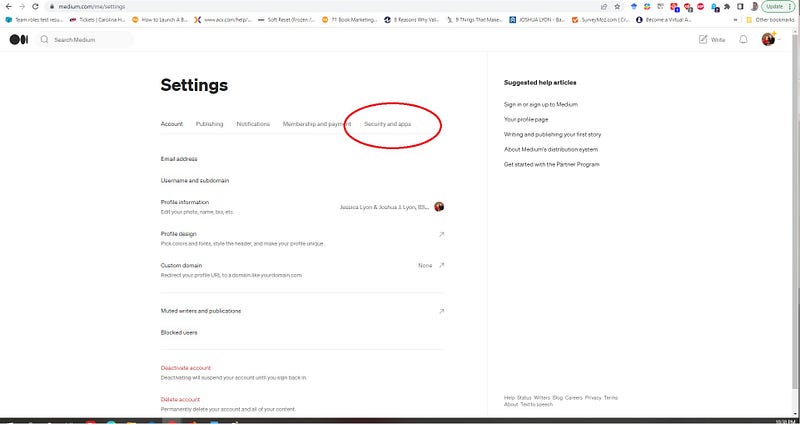
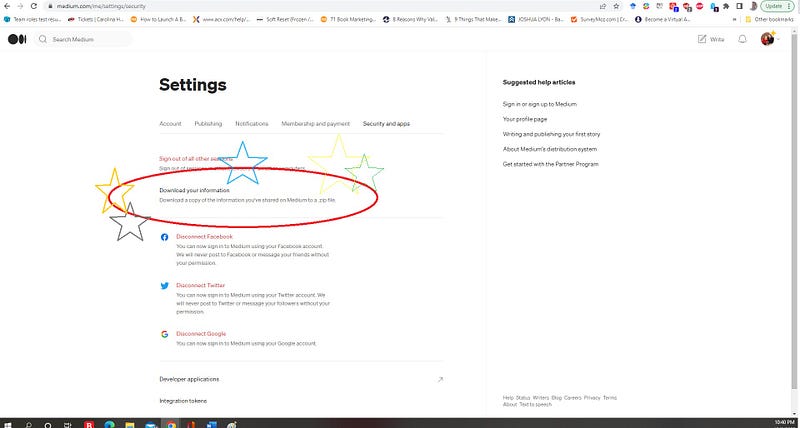
ption>Image by author via Paint</figcaption></figure><p id="2601">And boom! You’re here! Click “Download your information.”</p><h1 id="fde7">Lastly</h1><p id="7aa1">Lastly, click “Export.”</p><p id="47a3">Thank you for reading and sharing!</p><p id="7db0">Read More:</p><div id="15f9" class="link-block">
<a href="https://readmedium.com/a-few-things-to-check-as-you-start-writing-on-medium-or-wherever-839d0e8a78a4">
<div>
<div>
<h2>A Few Things to Check As You Start Writing on Medium or Wherever</h2>
<div><h3>Technical things guaranteed you did not read elsewhere</h3></div>
<div><p>medium.com</p></div>
</div>
<div>
<div style="background-image: url(https://miro.readmedium.com/v2/resize:fit:320/1*pYeY4krZNI3HUwLc6IZVoQ.jpeg)"></div>
</div>
</div>
</a>
</div><div id="f1b9" class="link-block">
<a href="https://readmedium.com/former-employment-professional-gives-his-best-advice-to-get-the-job-of-your-dreams-71d8d9e4829d">
<div>
<div>
<h2>Former Employment Professional Gives His Best Advice to Get the Job of Your Dreams</h2>
<div><h3>No yip-yap, let’s get to the work we love</h3></div>
<div><p>medium.com</p></div>
</div>
<div>
<div style
Options
="background-image: url(https://miro.readmedium.com/v2/resize:fit:320/1*iQr_hm8-ODttQtcZWi0A1w.jpeg)"></div>
</div>
</div>
</a>
</div><div id="32b6" class="link-block">
<a href="https://medium.datadriveninvestor.com/thinking-about-deleting-pictures-online-6f50f22449c2">
<div>
<div>
<h2>Thinking About Deleting Pictures Online?</h2>
<div><h3>What you should know</h3></div>
<div><p>medium.datadriveninvestor.com</p></div>
</div>
<div>
<div style="background-image: url(https://miro.readmedium.com/v2/resize:fit:320/1*a70X4qvezF2f2qSTp0l0bg.jpeg)"></div>
</div>
</div>
</a>
</div><div id="a325" class="link-block">
<a href="https://readmedium.com/i-was-asked-if-there-was-a-shortcut-to-good-employment-cbcf51639e8">
<div>
<div>
<h2>I Was Asked if There Was a Shortcut to Good Employment</h2>
<div><h3>Short answer: sure, here are a few shortcuts</h3></div>
<div><p>medium.com</p></div>
</div>
<div>
<div style="background-image: url(https://miro.readmedium.com/v2/resize:fit:320/1*TBU7Gcy_jA8VHru_7ipiuw.jpeg)"></div>
</div>
</div>
</a>
</div></article></body>

%22%3E)