
.NET Core Minimal APIs: Modern way of creating API (Part 1)
In older versions of ASP.NET Core, you would build a web service using controllers with an action method for each endpoint, a bit like building a website with ASP.NET Core MVC using controllers and models but without the views. Since .NET 6, you have another, often better, choice: ASP.NET Core Minimal APIs.
Another benefit of minimal APIs is that they do not use dynamically generated code, unlike controller-based Web APIs. This allows them to use native AOT to produce smaller, faster services that are better for implementing and hosting microservices in containers. Whenever possible, implement your web services using minimal APIs instead of controllers.

In earlier versions of ASP.NET Core, implementing even a simple web service required a lot of boilerplate code compared to alternative web development platforms. For example, a minimal Hello World web service implementation that has a single endpoint that returns plain text could be implemented using Express.js in just nine lines of code, as shown in the following code:
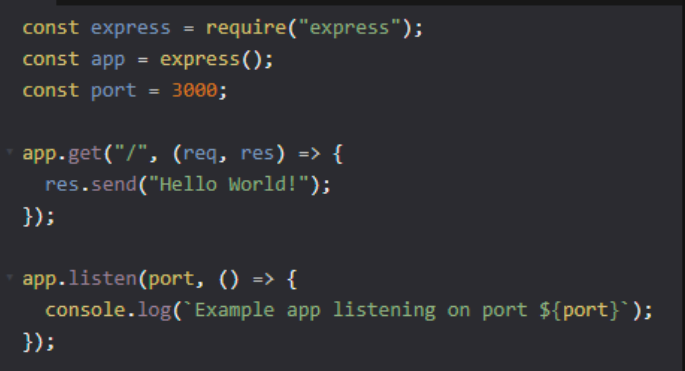
With ASP.NET Core 5 or earlier, achieving the same functionality would require over fifty lines of code.
However, with ASP.NET Core 6 or later and the use of ASP.NET Core Minimal APIs, it now only requires five lines of code and six lines of configuration, as demonstrated in the following code blocks
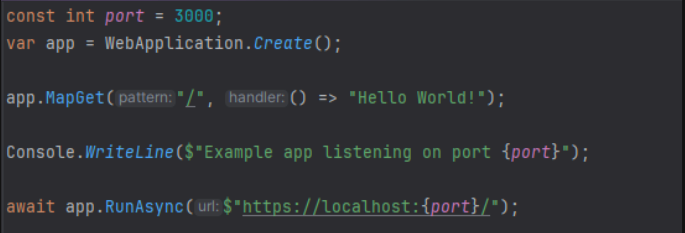
Route mappings
MapGet
- Map a route to a GET request to retrieve an entity.
MapPost
- Map a route to a POST request to insert an entity.
MapPut
- Map a route to a PUT request to update an entity.
MapPatch
- Map a route to a PATCH request to update an entity.
MapDelete
- Map a route to a DELETE request to delete an entity.
MapMethods
- Map a route to any other HTTP method or methods, for example, CONNECT or HEAD.

Parameter mapping
You can optionally use attributes to define where ASP.NET Core Minimal APIs should set the parameter values from:
[FromServices]
- The parameter will be set from the registered dependency services.
[FromRoute]
- The parameter will be set from a matching named route segment.
[FromQuery]
- The parameter will be set from a matching named query string parameter.
[FromBody]
- The parameter will be set from the body of the HTTP request.
Example
public static WebApplication MapGets(this WebApplication app, int pageSize = 10)
{
    app.MapGet("/", () => "Hello World!")
        .ExcludeFromDescription();

    app.MapGet("api/todos", ([FromServices] TodoContext db, [FromQuery] int? page) =>
        {
            return db.Todos
                .OrderBy(todo => todo.Id)
                .Skip(((page ?? 1) - 1) * pageSize)
                .Take(pageSize);
        })
        .WithName("GetTodos")
        .Produces<Todo[]>();

    return app;
}
Documenting APIs
You can call additional methods as many times as you need to specify what return types and status codes can be expected from an endpoint
Produces<T>(StatusCodes.Status200OK)
- When successful, this route returns a response containing a type
Tand status code200.
Produces(StatusCodes.Status404NotFound)
- When no match for the route is found, this route returns an empty response and status code 404.
Conclusion
In this part, we discussed the core aspects of Minimal APIs. It’s nice that it’s not too complicated; it’s built on what we already know about APIs but with a slightly different syntax. I believe it can also attract people from other languages due to its similarities with other frameworks.
In the next part, I will show you how we can use Minimal APIs in practice. We will build a simple project, where I will show you everything you will need to get started.
If you enjoyed the read and want to be part of our growing community, hit the follow button, and let’s embark on a knowledge journey together.
Your feedback and comments are always welcome, so don’t hold back!
Stackademic
Thank you for reading until the end. Before you go: