
Neovim for Beginners —Plugin Management
Manage Neovim packages using a plugin or package manager.

Let’s understand Neovim packages (:h packages), and see how to properly manage them using a plugin/package manager (packer.nvim).
We are going to
- Understand how packages work in Neovim.
- Configure profiling to monitor and profile the plugins.
- Understand the different options to lazy load plugins for better startup performance.
- Lazy load plugins using different options.
- Configure other useful plugins and lazy load them.
This article is part of the Neovim for Beginners series.
The Neovim configuration files can be found in this repository.
Packages
Let’s begin with the XDG base directory.
Neovim uses the $XDG_CONFIG_HOME and $XDG_DATA_HOME environment variables if they exist.
- For Linux/Unix, the
$XDG_CONFIG_HOMEconfiguration directory defaults to~/.configand~/.config/nvim. In Windows, it defaults to~/AppData/Local~/AppData/Local/nvim. - For the data directory
$XDG_DATA_HOME, in Linux/Unix it defaults to~/.local/shareand~/.local/share/nvim. In Windows, it defaults to~/AppData/Localand~/AppData/Local/nvim-data.
Neovim plugins or packages are installed under the$XDG_DATA_HOME directory. For our configuration, we explicitly specify the location of the$XDG_DATA_HOME in our installation script.
NVIM_BEGINNER=~/.config/nvim-beginner
export NVIM_BEGINNER
rm -rf $NVIM_BEGINNERmkdir -p $NVIM_BEGINNER/share
mkdir -p $NVIM_BEGINNER/nvimstow --restow --target=$NVIM_BEGINNER/nvim .alias nvb='XDG_DATA_HOME=$NVIM_BEGINNER/share XDG_CONFIG_HOME=$NVIM_BEGINNER nvim'export nvb- In the
lua/plugins.lua file, we specify the installation path ofpacker.nvimto be under$XDG_DATA_HOME/site/pack/packer/start.
local install_path = fn.stdpath "data" .. "/site/pack/packer/start/packer.nvim"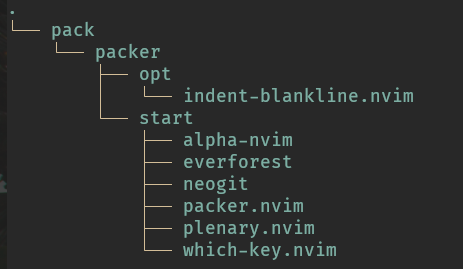
- Plugins under the
startfolder are loaded automatically (:h packages) whereas plugins underoptfolder are loaded optionally (:h pack-add).
Neovim packages is a built-in feature and packer.nvim is a Lua plugin built on this feature to make package management easier for us.
From the documentation,
A Vim package is a directory that contains one or more plugins. The advantages over normal plugins:
- A package can be downloaded as an archive and unpacked in its own directory. Thus the files are not mixed with files of other plugins. That makes it easy to update and remove.
- A package can be a git, mercurial, etc. repository. That makes it really easy to update.
- A package can contain multiple plugins that depend on each other.
- A package can contain plugins that are automatically loaded on startup and ones that are only loaded when needed with “
:packadd”.
Let’s continue to see how packer.nvim can help us manage the packages.
Profiling
Let’s set up profiling to help us monitor and profile the plugins.
In lua/plugins.lua, add the following packer.nvim configuration.
local conf = {
  profile = {
    enable = true,
    threshold = 0, -- the amount in ms that a plugins load time must be over for it to be included in the profile
  },
display = {
open_fn = function()
return require("packer.util").float { border = "rounded" }
end,
},
}To optimize startup time, packer.nvim compiles code to perform the lazy-loading operations you specify.
Run :PackerCompile to make sure we generate the compiled loader file (packer_compiled.lua).
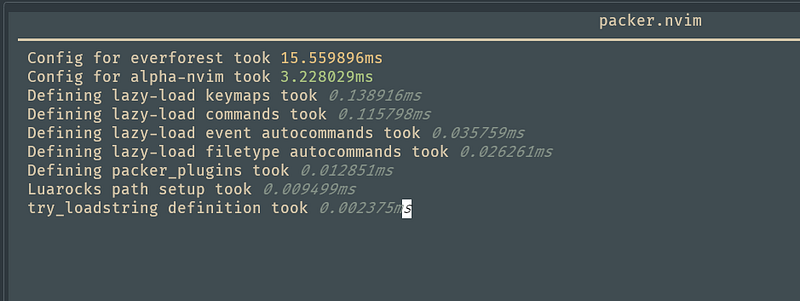
Restart Neovim and then type :PackerProfile.

We can see the configured plugins are loaded automatically on startup, and all of them are under the $XDG_DATA_HOME start folder. E.g. the Neogit plugin takes 13ms to load.
Package Management
Lazy Loading
For better startup performance, we should load the plugins or packages when they are needed. packer.nvim supports multiple options to lazy load plugins.
cmd: Specifies commands which load this plugin. Can be anautocmdpattern.ft: Specifiesfiletypesthat load this plugin.keys: Specifies maps that load this plugin.event: Specifiesautocommandevents that load this plugin.fn: Specifies functions that load this plugin.cond: Specifies a conditional test to load this plugin.module: Specifies Lua module names for require. When requiring a string that starts with one of these module names, the plugin will be loaded.module_pattern: Specifies the Lua pattern of Lua module names for require. When requiring a string that matches one of these patterns, the plugin will be loaded.
Lazy Loading using cmd
For our Neogit plugin, let’s change it so that it loads only when the Neogit command is triggered.
In lua/plugins.lua, add the line to load Neogit only when the command is triggered.
use {
   "TimUntersberger/neogit",
   cmd = "Neogit",
   requires = "nvim-lua/plenary.nvim",
     config = function()
       require("config.neogit").setup()
   end,
}
We configured the autocmd to compile plugins.lua automatically so it is not necessary to run :PackerCompile. However, if the change is not taking effect, try manually compiling the loader file.
Restart Neovim and run :PackerProfile.
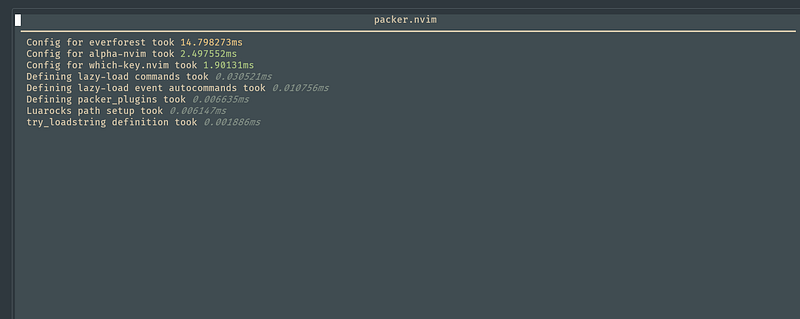
You can see the Neogit plugin is not loaded now. In the $XDG_DATA_HOMEfolder, it is now under the opt folder (previously it is under the start folder).
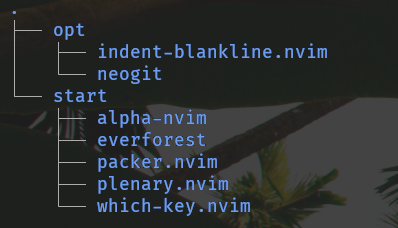
Try running the :Neogit command and the Neogit plugin should get lazy-loaded.
Lazy Loading using event
Let’s try to lazy load plugins using the event option.
-- WhichKey
use {
  "folke/which-key.nvim",
   event = "VimEnter",
   config = function()
    require("config.whichkey").setup()
   end,
}
-- IndentLine
use {
"lukas-reineke/indent-blankline.nvim",
event = "BufReadPre",
config = function()
require("config.indentblankline").setup()
end,
}- We configure the WhichKey plugin to load upon the
VimEnter(:h VimEnter) event. - We configure the Indent-BlankLine plugin to load upon the
BufReadPre(:h BufReadPre) event.
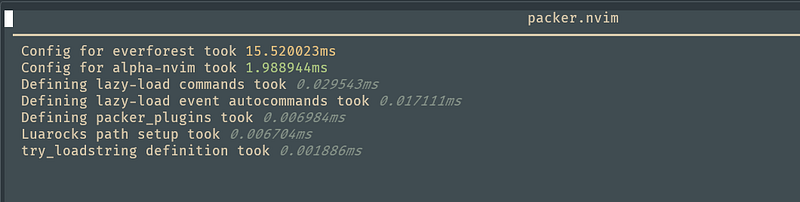
Restart Neovim and run :PackerProfile. Only the color scheme and startup screen plugins are loaded now.

Lazy Loading Other Plugins
We are going to install the following plugins and lazy load them.
nvim-web-devicons for better icons.Comment.nvim for better commenting.Hop andlightspeed.nvim for better motions.markdown-preview to preview Markdown files.
For plenary.nvim, we also change it to lazy load when “require”.
In lua/plugins.lua add the plugins.
- Run
:PackerInstallto install the plugins. - Restart Neovim and run
:PackerProfile. You can see the startup performance is not impacted.
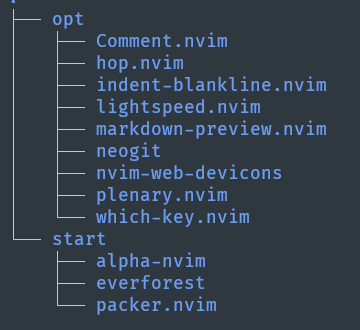
All the plugins are in the $XDG_DATA_HOME opt folder.
Run :PackerStatus to see the statuses of the plugins.
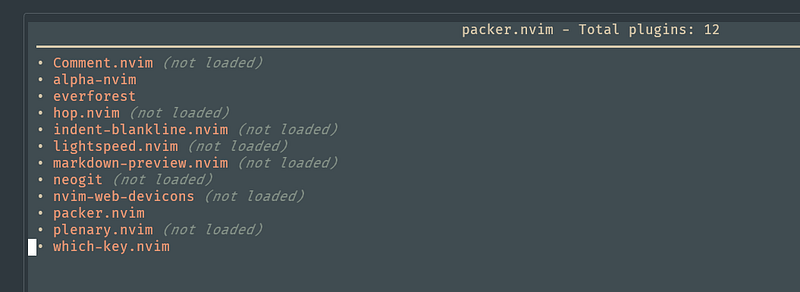
Exercise for you — try triggering the command or key to load the plugins and run :PackerStatus again.
Other Features
There are many more features that packer.nvim provides. We can optionally disable a plugin, tag the plugin to a particular commit/tag/branch, run a post-update/install hook, etc. Check out the documentation to experiment with them.
Check out Learn Neovim The Practical Way for all the Vim/Neovim articles!
If you are not a Medium member yet and want to become one, click here. (A part of your subscription fee will be used to support alpha2phi.)


