
Neovim and the Power of Play

Why Neovim?
If you use Neovim, like I do, it is not uncommon to have to explain yourself. After all, it is not a very popular choice, as you can see from the 2023 Stack Overflow Developer Survey:

Mind you, Neovim’s on the rise with 11.88% of the market share in 2023, which is almost double compared to the year before (6.75%), but you’re still bound to be the exception when you whip out the old nvim … To be completely honest, I’ve never even met another Neovim user in real life. Although, now that I think of it: I apparently live super close to plugin wizard Folke, so I guess I should keep my eyes peeled on the train! 😉
At work, our “official” editor is VSCode, and we’ve even developed a number of custom plugins for syntax highlighting our bespoke file formats and for using our internal deployment system. So when I wanted to switch to Neovim, about a year and half ago, I had to rewrite all of this myself.
So why would you go through so much trouble?
Neovim’s learning curve
It’s true that Neovim has a steep learning curve. First, you have to master Vim motions to effectively write code without using the mouse. And secondly, configuring the editor is not at all straightforward, especially the more advanced aspects like LSP integration, auto-formatting and auto-completion. Recently, for instance, ThePrimeagen published a video on YouTube where he reacts to the blog post “Neovim is driving me crazy but I can’t stop” (https://mataroa.blog/):
The blog ends like this:
I’m unsure if this falls under stupidity or insanity. My goal right now is to get a working config that I’m satisfied with during this weekend and if I get some real coding done as well then that is a big plus. Right now i regret I did not stay in VS Code, but I have spent too many hours now to go back.
I don’t think the person in question is either stupid or insane, but the question remains, why would anyone use a tool that is — let’s be frank — hard to use, at least at first?
Well, because Neovim’s learning curve is actually a good thing.
Of course, you need a usable tool, but this is not undoable. As ThePrimeagen points out, you should probably first learn Vim motions, which can be done in VSCode with a Vim emulator extension. If you like it, you can then try Neovim with a basic config, for instance with a template like kickstart.nvim or a distro like LazyVim.
Don’t expect to be a Vim Jedi master the first few weeks, it’ll take some time before you get proficient and fast. But remember when you started out with programming? Wasn’t it a very similar experience? My point is that Neovim’s learning curve is an opportunity for you as a programmer to educate yourself. And of course, you should only embark on this journey, if this is something that interests you.
If you do, however, you’ll need to learn a bit of Lua for starters. After all, in a way, Neovim is just a Lua interpreter dressed up as an editor! So that’s an extra programming language that you’ll have under your belt, which is always nice to have. You’ll also start learning about how a text editor works under the hood, like how syntax highlighting is done, how buffers, windows and tabs work, how the editor communicates with third-party tools like language servers, formatters and linters, the ins and outs of plugin management, and so on.
If you want a taste of this, check out this fascinating video by TJ De Vries about Neovim’s extensibility where he starts off by discussing (Neo-)vim in the historical context of Unix text editing:
Neovim and the terminal
Another reason why I continue to be an enthusiastic Neovim user is because it is so well suited for integration with the terminal. In my day to day work, I need to hop around from project to project, and I usually have a lot of files open in my editor. Besides that, I also need a couple of terminal windows for running and debugging code, and for SSH connections to various servers.
So for me, having VSCode open with a lot of tabs and a small terminal window at the bottom or an external terminal isn’t going to cut it. Instead I like to use tmux with Josh Medeski’s fantastic tmux session manager “t”:
What this does for me is that, from within tmux, I can quickly choose a project — based on fuzzy searching and/or recently visited directories — to work on in a separate tmux session:
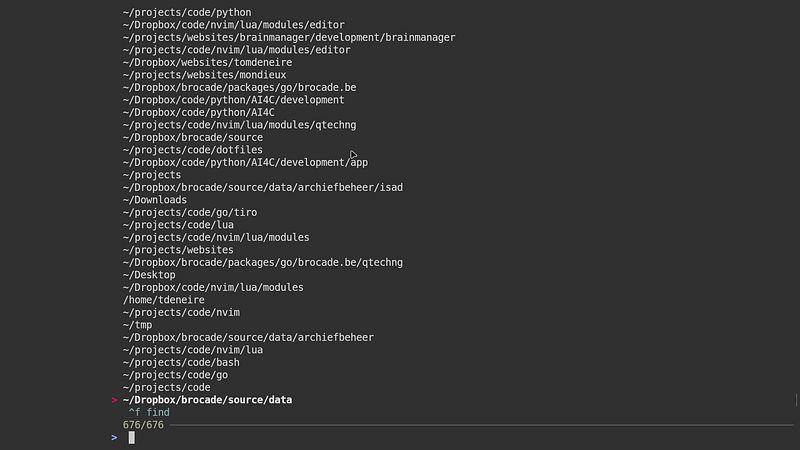
For instance, let’s select a Python REST API I’ve been working on, open a few files, fire up the Docker container in a second pane and open a Python interpreter in a third:
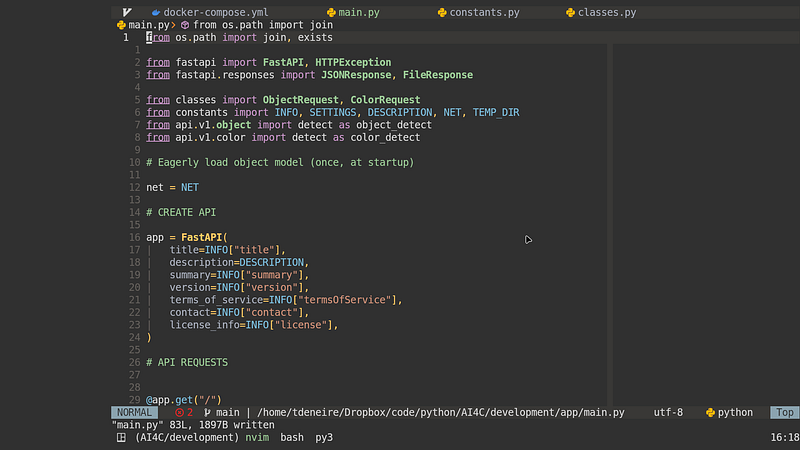
On the top of the screen you see the different buffers I’m editing in Neovim with the current buffer in green, on the bottom you have the tmux session name (“AI4C/development”) and the active panes, with the current one also in green.
From this, I can open a second tmux session, for instance, for a Go project, with again a terminal pane, and an SSH connection to our development server (called “presto”):
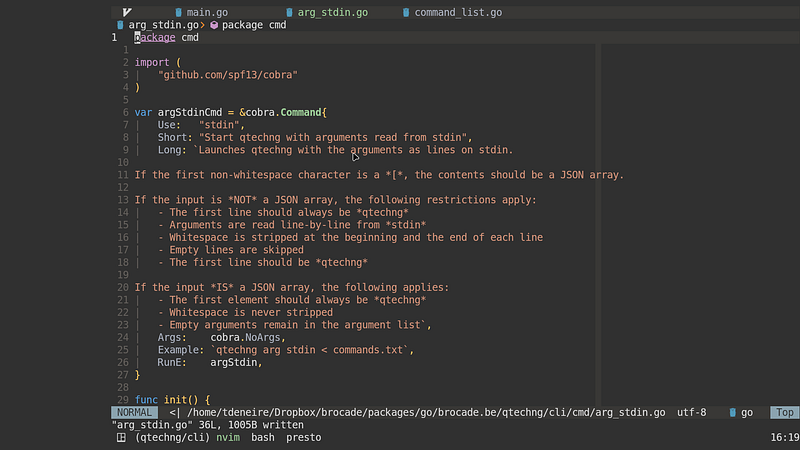
And the sky’s the limit: here’s another session with my Lua config for some editor related stuff in Neovim, which also shows the interface for starting new sessions or switching from one session to the other (the red arrow showing the current session):
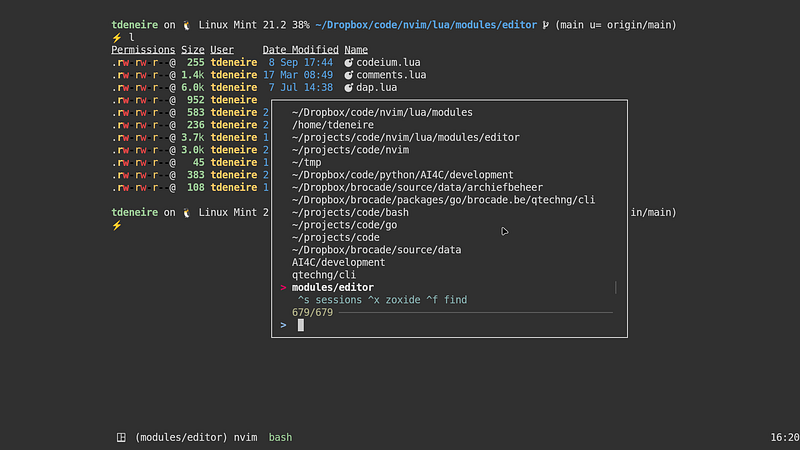
I regularly have five or six such sessions open and I never notice any lag.
Neovim community
Besides terminal integration, which is something that has become really indispensable for my developer workflow, another reason for enjoying Neovim is the great community. I’m sure this can be said for a lot of software, but it’s just really nice to have a community of kind and helpful people who can help you along your learning curve.
I’ve already mentioned ThePrimeagen, TJ De Vries and Josh Medeski but there are many other Neovim experts and content creators out there who all hang out on Twitter, like:
Codico also publishes a cool Neovim newsletter “This week in Neovim”:
And there is also a Neovim community on Twitter where people drop their dotfiles or post questions and answers.
Neovim and the power of play
With Neovim as a source of learning, a great terminal tool and a wonderful community, I still haven’t touched on the prime reason why I use Neovim — although there was a hint…
ThePrimeagen titled his video “Neovim Is a Waste Of Time, And I LOVE it” and he’s 100% right. Sure you can argue that you learn new skills configuring your editor and sure it can help you in your developer workflow, but in the end, what matters most is that you’re having FUN! For me, exploring Neovim is exciting. And if you don’t enjoy that kind of thing, that’s perfectly fine too…
This ties in beautifully with a wonderful podcast I’ve recently heard by Andrew Huberman about using playfulness to rewire and improve your brain:
Playfulness not only releases endogenous opioids in the body (which makes it feel nice), but it is a vitally important “exploration of contingencies”. Play allows us to experiment in a small-stakes environment and to explore new ways of being — almost like dreams allow you to act in ways that you wouldn’t in real life. Play promotes neuroplasticity; it “opens up” our prefrontal cortex, it makes us more focused and more creative.
With this in mind, everything I have said about Neovim so far can be considered as playfulness. Indeed, tinkering with your Lua editor config offers an ideal, small-stakes environment to learn a new programming language. Learning new skills like Vim motions and trying to get better and faster at them, is a textbook example of how play enhances brain and motor functions. And trying things out, and sometimes failing, in the safety of a supportive community is an ideal way to explore new paths of thinking and acting.
So next time someone asks you why you are “playing” with your editor all the time, you’ll know what to answer.
Neovim is not only fun, it improves our brain. 😄
Hi! 👋 I’m Tom. I’m a software engineer, a technical writer and IT burnout coach. If you want to get in touch, check out https://tomdeneire.be