
Neovim 101 —Tree-sitter Usage
Practical usage of Neovim Tree-sitter.

Previously, we went through the basics of Tree-sitter. In this article, let’s go through Tree-sitter usage to help us in coding.
This article is part of the Neovim 101 series.
The Neovim configuration files are available in this repository.
Getting Started
We already went through some of the practical usages of Tree-sitter in the Neovim Tips for a Betting Coding Experience series. This article covers additional tips not mentioned in the series.
Swapping
Previously we use the nvim-treesitter-textobjects plugin to swap parameters. Let’s extend this feature to other text objects.
In the lua/config/treesitter.lua file, we add the following code.
- We define the key mappings to swap different text objects (line 1 — line 15)
- We configure the swap mappings (line 25 — line 29)
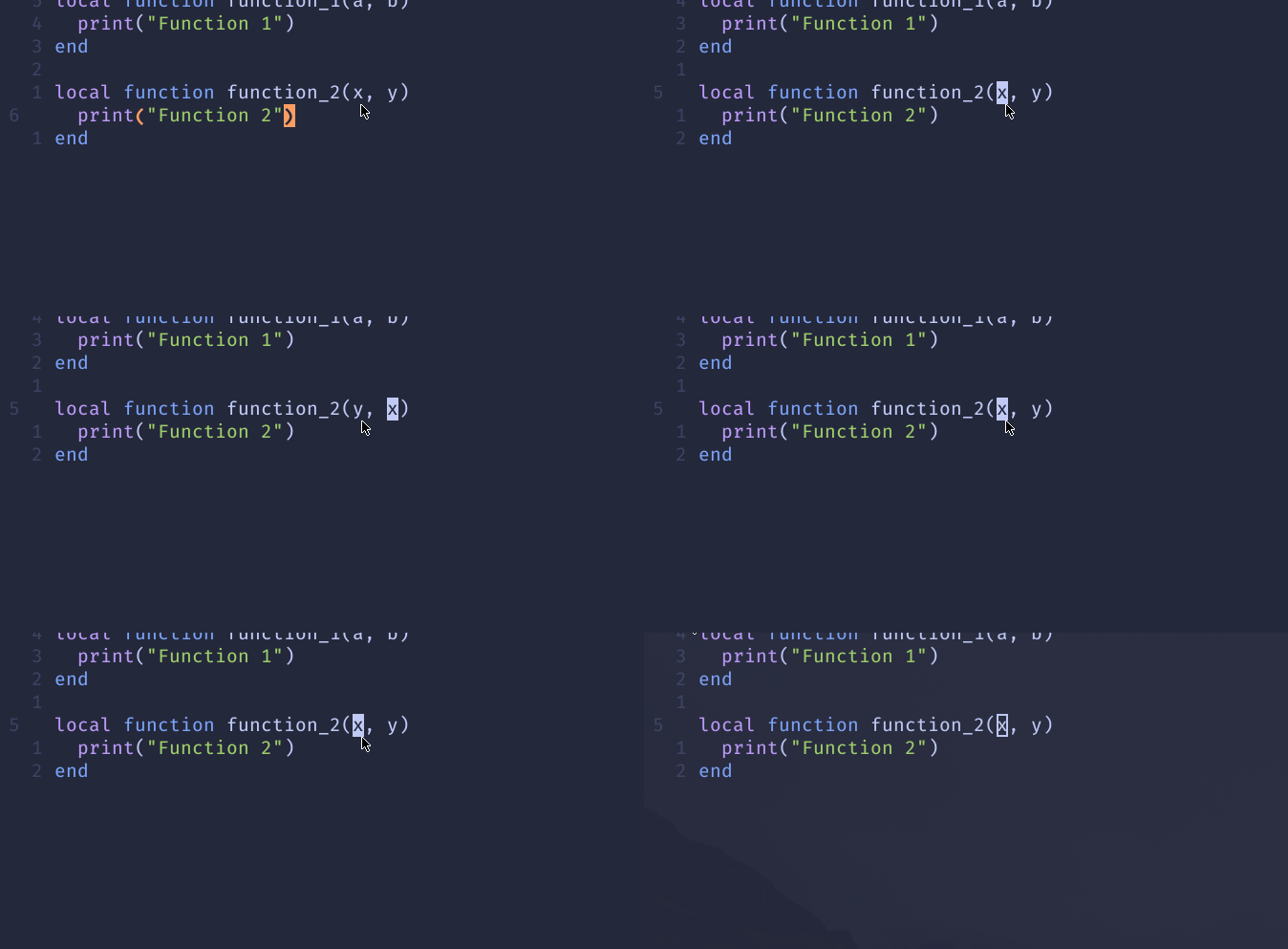
Now we can swap classes.
<Alt-n><Alt-c>to swap with the next class<Alt-p><Alt-c>to swap with the previous class

We can swap functions
<Alt-n><Alt-f>to swap with the next function<Alt-p><Alt-f>to swap with the previous function

We can swap parameters
<Alt-n><Alt-p>to swap with the next parameter<Alt-p><Alt-p>to swap with the previous parameter
Notes:
- Change the key mappings to fit your preference.
- To customize this feature further, check out the supported text objects and programming languages
Tree-sitter Queries
nvim-treesitter uses queries to extract information from the syntax tree. They are located in the queries/{language}/* runtime directories (:h rtp).
For nvim-treesitter, the following queries are supported using queries/{language}/*.scm.
highlights.scm— used for syntax highlighting, using thehighlightmodule.locals.scm— used to extract keyword definitions, scopes, references, etc, using thelocalsmodule.textobjects.scm— used to define text objects.folds.scm— used to define folds.injections.scm— used to define injections.
Syntax Highlighting for Embedded Language
Tree-sitter Query in Lua
We can use injections to highlight the syntax for embedded languages.
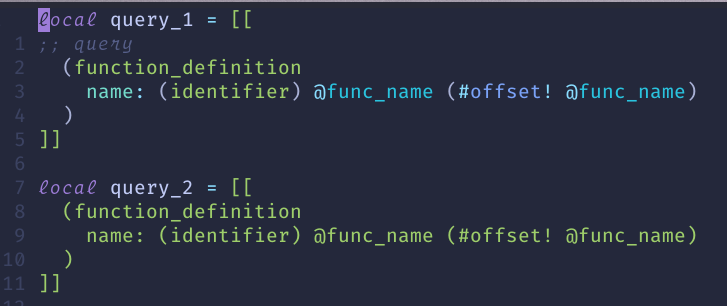
E.g., for Lua, the built-in Lua injection queries highlight a string as a Tree-sitter query if it starts with ;; query.
In the lua/config/treesitter.lua file, we enable syntax highlighting.
For a Lua file that contains embedded tree-sitter queries, we can have syntax highlighting now if it starts with ;;query.
In the screenshot below, we can see the difference. For the same query, the one starts with ;; query the syntax is highlighted correctly.
GraphQL in JavaScript and TypeScript
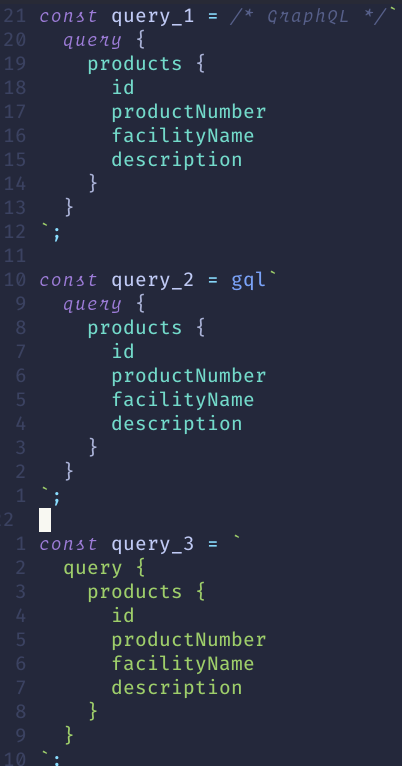
Similarly, for GraphQL queries embedded within JavaScript or TypeScript files, the built-in queries highlight the syntax if the gql identifier or the /* GraphQL */ comment is found.
From the screenshot below, for the same GraphQL query, only the first two constants are highlighted with the correct syntax.
Custom Queries
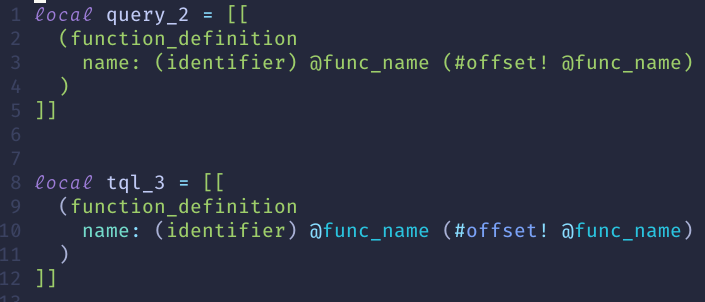
We can also define custom queries. E.g., create the after/queries/lua/injections.scm file with the following code.
This query highlights the string as a tree-sitter query if the variable/identifier name starts with tql_.
From the screenshot below, for the same query, the syntax is highlighted correctly when the variable name starts with tql_.
Notes:
- Check out the
nvim-treesitter queries for supported languages. - If you are not familiar with Tree-sitter query syntax, check out the Tree-sitter article.
Semantic Highlighting
From the screenshot below, we can see the passed-in parameters are not highlighted in the same color.

Rather than defining our highlight module, we can use the hlargs.nvim plugin to highlight arguments’ definitions and usages, asynchronously, using Treesitter.
In the init.lua file, we install this plugin.
Now the arguments should be highlighted correctly, as shown below.

Notes:
- A similar Neovim plugin to try is
markid - We can also use LSP semantic tokens. Check out the following article for details.
Conceal using Tree-sitter
In a previous article, we learned code folding using LSP and Tree-sitter. Using Tree-sitter, we can define custom conceal to hide blocks of code.
For example, create the after/queries/python/highlights.scm file with the following code snippet.
We define the conceal for some of the Python operators and data types.
Now in our Python code, those operators and data types are concealed when the conceallevel (:h conceallevel) is more than 0.

Check out this article for more Tree-sitter tips!
Check out this article for code folding using LSP and Tree-sitter!
Check out the article Learn Neovim The Practical Way for all the Vim/Neovim articles!
If you are not a Medium member yet and want to become one, click here. You will gain unlimited access to all Medium articles and support my work directly.


