
Navigating AI design: the new blueprint for designers
The changing context of AI product design today, and what’s needed for Designers in terms of capabilities to design with AI.
How do we approach the design of AI solutions?
With the rise of Responsible and ethical AI concerns, it’s worrying how this topic isn’t touched enough.
AI is everywhere today.
And yes, we see too many articles on the latest AI tools and exciting AI technological breakthroughs.
But…
What about how to approach the development of Human-Centered AI solutions?
In this article, I’ll share more on how to navigate this new (and exciting) AI Design landscape.
If you are new here, here’s Why Traditional Design Approaches Fall Short In The Age of AI. I’ll recommend reading this first to get more context!
First of all, what exactly is AI Design?
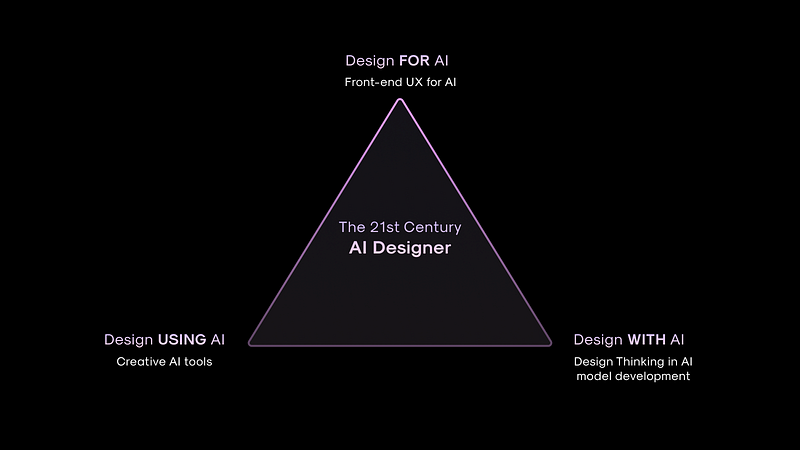
Let’s break the relationship between Design and AI into 3 simple categories:
Types of AI Design
1. Tool — Design using AI: AI is utilized as a design tool to augment design materials.
Examples include AI-powered tools and software like generative design, color palette generators.
2. Process — Design With AI: Involvement of design thinking approaches within AI life cycle stages and AI model development.
3. Outcome — Design for AI: Design of front-end AI-driven products, interface, and interactions for the end-user.
Examples include conversational UX and designing the user experience of AI-enabled features like personalized e-commerce recommendations.
To be an adept AI designer, you need to master all 3 angles, in essence — the Holy Trinity.
Design using AI is rather straightforward.
We have seen all the hype with AI tools (ChatGPT, Midjourney, AI Figma plugins etc) to automate mundane work and help creatives.
In this article, I won’t go into hat in-depth.
Instead, I’ll focus more on designing with and for AI (Process and outcome) which hasn’t been touched on much.
Some quick context.
I’ve helped design over 16+ AI Products for early-stage tech startups, mainly as their first few design hires.
Usually, I’m the only Product Designer in these startups collaborating with engineers, and have to wear many hats.
Startups have developed a great proprietary AI technology.
But lack direction to translate it into a user-friendly and applicable AI product — and that’s usually where I come in.
Helping them figure out how to innovate with their AI capability and translate it into a product their users need, AND are convinced by.
I emphasize the latter, because most times technical startups lack how to position and articulate the unique value proposition of their product.
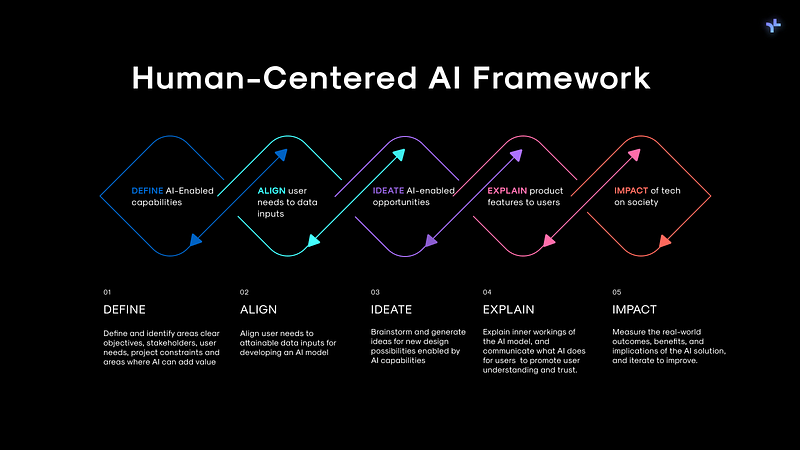
Under a yearlong thesis research with AI Singapore, I’ve also interviewed over 20+ industry AI designers and read over 40+ AI Design research papers on the web — which culminated in my development of the Human-Centered AI framework.
Curious? Now let’s dive in.
Here are my biggest takeaways:
1. The need to understand AI capabilities to ideate design opportunities
No, you don’t need in-depth technical knowledge about AI systems and how AI works.
Instead,
You do have to understand what AI can do and how to map user design opportunities from it.
In essence,
Identifying AI-enabled opportunities.
What are the challenges and benefits of using AI for feasible tech and business solutions?
Familiarising with common AI capabilities helped me to better spot and design good use cases where AI can add the user or business value
But…
What exactly is understanding ”AI as a design material”?
This means familiarising with common AI capabilities.
And being able to interpret design opportunities from AI capabilities.
To spot and design good use cases where AI can add the user or business value.
But I get it.
AI technology can be complex and so hard to understand especially for new beginners trying to grasp this technology.
Here’s an example of how to understand AI capabilities to map from the AI Design toolkit that I have created:
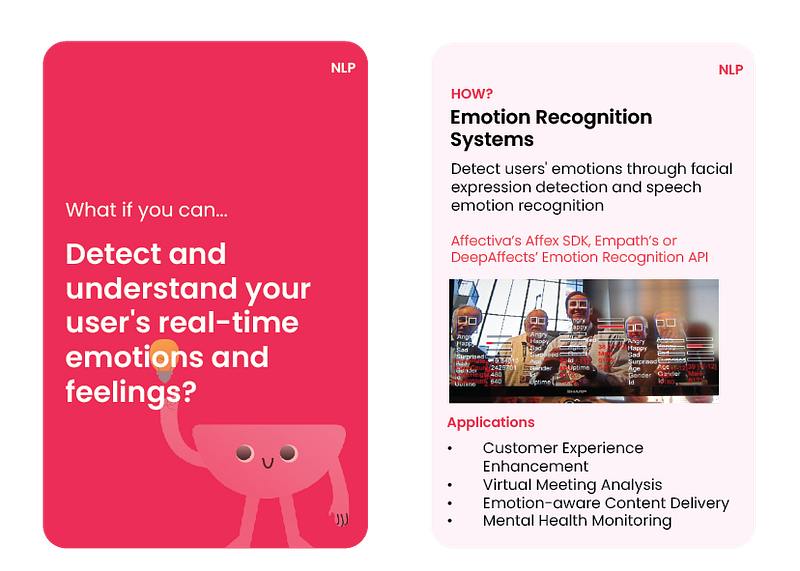
While in the past design thinking celebrates out-of-the-box ideation, with AI we now have to ideate within the field of AI capability constraints.
And this isn’t linear for just 1 capability.
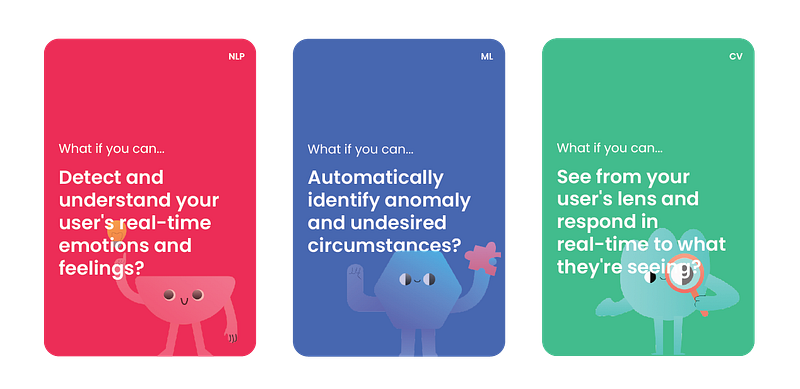
It means understanding different AI Capabilities, and identifying how capabilities in :
- Natural Language Processing (NLP)
- Computer Vision (CV)
- Machine Learning (ML)
can combine to form new design opportunities for product features and innovation.
Designers need to put on their thinking hats and ask,
Instead of what problems can AI solve…
How can AI solve this problem in a unique way?
It’s kind of like combining different blocks and building from there.
Which makes it even more fun.
2. Translating user needs to data
When dealing with AI models, defining user needs alone isn’t enough from a user-centered perspective to generate design possibilities.
With AI technology, we now have this additional design parameter of an AI model — whatever we design needs to fit into this context.
So what’s different?
We now need to consider:
AI capability constraints (what AI can do) + Technical feasibility of meeting user needs (how we can align user and business requirements with feasible technology inputs).
And here’s where we need to understand the VERY basics of how an AI model works.
Don’t worry I kept this simple:
Some questions to ask:
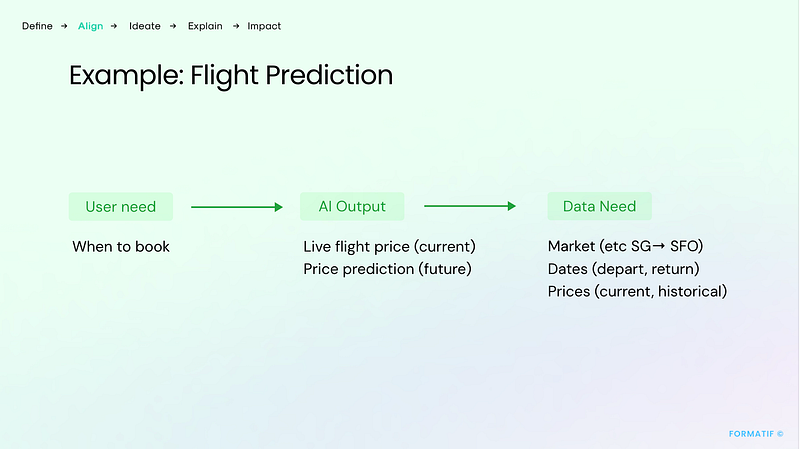
- Aligning user-data feasibility: Do users’ needs align clearly with possible AI outputs?
- Mapping datasets: Do AI outputs map into an attainable training dataset?
- Sourcing datasets: Where and how to source a diverse and robust dataset?
- Accessibility of data: How accessible are these datasets? Isit publicly available?
Here’s an example of all that in action (taken from Step 2 of the Human-Centered AI framework that I have developed):
And how you can try it out yourself:
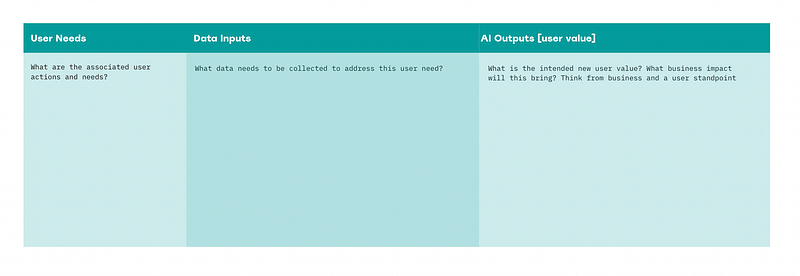
In the past, the “Emphasize” stage of Design Thinking focused solely on user insights and painpoints for design opportunities.
But with AI, we now have an additional technology feasibility angle to consider — and translate this from a user-data perspective.
TLDR: To effectively design AI solutions, you need to understand AI’s unique capabilities (+ data and user needs) to identify AI-enabled design opportunities
3. Explaining UX for AI
AI is a new and unfamiliar technology, with a new playing field.
Never 100% accurate, AI models learn from data and reiterate — meaning initial AI product features launched are prone to error and inaccuracy.
And it’s a continuous work in progress — needing users to provide the data to learn from for feedback and development.
Also, let’s not get started on user concerns about data privacy and security.
All this involves:
- Managing user’s expectations
- Enabling user’s feedback
- Empowering user autonomy and control
(this is similar to the current landscape of Web 3.0 Design, but I will touch on that in another article).
And for us Designers, it’s where we need to guide the ethical and responsible use of this technology.
Through educating and managing user expectations.
Some angles to consider:
- Understand: How do you communicate how the AI works to users?
- Accuracy: What if your AI is wrong in scenarios?
- Tech Literacy: How will users of different tech literacy understand and use your product?
- Trust: How do you build trust with users?
I dive deeper into these in my previous article series.
Check out the 3 part series on Human-Centered AI principles if you haven’t!
And all these are only just skimming the surface of Human-Centered AI Design.
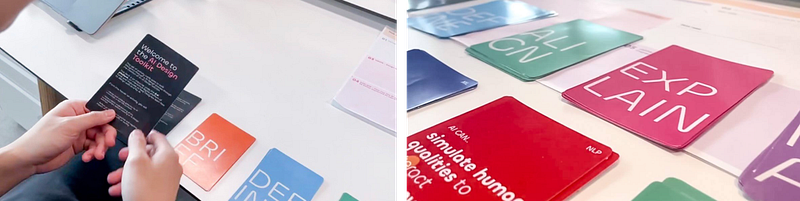
After a yearlong of research (interviewing over 20+ industry AI designers + my own experience in building AI products), I developed a Human-Centered AI framework and AI Design Toolkit to help Startup Founders and Designers in their process of designing better AI products.
Here’s a sneak peek:
—
Want to learn more about Human-Centered AI?
Check out my other article series:
👇🏻 Learn how to build a Human-Centered AI product
- Step 1: DEFINE your AI-enabled product opportunity
- Step 2: ALIGN your user needs to data
- Step 3: IDEATE design possibilities with AI capabilities
- Step 4: EXPLAIN AI to users
👇🏻 Learn more about Human-Centered AI principles here
- Part 1: How to Build Human-Centered AI Products that Build Trust with Your Users
- Part2: How to Empower User Autonomy and Control In Your AI Product
- Part 3: Here’s How to build AI Products with Purpose
👇🏻 Learn how to become a better AI Designer:
- The Design Approach to Learning Human-Centered AI Design
- The Problem with AI Development Today: Designers Need to Step Up
- Navigating AI Design: The AI Designer Blueprint
—
If you enjoyed this article, I would love to connect and hear your thoughts on this topic! Say hi on Linkedin!


