
Natural Language Fundamentals — Intro & Language Model Implementation of Sentiment Analysis, Machine Translation and Named-Entity Recognition
Multilingual language modeling in the Natural Language space

We humans use words, sounds, gestures and symbols to convey complex concepts and abstracts to each other in different forms such as speech, writing and signs. With the advent of computers and in order to take advantage of these powerful machines, we had to come up with ways for computers to understand human communications and the existing corpus of knowledge. Hence, the Natural Language Processing (NLP), Understanding (NLU) and Generation (NLG) branches of Artificial Intelligence were born. Boundaries of these three areas are sometimes unclear and the overall Natural Language space encompasses various applications in today’s Computer and Data Science world. Probably the most common of such applications are (I) Sentiment Analysis, (II) Machine Translation and (III) Named-Entity Recognition (NER), which we will define and implement in this post.
In order to implement these three tasks, we will leverage existing “Pre-Trained Language Models”. Therefore, let’s first understand what language modeling is. I do recommend glancing through the “Language Modeling” section but if you are mainly interested in the application and/or implementation, feel free to skip it.
Language Modeling
Language modeling encompasses various methods that use statistics and probability, combined with machine learning architectures (such as and especially deep neural networks) to determine the likelihood of a sequence of words occurring in a string, such as a sentence. Based on the calculated probability, certain decisions can be made — for example, a model can generate a string/response to a user-provided prompt (such as ChatGPT), perform a text classification to determine whether a word in question is a noun, a verb, etc. Thanks to the large corpora of textual data available all around us these days, such language models are usually trained on vast amounts of textual data. Consequently, such models are also referred to as Large Language Models. At this point you may be wondering how this is relevant to our post — we are just getting there. These pre-trained language models then can be further trained (i.e. fine-tuned) to perform specific tasks, such as sentiment analysis, machine translation and named-entity recognition, which we will explore in further detail today. Going deeper into the architecture and training strategies of language models is beyond the intent of this post, but if you are interested in that topic, feel free to visit the post below:
Pre-Trained Models in NLP
Fundamentals of Pre-Trained Models and their down-stream tasks.
medium.com
Now that we are familiar with what Natural Language space and Language Modeling are, let’s go to the fun part of using these models!
1. Sentiment Analysis
Task of identifying the sentiment of a piece of text, such as whether it is positive, negative, or neutral, is called Sentiment Analysis. It is used in applications such as social media monitoring, customer feedback analysis, and product review analysis. As you can imagine, this one is quite useful for a lot of companies. For example, a large online retail company would not be able to dedicate the human resources required to manually read all the comments about various products. Instead, they can run a Sentiment Analysis model on the reviews and analyze the results, saving time and money in the process. Next, let’s see how we can implement this.
1.1. Sentiment Analysis — Implementation
In this example, we first load a pre-trained langugae model from the Transformers library. Then, we use the model to generate sentiment from the input sentence. Finally, we test it on two different sentences, one positive and one negative, to verify model’s performance. Below are the two sentences that we will be using:
I loved this movie!, which we expect to be classified as a “Positive” sentiment by the modelI did not like this movie., which we expect to be classified as a “Negative” sentiment by the model
Let’s see how it works!
# Import libraries
from transformers import pipeline

# Load the pre-trained model
nlp = pipeline('sentiment-analysis', model='distilbert-base-uncased-finetuned-sst-2-english')

# Define the function to perform sentiment analysis
def sentiment_analyzer(input_text):
    # Perform sentiment analysis
    result = nlp(input_text)[0]

    # Return results
    return f"'{input_text}' has a {result['label']} sentiment, with a score of {round(result['score'], 4)}!\n"

# Define example sentences
sentence_1 = "I loved this movie!"
sentence_2 = "I did not like this movie."
sentence_list = [sentence_1, sentence_2]

# Analyze the sentiment of each sentence
for sentence in sentence_list:
    print(sentiment_analyzer(sentence))
Results:

Results look pretty good and as we expected. If you are interested in a more in-depth look at Sentiment Analysis, the following post is for you:
Let’s talk about Machine Translation next.
2. Machine Translation
Task of using computers to translate text from one language to another is called Machine Translation. The most well-known example for most users is Google Translate — what Google Translate does is called Machine Translation! Applications are plentiful. For example, one can read and understand information in other languages.
2.1. Machine Translation — Implementation
To implement Machine Translation, we are going to use mBART-50, developed by Facebook AI, from the Transformers library, which is a pre-trained language model for Machine Translation. The steps are very similar to what we did in the Sentiment Analysis and are as follows:
- Install Transformers as follows:
pip install transformers - Import the library
- Load the pre-trained model
- Run example sentences through the model and return the results
What is interesting about mBART-50 is that it is a multilingual Machine Translation model, meaning it can translate to and from different languages. Let’s test this capability in action, where we translate one sentence to 6 different languages, using one model!
Pro Tip: I emphasized the multilingual nature of this language model because historically, Neural Machine Translation models used to be able to translate only from one specific language to another specific language. For example, we would need to train one specific model for translation from English to French and train a separate model to translate from English to German. On the other hand, these multilingual machine translation models can translate from many languages to many languages using one single model, which is quite impressive!
In the following code block, we import the libraries, load the models and then create the translator function, which accepts three arguments: (1) A sentence (source_sentence), (2) The language of the provided sentence (source_language) and (3) The language that we would like the sentence to be translated to (target_language). Then translator returns the translation as instructed.
# Import library
from transformers import MBartForConditionalGeneration, MBart50TokenizerFast

# Load model and tokenizer
model = MBartForConditionalGeneration.from_pretrained("facebook/mbart-large-50-many-to-many-mmt")
tokenizer = MBart50TokenizerFast.from_pretrained("facebook/mbart-large-50-many-to-many-mmt")

def translator(source_sentence, source_language, target_language):
    # Encode sentence
    tokenizer.src_lang = source_language
    input_ids = tokenizer(source_sentence, return_tensors="pt").input_ids

    # Translate sentence
    output_ids = model.generate(input_ids, forced_bos_token_id=tokenizer.lang_code_to_id[target_language])
    translation = tokenizer.batch_decode(output_ids, skip_special_tokens=True)[0]

    # return translation
    return translation
Next, let’s test our function by translating Multilingual machine translation is impressive! to French, Spanish, Italian, German, Simplified Chinese and Japanese.
# Define sentence to be translated
original_sentence = 'Multilingual machine translation is impressive!'

# Define source language
english = "en_XX"

# Define target languages
french = "fr_XX"
spanish = "es_XX"
italian = "it_IT"
german = "de_DE"
simplified_chinese = "zh_CN"
japanese = "ja_XX"

# Create a list of target languages
target_list = [french, spanish, italian, german, simplified_chinese, japanese]

# Create a prompt list of lists
prompt_list = []

for target in target_list:
    prompt_list.append([original_sentence, english, target])

# Create translations
print(f"Generating machine translations for: \n'{original_sentence}'\n")

for i in enumerate(prompt_list):
    translation = translator(source_sentence=i[1][0], source_language=i[1][1], target_language=i[1][2])
    print(f"{i[1][2]}:")
    print(f"{translation}\n")
Results:
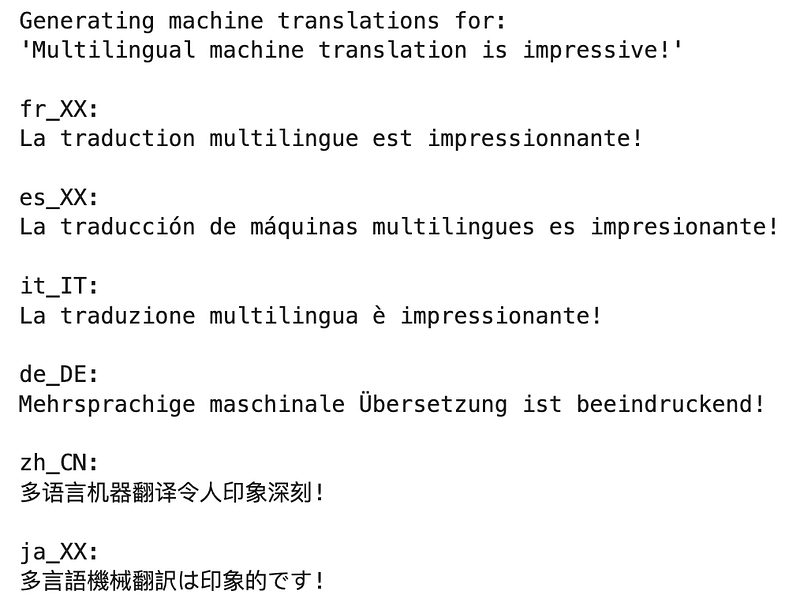
And we see the translations in the target languages in the results! I do not personally speak any of these languages but I verified them using Google Translate and the translations seem accurate!
Last but not least, let’s look at Named-Entity Recognition.
3. Named-Entity Recognition (NER)
Task of identifying and categorizing named entities in text and categorizing them into pre-defined classes is called Named-Entity Recognition or NER for short. Some examples of these categories are: person names, locations, dates, organizations, numbers, etc. You may be wondering why we would need such a model. NER has many applications in the Natural Language space. For example, Visa, American Express, Amazon, etc. can use NER to identify and black-out sensitive information in a customer communication to protect customers’ sensitive information, such as date of birth and credit card information. Another application for social media companies such as Meta is identifying locations and individual names in comments/posts and using them for content recommendation.
Now that we understand what NER is, let’s implement it and look at the results.
3.1. NER — Implementation
In this example, we are going to use spaCy pre-trained model for NER. The implementation is pretty straightforward. We will follow these steps:
- Install and download the required data
- Import the library
- Load the pre-trained tasks, inclusive of NER
- Run an example sentence through the model and return the results
If you need to install spaCy and download the data, you can use the following commands (source):
pip3 install spacy
python -m spacy download en_core_web_sm
I ran the installation above using the Command Line Interface. It is as simple as (I) opening the Terminal and then (II) running the above two lines. If you need a more detailed Command Line tutorial, feel free to check out the following:
Next, let’s implement and apply NER to the following sentence:Farzad wrote this Medium article in March 2023, using an Apple laptop, on a Jupyter notebook!
# Import library
import spacy

# Load English tokenizer, tagger, parser and NER
nlp = spacy.load("en_core_web_sm")

# Define example sentence
sentence = "Farzad wrote this Medium article in March 2023, using an Apple laptop, on a Jupyter notebook!"

# Apply NER
doc = nlp(sentence)

# Analyze syntax
print(f"Noun phrases:{[chunk.text for chunk in doc.noun_chunks]}\n")
print("Verbs:", [token.lemma_ for token in doc if token.pos_ == "VERB"])
print("")

# Find named entities, phrases and concepts
for entity in doc.ents:
    print(entity.text, entity.label_)
Results:

That’s quite interesting! Let’s talk about the results. The first line identified the nouns — I do not personally agree with all of them but still, that is quite impressive! The second line has correctly identified “write” and “use” as verbs and the third block has identified “Medium” as a location, “March 2023” as a date, “Apple” as an organization (this one is interesting since apple could also be the name of a fruit but the model recognized the company name, presumably based on the context of the sentence) and “Jupyter” as a person (this one needs some improvement). There are ways to further train these pre-trained models to ensure NER works more accurately for every use case but the point we wanted to articulate here was to showcase how these pre-trained language models can be used to accomplish complicated tasks such as NER with a reasonable level of accuracy.
Conclusion
In this post, we briefly walked through the world of Natural Language Processing (NLP), Understanding (NLU) and Generation (NLG) and tried to understand their importance by introducing and implementing some of the most common tasks within the Natural Language space, using language modeling. We then moved on to the introduction and language model implementation of (I) Sentiment Analysis, (II) Machine Translation and (III) Named-Entity Recognition (NER) and looked at the impressive results of these powerful pre-trained language models in multiple languages.
Thanks for Reading!
If you found this post helpful, please follow me on Medium and subscribe to receive my latest posts!
(All images, unless otherwise noted, are by the author.)