
Programming
MySQL: Zero to Hero with Syntax of All Topics
A database query language handbook

Everyone is working on data, but many of them don’t know about MySQL, it is a database management system. A database is a collection of data, where we stored the data and can be easily accessed by other means of sources.
Section 1: MySQL installation link
Section 2: Create database, table and Insert data
Section 3: Statements and Operators in MySQL
Section 4: Regular expression and Commands
Section 5: JOINS
Section 6: String and Date/Time Functions
Section 1:
Installation link
For MySQL practicals, download MySQL workbench from here:
Link : MySQL Workbench
Section 2:
Create Database
To create a database in MySQL with a command shown below:
create database employees;With this command, we can create a database and then create tables in the database. After every command we have to execute them by executing the command, i.e., is a lightning symbol in the photo.
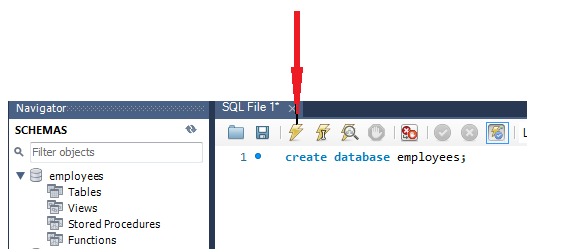
After executing it, we refresh the SCHEMAS on the left side, and we see our newly created database with employee’s names. Inside the database, we have to create tables that are our main target.
Create Tables
We have to create a table with column names in which we write information/records in the form of rows and columns with different data types.
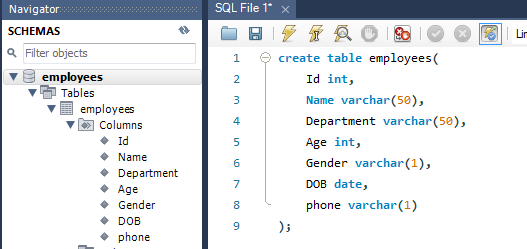
To create a table, we consider table name, column names, and its data type. Command for creating a table.
create table_name(
                  col_name1 datatype,
                  col_name2 datatype,
                  .
                  .
                  );
Example:
create table employees(
    Id int,
    Name varchar(50),      # upto 50 characters
    Department varchar(50),
    Age int,
    Gender varchar(1),
    DOB date,
    phone varchar(14)
);
Insert Data in table name employees
Syntax
insert into table_name( col1, col2, ....)
values(value1, value2, ...);
Example:
insert into employees(Id, Name, Department, Age, Gender, DOB, phone)
values(1, "Amit", "R&D", 25, "M", "2000-1-1","363463625");
For inserting multiple rows, you can add more values in the queries.
Section 3:
Statements
After inserting data, the next phase to see the table data differently by the SELECT command. If we want to see some column names, then write those column names only, and if we want to see all column names from the table, then we use a star(*) instead of column names.
select Id, Name, Gender
from employees;
or
select *
from employees;
If we want to give alias names of column names, then we use ‘AS’ in the command.
select Id as Roll_number, Name as Person_name
from employees;
WHERE clause is used to see conditional data, suppose if we want to see only information about employees whose age is more than 25, etc.
select col1, clo2, ...
from table_name
where condition;
Operators
AND operator
Both the conditions have to be true to get the right information from the table.
select col1, clo2, ...
from table_name
where condition1 AND condition2;
OR operator
At least one of the conditions should be true.
select col1, clo2, ...
from table_name
where condition1 OR condition2;
NOT operator
In this operator, the result won’t show that result in which NOT operator is used.
select col1, clo2, ...
from table_name
where NOT condition1 OR condition2;
IN operator
When we use AND OR operator, the query becomes a little bit lengthy, So we use IN operator.
select col1, clo2, ...
from table_name
where Age = 18 or Age = 21;
# with IN operator
select col1, clo2, ...
from table_name
where Age IN(18,21);
Between Operator
This operator is used to find data between two spans of condition.
select col1, clo2, ...
from table_name
where col_name BETWEEN value1 AND value2;Section 4:
Regular expression
Regular expressions are used to find expression with the help of some patterns.
Example:
select col1, clo2, ...
from table_name
where col_name REGEXP pattern;
           or
where col_name REGEXP 'Am';
When we write the pattern ‘Am’, it will show all the records from that column. There are various other pattern styles also.
'Am' - search this pattern anywhere in the expression.
'^Am' - search expression starting from 'Am'.
'it$' - dollar sign search expression ending with 'it'.
'Amit|Singh|Kumar' - searching multiple expressions.
'[AT]' - search A and T in all records
Commands
Order By
This command gives us a sorted record in ascending and descending order.
select col1, clo2, ...
from table_name
where col_name
ORDER BY col_name;
IS NULL
Sometimes when we create big data, then we forget/missed some entries or in the records. This operator will find all the null/missed records in the data/column.
select col1, clo2, ...
from table_name
where col_name IS NULL;
Limit
Suppose we have very big data, and when we use star ‘*’ we get all records, but if we want to see only some records from them, then we use LIMIT.
select col1, clo2, ...
from table_name
where condition
LIMIT number;              #LIMIT 100 (to see first 100 records)
Update
Sometimes we fill incorrect data and need to update some records in the data. Then we use UPDATE for these.
UPDATE col_name
SET col1 = value1, col2 = value2, ....
where condition;
Section 5:
JOINS
PRIMARY KEY
The primary key is used to get unique records only. We can also get unique data with the UNIQUE keyword, but we can make only one column as the primary key. A primary key doesn’t have null values.
create table employees(
    Id int NOT NULL AUTO_INCREMENT,
    Name varchar(50) NOT NULL,      # up to 50 characters
    Department varchar(50) NOT NULL,
    PRIMARY KEY(Id)
);
FOREIGN KEY
The main important work of Foreign key to link two tables. A Foreign key can be used when there is a primary key in another table.
create table employees(
    Id int NOT NULL AUTO_INCREMENT,
    Name varchar(50) NOT NULL,      # upto 50 characters
    Department varchar(50) NOT NULL,
    PRIMARY KEY(Id),
    FOREIGN KEY(student), REFERENCES student(Id)
);
INNER JOIN
Inner join is used to get common data of two tables.
select columns
from table_name1
INNER JOIN table_name2
ON table1.col_name = table2.col_name;
LEFT JOIN
This join is used to find the records from one table and also get the common data from both the data.
select columns
from table_name1
LEFT JOIN table_name2
ON table1.col_name = table2.col_name;
RIGHT JOIN
This join is used to find the records from one table and also get the common data from both the data.
select columns
from table_name1
RIGHT JOIN table_name2
ON table1.col_name = table2.col_name;
CROSS JOIN
In this joint, we don’t have to use the primary and foreign keys. Cross join is used to join records from table 1 to join with all records with table 2.
SELECT columns
FROM table1
CROSS JOIN table2;
Section 6:
String Functions
Upper
It is used to capitalize on each character in all strings.
SELECT UPPER(Name)
FROM employees;
Lower
It is used to convert all letters to small cases each of all records.
SELECT LOWER(Name)
FROM employees;
Character Length
It is used to count the character of the string.
SELECT Name, LOWER(Name) as Char_length
FROM employees;
Data/Time Functions
Current_Date
It is used to show the current date.
Select Current_date();SYSDATE
It is used to show the current date and time.
Select SYSDATE();NOW
It is also used the same as SYSDATE.
MONTH
It is used to find the month from the date.
Select MONTH("2020-07-02 02:21:32") as Month
#output:
Month
10
Conclusion
MySQL queries are used in many database management systems almost in all good companies.
I hope you like the article. Reach me on my LinkedIn and twitter.


