avatarakhil anand

Free AI web copilot to create summaries, insights and extended knowledge, download it at here

1411

Abstract

9341">By filling above credentials you will set up your python connection with the MySQL database. Now we need to execute the query in python using MySQL database. The primary step would be setting up the cursor for the query(to extract data from MySql Database).</p><blockquote id="3eca"><p><b>Reading the data and converting it into the pandas data frame</b></p></blockquote><div id="5e16"><pre>cursor=mydb.cursor() <span class="hljs-comment"># setting up the cursor</span> cursor.execute(<span class="hljs-string">''' Select * from akhil_db.users as u limit 10'''</span>) <span class="hljs-comment"># it will return first 10 rows</span></pre></div><p id="8357">Now we need to form a Data Frame in python, by using the data we fetched from the MySQL database. For this, we need rows and columns.</p><div id="686a"><pre>rows=cursor.fetchall() columns=[i[o] <span class="hljs-keyword">for</span> i <span class="hljs-keyword">in</span> <span class="hljs-built_in">range</span> cursor.description] <span class="hljs-comment">#we need column name present on index 0 </span></pre></div><p id="29d1"><code>cursor.fetchall</code> It will fetch all the rows and return the data as a list of tuples.</p><figure id="48a3"><img src="https://cdn-images-1.readmedium.com/v2/resize:fit:800/1*pjjwylWTUTOk19U5mvxY2w.png"><figcaption>Result of cursor.fetchall</figcaption></figure><p id="9d26"><code>cursor.description</code> I

Options

t gives a description of the columns present in the result set.</p><figure id="72c9"><img src="https://cdn-images-1.readmedium.com/v2/resize:fit:800/1*iUH04BVsKigLmgOFKDinrA.png"><figcaption>Result of cursor.description</figcaption></figure><div id="9404"><pre><span class="hljs-keyword">import</span> pandas <span class="hljs-keyword">as</span> pd df=pd.DataFrame(rows=rows,columns=columns) df.head()</pre></div><figure id="c54d"><img src="https://cdn-images-1.readmedium.com/v2/resize:fit:800/1*o43zBVprmiz5ptiZymZD0g.png"><figcaption>Final Data Frame</figcaption></figure><blockquote id="0414"><p><b>Conclusion</b></p></blockquote><p id="2034">Thanks for reading this blog. You can access more data-related content <a href="https://medium.com/@akhilanandkspa"><b>here</b></a><b>.</b></p><h2 id="ce49">More content at PlainEnglish.io.</h2><p id="3aa9"><i>Sign up for our <a href="http://newsletter.plainenglish.io/"><b>free weekly newsletter</b></a>. Follow us on <a href="https://twitter.com/inPlainEngHQ"><b>Twitter</b></a></i>, <a href="https://www.linkedin.com/company/inplainenglish/"><b><i>LinkedIn</i></b></a><b><i>, <a href="https://www.youtube.com/channel/UCtipWUghju290NWcn8jhyAw">YouTube</a>, and</i></b><i> <a href="https://discord.gg/GtDtUAvyhW"><b>Discord</b></a><b>.</b></i></p><h2 id="a759">Looking to scale awareness and adoption for your tech startup? Check out Circuit.</h2></article></body>

MySql →Python Connection: Read Operation
Image

Overview

If you are working in the data industry then you must have come to the stage where you need the python and SQL connection to fetch data for analysis/prediction. This blog will help you to make the connection between python with MySQL. Let’s get started….

Python & MySql Affair

Python needs a MySql driver to establish the connection with MySql Database. 1. Installation of Mysql Driver in python environment

pip install mysql #installation of mysql Connector

Importing the installed driver in python and setting up the connection.

import mysql.connector
mydb=mysql.connector.connect(host='endpoints provided by your tech team'
                             userName='provide the user name'
                             password='password')
print(mydb)

By filling above credentials you will set up your python connection with the MySQL database. Now we need to execute the query in python using MySQL database. The primary step would be setting up the cursor for the query(to extract data from MySql Database).

Reading the data and converting it into the pandas data frame

cursor=mydb.cursor() # setting up the cursor
cursor.execute(''' Select * from akhil_db.users as u limit 10''') # it will return first 10 rows

Now we need to form a Data Frame in python, by using the data we fetched from the MySQL database. For this, we need rows and columns.

rows=cursor.fetchall()
columns=[i[o] for i in range cursor.description] #we need column name present on index 0 

cursor.fetchall It will fetch all the rows and return the data as a list of tuples.

Result of cursor.fetchall

cursor.description It gives a description of the columns present in the result set.
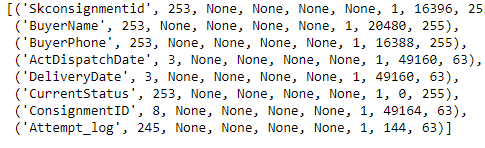
Result of cursor.description
import pandas as pd
df=pd.DataFrame(rows=rows,columns=columns)
df.head()
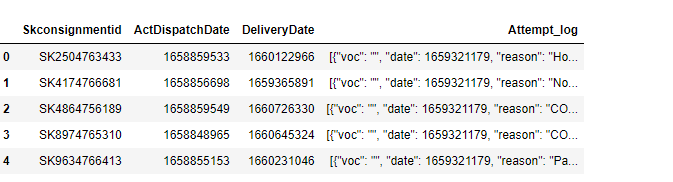
Final Data Frame

Conclusion

Thanks for reading this blog. You can access more data-related content here.

More content at PlainEnglish.io.

Sign up for our free weekly newsletter. Follow us on Twitter, LinkedIn, YouTube, and Discord.

Looking to scale awareness and adoption for your tech startup? Check out Circuit.

Data Analysis
Data Analytics
Machine Learning
Business Analysis
Recommended from ReadMedium