avatarEllane W

Summary

The author has enhanced their minimalist Obsidian daily note template with hidden navigation links for better organization and accessibility, while maintaining a clean interface.

Abstract

The author of the article has implemented a hidden navigation system within their Obsidian daily note template, which was previously ultra-minimalist. This system allows for seamless navigation between daily, weekly, monthly, and yearly pages without cluttering the interface. The navigation is designed to be intuitive, following a logical progression from day to year. The author also explains the utility of having a link to the current day on the current day's page, which is particularly useful when daily notes are transcluded onto other pages. The code for the new template is provided, showcasing how it adapts to different date patterns. While acknowledging that Obsidian's keyboard shortcuts could suffice, the author emphasizes the value of these navigation links in another text editor like iA Writer, where such shortcuts are limited. The article concludes with an invitation to download productivity tools from the author's Gumroad store and a suggestion to subscribe to Medium using the author's referral link for unlimited access to content.

Opinions

  • The author believes that the new navigation links are a significant enhancement to their daily note template without compromising the minimalist aesthetic.
  • They find the navigation system intuitive, as it mirrors the natural order from day to year.
  • The author values the convenience of the navigation links, especially in scenarios where the current day's note is embedded within other pages.
  • They acknowledge that while Obsidian's existing keyboard shortcuts could be sufficient, the added navigation links are particularly beneficial in text editors with fewer shortcuts, like iA Writer.
  • The author sees the navigation links as a feature that provides additional value in one interface (Obsidian) without causing harm, and as an essential tool in another (iA Writer).
  • They encourage readers to explore further productivity resources and support their work by subscribing to Medium through their referral link.

My Ultra-Minimalist Obsidian Daily Note Gets Some Hidden Nav Power

What’s superfluous in one Markdown editor can be a big help in another
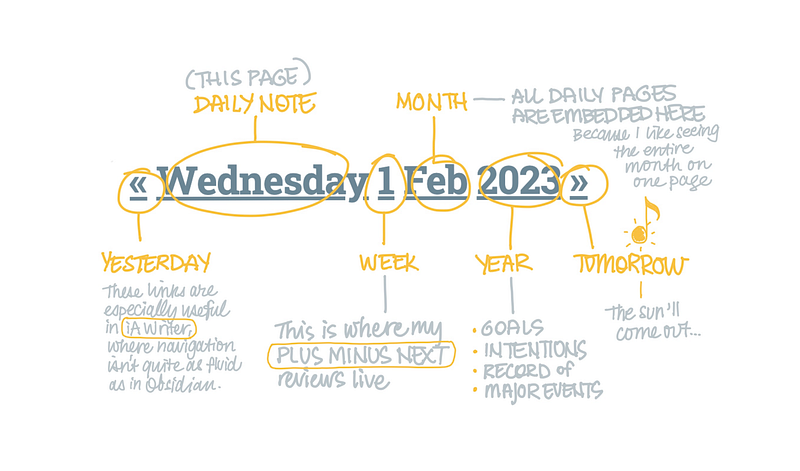
Screenshot by Author

I’ve just added some under-the-hood navigation to my super minimalist Obsidian daily note template.

From everything but the kitchen sink to nothing but the date, my daily note now links to the previous day, current day, week, month, and yearly plan.

But you wouldn’t know it from first glance.

It’s easy to remember which part of the date leads to which page, as it goes in order from the leaf to the tree: day → week → month → year.

Why have a link to the current day on the current day page, I imagine you’re asking?

Because it’s a handy way to get back to the file when it’s transcluded onto another page. And all my daily notes are embedded on the monthly page, so it’s something I use often to get back to the source. I know you can click the little link symbol to the side, but that’s fiddly. More often than not I can’t find it first time.

To me it makes more sense to click on the name of the day when the day is where I want to go.

Here’s the code from my new daily note template. It presumes that days, weeks, and months follow these patterns:

  • 2022–01–17 Tue
  • 2022-W03
  • 2022–01
## [[{{date-1d:YYYY-MM-DD ddd}}|«]] [[{{date:YYYY-MM-DD ddd}}|{{date:dddd}}]] [[{{date:YYYY-[W]ww}}|{{date:D}}]] [[{{date:YYYY-MM}}|{{date:MMM}}]] [[{{date:YYYY}} Year Plan|{{date:YYYY}}]] [[{{date+1d:YYYY-MM-DD ddd}}|»]]

If you’re thinking there’s no real need for any of this in Obsidian as the extra links can be accessed with keyboard shortcuts, you’re right. But in iA Writer, where keyboard shortcuts are thin on the ground, it’s invaluable.

It’s a good example of something that does no harm in one interface, while providing value in another.

Download some free productivity goodies (including an Obsidian Planner demo vault, and Plus Minus Next Weekly Review template) on my Gumroad store. For more plain text geekery, check out my Plain Text, Paper-Less Productivity Digest:

Get unlimited access to all the brilliant minds on Medium for $5 a month or $50 a year, and directly support the work of everyone you read. If you use my referral link, you pay the same, but I get a small (much appreciated) commission.

Productivity
Technology
Markdown
Obsidian
Ia Writer
Recommended from ReadMedium