
My Top (Neo)Vim Plugins For Competitive Programming
Vim plugins can make your experience smoother, nicer, and more productive.
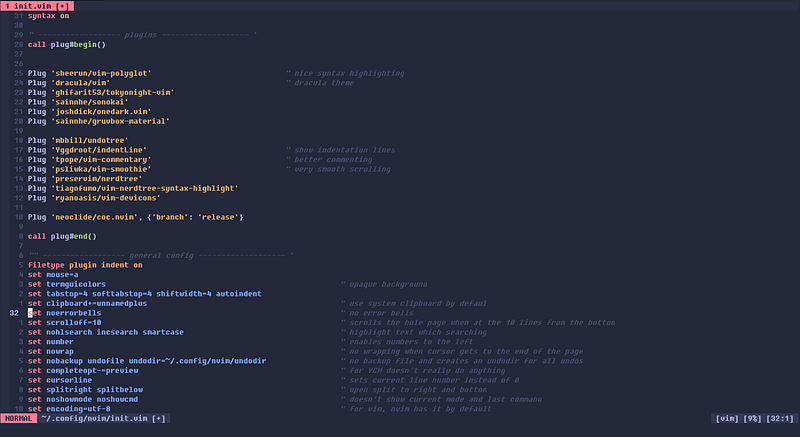
I am currently using Neovim instead of Vim, because I switched a while back and can’t bother to go back.
Plugin Managers
Vim-Plug
I use Vim-Plug, however this is the only one I have tried and it works for me. So there is no reason for me to switch. I enjoy it. When you go to the website, make sure to download the right one for either Vim or Neovim. To download any plugin, just take the last half of the GitHub link and place it in between the brackets of the statement:
Plug ‘[HERE]’I will give the way to install the plugins in the format above.
Visual Plugins
By no means do the following plugins need to be installed. Actually, they are completely up to personal preference. Go explore find what you like.
Vim-Polyglot
Polyglot is a syntax highlighting plugin. It makes code more readable and so much more enticing to work on. It works with many plugins and is one of the most popular syntax highlighting plugins for Vim.
Install
Plug ‘sheerun/vim-polyglot’
In my opinion, many of the colorschemes look a lot better with it and is sometimes recommended by the colorscheme/plugin maker. Go try it out with your favorite colorscheme.
My Personal Colorscheme — Tokyonight
Tokyonight was originally created for VS Code, but thanks to the vast vim community it came to vim. It is both a dark and light theme, but the plugin I use only has the dark theme (which is the one I use). It has two variants; night and storm. They have the same highlighting, just a different background. Night is dark, dark blue, while storm is a lighter blue. Storm was shown in the image above.
Install
Plug ‘ghifarit53/tokyonight-vim’
There are many other great themes, just do a quick google search, and you will find yourself in a rabbit hole of colorschemes (I got stuck for a few days to find what I wanted).
Here are a few: — Onedark — Nord — Gruvbox — Dracula
If you don’t like any themes, you can create your own. I have never done this and would think it is very time-consuming, but do whatever your heart desires.
Indentline
Indentline is a plugin that shows where your tabs are. It is similar to when you press two tabs in VSCode and it shows this: ‘|’. Go check it out, and you might just fall in love with it.
Install
Plug ‘Yggdroot/indentLine’
Vim-Smoothie
Vim-Smoothie is a plugin that makes scrolling very, very smooth. Keybinds like Ctrl+d and Ctrl+u is super satisfying and amazing. This probably gets the least usefulness score out of all the Visual Plugins but is nice to have.
Install
Plug ‘psliwka/vim-smoothie’
Functional
These functional plugins give new life to Vim and will make your life faster.
UndoTree
UndoTree is a plugin that shows your undoes. You will be able to go back to revisions just like any other word processor. I like it and it works well.
Install
Plug ‘mbbill/undotree’
Give UndoTree a try, it might just save your masterpiece.
Vim-Commentary
Vim-Commentary is a useful plugin that gives you keybinds to quickly comment a line. It is really useful in competitive programming because it allows you to debug with print statements very easily.
Install
Plug ‘tpope/vim-commentary’
NerdTree
NerdTree is a file manager and is completely unnecessary because there is a built-in one, which u can use :Ex to enter. But it looks nice with some visual plugins.
Install
Plug ‘preservim/nerdtree’
The visual plugins are Vim-NerdTree-Syntax-Highlighting and Vim-Devicons (which can be used with other plugins). They can be installed by doing
Plug ‘tiagofumo/vim-nerdtree-syntax-highlight’and
Plug ‘ryanoasis/vim-devicons’
respectively.
Completion
Completion is usually not needed in competitive programming, but nice to have.
Conquer of Completion
Conquer of Completion (Coc), is a very powerful code completion tool and isn’t used to its full potential in competitive programming. This is mainly due to the fact that it is excellent at multiple file completion.
Install
Plug ‘neoclide/coc.nvim’, {‘branch’: ‘release’}Coc is a great completion, but there is one that I like better.
YouCompleteMe
YouCompleteMe or Ycm for short is a fantastic completion tool. It’s very good at finding what you need. However, the only reason I don’t use it, is because it is very slow to load. Your millage may vary, however, so give this a try, and it might just be what you need.
Install
Plug ‘ycm-core/YouCompleteMe’Conclusion
Plugins make life easier and so much more enjoyable. Give the plugins a try, and you might just use it the rest of your life (because you will never leave vim). Keep working on your speed and if you use Eclipse or IntelliJ, just use vim, just do it. You will thank me, but don’t blame me when you fail. Have a great rest of your day.