avatarAhmed Nafies

Free AI web copilot to create summaries, insights and extended knowledge, download it at here

4154

Abstract

ve AI-driven capabilities.</p><div id="aacf" class="link-block"> <a href="https://marketplace.visualstudio.com/items?itemName=GitHub.copilot"> <div> <div> <h2>GitHub Copilot - Visual Studio Marketplace</h2> <div><h3>Extension for Visual Studio Code - Your AI pair programmer</h3></div> <div><p>marketplace.visualstudio.com</p></div> </div> <div> <div style="background-image: url(https://miro.readmedium.com/v2/resize:fit:320/0*WRNtsdzz16adddRA)"></div> </div> </div> </a> </div><figure id="97f2"><img src="https://cdn-images-1.readmedium.com/v2/resize:fit:800/0*ls7qIANa42idbcuH.gif"><figcaption></figcaption></figure><h1 id="2c1d">4. Python Preview</h1><p id="4110">by dongli</p><p id="05fa">Extension provides preview for python execution.</p><div id="2970" class="link-block"> <a href="https://ahmed-nafies.medium.com/my-top-10-visual-studio-code-extensions-for-python-in-2020-9896beb04e89"> <div> <div> <h2>My Top 10 Visual Studio Code Extensions for Python in 2020</h2> <div><h3>This is my top 10 list of visual studio code extensions in 2020 for python.</h3></div> <div><p>ahmed-nafies.medium.com</p></div> </div> <div> <div style="background-image: url(https://miro.readmedium.com/v2/resize:fit:320/0*lZiBEDcDSzouONxe.jpg)"></div> </div> </div> </a> </div><figure id="3f13"><img src="https://cdn-images-1.readmedium.com/v2/resize:fit:800/0*7fSDjc5L8Z6sfFMV.gif"><figcaption></figcaption></figure><h1 id="9360">5. Indent-Rainbow</h1><p id="343a">by oderwat</p><div id="9c43" class="link-block"> <a href="https://marketplace.visualstudio.com/items?itemName=oderwat.indent-rainbow"> <div> <div> <h2>indent-rainbow - Visual Studio Marketplace</h2> <div><h3>Extension for Visual Studio Code - Makes indentation easier to read</h3></div> <div><p>marketplace.visualstudio.com</p></div> </div> <div> <div style="background-image: url(https://miro.readmedium.com/v2/resize:fit:320/0*Fn2NZeRXi3h0hqsJ)"></div> </div> </div> </a> </div><p id="68b9">This extension adds colors to the indentation in front of the text alternating four different colors on each step.</p><figure id="0b24"><img src="https://cdn-images-1.readmedium.com/v2/resize:fit:800/0*wjIE-gdsa06-Uwfi.png"><figcaption></figcaption></figure><h1 id="02ce">6. Bracket Pair Colorization Toggler</h1><p id="5288">by Dzhavat Ushev</p><div id="f7a8" class="link-block"> <a href="https://marketplace.visualstudio.com/items?itemName=dzhavat.bracket-pair-toggler"> <div> <div> <h2>Bracket Pair Colorization Toggler - Visual Studio Marketplace</h2> <div><h3>Extension for Visual Studio Code - Quickly toggle 'Bracket Pair Colorization' setting with a simple command</h3></div> <div><p>marketplace.visualstudio.com</p></div> </div> <div> <div style="background-image: url(https://miro.readmedium.com/v2/resize:fit:320/0*6qG9sQn0sSNX0E7R)"></div> </div> </div> </a> </div><p id="d6b0">This extension allows matching brackets to be identified with colors.</p><figure id="a901"><img src="https://cdn-images-1.readmedium.com/v2/resize:fit:800/0*7wS9nwRbUi1sl3vM.gif"><figcaption></figcaption></figure><h1 id="083b">7. Python Snippets</h1><p id="434a">by Ferhat Yalçın</p><div id="09a9" class="link-block"> <a href="https://marketplace.visualstudio.com/items?itemName=frhtylcn.pythonsnippets"> <div> <div> <h2>python snippets - Visual Studio Marketplace</h2> <div><h3>Extension for Visual Studio Code - Code snippets for python</h3></div>

Options

<div><p>marketplace.visualstudio.com</p></div> </div> <div> <div style="background-image: url(https://miro.readmedium.com/v2/resize:fit:320/0*1gPZ9mEuTMjMv4Bh)"></div> </div> </div> </a> </div><figure id="a48c"><img src="https://cdn-images-1.readmedium.com/v2/resize:fit:800/0*lbrp1KNY0j-zdC56.gif"><figcaption></figcaption></figure><h1 id="663a">8. Python Test Explorer for Visual Studio Code</h1><p id="17f3">by Little Fox Team</p><p id="662e">Extension allows you to run your python tests in the sidebar of Visual Studio Code</p><figure id="cc82"><img src="https://cdn-images-1.readmedium.com/v2/resize:fit:800/0*5PTSqZ44wmiGXLKg.png"><figcaption></figcaption></figure><h1 id="b2f3">9. Better Comments</h1><p id="80a6">by Aaron Bond</p><div id="ac30" class="link-block"> <a href="https://marketplace.visualstudio.com/items?itemName=aaron-bond.better-comments"> <div> <div> <h2>Better Comments - Visual Studio Marketplace</h2> <div><h3>Extension for Visual Studio Code - Improve your code commenting by annotating with alert, informational, TODOs, and…</h3></div> <div><p>marketplace.visualstudio.com</p></div> </div> <div> <div style="background-image: url(https://miro.readmedium.com/v2/resize:fit:320/0*ukFZ4bhEusiMVLFz)"></div> </div> </div> </a> </div><p id="35cf">Extension will make you able to categorise your annotations into:</p><ul><li>Alerts</li><li>Queries</li><li>TODOs</li><li>Highlights</li><li>Commented out code can also be styled to make it clear the code shouldn’t be there</li><li>Any other comment styles you’d like can be specified in the settings</li></ul><figure id="f2a0"><img src="https://cdn-images-1.readmedium.com/v2/resize:fit:800/0*R7UtEllKMEU7GDTQ.PNG"><figcaption></figcaption></figure><h1 id="99d8">10. AI Python Docstring Generator</h1><p id="8bc3">by Tae Hwan Jung</p><p id="d2f5">Extension will help you quickly generate doc-strings for python.</p><figure id="e337"><img src="https://cdn-images-1.readmedium.com/v2/resize:fit:800/0*nb3HfrtwFIGCujSU.gif"><figcaption></figcaption></figure><h1 id="44f1">Conclusion</h1><p id="8063">In the dynamic realm of programming, innovation continues to propel development environments forward, and the year 2023 stands as a testament to this progress. The curated ensemble of top 10 Visual Studio Code extensions for Python programming serves as a glimpse into the possibilities that arise when technology converges with creativity. These extensions, whether empowering developers with AI-driven assistance or simplifying the mundane tasks of code annotation and documentation, have revolutionized the art of coding. As we conclude our exploration of these extensions, it’s evident that the landscape of programming tools is shifting towards a future where efficiency, collaboration, and creativity are elevated by the synergy between developers and their digital companions. The journey of coding is an ever-evolving one, and with extensions like the ones we’ve uncovered, developers are equipped to embrace the challenges and opportunities that lie ahead in this exciting era of software development.</p><h1 id="9f6d">In Plain English</h1><p id="cc22"><i>Thank you for being a part of our community! Before you go:</i></p><ul><li><i>Be sure to <b>clap</b> and <b>follow</b> the writer! 👏</i></li><li><i>You can find even more content at <a href="https://plainenglish.io/"><b>PlainEnglish.io</b></a><b> 🚀</b></i></li><li><i>Sign up for our <a href="http://newsletter.plainenglish.io/"><b>free weekly newsletter</b></a>. 🗞️</i></li><li><i>Follow us on <a href="https://twitter.com/inPlainEngHQ"><b>Twitter</b></a></i>, <a href="https://www.linkedin.com/company/inplainenglish/"><b><i>LinkedIn</i></b></a>, <a href="https://www.youtube.com/channel/UCtipWUghju290NWcn8jhyAw"><b><i>YouTube</i></b></a>, and <a href="https://discord.gg/GtDtUAvyhW"><b><i>Discord</i></b></a><b><i>.</i></b></li></ul></article></body>

My Top 10 VSCode Extensions for Python in 2023
In the rapidly evolving landscape of programming tools and technologies, Visual Studio Code has emerged as a cornerstone for developers seeking an efficient and feature-rich integrated development environment. As we step into the year 2023, the capabilities of Visual Studio Code are further amplified through a myriad of extensions that cater to diverse programming needs. In this article, we delve into a curated selection of the top 10 Visual Studio Code extensions that have proven indispensable for developers, especially those inclined towards Python programming. These extensions transcend conventional coding paradigms, harnessing the power of AI, enhancing code readability, and optimising development workflows. From bolstering type checking to AI-driven coding assistance, and from colorful indentation guides to automated documentation generation, these extensions epitomise the innovation and versatility that characterize the programming landscape of today. Join us as we explore these remarkable extensions that are poised to redefine the way we code in 2023.

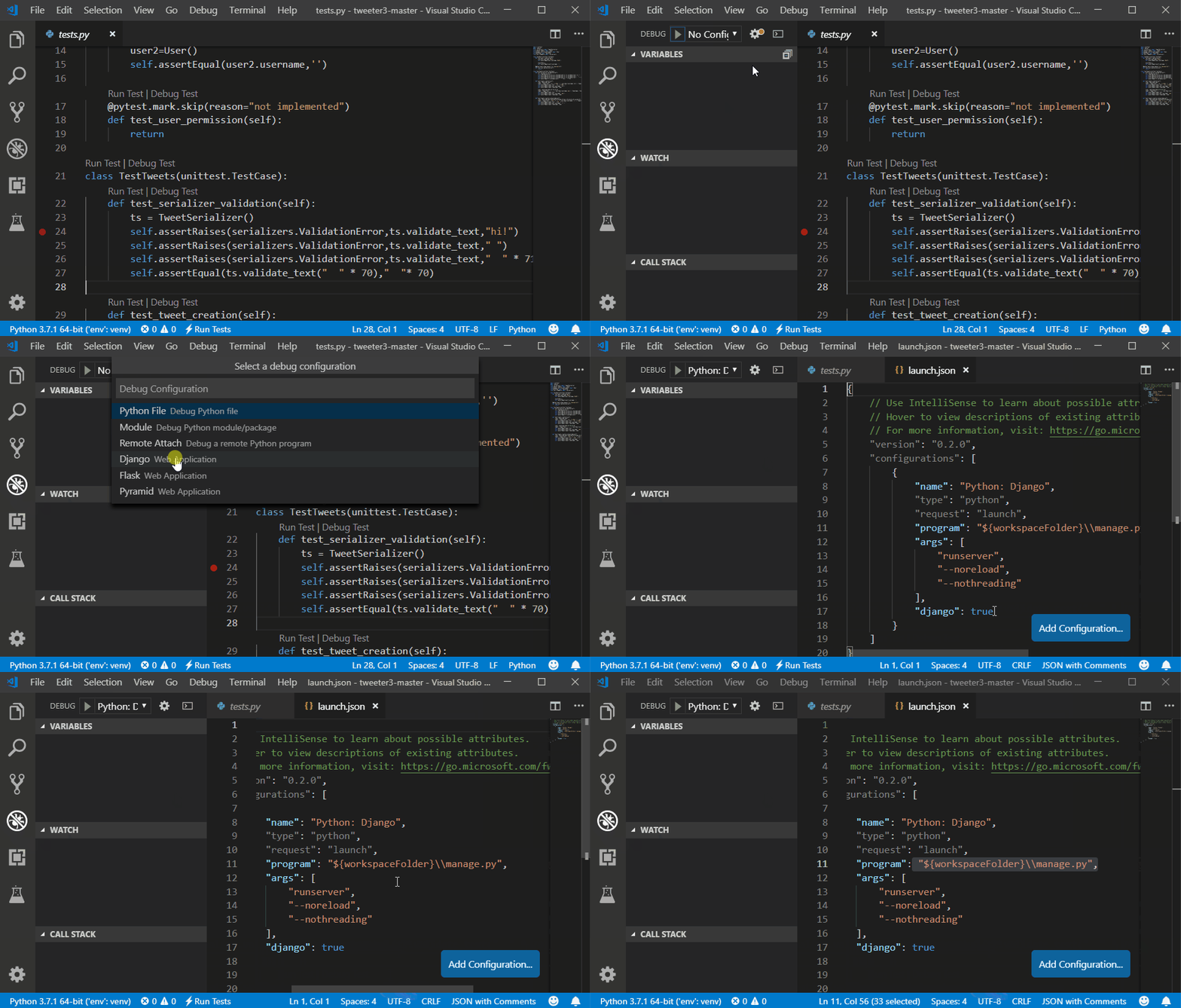
1. Python extension for Visual Studio Code

by Microsoft
2. Pylance

by Microsoft

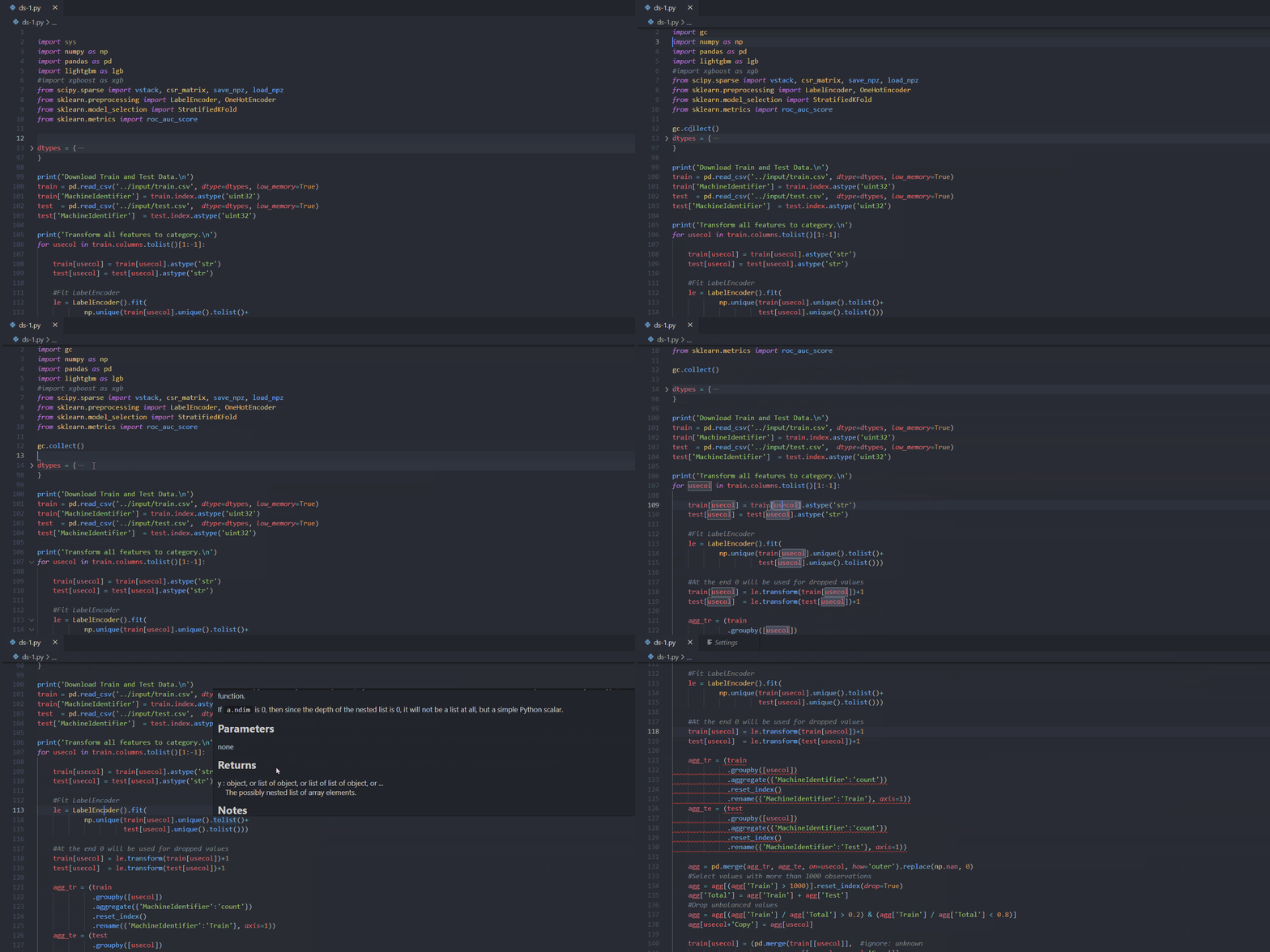
Pylance is an extension developed by Microsoft that builds upon the Python extension mentioned above. It enhances the Python development experience by providing advanced type checking, type inference, and IntelliSense features powered by the Pyright static type checker. Pylance can help catch type-related errors and provide more accurate code suggestions.
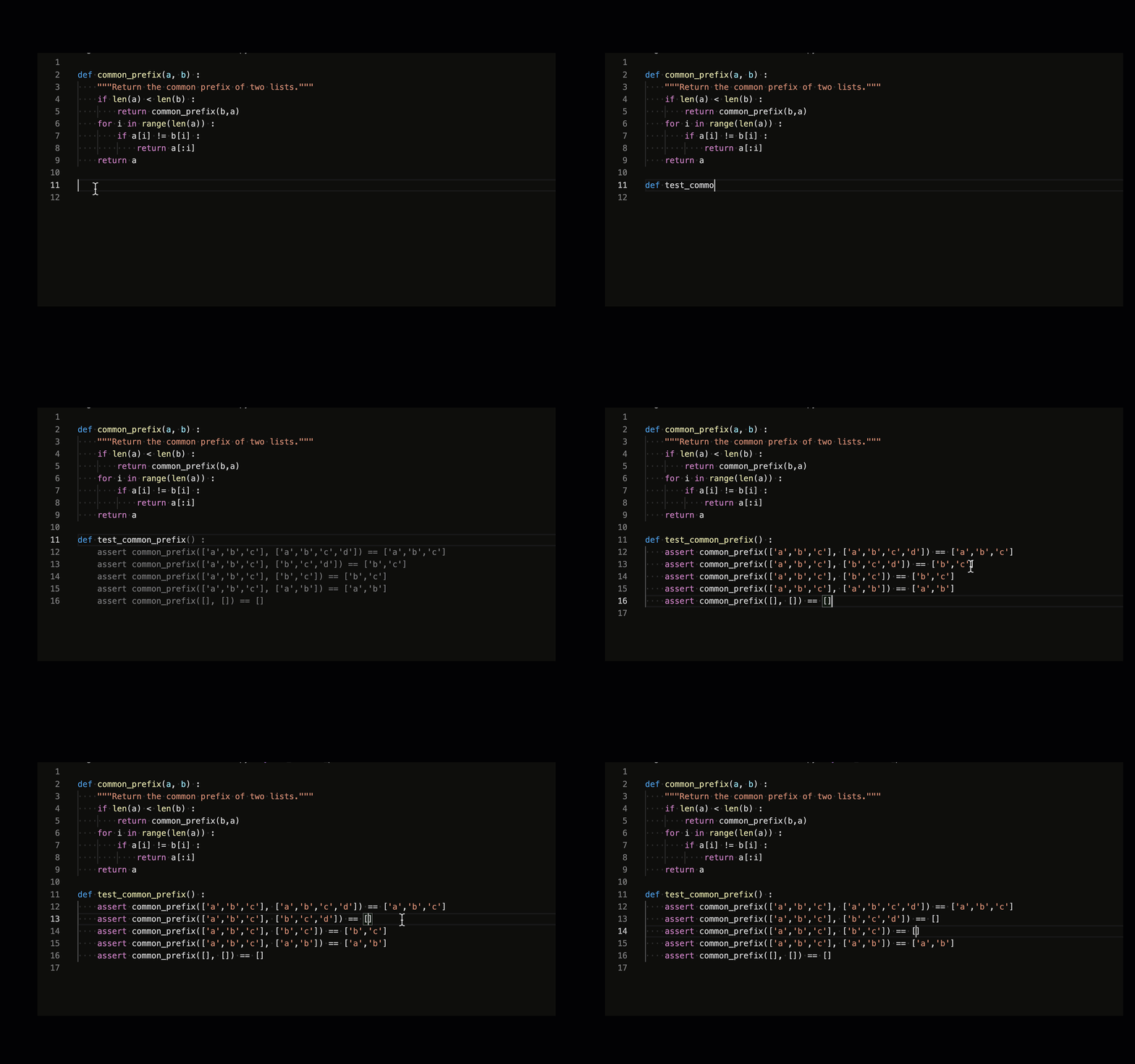
3. Github Copilot

by Github

GitHub Copilot is an AI-powered coding assistant developed by GitHub in collaboration with OpenAI. It integrates directly into code editors, providing real-time suggestions and autocompletions to developers as they write code. By analyzing code context and comments, Copilot generates code snippets, function definitions, and even entire lines of code, covering a wide range of programming languages and frameworks. It aims to enhance developer productivity, foster learning, and streamline the coding process by assisting with repetitive tasks, suggesting best practices, and accelerating the development workflow through its innovative AI-driven capabilities.
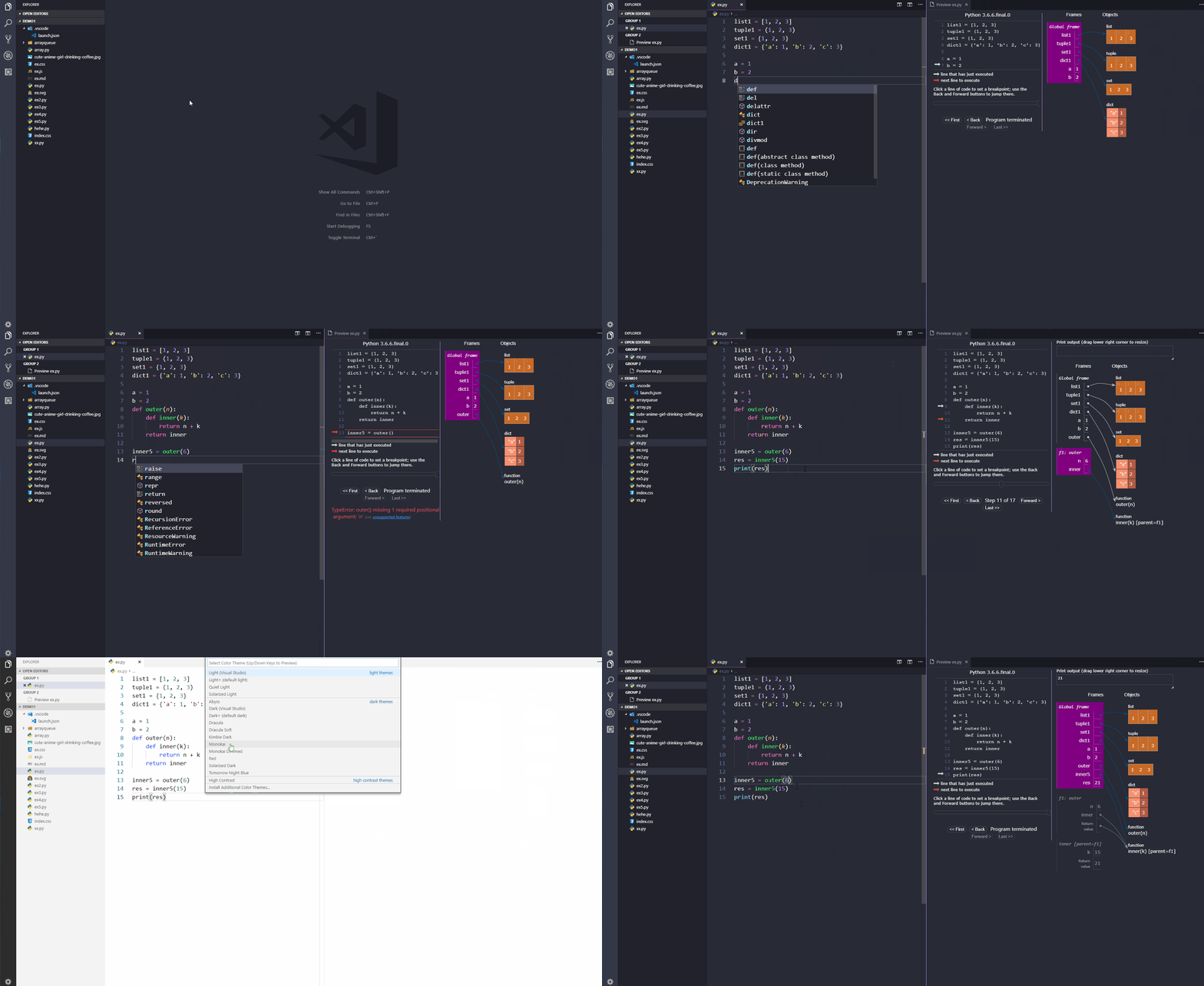
4. Python Preview

by dongli

Extension provides preview for python execution.
5. Indent-Rainbow

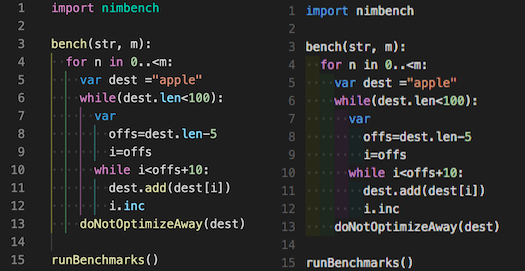
by oderwat

This extension adds colors to the indentation in front of the text alternating four different colors on each step.
6. Bracket Pair Colorization Toggler

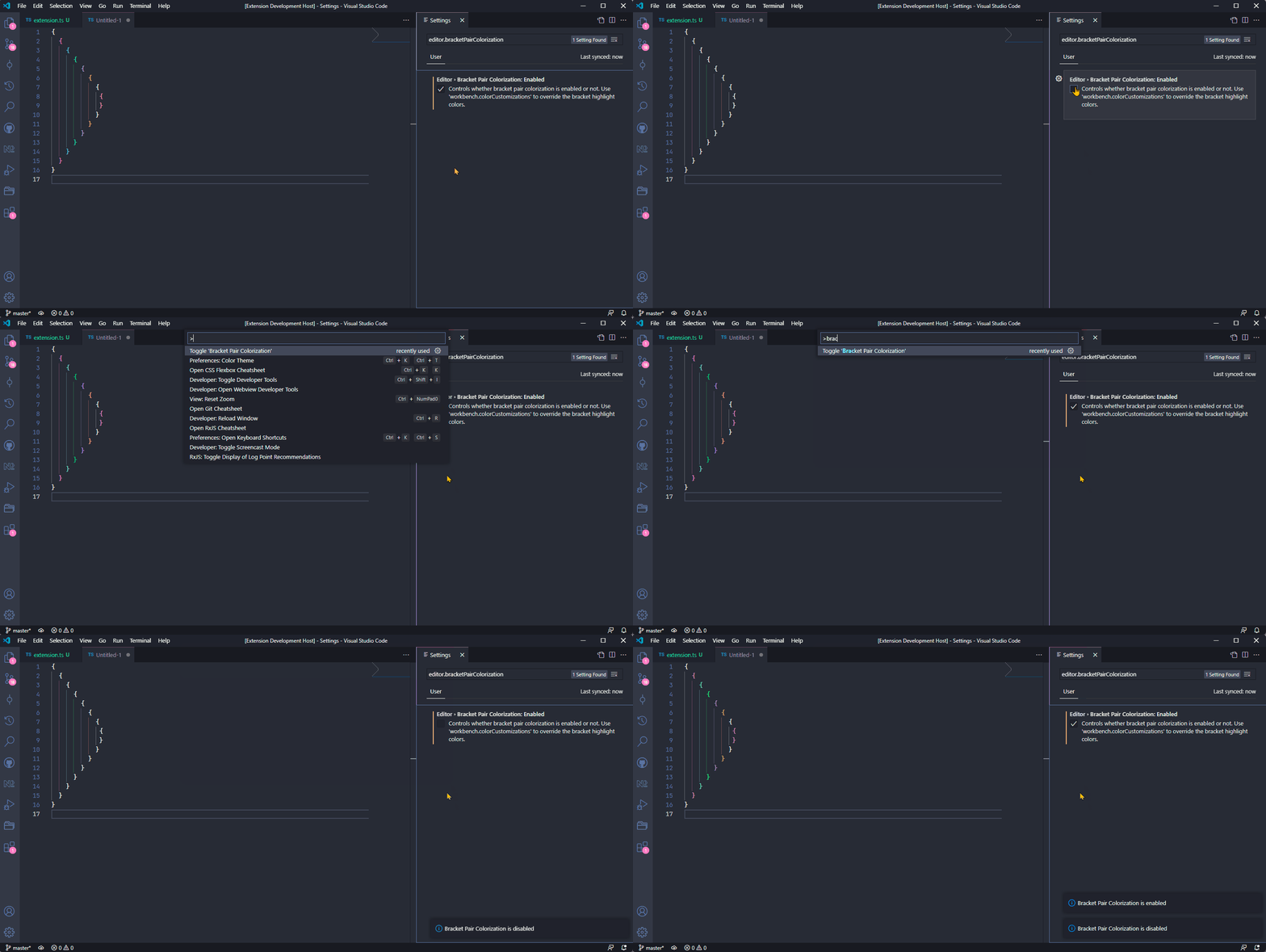
by Dzhavat Ushev

This extension allows matching brackets to be identified with colors.
7. Python Snippets

by Ferhat Yalçın

8. Python Test Explorer for Visual Studio Code

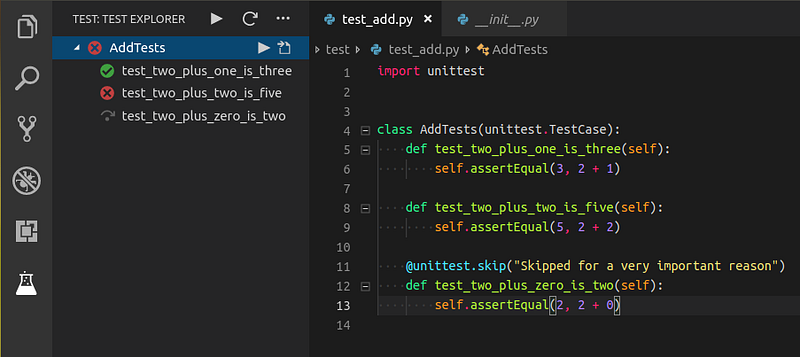
by Little Fox Team

Extension allows you to run your python tests in the sidebar of Visual Studio Code
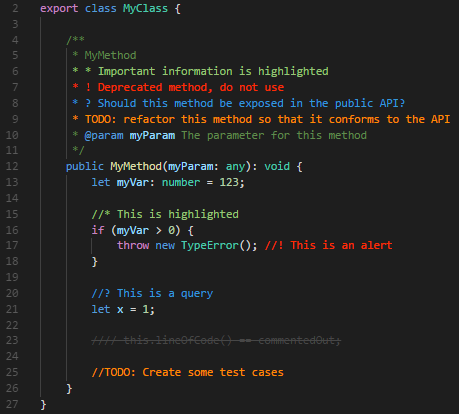
9. Better Comments

by Aaron Bond

Extension will make you able to categorise your annotations into:

  • Alerts
  • Queries
  • TODOs
  • Highlights
  • Commented out code can also be styled to make it clear the code shouldn’t be there
  • Any other comment styles you’d like can be specified in the settings
10. AI Python Docstring Generator

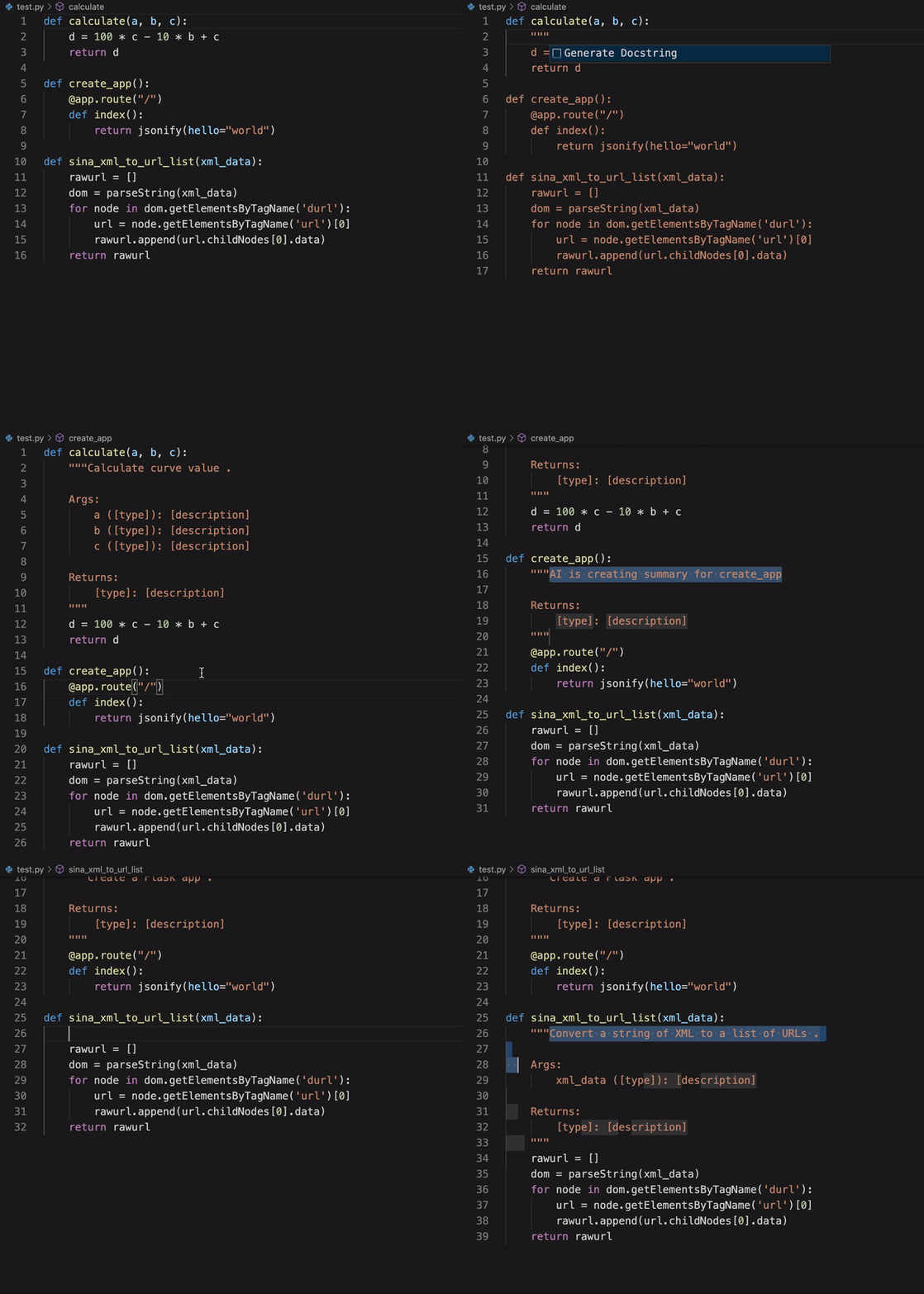
by Tae Hwan Jung

Extension will help you quickly generate doc-strings for python.
Conclusion

In the dynamic realm of programming, innovation continues to propel development environments forward, and the year 2023 stands as a testament to this progress. The curated ensemble of top 10 Visual Studio Code extensions for Python programming serves as a glimpse into the possibilities that arise when technology converges with creativity. These extensions, whether empowering developers with AI-driven assistance or simplifying the mundane tasks of code annotation and documentation, have revolutionized the art of coding. As we conclude our exploration of these extensions, it’s evident that the landscape of programming tools is shifting towards a future where efficiency, collaboration, and creativity are elevated by the synergy between developers and their digital companions. The journey of coding is an ever-evolving one, and with extensions like the ones we’ve uncovered, developers are equipped to embrace the challenges and opportunities that lie ahead in this exciting era of software development.

In Plain English

Thank you for being a part of our community! Before you go:

Python
Vscode
Github
Programming
Web Development
Recommended from ReadMedium