avatarBlake West

Free AI web copilot to create summaries, insights and extended knowledge, download it at here

1941

Abstract

k S8 Pro Ultra.</p><p id="3c3f">The standout is the ability to lift the mop when vacuuming over carpet. This is the first ECOVACS robot to offer this feature and the mopping water is heated to 55℃. Now there is no onboard water tank, so the robot does need to return to the dock to clean the pads. This can be set to occur every 6, 10 or 15 minutes, but don’t let this deter you. I actually prefer having the mopping pads cleaned instead of just adding water to already dirty pads. There’s also the hot air drying of the mopping pads after cleaning, another great feature.</p><figure id="2998"><img src="https://cdn-images-1.readmedium.com/v2/resize:fit:800/1*V78ue19s4pxSJxXEPVDaCw.png"><figcaption></figcaption></figure><p id="3d77">The obstacle avoidance does well to avoid objects — a plus at our place where, with two young kids at home, there are always challenges. I have found a flaw when it comes to dealing with clothes airers, stools or anything with bars running level to the ground. Though it manages to climb over, it can still be a pain to hear the wheels squeak while it finds the correct approach. You can optionally adjust the obstacle avoidance to prioritise either cleaning or objects.</p><figure id="e2e9"><img src="https://cdn-images-1.readmedium.com/v2/resize:fit:800/1*XZEWqH7d0PBGGy3hC8XpSQ.png"><figcaption></figcaption></figure><p id="19c2">The 5200mAh battery is adequate, however I would prefer more runtime. My home has around 400 square meters in floor space and I’ve found that it can’t clean the entire house when trying to mop and vacuum at the same time. However as a workaround I spread the workload over different schedules. There are optional settings to adjust the cleaning level, which can help with increasing the floor area covered, but it will slightly impact the cleaning quality.</p><figure id="d236"><img src="https://cdn-images-1.readmedium.com/v2/resize:fit:800/1*su5HxpxfZUf9lTR2g59Cdw.png"><

Options

figcaption></figcaption></figure><p id="2dea">The mobile app for iPhone works well, but only once you’ve got your preferences, map and schedules setup. I experienced a number of issues with trying to update the map, mostly when trying to split rooms. It takes a few goes to get the app to accept the change.</p><p id="1d64">The app allows you to create customised cleanup scenarios, where you can specify the rooms to clean, the type of clean, mop and/or vacuum, including the suction power and 1 or 2 cleans per room. There is however a limitation to only 5 scenarios that you can create.</p><figure id="e335"><img src="https://cdn-images-1.readmedium.com/v2/resize:fit:800/1*zBIl03XI-M46LMWnnhndNQ.png"><figcaption></figcaption></figure><p id="9eec">Scenarios can then be linked to schedules, which can be set to run either once off, or on a weekly reoccurring schedule. If you’re looking to set a schedule for every fortnight or once a month, that’s unfortunately not available.</p><figure id="7c26"><img src="https://cdn-images-1.readmedium.com/v2/resize:fit:800/1*cSOpIUeSnfELqqHlMki8MQ.png"><figcaption></figcaption></figure><p id="06e7">It’s still early days for me and the robot, but so far it’s blown me away. I’m a cleaning freak, so having clean floors all the time is a big plus. Apart from changing the water in the dock regularly, this really is a low maintenance machine, perfect for busy households.</p><p id="890c">I’m yet to explore other features in the app but I’ll keep you updated. I hope you enjoyed the read.</p><figure id="5332"><img src="https://cdn-images-1.readmedium.com/v2/resize:fit:800/1*FPABIAWpM3DKmzm7Y4sKQQ.png"><figcaption></figcaption></figure><p id="b068">*<i>Disclosure: This post contains affiliate links, which means I may earn a commission if you click through and make a purchase. This has no impact on my view on these products — all thoughts and opinions are 100% my own.</i></p></article></body>

My Review: Latest ECOVACS DEEPBOT T20 Omni Robot Cleaner

As a home automation fanatic, I’ve been eagerly waiting for ECOVACS to release the latest DEEBOT T20 Omni robot vacuum in Australia.

If you’re not familiar with this module see the affiliate link below:

In Australia the model became available in July this year. To set the tone, this is one amazing machine, which is well worth the $1,799.00 AUD price tag. It’s main competitor is the Roborock S8 Pro Ultra, if you’re looking for an alternative.

I’m going to share my honest opinion and let you know why I chose this product over the Roborock. I’ll also let you in on a few things that I’ve only recently discovered. This will hopefully help you, if you’re thinking about purchasing one.

To start, I was pleasantly surprised by the price. Compared to the previous flagship model ECOVACS Deebot X1 Omni this model is $200 cheaper, and $900 cheaper than the average price for the Roborock S8 Pro Ultra.

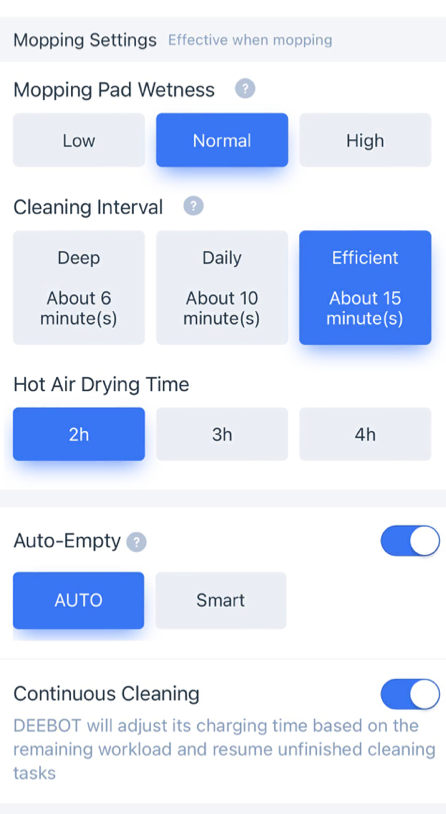
The standout is the ability to lift the mop when vacuuming over carpet. This is the first ECOVACS robot to offer this feature and the mopping water is heated to 55℃. Now there is no onboard water tank, so the robot does need to return to the dock to clean the pads. This can be set to occur every 6, 10 or 15 minutes, but don’t let this deter you. I actually prefer having the mopping pads cleaned instead of just adding water to already dirty pads. There’s also the hot air drying of the mopping pads after cleaning, another great feature.
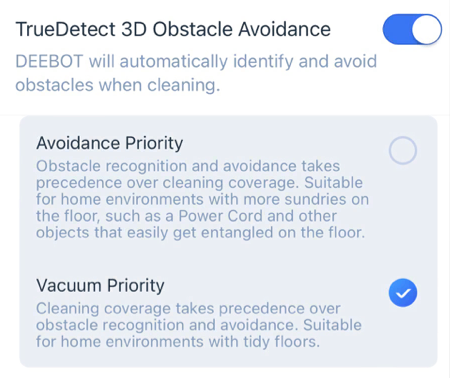
The obstacle avoidance does well to avoid objects — a plus at our place where, with two young kids at home, there are always challenges. I have found a flaw when it comes to dealing with clothes airers, stools or anything with bars running level to the ground. Though it manages to climb over, it can still be a pain to hear the wheels squeak while it finds the correct approach. You can optionally adjust the obstacle avoidance to prioritise either cleaning or objects.
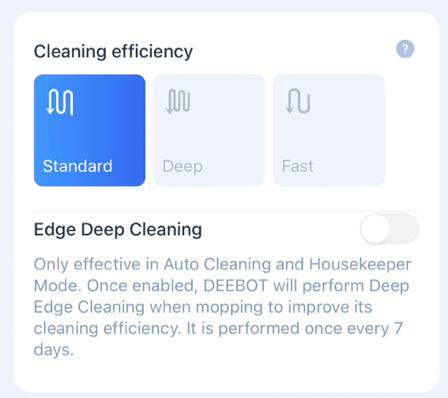
The 5200mAh battery is adequate, however I would prefer more runtime. My home has around 400 square meters in floor space and I’ve found that it can’t clean the entire house when trying to mop and vacuum at the same time. However as a workaround I spread the workload over different schedules. There are optional settings to adjust the cleaning level, which can help with increasing the floor area covered, but it will slightly impact the cleaning quality.
The mobile app for iPhone works well, but only once you’ve got your preferences, map and schedules setup. I experienced a number of issues with trying to update the map, mostly when trying to split rooms. It takes a few goes to get the app to accept the change.

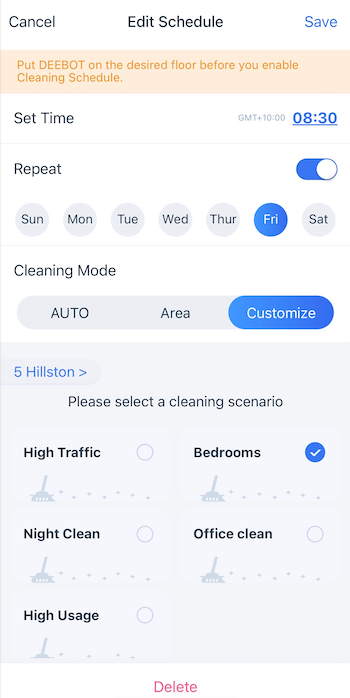
The app allows you to create customised cleanup scenarios, where you can specify the rooms to clean, the type of clean, mop and/or vacuum, including the suction power and 1 or 2 cleans per room. There is however a limitation to only 5 scenarios that you can create.
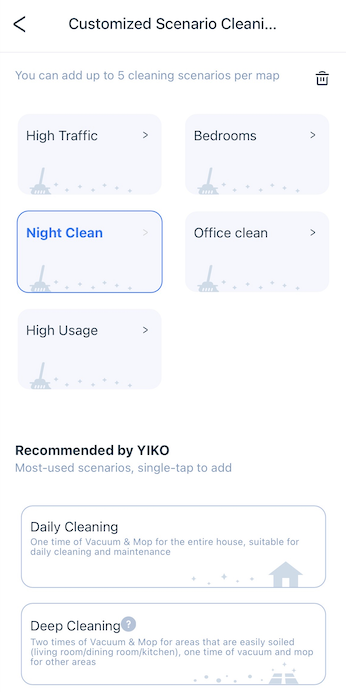
Scenarios can then be linked to schedules, which can be set to run either once off, or on a weekly reoccurring schedule. If you’re looking to set a schedule for every fortnight or once a month, that’s unfortunately not available.
It’s still early days for me and the robot, but so far it’s blown me away. I’m a cleaning freak, so having clean floors all the time is a big plus. Apart from changing the water in the dock regularly, this really is a low maintenance machine, perfect for busy households.

I’m yet to explore other features in the app but I’ll keep you updated. I hope you enjoyed the read.

*Disclosure: This post contains affiliate links, which means I may earn a commission if you click through and make a purchase. This has no impact on my view on these products — all thoughts and opinions are 100% my own.

Home Technology
Cleaning
Vaccum
Robotics
Mop
Recommended from ReadMedium