
My NLP practicals: Embedding Creation and Search with Bedrock and OpenSearch Serverless

Word embeddings are low-dimensional and continuous (i.e., dense, as opposed to sparse) vector representations that map words into a structured geometric space, thereby capturing semantic and contextual information. See my post “But wait! What are the word embeddings” to learn further about embeddings concept. In this blog post, we’ll learn about generating embeddings using Bedrock and storing it in Amazon Opensearch serverless for later searches. Let’s begin with a quick introduction to the services involved.
Amazon Bedrock is a fully managed service that makes Fundamental Models from leading AI startups and Amazon available via an API. You can get started with use cases like text generation, text summarization, chatbots quickly.
As for Amazon OpenSearch, our primary focus will be on the Vector Search collection of the service.
OpenSearch’s Vector search collection type is designed for storing, semantic searching, and retrieving vector embeddings in real-time in the vector engine.
Let's delve into generating, storing, and searching embeddings.
Step 0 — Load data
from langchain.document_loaders import HuggingFaceDatasetLoader
loader = HuggingFaceDatasetLoader("fka/awesome-chatgpt-prompts", page_content_column="prompt")
docs = loader.load()
Step 1 — Setup Embeddings
Split Text into chunks
Language Models are often limited by the amount of text that you can pass to them. Most models have token limit and you simply can’t feed a 50-page report to the LLM. Therefore, it is necessary to split them up into smaller chunks. For example, the token limit for Titan Embeddings G1 — Text is 8k.
from langchain.text_splitter import RecursiveCharacterTextSplitter
max_seq_len = 0
max_seq_len = max(len(doc.page_content) for doc in docs)

text_splitter = RecursiveCharacterTextSplitter(
    chunk_size = max_seq_len,
    chunk_overlap = 150
)
splits = text_splitter.split_documents(docs)
Setup Embeddings
from langchain.embeddings import BedrockEmbeddings
from langchain.llms.bedrock import Bedrock
import boto3

region_name='us-east-1'
bedrock_client = boto3.client(service_name='bedrock-runtime',
                              region_name=region_name)
# - create the Titan Embeddings Model
bedrock_embeddings = BedrockEmbeddings(model_id="amazon.titan-embed-text-v1",
                                       client=bedrock_client)
2. Prepare OpenSearch Vector Store
Configure Permissions
To use OpenSearch Serverless in general, Your user or role must have an attached identity-based policy with the following minimum permissions:
{
  "Version": "2012-10-17",
  "Statement": [
    {
      "Action": [
        "aoss:CreateCollection",
        "aoss:ListCollections",
        "aoss:BatchGetCollection",
        "aoss:DeleteCollection",
        "aoss:CreateAccessPolicy",
        "aoss:ListAccessPolicies",
        "aoss:UpdateAccessPolicy",
        "aoss:CreateSecurityPolicy",
        "iam:ListUsers",
        "iam:ListRoles"
      ],
      "Effect": "Allow",
      "Resource": "*"
    }
  ]
}
Create a collection
Collection is logical group of indexes that work together to support your workload.
- Open the Amazon OpenSearch Service console.
- Choose Collections in the left navigation pane and choose Create collection.
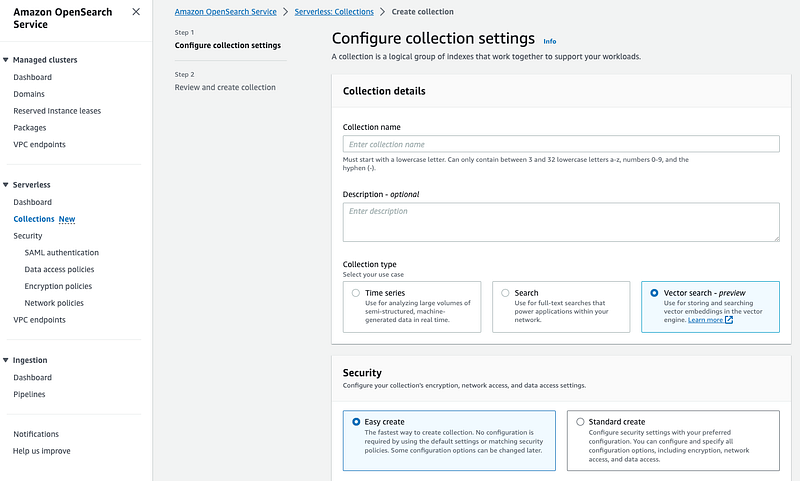
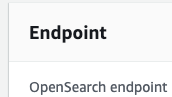
Once created, note down the endpoint of created collection
3. Create Index
Create OpenSearch Client. Replace host with your own endpoint.
# https://www.cianclarke.com/blog/aws-opensearch-and-langchain/
from opensearchpy import OpenSearch, RequestsHttpConnection, AWSV4SignerAuth

# # NB without HTTPS prefix, without a port - be sure to substitute your region again
host = '<Collection Endpoint e.g a1b540f7a6eta.us-east>'
region = 'us-east-1' # substitute your region here
service = 'aoss'
credentials = boto3.Session().get_credentials()
auth = AWSV4SignerAuth(credentials, region, service)

client = OpenSearch(
    hosts=[{'host': host, 'port': 443}],
    http_auth=auth,
    use_ssl=True,
    verify_certs=True,
    connection_class=RequestsHttpConnection
)
Create Index. Replace
# Index Creation
index_name = "<Index Name>"
indexBody = {
    "settings": {
        "index.knn": True
    },
    "mappings": {
        "properties": {
            "vector_field": {
                "type": "knn_vector",
                "dimension": 1536,
                "method": {
                    "engine": "faiss",
                    "name": "hnsw"
                }
            }
        }
    }
}

try:
    create_response = client.indices.create(index_name, body=indexBody)
    print('\nCreating index:')
    print(create_response)
except Exception as e:
    print(e)
    print("(Index likely already exists?)")
4. Create Embeddings
# https://api.python.langchain.com/en/latest/vectorstores/langchain.vectorstores.opensearch_vector_search.OpenSearchVectorSearch.html
from langchain.vectorstores import OpenSearchVectorSearch

docsearch = OpenSearchVectorSearch.from_documents(
    splits,
    bedrock_embeddings,
    opensearch_url=f'https://{host}:443',
    http_auth=auth,
    use_ssl=True,
    verify_certs=True,
    connection_class=RequestsHttpConnection,
    index_name=index_name,
    bulk_size=1000
)
5. Search for similar docs
query = "proofread"

# query_embedding = docsearch.embedding_function(query)
relevant_documents = docsearch.similarity_search(query, k=5)
print(f'{len(relevant_documents)} documents are fetched which are relevant to the query.')
print('----')
for i, rel_doc in enumerate(relevant_documents):
    print(f'## Document {i+1}: {rel_doc.metadata["act"]}: {rel_doc.metadata["prompt"]}')
References
Get an Amazon OpenSearch Serverless search collection up and running LangChain OpenSearch OpenSearch VectorSearch API Boto3 OpenSearch OpenSearch Vector Engine Semantic Search with Vector Engine


