
DISCOVER FLUTTER — WEEK #20
My January Recommendations for Flutter Packages
The best packages that I discovered in December 2020

The new year is ahead of us with new goals and new wishes, but we’re still keeping the tradition acquired during the previous four months — recommendations of the best Flutter packages.
Here are my top five discoveries related to this topic.
1. Style Your Flutter Widgets Without Confusion and Make Your Code Readable
What if you want to reuse just the padding and alignment on multiple different widgets?
This package tries to decouple style from the structure, and you can easily extract the style of a widget.
The result of using this package is much more readable code.
2. Ratings Are Important
Ratings are one of the most important parts of a business in our digital age of consumerism. When we hear about a new restaurant/club/labor company, we generally hop on the internet to see reviews for that business.

Thinking about it, I researched if there is a package that provides a classic rating look. Using the flutter_rating_bar package, you can choose one of the offered rating bar layouts.
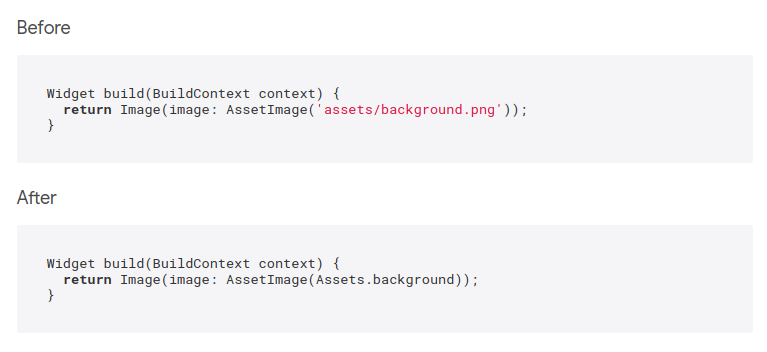
3. Goodbye to String Typos When Specifying the Asset File Location
This package is very handy when you have a large number of assets because it eliminates the possibility of string typos.
It generates Dart class with static const variables in it, which can be used to reference the assets safely anywhere in the flutter app.
4. Day ’n’ Nite
I chose this package because of its interesting design. Packages like this always attract my attention.
Maybe someone needs a day-night switch widget!

5. Speed Up Your App Development With the Login Widget
Ready to use login/signup widgets with various options for animations can definitely speed you up.

Conclusion
If you’re a fan of short, interesting articles covering various Flutter topics and you want to get into the habit of learning Flutter with me over the next weeks, you can read my articles every Tuesday.
If you have any questions or comments about this article, let me know in the comments section.
For those who want to jump into our Flutter journey, links from the previous weeks can be found below:
- Week #17 — “Create Layout For The Settings Screen In a Flash in Flutter”
- Week #18— “Combine Multiple Styles Per Line With RichText in Flutter”
See you next week, don’t break the streak!