
My First Week as a Publication Editor on Medium
What I Learned: The highs, the lows and everything in between

This week I took the leap and volunteered to become an editor for my friend, Megan Llorente’s new publication called MIDFORM.
I’d been thinking about becoming an editor for a Medium publication for a while, and when Megan put out a call for editors I knew this was my chance.
I have a lot of editing experience in my background working as a reporter and a technical editor and I love doing it. Also, I always wanted to be a magazine editor and editing stories for Medium Publications is a lot like that.
Learning the Ropes
The first thing I needed to learn was how to view the submissions as an editor.
“Where the heck do I start?” was my first question.
The answer: You just go to the publication, click on … and then click on Stories.
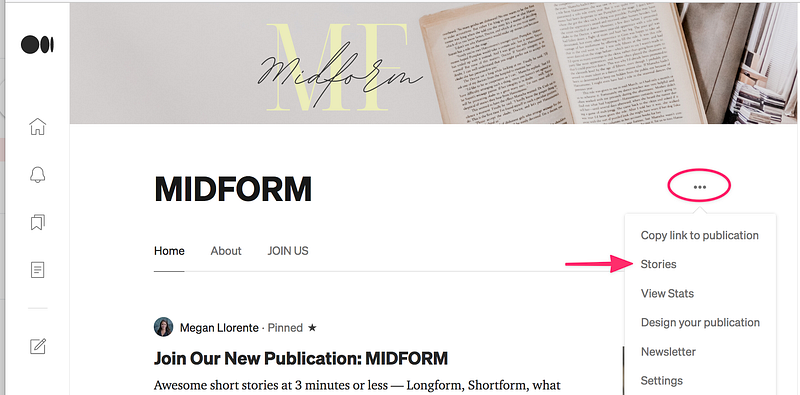
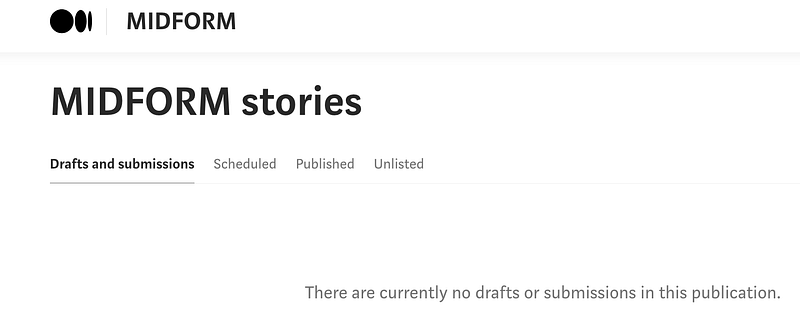
That will take you to the stories for the publication. As an editor you can review, edit and publish the stories listed under Drafts and submissions.
Helpful Hints about Editing
Some things to keep in mind when you’re doing your editorial reviews.
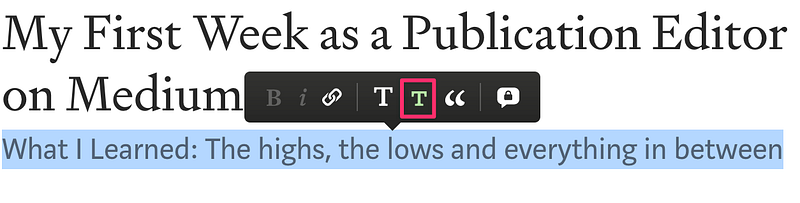
First, always check the Subtitle (if there is one) in the submitted story and make sure it’s properly formatted using the Small T in the Toolbar. A lot of authors forget to format this correctly, but it’s an easy fix.
Always check for Private Notes from other editors in the draft story.
Look for the little gray asterisk * in the right hand margin of the story. Just click on it and you can see any comments that the editor(s) and author have exchanged.
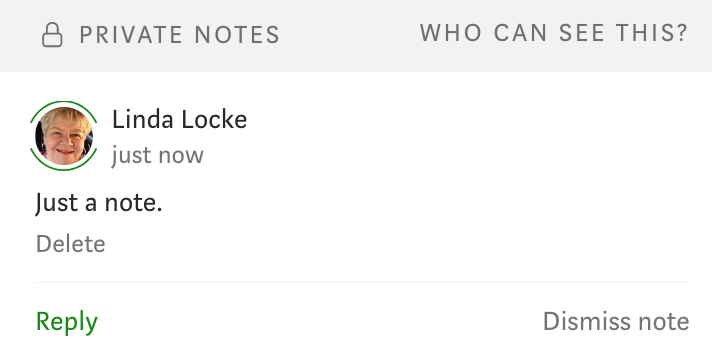
This is important since you want to have a consistent message flowing from the editor(s) to the author. Also you don’t want to duplicate efforts already completed by a different editor.
Tip: You can put Private Notes anywhere in a draft. If it’s a general note, place it near the top of the story. It’s easier for the other editors to see it there. And don’t get carried away and leave lots of little notes everywhere. That’s just confusing for everyone.
Reviewing the Draft Story
- Start with a quick read through, so you can get an idea of the writer’s style and the topic of the story.
- Next, check the story word count by using Ctrl+A for Windows or ⌘+A for Macs (for MIDFORM it’s 700 words max). Note: This word count hack only works in Draft mode on Medium. Bummer :)
- Make sure that the story complies with all of the publication’s rules.
- Do another read through and make any minor changes as needed.
- Now, it’s decision time. If the changes are minor and you fixed them, you can now decide to go ahead and publish. If the changes needed are more major, or the author has not complied with all the publication’s rules, you can send them a Private Note to tell them what needs to be done before the story can be published.
- Please be kind in your Private Notes. Just let the author know what they need to do and leave it at that. No snide comments please :)
- Side Note: Some stories will Not be a fit for your publication. As an editor you get to make that decision. Send a private note to the author and notify them. You don’t have to go into a lot of details to justify your decision. Keep it short and sweet.
- Finally, hit Publish!
Lessons Learned
Create an Editing Checklist for your publication. It doesn’t have to be complicated, just list the publication rules, a quick grammar and spelling review, and anything else you want to check. It’s up to you :)
It’s easy to get lost in the reading of a good story and forget to check the formatting, word count and other things.
I made this mistake once, but I’m not going to make it again. A checklist will help me do that.
The Highs
It’s fun to read and edit stories and to help writers get their work noticed. I like hitting the Publish button!
The Lows
Sometimes you have to tell authors to go back to the drawing board and do a good self edit or rewrite.
And sometimes you need to disappoint people and tell them you can’t publish their story. That sucks! But that’s part of being an editor.
You aren’t helping people if you don’t let them know how to become a better writer.
The In Between
Sometimes editing other author’s stories is more like work and you wish you were working on your own writing instead. But that’s just part of the writing experience.
But the good news is, you really are working on your own skills too. Writing is only part of the equation for a well-written story.
Editing is the balance that helps you learn how to tighten things up, format for emphasis and learn how to work within the constraints of word counts and other rules.
It’s all such a great learning experience and you will become a better editor of your own work because of it.
The Takeaway
When you’re ready to put on the editor’s cape, just go to your keyboard and step up to the challenge.
The best way to learn anything is to take the leap and just start doing it.
And remember:
You can always edit a bad page. You can’t edit a blank page. ― Jodi Picoult
Happy editing!
Let me know in the comments about your own editing experiences on Medium.
Linda Locke is a writer and mentor/teacher. She lives in Southern California in Ventura County by the coast with her husband and lots and lots of books.
If you liked this story and want to see more of my work, follow me here.
Want to get unlimited access to all the stories on Medium and get paid for writing? You can become a Member here. I get a small commission for your referral.


