avatarLamcer31210

Free AI web copilot to create summaries, insights and extended knowledge, download it at here

5698

Abstract

ase.com/price/solana</a></figcaption></figure><p id="e059">Transferring it to my new Phantom wallet…</p><figure id="6d8b"><img src="https://cdn-images-1.readmedium.com/v2/resize:fit:800/1*Xb0QpkZija594ZCa0HC9uw.png"><figcaption><a href="https://www.coinbase.com/price/solana">https://www.coinbase.com/price/solana</a></figcaption></figure><figure id="46a2"><img src="https://cdn-images-1.readmedium.com/v2/resize:fit:800/1*Em9Lt2UIXnvFQaea0hHm4Q.png"><figcaption><a href="https://www.coinbase.com/price/solana">https://www.coinbase.com/price/solana</a></figcaption></figure><p id="1e0f">Coinbase acknowledged me sending these tokens…</p><figure id="7ec4"><img src="https://cdn-images-1.readmedium.com/v2/resize:fit:800/1*x9RYPEiyYNetzoFihPgFQQ.png"><figcaption>Now I have Solana in my new wallet.</figcaption></figure><p id="8bc8">…& they were shown as received in my new wallet.</p><ul><li><b>So far so good!</b></li></ul><p id="5a76">I also have a small amount of USDC on Coinbase, that we will need to use later on for the LP.</p><figure id="03b4"><img src="https://cdn-images-1.readmedium.com/v2/resize:fit:800/1*KET6pkfRE0-V05wDo0z_yA.png"><figcaption><a href="https://www.coinbase.com/price/usdc">https://www.coinbase.com/price/usdc</a></figcaption></figure><p id="fafe">I sent it to the phantom wallet, using the same process as with my SOL above.</p><figure id="e8ac"><img src="https://cdn-images-1.readmedium.com/v2/resize:fit:800/1*ahmRQ50EaZJnRmfLYsKqYg.png"><figcaption><a href="https://www.coinbase.com/price/usdc">https://www.coinbase.com/price/usdc</a></figcaption></figure><h1 id="1841">Step 3 — Bridging Trunk to Solana</h1><p id="3061">I now need to go get some more TRUNK tokens to my Solana wallet.</p><ul><li>I converted some BNB to some new TRUNK for this new journey, using <a href="https://pancakeswap.finance/swap?outputCurrency=0xdd325c38b12903b727d16961e61333f4871a70e0&amp;chainId=56"><b><i>Pancakeswap</i></b></a>.</li></ul><figure id="6cb0"><img src="https://cdn-images-1.readmedium.com/v2/resize:fit:800/1*lWWCITLLOlfl_6FAmeAuFg.png"><figcaption><a href="https://pancakeswap.finance/swap?inputCurrency=BNB&amp;outputCurrency=0xdd325C38b12903B727D16961e61333f4871A70E0">https://pancakeswap.finance/swap?inputCurrency=BNB&amp;outputCurrency=0xdd325C38b12903B727D16961e61333f4871A70E0</a></figcaption></figure><p id="bd7f">Now that I have my Trunk tokens, I need to move them over to Solana via the <a href="https://portalbridge.com/advanced-tools/#/transfer">Workhole</a> bridge…</p><figure id="fb90"><img src="https://cdn-images-1.readmedium.com/v2/resize:fit:800/1*O_TjLGulhApS5woivzw8Sw.png"><figcaption><a href="https://portalbridge.com/advanced-tools/#/transfer">https://portalbridge.com/advanced-tools/#/transfer</a></figcaption></figure><p id="e0cf">It seemed to be a pretty intuitive process.</p><ul><li><b><i>I just needed to follow the steps, from top to bottom.</i></b></li></ul><p id="63ec">I had to create the associated token account…</p><figure id="1b15"><img src="https://cdn-images-1.readmedium.com/v2/resize:fit:800/1*ohYOGw8bfKgjfcbJcMxj5A.png"><figcaption><a href="https://portalbridge.com/advanced-tools/#/transfer">https://portalbridge.com/advanced-tools/#/transfer</a></figcaption></figure><p id="cc9d">… select the Solana as the target blockchain…</p><figure id="94f4"><img src="https://cdn-images-1.readmedium.com/v2/resize:fit:800/1*tH6n8LOGGr_dIhen8AGazg.png"><figcaption><a href="https://portalbridge.com/advanced-tools/#/transfer">https://portalbridge.com/advanced-tools/#/transfer</a></figcaption></figure><p id="0e45">…Approve the tokens…</p><figure id="e046"><img src="https://cdn-images-1.readmedium.com/v2/resize:fit:800/1*SkTlkRYfMb7l6202fhlhsg.png"><figcaption><a href="https://portalbridge.com/advanced-tools/#/transfer">https://portalbridge.com/advanced-tools/#/transfer</a></figcaption></figure><figure id="50c3"><img src="https://cdn-images-1.readmedium.com/v2/resize:fit:800/1*vcCqurppeTVkqqS_tVurgA.png"><figcaption><a href="https://portalbridge.com/advanced-tools/#/transfer">https://portalbridge.com/advanced-tools/#/transfer</a></figcaption></figure><p id="b8cc">…yes. I’m sure…(<i>That’s a funky name for the TRUNK token</i>).</p><figure id="6c58"><img src="https://cdn-images-1.readmedium.com/v2/resize:fit:800/1*h3nGefRFoutAC0Gx7UuVbw.png"><figcaption><a href="https://portalbridge.com/advanced-tools/#/transfer">https://portalbridge.com/advanced-tools/#/transfer</a></figcaption></figure><p id="e878">I had to do a bunch of different approvals.</p><figure id="8133"><img src="https://cdn-images-1.readmedium.com/v2/resize:fit:800/1*ditjT9mSafuWxIjjezilpw.png"><figcaption><a href="https://portalbridge.com/advanced-tools/#/transfer">https://portalbridge.com/advanced-tools/#/transfer</a></figcaption></figure><p id="5606">Lastly, I had to “redeem” these tokens for them to become available in my wallet.</p><figure id="e27d"><img src="https://cdn-images-1.readmedium.com/v2/resize:fit:800/1*0pagOYEH7298CIBeYFvmWg.png"><figcaption><a href="https://portalbridge.com/advanced-tools/#/transfer">https://portalbridge.com/advanced-tools/#/transfer</a></figcaption></figure><p id="ebb8">At this point, I’m done with the bridge.</p><ul><li><b><i>I may transfer more tokens over at a later time or just convert some more SOL to Trunk.</i></b></li></ul><figure id="c509"><img src="https://cdn-images-1.readmedium.com/v2/resize:fit:800/1*ezxyvArdan5hMJ-3qINI0A.png"><figcaption><a href="https://portalbridge.com/advanced-tools/#/transfer">https://portalbridge.com/advanced-tools/#/transfer</a></figcaption></figure><p id="d458">Now I can see my Trunk tokens in the Phantom wallet.</p><ul><li><b><i>Happy! Happy! Happy!</i></b>

Options

</li></ul><figure id="6b38"><img src="https://cdn-images-1.readmedium.com/v2/resize:fit:800/1*GOKloXhR_rqJTMu_JRbZpA.png"><figcaption>You now see my new TRUNK tokens in my Solana wallet!</figcaption></figure><h1 id="8c41">Step 4 — Supplying Trunk on Meteora LP</h1><p id="7c4a">Go to the <a href="https://app.meteora.ag/pools/2DK47wYQqvvQFxHbJFG23cHAeYW73NFd17hASrv1W2q4">Meteroa web link</a> posted on the <a href="https://elephant.money/trunk">Elephant Money site</a>.</p><ul><li>I connected my Phantom wallet &amp; it showed me my Trunk &amp; USDC tokens.</li></ul><figure id="6868"><img src="https://cdn-images-1.readmedium.com/v2/resize:fit:800/1*bste5Ctrx03Lt_zkZUBgdA.png"><figcaption><a href="https://app.meteora.ag/pools/2DK47wYQqvvQFxHbJFG23cHAeYW73NFd17hASrv1W2q4">https://app.meteora.ag/pools/2DK47wYQqvvQFxHbJFG23cHAeYW73NFd17hASrv1W2q4</a></figcaption></figure><p id="219a">Looks like I didn’t transfer enough USDC to cover all of my Trunk tokens…</p><figure id="e4d2"><img src="https://cdn-images-1.readmedium.com/v2/resize:fit:800/1*ziprD3UhV13bWAfVvyaIsw.png"><figcaption><a href="https://app.meteora.ag/pools/2DK47wYQqvvQFxHbJFG23cHAeYW73NFd17hASrv1W2q4">https://app.meteora.ag/pools/2DK47wYQqvvQFxHbJFG23cHAeYW73NFd17hASrv1W2q4</a></figcaption></figure><p id="ec0f">…so I just did the max USDC &amp; let it figure out how many Trunk tokens I needed for the LP.</p><figure id="ce2e"><img src="https://cdn-images-1.readmedium.com/v2/resize:fit:800/1*v65sxA_kwvvRbQlrNv2jHA.png"><figcaption><a href="https://app.meteora.ag/pools/2DK47wYQqvvQFxHbJFG23cHAeYW73NFd17hASrv1W2q4">https://app.meteora.ag/pools/2DK47wYQqvvQFxHbJFG23cHAeYW73NFd17hASrv1W2q4</a></figcaption></figure><p id="7984">This is what it looked like once I completed adding both tokens to the Meteora LP.</p><figure id="54d9"><img src="https://cdn-images-1.readmedium.com/v2/resize:fit:800/1*Tj0H_EtQP-D8oaTJytEKsQ.png"><figcaption><a href="https://app.meteora.ag/pools/2DK47wYQqvvQFxHbJFG23cHAeYW73NFd17hASrv1W2q4">https://app.meteora.ag/pools/2DK47wYQqvvQFxHbJFG23cHAeYW73NFd17hASrv1W2q4</a></figcaption></figure><ul><li><b>All done!</b></li></ul><h1 id="92fa">Helpful Tips!</h1><p id="91a2">Here’s some useful information about how I did all these steps.</p><ol><li>I was using the Chrome browser on a Windows 11 laptop.</li><li>I used the Rabby wallet for my bsc transactions &amp; the Phantom wallet for my SOL transactions.</li><li>I waited for each transaction &amp; approval to finish before clicking anything else.</li><li>I stayed on the same webpage, &amp; didn’t look at another app until the transfer was completed.</li><li>The whole process took roughly around 15 minutes to complete.</li></ol><p id="5de8"><b>BONUS: I followed the steps outlined in <a href="https://www.youtube.com/watch?v=9Z1BrUA-1Ko">this video</a>.</b></p> <figure id="26c2"> <div> <div> <img class="ratio" src="http://placehold.it/16x9"> <iframe class="" src="https://cdn.embedly.com/widgets/media.html?src=https%3A%2F%2Fwww.youtube.com%2Fembed%2F9Z1BrUA-1Ko%3Ffeature%3Doembed&amp;display_name=YouTube&amp;url=https%3A%2F%2Fwww.youtube.com%2Fwatch%3Fv%3D9Z1BrUA-1Ko&amp;image=https%3A%2F%2Fi.ytimg.com%2Fvi%2F9Z1BrUA-1Ko%2Fhqdefault.jpg&amp;key=a19fcc184b9711e1b4764040d3dc5c07&amp;type=text%2Fhtml&amp;schema=youtube" allowfullscreen="" frameborder="0" height="480" width="854"> </div> </div> </figure></iframe></div></div></figure><h1 id="6704">Hope this helps!</h1><p id="fd44">My referral info is below if you choose to join The Herd.</p><div id="c269" class="link-block"> <a href="https://elephant.money/partner.html?ref=0x8639551F642CCef27d99c2EB50E2c3572dD1A9B2&amp;source=post_page-----946029add263--------------------------------"> <div> <div> <h2>ELEPHANT.MONEY - PARTNER NETWORK</h2> <div><h3>Our Partner Network, aka "The Herd", rewards participants for onboarding their direct social networks where they have…</h3></div> <div><p>elephant.money</p></div> </div> <div> <div style="background-image: url(https://miro.readmedium.com/v2/resize:fit:320/0*TCU8nzkfuNZToEbY)"></div> </div> </div> </a> </div><p id="b99b">Once you are on the website above, ensure that my wallet’s address is in the “update partner” &amp; click update. You can use the wallet address below.</p><p id="04e1"><b>0x8639551F642CCef27d99c2EB50E2c3572dD1A9B2</b></p><p id="c12d">Click the link below if you would like to read any of my other Elephant Money articles.</p><div id="0f61" class="link-block"> <a href="https://medium.com/@lamcer31210/list/fa3d481e8192"> <div> <div> <h2>Elephant Money</h2> <div><h3>Edit description</h3></div> <div><p>medium.com</p></div> </div> <div> <div style="background-image: url(https://miro.readmedium.com/v2/resize:fit:320/0*10cc097fa6d4877d06fbba58b76d2f3d5ba75d46.jpeg)"></div> </div> </div> </a> </div><p id="4521">Till next time.</p><p id="aec9">God Speed!</p><p id="92c5">(NONE OF WHAT I WRITE IN MY ARTICLES IS TO BE TAKEN AS INVESTMENT ADVICE. It is primarily a record of what I am doing &amp; the different strategies I’m using to reach ROI &amp; make a profit in Defi. I am neither an advisor for this nor suggesting any financial action on your part. Invest at your own risk. DO NOT INVEST MORE THAN YOU ARE WILLING TO LOSE! DYOR. NFA.)</p></article></body>

My Experience with Trunk on Solana

Here is how it went for me, with lots of screenshots (because I like pictures).

https://elephant.money/

There has been quite a stir in the Elephant Money community as of late, mostly due to an enhancement with the TRUNK token.

  • The Trunk token is now cross-chain, as well as deflationary!

The Trunk/ Trumpet page has also been updated to reflect this change.
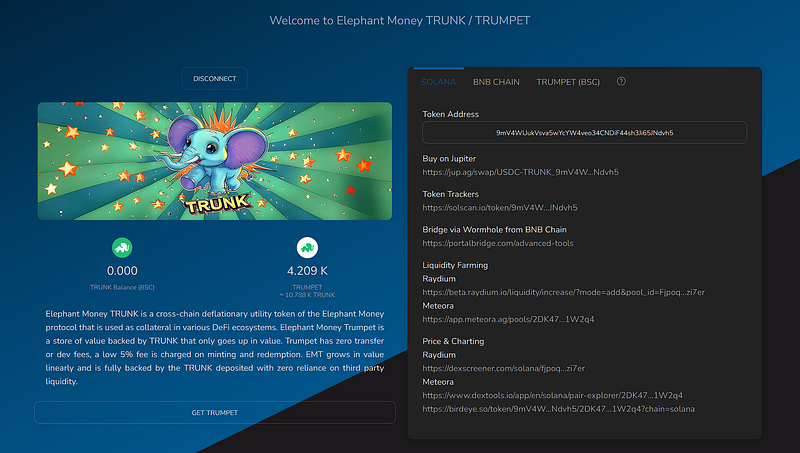
https://elephant.money/trunk

Users are now encouraged to start bridging their Trunk tokens over to the Solana blockchain & adding them to one of the 2 Trunk-USDC LPs on that chain.

  • Here is my experience moving a small amount of my Trunk over to the Solana blockchain & adding it to the Meteora LP.

The whole experience went smoothly for me.

Hopefully, it’ll go smoothly for you as well.

If you want to learn about all the projects I’m active with & my current strategies then click the link below.

Step 1- Get The Phantom Wallet

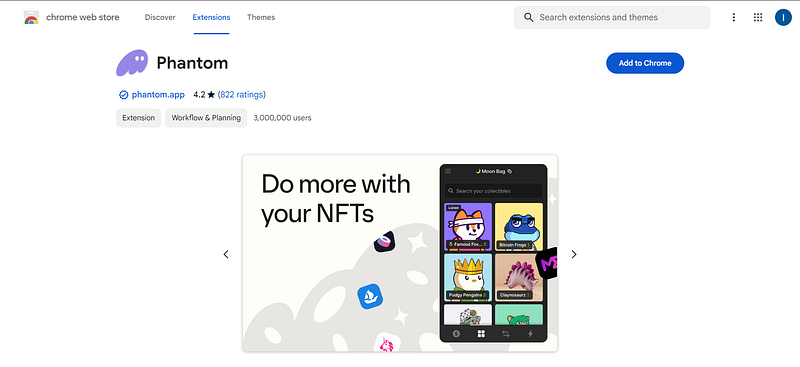
Head to the Phantom.app website to get the Phantom wallet.
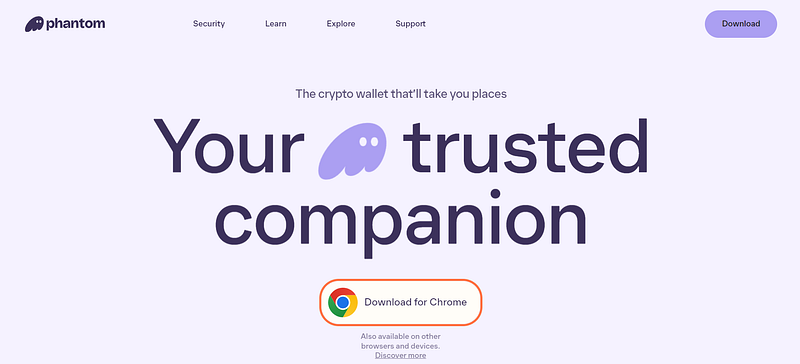
https://phantom.app/

Download the extension for Chrome.

https://chromewebstore.google.com/detail/phantom/bfnaelmomeimhlpmgjnjophhpkkoljpa?pli=1

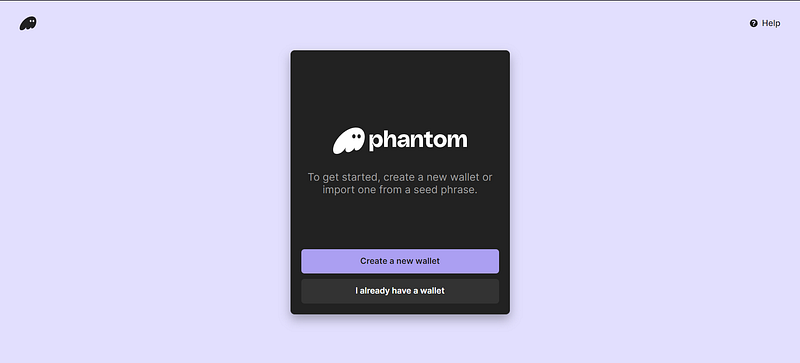
I had to create a new wallet.

chrome-extension://bfnaelmomeimhlpmgjnjophhpkkoljpa/onboarding.html

This new wallet needed a new password & seed phrase.
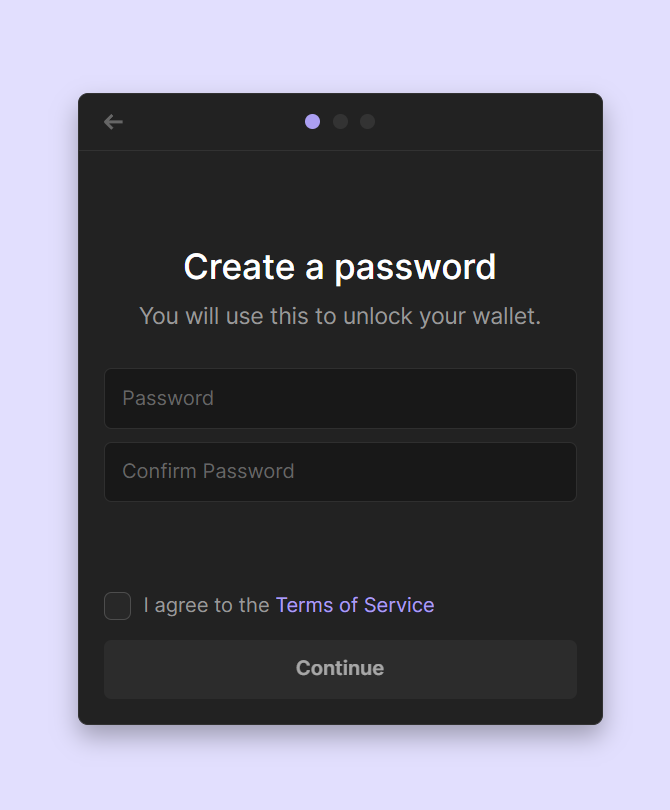
chrome-extension://bfnaelmomeimhlpmgjnjophhpkkoljpa/onboarding.html

Here’s my new wallet, all nice & clean!
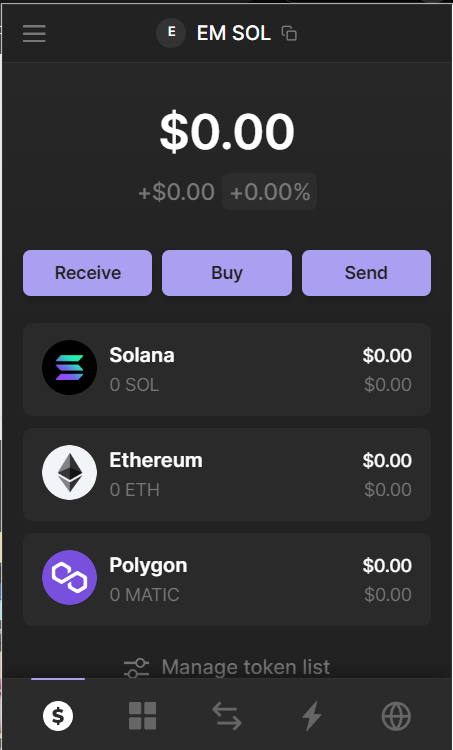
https://chromewebstore.google.com/detail/phantom/bfnaelmomeimhlpmgjnjophhpkkoljpa?pli=1

Here are my top 5 highest-earning articles from March.

Please check them out as well.

  1. My Current Crypto/ Defi Strategies & Goals
  2. Learning about the Earn Ecosystem…
  3. The 1% Club
  4. My Weekly EM Report #26–03/02/24
  5. I’m Adding BTC to My 1% Club

Step 2 — Move some Solana & USDC to my new wallet

Solana is the gas token on the Solana blockchain, just as BNB is the gas token on the Binance blockchain.

  • So I’ll need some SOL tokens to do stuff there.
  • I’ll also need some USDC tokens to use in LP on Meteroa.

I already have a small amount of SOL & USDC on Coinbase.

  • So we’ll use that.
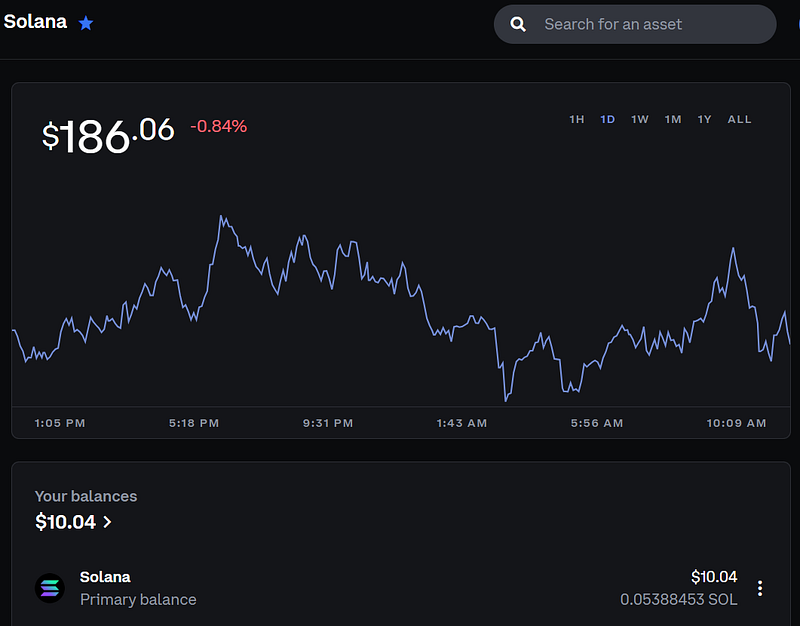
https://www.coinbase.com/price/solana

Transferring it to my new Phantom wallet…
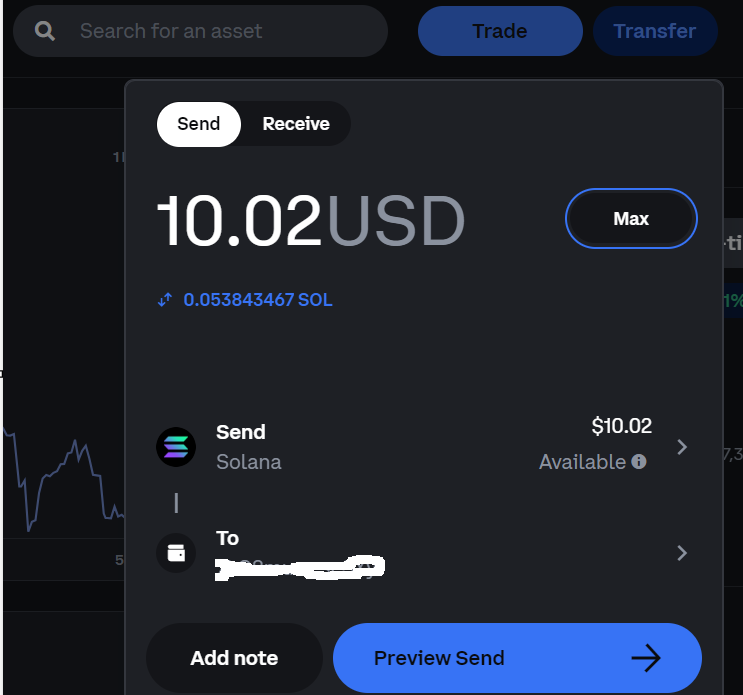
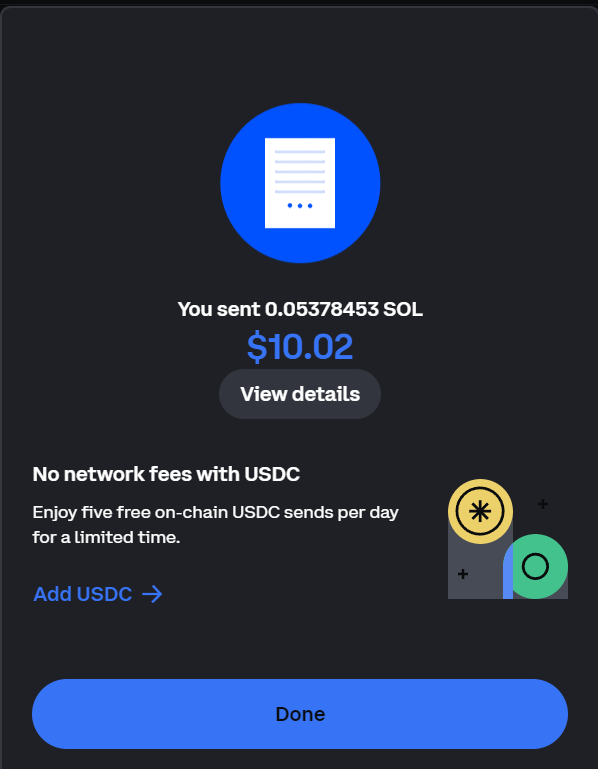
https://www.coinbase.com/price/solana

Coinbase acknowledged me sending these tokens…
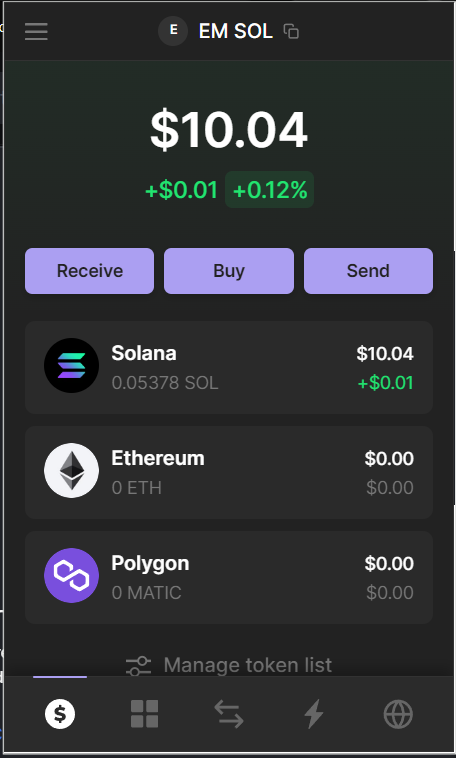
Now I have Solana in my new wallet.

…& they were shown as received in my new wallet.

  • So far so good!

I also have a small amount of USDC on Coinbase, that we will need to use later on for the LP.
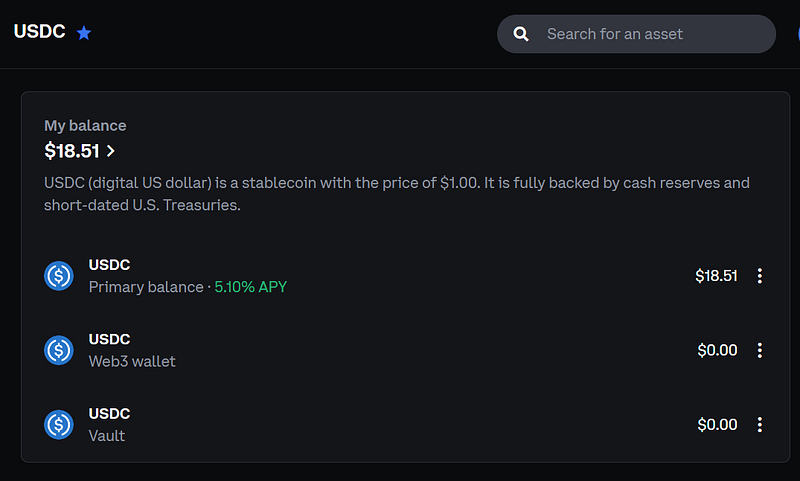
https://www.coinbase.com/price/usdc

I sent it to the phantom wallet, using the same process as with my SOL above.
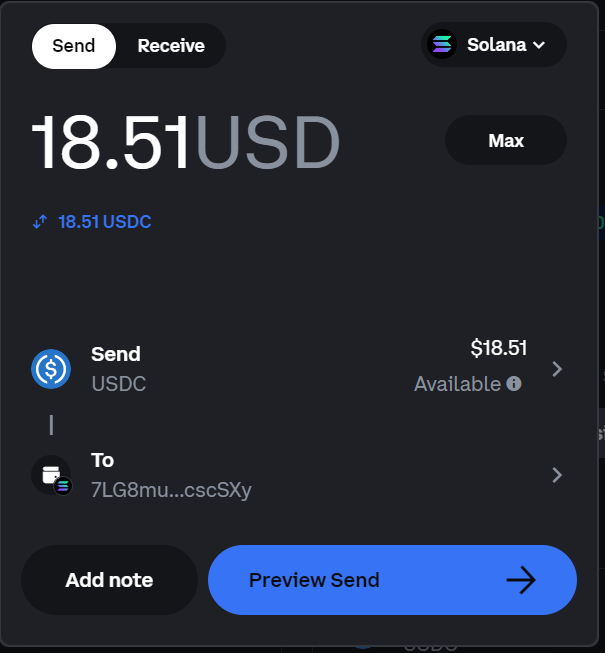
https://www.coinbase.com/price/usdc

Step 3 — Bridging Trunk to Solana

I now need to go get some more TRUNK tokens to my Solana wallet.

  • I converted some BNB to some new TRUNK for this new journey, using Pancakeswap.
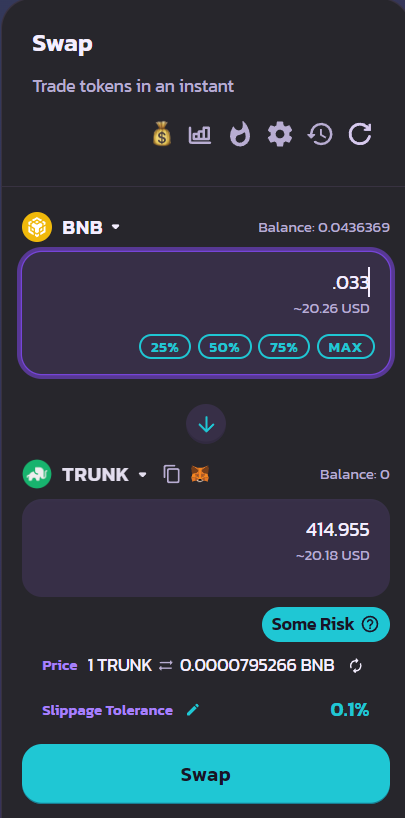
https://pancakeswap.finance/swap?inputCurrency=BNB&outputCurrency=0xdd325C38b12903B727D16961e61333f4871A70E0

Now that I have my Trunk tokens, I need to move them over to Solana via the Workhole bridge…
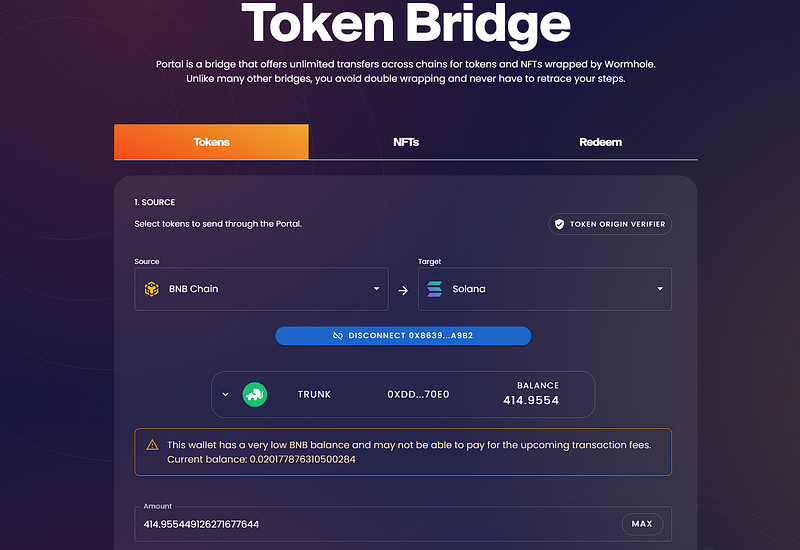
https://portalbridge.com/advanced-tools/#/transfer

It seemed to be a pretty intuitive process.

  • I just needed to follow the steps, from top to bottom.

I had to create the associated token account…
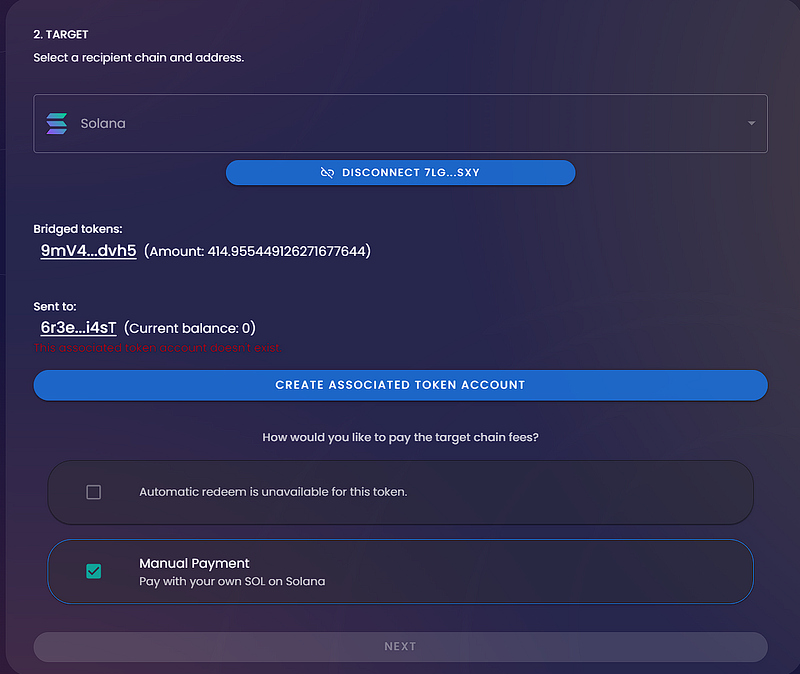
https://portalbridge.com/advanced-tools/#/transfer

… select the Solana as the target blockchain…
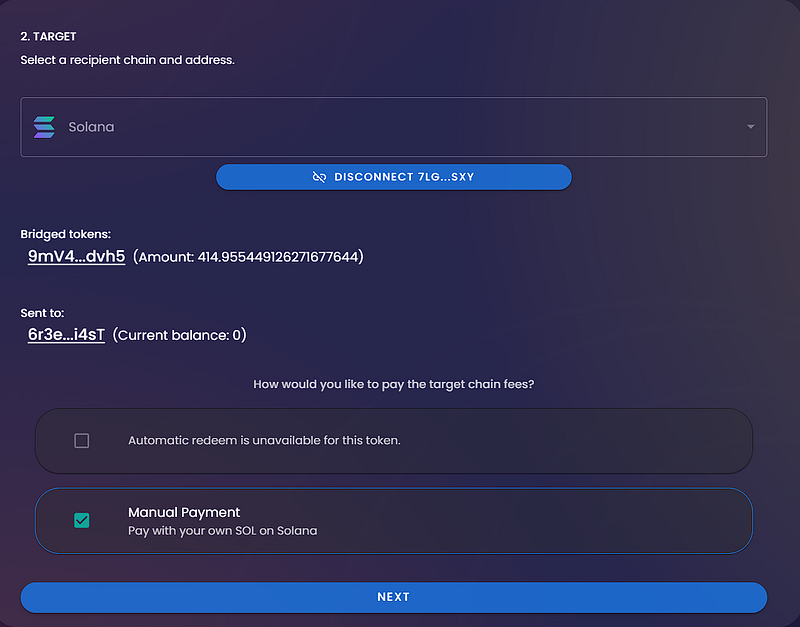
https://portalbridge.com/advanced-tools/#/transfer

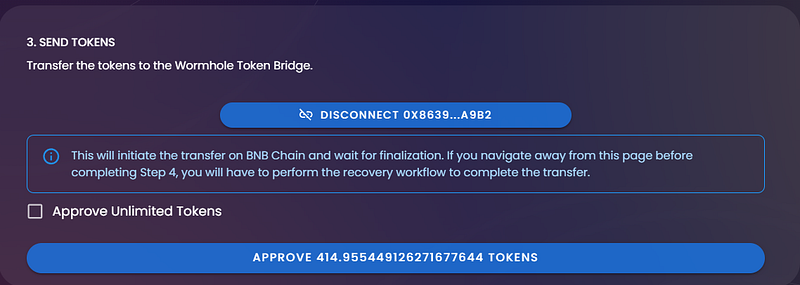
…Approve the tokens…

https://portalbridge.com/advanced-tools/#/transfer

…yes. I’m sure…(That’s a funky name for the TRUNK token).
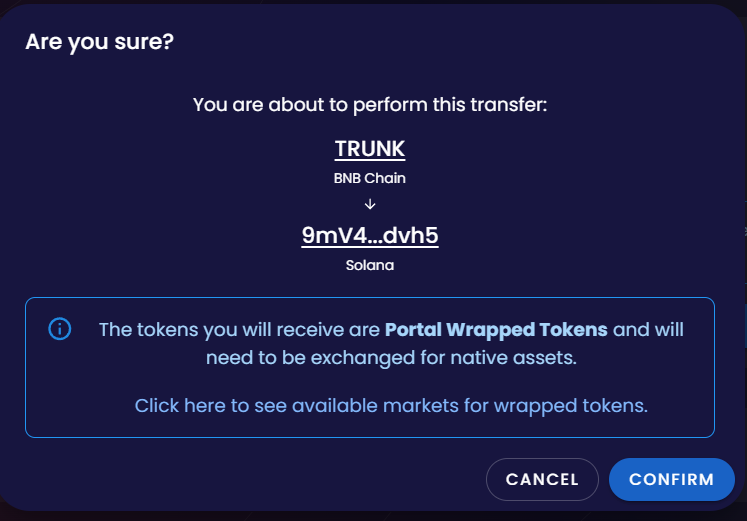
https://portalbridge.com/advanced-tools/#/transfer

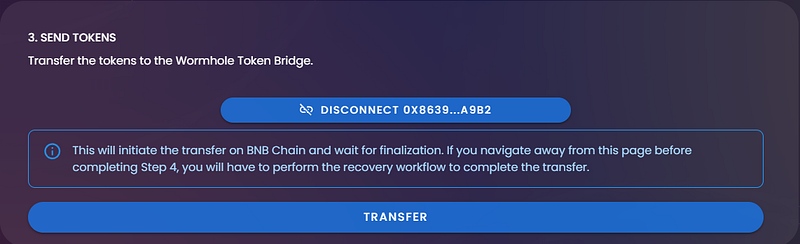
I had to do a bunch of different approvals.
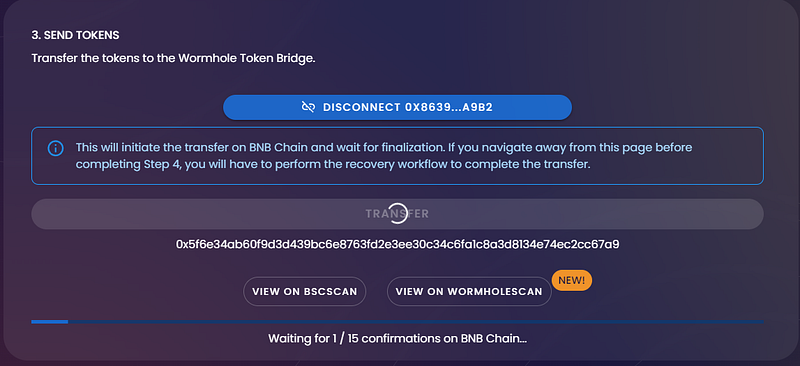
https://portalbridge.com/advanced-tools/#/transfer

Lastly, I had to “redeem” these tokens for them to become available in my wallet.
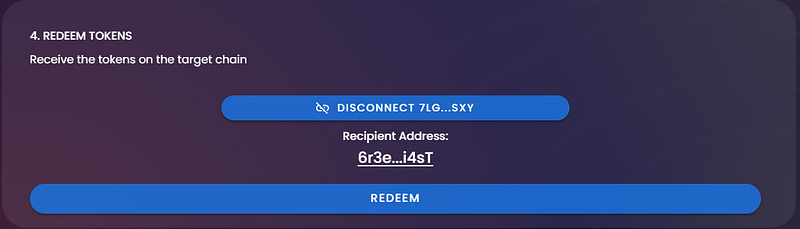
https://portalbridge.com/advanced-tools/#/transfer

At this point, I’m done with the bridge.

  • I may transfer more tokens over at a later time or just convert some more SOL to Trunk.
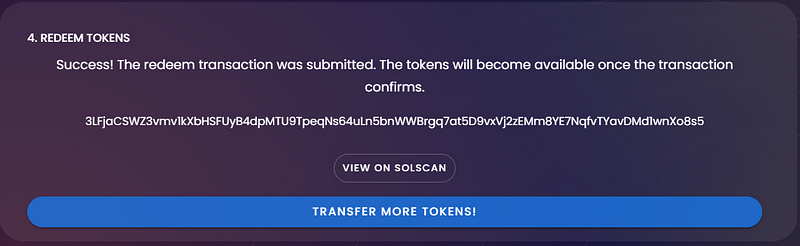
https://portalbridge.com/advanced-tools/#/transfer

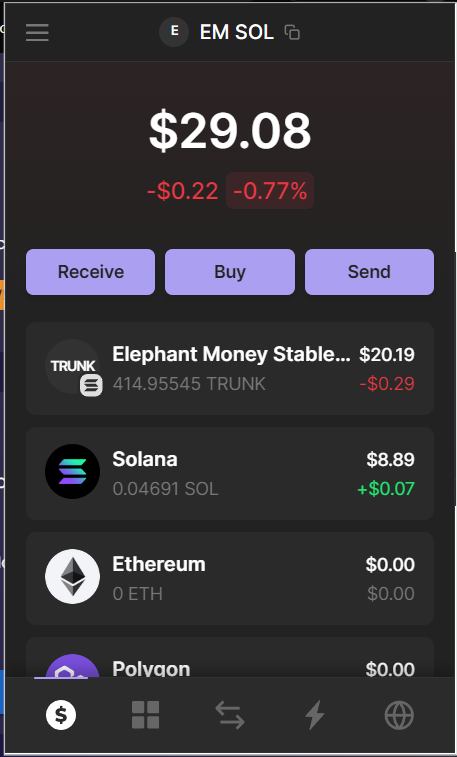
Now I can see my Trunk tokens in the Phantom wallet.

  • Happy! Happy! Happy!
You now see my new TRUNK tokens in my Solana wallet!

Step 4 — Supplying Trunk on Meteora LP

Go to the Meteroa web link posted on the Elephant Money site.

  • I connected my Phantom wallet & it showed me my Trunk & USDC tokens.
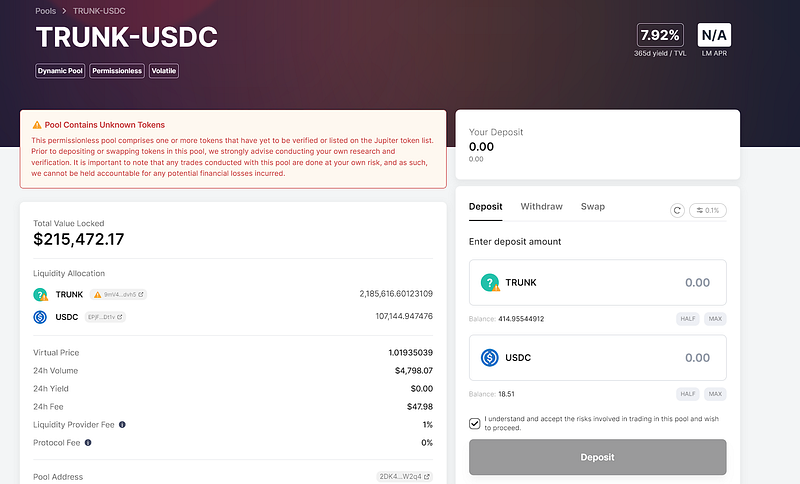
https://app.meteora.ag/pools/2DK47wYQqvvQFxHbJFG23cHAeYW73NFd17hASrv1W2q4

Looks like I didn’t transfer enough USDC to cover all of my Trunk tokens…
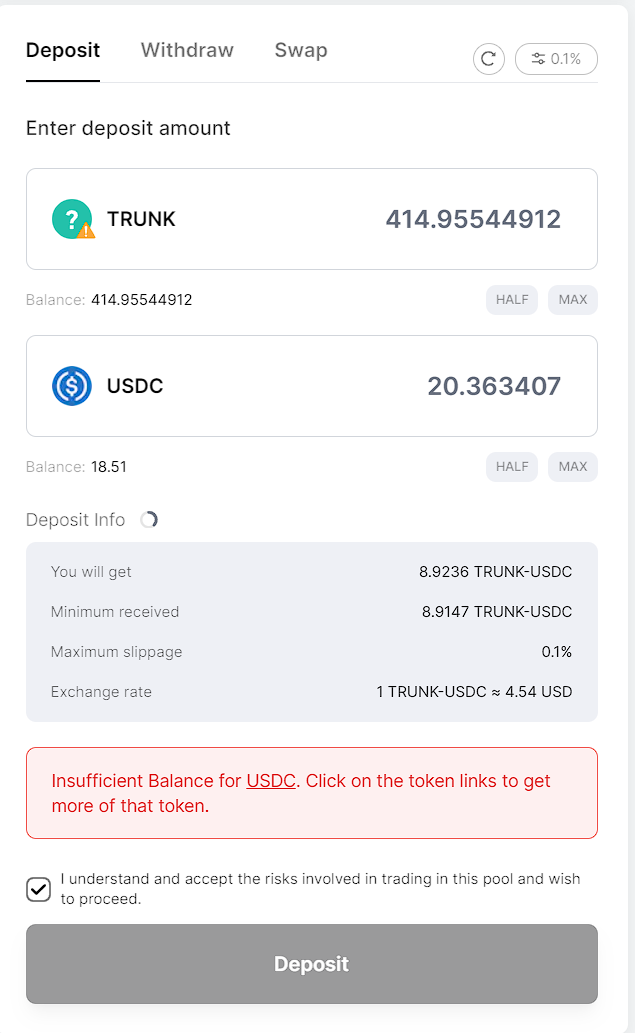
https://app.meteora.ag/pools/2DK47wYQqvvQFxHbJFG23cHAeYW73NFd17hASrv1W2q4

…so I just did the max USDC & let it figure out how many Trunk tokens I needed for the LP.
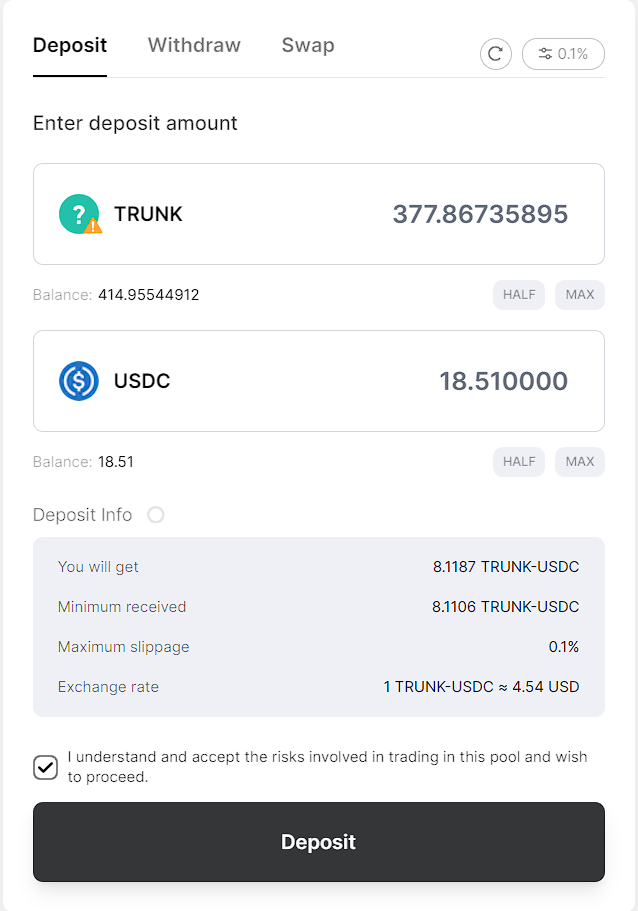
https://app.meteora.ag/pools/2DK47wYQqvvQFxHbJFG23cHAeYW73NFd17hASrv1W2q4

This is what it looked like once I completed adding both tokens to the Meteora LP.
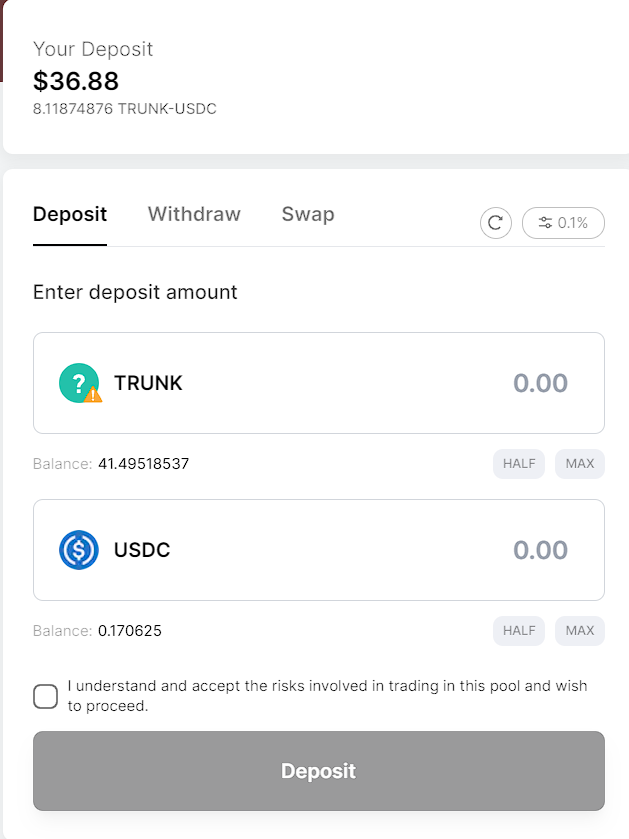
https://app.meteora.ag/pools/2DK47wYQqvvQFxHbJFG23cHAeYW73NFd17hASrv1W2q4
  • All done!

Helpful Tips!

Here’s some useful information about how I did all these steps.

  1. I was using the Chrome browser on a Windows 11 laptop.
  2. I used the Rabby wallet for my bsc transactions & the Phantom wallet for my SOL transactions.
  3. I waited for each transaction & approval to finish before clicking anything else.
  4. I stayed on the same webpage, & didn’t look at another app until the transfer was completed.
  5. The whole process took roughly around 15 minutes to complete.

BONUS: I followed the steps outlined in this video.

Hope this helps!

My referral info is below if you choose to join The Herd.

Once you are on the website above, ensure that my wallet’s address is in the “update partner” & click update. You can use the wallet address below.

0x8639551F642CCef27d99c2EB50E2c3572dD1A9B2

Click the link below if you would like to read any of my other Elephant Money articles.

Till next time.

God Speed!

(NONE OF WHAT I WRITE IN MY ARTICLES IS TO BE TAKEN AS INVESTMENT ADVICE. It is primarily a record of what I am doing & the different strategies I’m using to reach ROI & make a profit in Defi. I am neither an advisor for this nor suggesting any financial action on your part. Invest at your own risk. DO NOT INVEST MORE THAN YOU ARE WILLING TO LOSE! DYOR. NFA.)

Crypto
Elephant Money
Trunk
Solana Network
Staking
Recommended from ReadMedium