
My Data Capture Workflow
Up-front Disclaimer: I’ve built this Data Capture Workflow in the Apple ecosystem. However, except for my Task Manager and Read It Later app, I believe all other apps should be available for Android and Windows.

In 2017, it was estimated that the average person processed as much as 74GB of information every day via their TV, laptops, mobile phones and tablets. Five years later (with the huge growth in online video and podcasting) that has surely increased significantly.
Of course, we just ignore the majority of that information. When we find something useful, though — that diamond in the rough — how do we make sure that we remember it for the long term before it gets drowned out again by less useful facts?
Thankfully, as the amount of information thrown our way has increased, technology has risen to that challenge. Today, we have an unparalleled number of apps and pieces of software that we can use to pull all this information together.
That, in itself, can be a challenge though. Which apps should we use? How do they fit together? Where do we store these combined bits of information to gain any value from them?
Well, with that in mind, I thought I’d share with you my own system for capturing this information. I’m not saying it’s the right way of doing things — in fact, one of the main reasons for posting this is to ask for feedback on how I can improve things.
So, anyone has any thoughts/comments on the below, do please leave a comment — I’d love to hear what you think!
Which apps am I using?
Let’s start with the apps that I’ve configured across my phone, tablet and laptop.
Data Sources:
Kindle: I read all non-fiction books through the Amazon Kindle app now, as it is much easier to mark (and then process) highlights digitally, rather than through traditional paperbacks.
Snipd: I’ve tried several note-taking podcast apps and I’ve found myself coming back to Snipd. It’s not perfect and can be frustrating but it allows easy editing of my highlights and offers direct integrations into both Readwise and Obsidian. [More Info]
Goodlinks: I’ve been using Goodlinks as my Read-it-Later service for the last couple of years. It looks good, is easy to use and it doesn’t require a subscription.
Once again, it’s not perfect, though. It doesn’t allow highlighting of text and doesn’t really have any export features. As such, I’m looking forward to seeing the Readwise when it comes out later this year and I have also been looking at … [More Info]
Matter: Matter has generated a lot of interest over the last few months, primarily as a Read-it-Later Service. I’ve been using it as a place for my newsletters though. That’s because the app offers all users a unique email address. As such, all of my newsletters appear in one place, without the need for me to submit my personal email address to a variety of sites.
In addition, the design makes reading incredibly easy (it’s gorgeous!), the app allows highlighting of text and has a range of export capabilities including PDF, Markdown and direct integrations into Readwise.
If it included highlights in the exported PDFs, it would be perfect. [More details]
Things3: Like most of us, I’ve tried a range of To List apps, but I always find myself returning to Things3. It may not offer the capabilities of some of its rivals, but it’s incredibly well designed, syncs fast across all devices and doesn’t require a subscription (although the one-off pricing is high).
I’ve also just got totally used to how it works. I’ve developed a range of shortcuts that allows me to get tasks into the inbox in quick time … and then process them twice as fast. [More Info]
Data Collection/Processing
Readwise: This is an iOS app that sits at the heart of the whole process. It ingests highlights from a number of the sources above and then synchs them into my Data Storage. You can try out Readwise for two months (rathr than the standard one month) by using this link.
Data Storage
Obsidian: While it took me a little bit of time to get my head around how to best use Obsidian, I now use it to run my life. Everything I write goes in there from book reviews, to work projects, to a breakdown of the conversation I had with the doctor when my daughter had earache last week.
It’s also the final destination for all of the pieces of information that I collect from the apps listed above. Everything that is collected there is processed with my own thoughts and tagged accordingly. [More Info]
DEVONthink: If Obsidian is for my own writing and thoughts, DEVONthink is for content created by others that I want to keep over the long term.
That could be reference material (to support my thoughts that I’ve laid out in Obsidian), instruction manuals for the various things we’ve got around the house, email archives from previous jobs or sensitive material like our family’s passports.
I sync all of this with my mobile (via the DEVONthink To Go app) meaning that everything is available to me wherever I am. [More Info]
Putting it all together
So without further ado, this is how I’ve pulled these apps together to ensure that, whenever I see or hear something useful, I can make a record of it instantly.
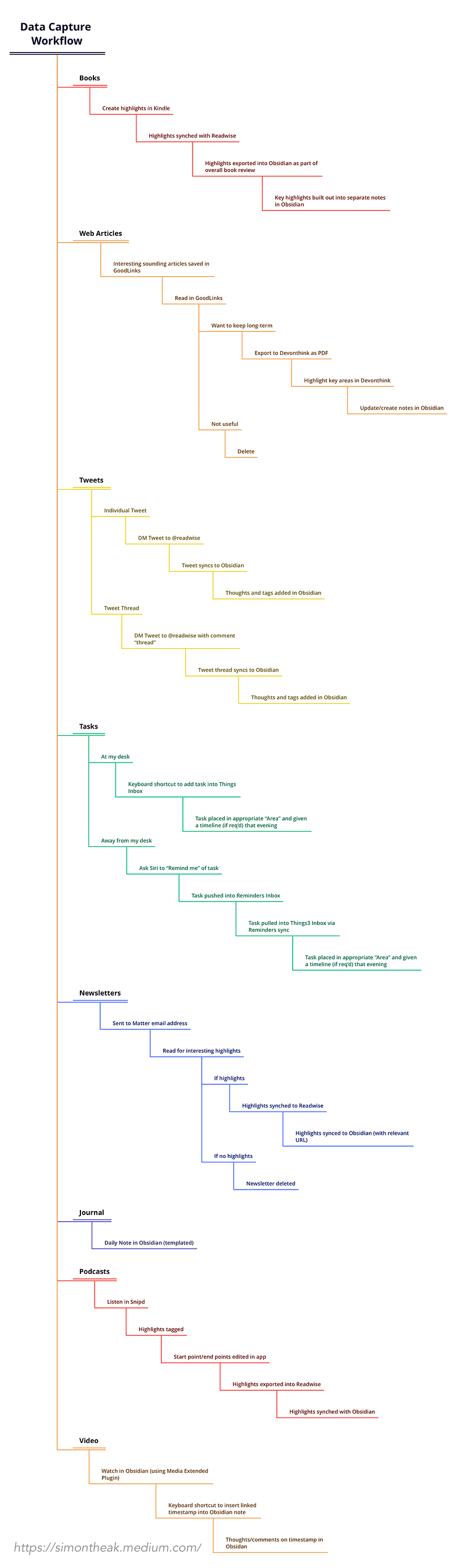
The key thing here is that information can be captured instantly wherever I am and whatever data source I’m interacting with.
Once potentially useful information has gone through this system, I can sit down at a time that best suits me (usually in the evening or at the end of the week) and evaluate it accordingly.
That typically means taking the time to decide whether what I’ve captured is actually useful to me and worth storing over the long-term. If it is, then I can add my own thoughts/insights, tag notes accordingly and link what I’ve collected to similar notes within Obsidian.
Not everything makes the cut though, and I can still use this time to delete thoughts and ideas that I deem not relevant. The key thing though is that this process allows me to instantly collect potentially useful bits of information over the course of my day and then evaluate their worth in my own time.
One last thing …
I hope you found the above useful. If you did, I’d really appreciate it if you would consider following me. I’m trying to build a regular writing habit so that I can get into Medium’s Partner Program but, to do that, I need 100 followers — and I’m a way off that at the moment!
If you’re not currently signed up for Medium, you can do so here or alternatively Buy Me a Coffee here.
Thank you very much. It’s hugely appreciated
Subscribe to DDIntel Here.
Join our network here: https://datadriveninvestor.com/collaborate


