avatarmegha mohan

Free AI web copilot to create summaries, insights and extended knowledge, download it at here

3784

Abstract

jects</b>:</p></blockquote><blockquote id="20ad"><p>list, dict, set, byte array</p></blockquote><blockquote id="27d6"><p><b>Immutable objects:</b></p></blockquote><blockquote id="1188"><p>int, float, complex, string, tuple, frozen set [note: immutable version of set], bytes</p></blockquote><p id="c01d">A practical example to find out the mutability of object types</p><div id="8951"><pre><span class="hljs-attribute">x</span> <span class="hljs-operator">=</span> <span class="hljs-number">10</span></pre></div><div id="6724"><pre><span class="hljs-attribute">x</span> <span class="hljs-operator">=</span> y</pre></div><p id="9d1d">We are creating an object of type int. identifiers x and y points to the same object.</p><div id="4b89"><pre><span class="hljs-function"><span class="hljs-title">id</span><span class="hljs-params">(x)</span></span> == <span class="hljs-built_in">id</span>(y)</pre></div><div id="325b"><pre><span class="hljs-function"><span class="hljs-title">id</span><span class="hljs-params">(y)</span></span> == <span class="hljs-built_in">id</span>(<span class="hljs-number">10</span>)</pre></div><p id="a089">if we do a simple operation.</p><div id="73b0"><pre><span class="hljs-attr">x</span> = x + <span class="hljs-number">1</span></pre></div><p id="a595">Now</p><div id="7ce8"><pre><span class="hljs-function"><span class="hljs-title">id</span><span class="hljs-params">(x)</span></span> != <span class="hljs-built_in">id</span>(y)</pre></div><div id="853b"><pre><span class="hljs-function"><span class="hljs-title">id</span><span class="hljs-params">(x)</span></span> != <span class="hljs-built_in">id</span>(<span class="hljs-number">10</span>)</pre></div><p id="399b">The object in which x was tagged is changed. object 10 was never modified. <b>Immutable objects doesn’t allow modification after creation</b></p><p id="d6be">In the case of <b>mutable objects</b></p><div id="710e"><pre><span class="hljs-attribute">m</span> = list([<span class="hljs-number">1</span>, <span class="hljs-number">2</span>, <span class="hljs-number">3</span>])</pre></div><div id="517d"><pre><span class="hljs-attribute">n</span> <span class="hljs-operator">=</span> m</pre></div><p id="5c49">We are creating an object of type list. identifiers m and m tagged to the same list object, which is a collection of 3 immutable int objects.</p><div id="69be"><pre><span class="hljs-function"><span class="hljs-title">id</span><span class="hljs-params">(m)</span></span> == <span class="hljs-built_in">id</span>(n)</pre></div><p id="2622">Now poping an item from list object does change the object,</p><div id="0e14"><pre>m.<span class="hljs-built_in">pop</span>()</pre></div><p id="7029">object id will not be changed</p><div id="07f9"><pre><span class="hljs-function"><span class="hljs-title">id</span><span class="hljs-params">(m)</span></span> == <span class="hljs-built_in">id</span>(n)</pre></div><p id="77d3">m and n will be pointing to the same list object after the modification. The list object will now contain [1, 2].</p><p id="870b">So what have we seen so far from the above examples?</p><ul><li>Python handles mutable and immutable objects differently.</li><li>Immutable are quicker to access than mutable objects.</li><li>Mutable objects are great to use when you need to change the size of the object, example list, dict etc.. Immutables are used when you need to ensure that the object you made will always stay the same.</li><li>Immutable objects are fundamentally expensive to “change”, because doing so involves creating a copy. Changing mutable objects is cheap.</li></ul><h1 id="0a4b">Exceptions in immutability..</h1><p id="38fc">Not all of the immutable objects are actually immutable. Confused? Let me explain.</p><p id="1f2f">As discussed earlier, Python

Options

containers liked tuples are immutable. That means value of a <code>tuple</code> can't be changed after it is created. But the "value" of a tuple is infact a sequence of names with unchangeable bindings to objects. The key thing to note is that the <i>bindings</i> are unchangeable, not the objects they are bound to.</p><p id="8048">Let us consider a tuple <b>t = (‘holberton’, [1, 2, 3])</b></p><p id="0e67">The above tuple <b>t</b> contains elements of different data types, the first one is an immutable string and the second one is a mutable list.The tuple itself isn’t mutable . i.e. it doesn’t have any methods for changing its contents. Likewise, the string is immutable because strings don’t have any mutating methods. But the list object does have mutating methods, so it can be changed. This is a subtle point, but nonetheless important: the “value” of an immutable object <i>can’t</i> change, but it’s constituent objects <i>can</i>.</p><h1 id="73a6">How objects are passed to Functions</h1><p id="add2">Its important for us to know difference between mutable and immutable types and how they are treated when passed onto functions .Memory efficiency is highly affected when the proper objects are used.</p><p id="bee9">For example if a mutable object is called by reference in a function, it can change the original variable itself. Hence to avoid this, the original variable needs to be copied to another variable. Immutable objects can be called by reference because its value cannot be changed anyways.</p><div id="aa67"><pre><span class="hljs-function">def <span class="hljs-title">updateList</span><span class="hljs-params">(list1)</span>: list1 +=</span> [<span class="hljs-number">10</span>]</pre></div><div id="f0e1"><pre>n = [5, 6] <span class="hljs-built_in">print</span>(<span class="hljs-built_in">id</span>(n)) <span class="hljs-comment"># 140312184155336</span></pre></div><div id="a107"><pre><span class="hljs-built_in">updateList</span>(n) <span class="hljs-built_in">print</span>(n) # <span class="hljs-selector-attr">[5, 6, 10]</span> <span class="hljs-built_in">print</span>(id(n)) # <span class="hljs-number">140312184155336</span></pre></div><p id="3ec9">As we can see from the above example, we have called the list via <b>call by reference</b>, so the changes are made to the original list itself.</p><p id="fcb5">Lets take a look at another example:</p><div id="beb6"><pre><span class="hljs-variable">def</span> <span class="hljs-function"><span class="hljs-title">updateNumber</span>(<span class="hljs-variable">n</span>): <span class="hljs-title">print</span>(<span class="hljs-title">id</span>(<span class="hljs-variable">n</span>))</span> <span class="hljs-variable">n</span> += <span class="hljs-number">10</span></pre></div><div id="2b30"><pre><span class="hljs-keyword">b </span>= <span class="hljs-number">5</span> print(id(<span class="hljs-keyword">b)) </span> <span class="hljs-comment"># 10055680</span> updateNumber(<span class="hljs-keyword">b) </span> <span class="hljs-comment"># 10055680</span> print(<span class="hljs-keyword">b) </span> <span class="hljs-comment"># 5</span></pre></div><p id="85cb">In the above example the same object is passed to the function, but the variables value doesn’t change even though the object is identical. This is called <b>pass</b> <b>by value</b>. So what is exactly happening here? When the value is called by the function, only the value of the variable is passed, not the object itself. So the variable referencing the object is not changed, but the object itself is being changed but within the function scope only. Hence the change is not reflected.</p></article></body>

Mutable vs Immutable Objects in Python

Everything in Python is an object. And what every newcomer to Python should quickly learn is that all objects in Python can be either mutable or immutable.
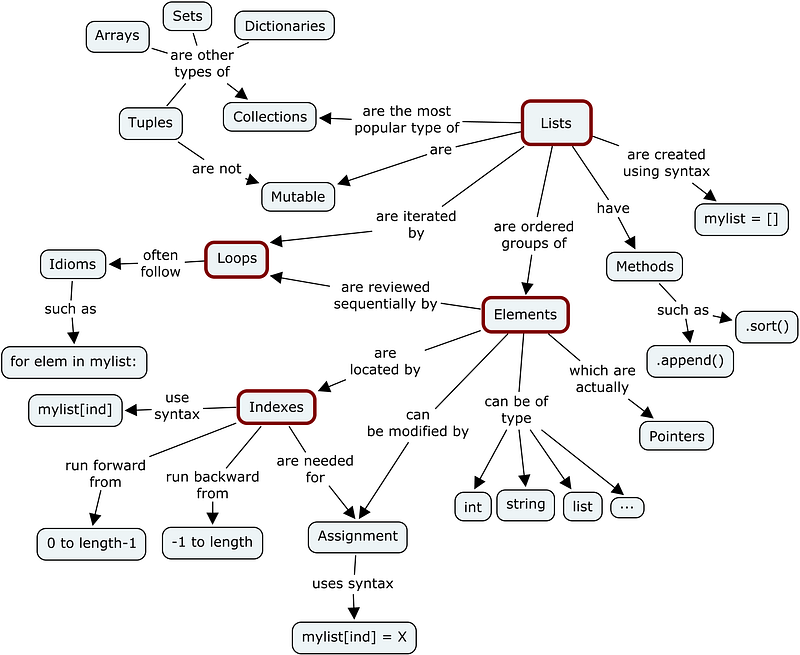
Lets dive deeper into the details of it… Since everything in Python is an Object, every variable holds an object instance. When an object is initiated, it is assigned a unique object id. Its type is defined at runtime and once set can never change, however its state can be changed if it is mutable. Simple put, a mutable object can be changed after it is created, and an immutable object can’t.

Objects of built-in types like (int, float, bool, str, tuple, unicode) are immutable. Objects of built-in types like (list, set, dict) are mutable. Custom classes are generally mutable. To simulate immutability in a class, one should override attribute setting and deletion to raise exceptions.
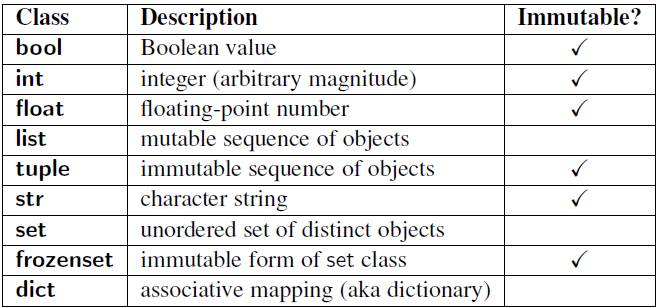
Now comes the question, how do we find out if our variable is a mutable or immutable object. For this we should understand what ‘ID’ and ‘TYPE’ functions are for.

ID and TYPE

The built-in function id() returns the identity of an object as an integer. This integer usually corresponds to the object’s location in memory, although this is specific to the Python implementation and the platform being used. The is operator compares the identity of two objects.

The built-in function type() returns the type of an object. Lets look at a simple example

''' Example 1 '''
>>> x = "Holberton"
>>> y = "Holberton"
>>> id(x)
140135852055856
>>> id(y)
140135852055856
>>> print(x is y) '''comparing the types'''
True
''' Example 2 '''
>>> a = 50
>>> type(a)
<class: ‘int’>
>>> b = "Holberton"
>>> type(b)
<class: 'string'>

We have now seen how to compare two simple string variables to find out the types and id’s .So using these two functions, we can check to see how different types of objects are associated with variables and how objects can be changed .

Mutable and Immutable Objects

So as we discussed earlier, a mutable object can change its state or contents and immutable objects cannot.

Mutable objects:

list, dict, set, byte array

Immutable objects:

int, float, complex, string, tuple, frozen set [note: immutable version of set], bytes

A practical example to find out the mutability of object types

x = 10
x = y

We are creating an object of type int. identifiers x and y points to the same object.

id(x) == id(y)
id(y) == id(10)

if we do a simple operation.

x = x + 1

Now

id(x) != id(y)
id(x) != id(10)

The object in which x was tagged is changed. object 10 was never modified. Immutable objects doesn’t allow modification after creation

In the case of mutable objects

m = list([1, 2, 3])
n = m

We are creating an object of type list. identifiers m and m tagged to the same list object, which is a collection of 3 immutable int objects.

id(m) == id(n)

Now poping an item from list object does change the object,

m.pop()

object id will not be changed

id(m) == id(n)

m and n will be pointing to the same list object after the modification. The list object will now contain [1, 2].

So what have we seen so far from the above examples?

  • Python handles mutable and immutable objects differently.
  • Immutable are quicker to access than mutable objects.
  • Mutable objects are great to use when you need to change the size of the object, example list, dict etc.. Immutables are used when you need to ensure that the object you made will always stay the same.
  • Immutable objects are fundamentally expensive to “change”, because doing so involves creating a copy. Changing mutable objects is cheap.

Exceptions in immutability..

Not all of the immutable objects are actually immutable. Confused? Let me explain.

As discussed earlier, Python containers liked tuples are immutable. That means value of a tuple can't be changed after it is created. But the "value" of a tuple is infact a sequence of names with unchangeable bindings to objects. The key thing to note is that the bindings are unchangeable, not the objects they are bound to.

Let us consider a tuple t = (‘holberton’, [1, 2, 3])

The above tuple t contains elements of different data types, the first one is an immutable string and the second one is a mutable list.The tuple itself isn’t mutable . i.e. it doesn’t have any methods for changing its contents. Likewise, the string is immutable because strings don’t have any mutating methods. But the list object does have mutating methods, so it can be changed. This is a subtle point, but nonetheless important: the “value” of an immutable object can’t change, but it’s constituent objects can.

How objects are passed to Functions

Its important for us to know difference between mutable and immutable types and how they are treated when passed onto functions .Memory efficiency is highly affected when the proper objects are used.

For example if a mutable object is called by reference in a function, it can change the original variable itself. Hence to avoid this, the original variable needs to be copied to another variable. Immutable objects can be called by reference because its value cannot be changed anyways.

def updateList(list1):
    list1 += [10]
n = [5, 6]
print(id(n))                  # 140312184155336
updateList(n)
print(n)                      # [5, 6, 10]
print(id(n))                  # 140312184155336

As we can see from the above example, we have called the list via call by reference, so the changes are made to the original list itself.

Lets take a look at another example:

def updateNumber(n):
    print(id(n))
    n += 10
b = 5
print(id(b))                   # 10055680
updateNumber(b)                # 10055680
print(b)                       # 5

In the above example the same object is passed to the function, but the variables value doesn’t change even though the object is identical. This is called pass by value. So what is exactly happening here? When the value is called by the function, only the value of the variable is passed, not the object itself. So the variable referencing the object is not changed, but the object itself is being changed but within the function scope only. Hence the change is not reflected.

Programming
Holberton School
Python
Oop
Object Oriented
Recommended from ReadMedium