
Must-Know Docker Commands
Must Know Docker Commands To Bookmark
Docker containers are lightweight software applications. They offer a number of benefits including a reduction in time to deliver an application, scalability, ease of application management, support, and better user experience.
The containers isolate the applications from the environments they run in and help the engineers treat and manage the infrastructure environments as software.
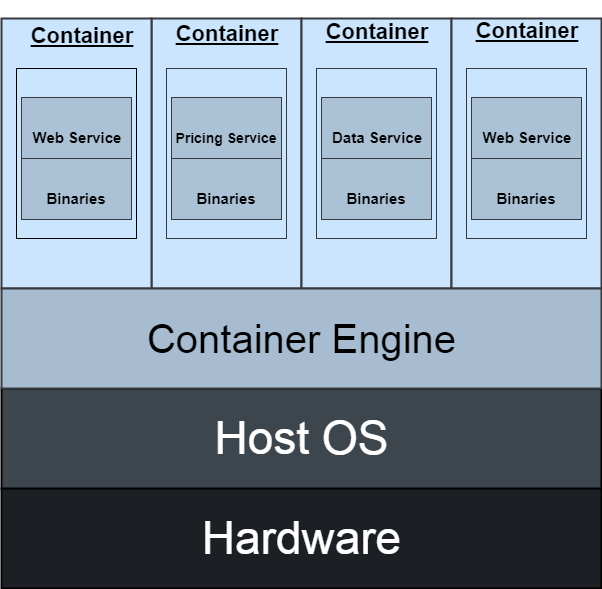
1. Quick Intro To Docker
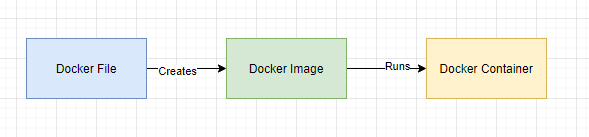
- A docker file is a text file. It is essentially a code or set of instructions for the Docker platform.
- A docker image contains a set of instructions to help Docker understand the assemblies to install and the dependencies that are required to set up the environment.
- A docker container runs the application code.
2. Key Docker Commands
There is a large list of docker commands available. This article will concentrate on the most important commands that I highly recommend everyone to be familiar with which will help them on daily basis docker use.
- Version: Type in
docker --versionto get the installed docker version. - Ps: Type in
docker psto show the containers. - Build: Type in
docker build.It builds a docker image from a Dockerfile. - Container: Type in
docker containerto manage containers. Within a docker container, we need to specify a sub-command e.g.
- docker container attach: To attach local standard input, output, and error streams to a running container
- docker container ps: Gets container details e.g. container id, image, command, when it was created, status, ports, names and so on.
- docker container commit: To create a new image from a container’s changes. It will save the docker container state and create a new image out of the container.
- docker container cp: To copy files/folders between a container and the local filesystem
- docker container create: To create a new container from a docker image
- docker container exec: To run a command in a running container
- docker container export: To export a container’s filesystem as a tar archive
- docker container inspect: To display detailed information on one or more containers
- docker container kill
: To kill one or more running containers - docker container logs
: To fetch the logs of a container - docker container ls
: To list containers - docker container rm
: To remove one or more containers - docker container run
: To run a command in a new container. We can pass in optional parameters such as -e to set environment variables, — name to set the container name, — volume to bind mount a volume, -w to set the working directory inside the container, — expose to export a range of ports, -p to publish and bind container ports to the host and so on. I recommend reading more on the run command. It is one of the most important commands to learn about. - docker container start
: To start one or more stopped containers - docker container stats
: To display a live stream of container(s) resource usage statistics - docker container stop
: To stop one or more running containers - docker container top
: To display the running processes of a container - Volume: Type
docker volumeto manage docker volumes. We can type in docker volume create to create docker volume, docker volume inspects to display delayed information of a volume, docker volume ls to view all of the volumes, and docker volume rm to remove a volume.
It’s vital to understand the concept of docker volumes.
Summary
There are also many other docker commands like network, node, plugin, secret, service, stack, swarm, trust, and so on. I have left it out for now because although they are important they are not used on day to day basis.
This article concentrated on the most important commands that I highly recommend everyone to be familiar with.


