
Multi-label Land Cover Classification with Deep Learning
A step by step guide on Classifying Multi-label Land cover classification using Deep Neural Networks
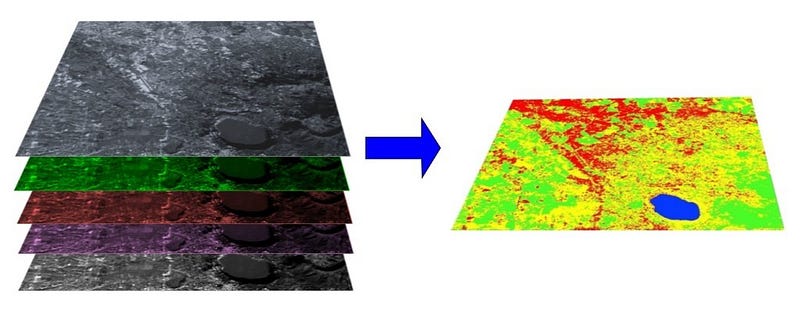
Multi-label land cover classification is less explored compared to single-label classifications. In contrast, multi-label classifications are more realistic as we always find out multiple land cover in each image. However, with the Deep learning applications and Convolutional Neural Networks, we can tackle the challenge of multilabel classifications.
In this tutorial, we use the redesigned Multi-label UC Merced dataset with 17 land cover classes. UC Merced Land use dataset was initially introduced as one of the earliest satellite datasets for computer vision. The UC Merced dataset is considered as the MNIST of satellite image dataset. The original dataset consisted of 21 classes of single-label classification.
In the next section, we get the data and look into classes and class imbalances in the dataset. Next, we train our model using Deep Neural Networks, and finally, we test our model with external images for inference.
Getting Data
We can access the data directly in Jupyter Notebook/Google Colab using WGET package from the following URL.
!wget https://www.dropbox.com/s/u83ae1efaah2w9o/UCMercedLanduse.zip!unzip UCMercedLanduse.zipOnce we get the data and unzip it, we are ready to explore it. Let us start with the labels. We read the labels with Pandas.
df = pd.read_csv(“UCMerced/multilabels.txt”, sep=”\t”)df.head()And here are the first five rows of the labels. As you can see, the data is in One-Hot Encoded format. Each Image has 17 labels where “0” means the absence of that label in the particular image and “1” signals the presence of that label in the picture. In total, we have 2100 images.

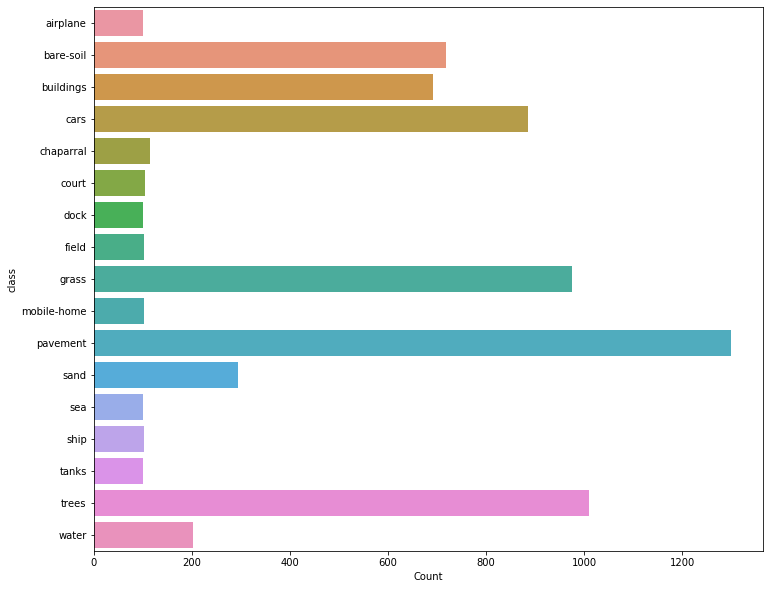
Before we move on to classifying tasks using Neural Network and deep learning, we can look into the distribution of the classes in the dataset. Checking the distribution of the dataset is an important step to check for data imbalances in your dataset. We first create a new data frame to store the classes and their counts.
# Create Class count dataframe
class_count = pd.DataFrame(df.sum(axis=0)).reset_index()
class_count.columns = [“class”, “Count”]
class_count.drop(class_count.index[0], inplace=True)
# Visualize class distribution as Barchartfig, ax= plt.subplots(figsize=(12,10))
sns.barplot(y="class", x="Count", data=class_count, ax=ax);The following visualisation indicates the class imbalances in the dataset. We have pavement class with over 1200 image while Airplane class have 100 images.
In the next section, we start training the dataset with Fastai library. Fastai is a user-friendly library built on top of Pytorch which offers a lot of easy to use functionalities.
Training
We need to get the data prepared for the training. Our data labels are in One-Hot Encoded format, and I assumed that would be challenging. Luckily with a little bit of browsing the Fastai Forum, I found out that there is a native function in Fastai for multiple-labels with One-hot encoding format. We need to pass the column names when we are labelling the dataset and also indicate that the data is multicategory dataset.
path = Path(“UCMerced”)data_src = (ImageList.from_df(df=df, path=path, folder=’images’, suffix=”.tif”)
.split_by_rand_pct(0.2)
.label_from_df(cols=list(class_count[‘class’]), label_cls=MultiCategoryList, one_hot=True))Once we create the data source, we can pass it through the data bunch API in Fastai. We also perform some data augmentations.
tfms = get_transforms(flip_vert=True, max_lighting=0.1, max_zoom=1.05, max_warp=0.)data = (data_src.transform(tfms, size=256).databunch().normalize(imagenet_stats))data.show_batch(4)Here are some random images with their labels visualised with Fastai.
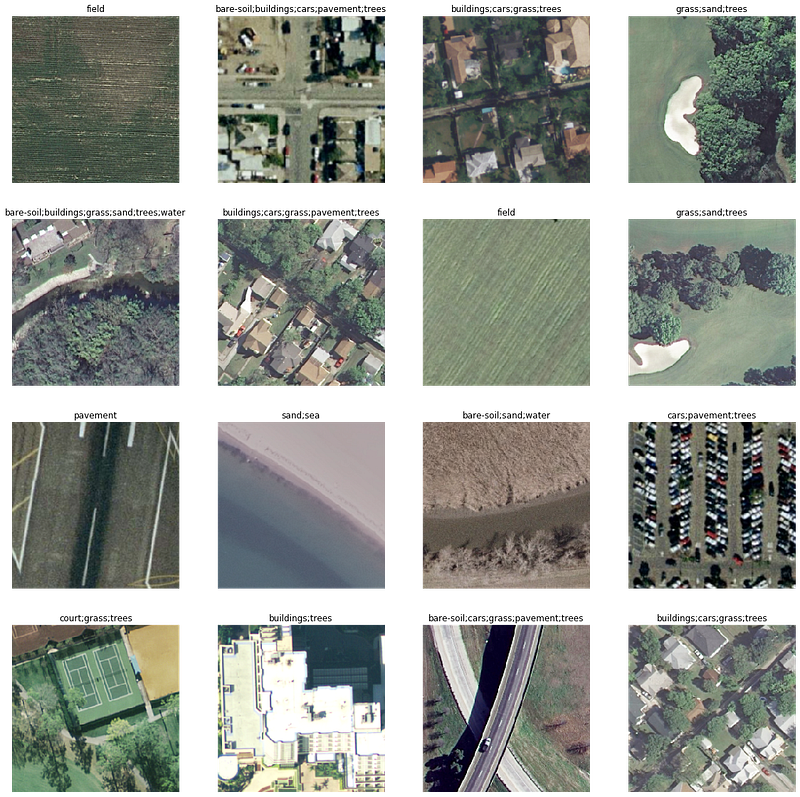
Next, we create a learner where we pass the data bunch we created, the choice of the model (in this case, we use resnet34) and metrics ( accuracy_thresh and F Score).
f_score = partial(fbeta, thresh=0.45)learn = cnn_learner(data, models.resnet34, metrics=[accuracy_thresh, f_score], callback_fns=[CSVLogger,ShowGraph, SaveModelCallback])We can also get the learning rate suitable for training the dataset by plotting with lr_find in Fastai.
learn.lr_find()learn.recorder.plot()Now, we can start training our model with the data. We use the fit_one_cycle function, which is powerful and incorporates state of the art techniques using one cycle technique.
learn.fit_one_cycle(5, 1e-2)Once the training starts, Fastai displays the metrics provided with the training and validation loss and time for each epoch
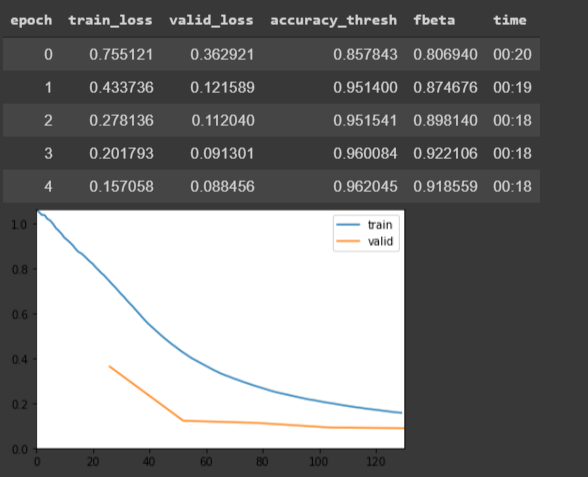
Our final epoch records a 95.53 accuracy threshold and F Score of 90.84 which is considerably accurate with just five epochs. We can train further and improve our metrics. To do so, we can freeze some layers and train others from scratch.
learn.freeze()
lr = 1e-3learn.fit_one_cycle(5, slice(lr))Our final model scores 91.39 F Score, which is a little bit of improvement compared to the previous training. We could train more by using more epochs or increasing the architecture of the deep neural network. You can try that and see if it helps improve the model. In the next section, we will use external images as an inference to the model.
Prediction of different dataset
To test the model, we predict several images from an external source and see how the model performs.
!wget https://www.dropbox.com/s/6tt0t61uq2w1n3s/test.zip!unzip test.zipimg = open_image(“/content/test/roundabout_086.jpg”)imgThe first image from the test dataset is shown below.
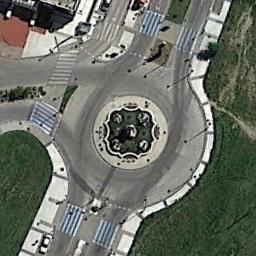
Let us see what the model predicts:
MultiCategory bare-soil;buildings;cars;grass;pavementWell, that is what the model produces, and I think it is accurate from the classes we used in our training dataset. Our prediction has predicted most classes present in the image (at least from what I can see in my eyes).
Let us test with another image.
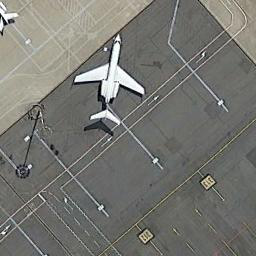
And the model predicts
MultiCategory airplane;cars;pavementAirplane and pavement, yes, but I do not see any cars.
Conclusion
In this tutorial, we trained a multi-label category classification model using Deep Neural Networks. We also carried out inferences of the model with other images.
The code and Google Colab Notebook for this tutorial is available in this Github Repository.
You can access Google Colab Notebook directly in this link


