avatarJordan Lee

Free AI web copilot to create summaries, insights and extended knowledge, download it at here

3514

Abstract

/span>. Now let us find all <span class="hljs-keyword">the</span> subscriptions <span class="hljs-built_in">to</span> which you have access...</pre></div><p id="1ae3">Then we can get our kubectl credentials <code>az aks get-credentials</code>:</p><figure id="40d6"><img src="https://cdn-images-1.readmedium.com/v2/resize:fit:800/1*tAqp_4HXGRpxH2X3p7m0Jw.png"><figcaption></figcaption></figure><p id="83a0">Now, when I first try running a kubectl command, I get prompted to perform an AAD login:</p><figure id="3fc6"><img src="https://cdn-images-1.readmedium.com/v2/resize:fit:800/1*TQSW-UxcivusGvediGOghw.png"><figcaption></figcaption></figure><figure id="7604"><img src="https://cdn-images-1.readmedium.com/v2/resize:fit:800/1*diyuCXpmqU0ozDGMwtkDNg.png"><figcaption></figcaption></figure><figure id="8d20"><img src="https://cdn-images-1.readmedium.com/v2/resize:fit:800/1*U7Zf5GbiueZvvmUFTWtoyQ.png"><figcaption></figcaption></figure><figure id="51b7"><img src="https://cdn-images-1.readmedium.com/v2/resize:fit:800/1*hOFXFsCs-JulHgUnfRRv3w.png"><figcaption></figcaption></figure><p id="261b">Only after completing the login will I get any output from <code>kubectl</code>:</p><figure id="4fb7"><img src="https://cdn-images-1.readmedium.com/v2/resize:fit:800/1*qIy-ptkJDYvREmkEW07nUA.png"><figcaption></figcaption></figure><h2 id="3dee">What do kubectl AAD credentials look like?</h2><p id="8caa">In case you’re curious how the kubectl credentials differ on between an AKS cluster with AAD integration vs. one without, here you go!</p><p id="787a"><i>Without AAD: You’re using a certificate to authenticate to AKS</i></p><figure id="34e6"><img src="https://cdn-images-1.readmedium.com/v2/resize:fit:800/1*yT3XGbZBiW8xdJa4raRJ8Q.png"><figcaption>Without AAD</figcaption></figure><p id="58bd"><i>With AAD: When you first run <code>az aks get-credentials</code>, kubectl config initially gets populated with AAD auth-provider configuration:</i></p><figure id="19ce"><img src="https://cdn-images-1.readmedium.com/v2/resize:fit:800/1*WloZJZSQ4DjoGAVCTxHsmQ.png"><figcaption>With AAD (prior to AAD authentication)</figcaption></figure><p id="f4c7"><i>Once you actually authenticate with AAD, kubectl configuration gets updated with an access token:</i></p><figure id="dec7"><img src="https://cdn-images-1.readmedium.com/v2/resize:fit:800/1*zUXYt-5ttIWrJxHq3qPMww.png"><figcaption>With AAD (after successful AAD authentication)</figcaption></figure><p id="38c8">This is much better (from a cybersecurity perspective) because if you have somebody leave the company, you don’t have to worry about them taking any Kubernetes certificates with them.</p><h1 id="7553">Setting it up</h1><p id="c864">Here are the steps for creating a new AKS instance with AAD integration. <i>Note: All these steps are available from the Microsoft <a href="https://docs.microsoft.com/en-us/azure/aks/managed-aad">documentation</a></i></p><ul><li>Create resource group</li><li>Create AD group (used for assigning AKS permissions)</li><li>Create AKS-managed AD cluster</li></ul><div id="481e"><pre># <span class="hljs-keyword">Login</span> <span class="hljs-keyword">to</span> Azure az <span class="hljs-keyword">login</span> az account <span class="hljs-keyword">set</span> -s "Your Subscription Name"</pre></div><div id="27c1"><pre><span class="hljs-meta"># Set up variables</span> RG=<span class="hljs-string">"digital-aks"</span> AKSCLUSTER=<span class="hljs-string">"digital-aks"</span> $AKSADMINGROUP=<span class="hljs-string">"AKS Admin

Options

s"</span></pre></div><div id="3100"><pre># <span class="hljs-keyword">Create</span> an Azure AD <span class="hljs-keyword">group</span> <span class="hljs-keyword">for</span> <span class="hljs-keyword">cluster</span> admins az ad <span class="hljs-keyword">group</span> <span class="hljs-keyword">create</span> <span class="hljs-comment">--display-name AKSADMINGROUP --mail-nickname digitalaksadmins</span></pre></div><div id="74bc"><pre><span class="hljs-comment"># Create resource groups for AKS</span> az <span class="hljs-keyword">group</span> <span class="hljs-title">create</span> --name DefaultResourceGroup-EAU --<span class="hljs-keyword">location</span> <span class="hljs-title">australiaEast</span> </pre></div><div id="ce58"><pre>az <span class="hljs-keyword">group</span> <span class="hljs-title">create</span> --name RG --<span class="hljs-keyword">location</span> <span class="hljs-title">australiaEast</span> </pre></div><div id="254c"><pre># Create an AKS-managed Azure AD <span class="hljs-keyword">cluster</span> AKS_GROUP_ID=(az ad <span class="hljs-keyword">group</span> show -g AKSADMINGROUP --query objectId -o tsv)</pre></div><div id="d775"><pre>az aks create -g <span class="hljs-variable">RG</span> -n <span class="hljs-variable">AKSCLUSTER</span> <span class="hljs-attr">--enable-aad</span> <span class="hljs-attr">--aad-admin-group-object-ids</span> <span class="hljs-variable">AKS_GROUP_ID</span></pre></div><div id="4880"><pre># Assign <span class="hljs-keyword">cluster</span> admin role to AD <span class="hljs-keyword">group</span> AKS_ID=(az aks show --resource-<span class="hljs-keyword">group</span> RG --name AKSCLUSTER --query id -o tsv)</pre></div><div id="b88c"><pre>az <span class="hljs-keyword">role</span> <span class="hljs-title">assignment</span> create --assignee AKS_GROUP_ID --<span class="hljs-keyword">role</span> <span class="hljs-title">"Azure</span> Kubernetes Service Cluster Admin Role<span class="hljs-string">" --scope AKS_ID</span></pre></div><div id="e503"><pre><span class="hljs-comment"># Assign users to the AKS admin group</span> <span class="hljs-attr">MEMBER_ID=</span>(az ad <span class="hljs-keyword">user</span> <span class="hljs-title">show</span> --id [email protected] --query objectId -o tsv) az ad <span class="hljs-keyword">group</span> <span class="hljs-title">member</span> add --<span class="hljs-keyword">group</span> <span class="hljs-title">AKS_GROUP_ID</span> --member-id MEMBER_ID</pre></div><h1 id="8303">Conclusion</h1><p id="f958">One of the great things about App Services is that integration with Azure AD is built into the platform (I’m referring specifically about the infrastructure layer). Getting to things like Kudu or App Service settings all require going through the Azure Portal, which forces you to do AAD authentication.</p><p id="bab9">AKS by default manages authentication using certificates — and while this is convenient, it tends to raise cybersecurity red flags (who has a copy of the cert, how are they kept, how are they rotated when people leave, etc).</p><p id="efdf">AAD is the preferred IDP for many enterprises running on Azure, so chances are the security folks will want you to implement AAD integration if you’re trying to push AKS as the platform of choice at your company.</p><p id="7a70">Luckily, Microsoft has made this very easy to do, so why not use it? Its definitely nice not having to worry about rotating certificates every time somebody quits!</p></article></body>

Moving from Azure App Services to Azure Kubernetes Service (Part 2)

Managing Kubernetes access using Azure Active Directory

This is a follow-up to my previous post:

At the company I work in, centralized authentication for any sort of PaaS or SaaS solutions is a requirement to get anything into production. With Azure App Services, this is built into the platform by default — in order to access any of the App Service infrastructure stuff (e.g. App Settings, Kudu, Configuration) you need to go login to the Azure portal or Azure CLI.

Unfortunately, with AKS this isn’t the case — if you use the default setup, AKS will use client certificates for controlling access through kubectl.

In order for me to take the next step in making AKS our platform of choice for running our web applications, I need to make sure it integrates with Azure Active Directory.

In this post, I’ll run through how exactly the authentication process will look like, and how to do the setup.

AKS-managed Azure Active Directory integration

Required tools:

  • az cli: used to set up the configuration for kubectl
  • kubectl: the cli for interacting with kubernetes

As you’ll see below, the process for setting up kubectl is pretty exactly the same as non-AAD integrated AKS. However, a key difference is that AAD-integrated clusters force you to perform an AAD authentication before you can run any kubectl commands.

Let’s take a look at how this works below:

We first perform an az login

PS C:\> az login
The default web browser has been opened at https://login.microsoftonline.com/common/oauth2/authorize. Please continue the login in the web browser. If no web browser is available or if the web browser fails to open, use device code flow with `az login --use-device-code`.
You have logged in. Now let us find all the subscriptions to which you have access...

Then we can get our kubectl credentials az aks get-credentials:

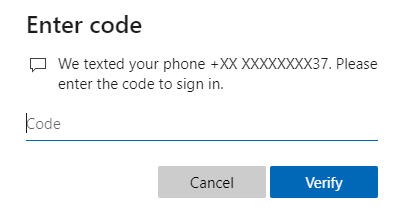
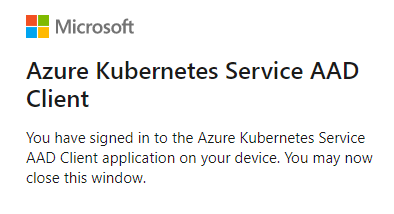
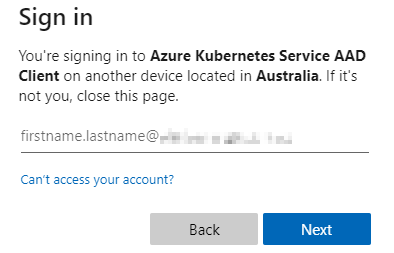
Now, when I first try running a kubectl command, I get prompted to perform an AAD login:

Only after completing the login will I get any output from kubectl:

What do kubectl AAD credentials look like?

In case you’re curious how the kubectl credentials differ on between an AKS cluster with AAD integration vs. one without, here you go!

Without AAD: You’re using a certificate to authenticate to AKS
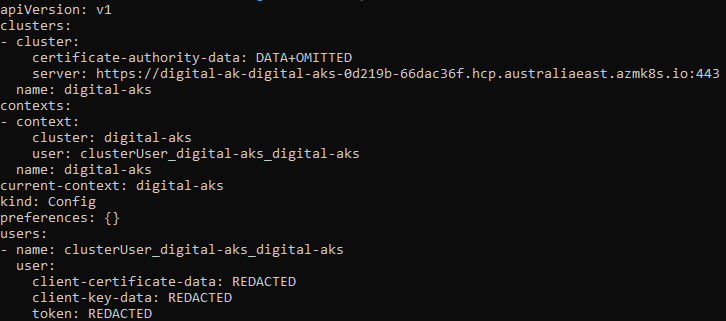
Without AAD

With AAD: When you first run az aks get-credentials, kubectl config initially gets populated with AAD auth-provider configuration:
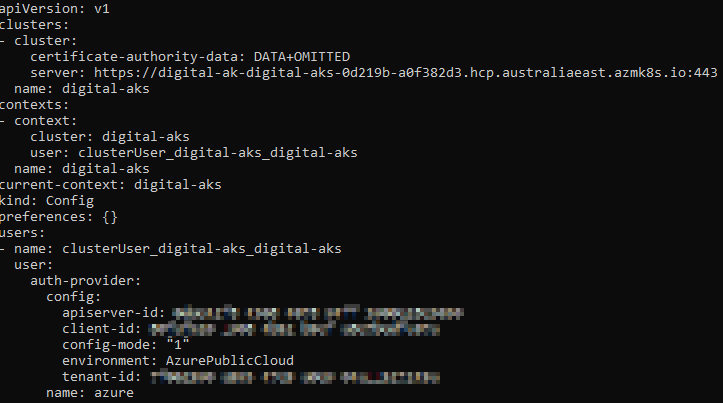
With AAD (prior to AAD authentication)

Once you actually authenticate with AAD, kubectl configuration gets updated with an access token:
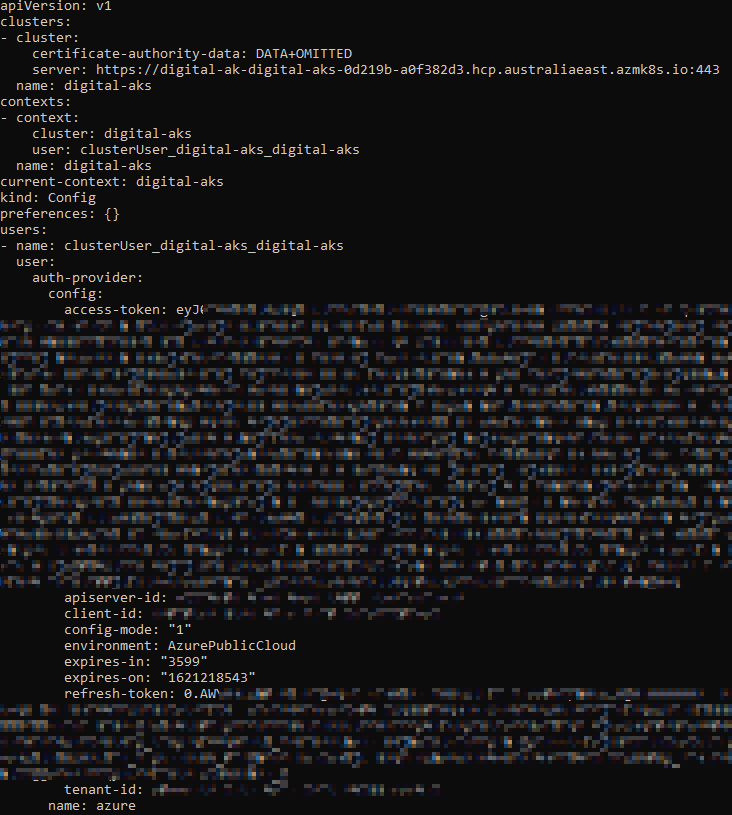
With AAD (after successful AAD authentication)

This is much better (from a cybersecurity perspective) because if you have somebody leave the company, you don’t have to worry about them taking any Kubernetes certificates with them.

Setting it up

Here are the steps for creating a new AKS instance with AAD integration. Note: All these steps are available from the Microsoft documentation

  • Create resource group
  • Create AD group (used for assigning AKS permissions)
  • Create AKS-managed AD cluster
# Login to Azure
az login
az account set -s "Your Subscription Name"
# Set up variables
$RG="digital-aks"
$AKSCLUSTER="digital-aks"
$AKSADMINGROUP="AKS Admins"
# Create an Azure AD group for cluster admins
az ad group create --display-name $AKSADMINGROUP --mail-nickname digitalaksadmins
# Create resource groups for AKS
az group create --name DefaultResourceGroup-EAU --location australiaEast 
az group create --name $RG --location australiaEast 
# Create an AKS-managed Azure AD cluster
$AKS_GROUP_ID=$(az ad group show -g $AKSADMINGROUP --query objectId -o tsv)
az aks create -g $RG -n $AKSCLUSTER --enable-aad --aad-admin-group-object-ids $AKS_GROUP_ID
# Assign cluster admin role to AD group
$AKS_ID=$(az aks show --resource-group $RG --name $AKSCLUSTER --query id -o tsv)
az role assignment create --assignee $AKS_GROUP_ID --role "Azure Kubernetes Service Cluster Admin Role" --scope $AKS_ID
# Assign users to the AKS admin group
$MEMBER_ID=$(az ad user show --id [email protected] --query objectId -o tsv)
az ad group member add --group $AKS_GROUP_ID --member-id $MEMBER_ID

Conclusion

One of the great things about App Services is that integration with Azure AD is built into the platform (I’m referring specifically about the infrastructure layer). Getting to things like Kudu or App Service settings all require going through the Azure Portal, which forces you to do AAD authentication.

AKS by default manages authentication using certificates — and while this is convenient, it tends to raise cybersecurity red flags (who has a copy of the cert, how are they kept, how are they rotated when people leave, etc).

AAD is the preferred IDP for many enterprises running on Azure, so chances are the security folks will want you to implement AAD integration if you’re trying to push AKS as the platform of choice at your company.

Luckily, Microsoft has made this very easy to do, so why not use it? Its definitely nice not having to worry about rotating certificates every time somebody quits!

Kubernetes
Azure Kubernetes Service
Azure
DevOps
Recommended from ReadMedium