
Moving Epics and Features from Aha to GitLab

Where I work the Product Management team has chosen Aha! as their planning tool. Once PM has their product high level plan in place then the engineering team comes in and reviews the high level plans, asks questions and then works to scope out the effort required.
This all works OK and is nice and interactive. Where things get painful is getting that work in GitLab, the system the engineering team uses to actually do the work that is defined by PM. This is where we hit a huge roadblock the first time we used Aha!
What is Aha! and How We Used It
Aha! is, according to them, “The world’s #1 roadmap software”. I am sure there are a lot of different uses for the solution and we are likely just scratching the surface as we just started to use it. The way that we did planning is to create a few “releases” and then had high level “epics” assigned to those releases. Each epic then had “features” assigned to it that broke down the epic further and detailed parts of the epic. If you have worked in Jira or GitLab this likely sounds very familiar already.
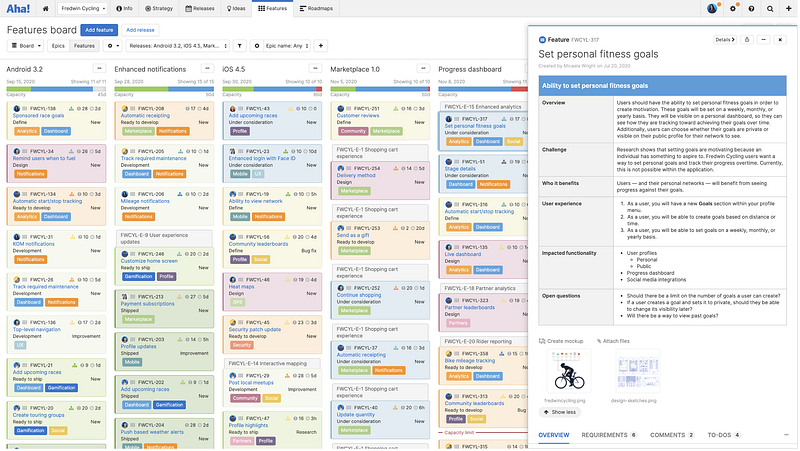
After Product Management added the high level information, the Product Owners add in additional details and help drive things down one more level and then engage the engineering leads for time estimations and to get any clarifications. Which ultimately translates to multiple comments on the epics/features along with meetings.
This is how we use Aha! here, does not mean it is the correct or intended way.
Aha!, Well Maybe Not
Aha! has some integration with GitLab, it can create a GitLab Issue from a feature. It does a good job at that, but for our workflow that is too low level. What we really need is Aha! to create a GitLab Epic for every Aha! epic and a child epic in for every feature of that Aha! epic.
Also given how are teams are broken down and where GitLab issues are created it wouldn’t work to create an issue then promote it to an epic. Doing this also closes out the feature in Aha! since when you promote an epic in GitLab it closes the issue and makes it an epic. The webhook in Aha! doesn’t understand this.
There Has to Be a Solution
Well, there has to be a solution other than manually copying and pasting all of the data.
Thankfully, in this day and age of SaaS, most solutions have an API and GitLab and Aha! are no exception. The main question about the APIs is usually focused around robustness and completeness of the APIs and the areas that you are hoping to get information from.
With the Aha! APIs we are able to get the information about an epic inclusive of the features attached to that epic. Given this data, it was easy enough to pull this information and create epics from the Aha! epics and child epics for the features.
One issue that I did discover is that comments on epics or features is not available via the API (that I could find). This isn’t a showstopper for us as most of the engineering team has read-only access to Aha! so I added a link to the original Aha! artifact on the GitLab side so if needed it is easy enough to get back to the source data.
A GitLab Challenge Too
Mapping the Epics and Features to Epics and Child Epics worked for our development planning. One issue that we did run into was that we lost the Aha! Release that the epics were associated with. Since in GitLab you can’t map an epic to a release our Product Owners/engineers will have to be vigilant to make sure issues are mapped to a milestone. To automate this we are looking into GitLab’s triage-ops to handle the verification of milestone assignment.
Final Thoughts
If you find yourself in the need of pulling data out of Aha! to be worked on in GitLab, hopefully this information and code exercise will be useful. The script to load the data into GitLab is located in a GitHub repo. If you have any suggestions to the script or thoughts on way to improve it, drop in a comment or issue on GitHub.
If you found this write-up useful or if you enjoyed it, give me a clap.