
Moving A Lambda Function to AWS Batch
ACM.331 Considering new risks in a different execution environment with different security configuration options
~~~~~~~~~~~~~~~~~~~~~~~~~~~~~~~~~~~~~~~~~~~~~~~~~~~~~~~
⚙️ Check out my series on Automating Cybersecurity Metrics | Code.
🔒 Related Stories: Lambda | Secure Code | Container Security
💻 Free Content on Jobs in Cybersecurity | ✉️ Sign up for the Email List
~~~~~~~~~~~~~~~~~~~~~~~~~~~~~~~~~~~~~~~~~~~~~~~~~~~~~~~
In the last post, I was trying to run a Lambda function that assumes a role with MFA. Although I could run it just fine with the local emulator, I could not get it to work when I deployed it to Lambda. Two posts back, I also realized that enforcing MFA in an SCP for Lambda doesn’t work in all scenarios. That leaves me out of options for using Lambda, presuming I haven’t done something wrong in my Lambda function.
I want to see if this container will work in AWS Batch. Essentially AWS Batch allows you to run non-interactive programs in containers like you can in Lambda but they can run longer. AWS Batch is what I actually wanted to use in the first place as I have some long running programs that I use to evaluate AWS account security and to perform penetration testing. I wrote about AWS Batch here:
Now, it would be nice if we could just take the container and drop it into AWS Batch from AWS Lambda. However, it’s not going to just work as is. Recall that I’m grabbing the function name from headers and using certain environment variables, which don’t appear to exist in AWS Batch.
Environment
On AWS we need to create the following to run our batch job:
- A compute environment: This is a definition of the environment in which the batch job runs such as running it on Fargate, ECS, or Kubernetes and with what network configuration and compute resources.
- Job Definition: A template for the job (like an image for a container or an AMI for an EC2 instance).
- Job: An running instance of the job definition (like a container that runs using an image).
- Job Queue: To handle scheduling and management.
Just a note that you can also trigger a job with EventBridge.
IAM Roles
Similar to Lambda I need to set up my IAM roles. My user and the assumed role to access GitHub secrets can work the same way. But I need to create a role that the AWS Batch Service can assume rather than Lambda for the running Batch job.
Networking
You can define networking when you create your compute environment. We can reuse our existing network.
AWS Batch supports VPC Endpoints, but not in all regions.
If we want to run AWS CLI commands to trigger the Batch job then we will need a VPC Endpoint in the network where the EC2 instance I’m using for development exists and access to the endpoint via a Security Group.
Service Control Policy
I can attempt to set up a service control policy to only run AWS Batch jobs if MFA exists and see if that works. However, for existing testing I’m not going to do that. You may have automation that doesn’t work with that Service Control Policy. What I’m trying to do is handle that within the container.
Environment Variables
We’ll need to change our environment variables. I can create roles with the batch job name the same way I did for Lambda to create a reusable batch job template.
AWS Batch Best Practices
I ran across this best practices list for AWS Batch which should come in handy as we flesh this out.
Local Testing
What about local testing? Well, hopefully our container runs pretty much as is. Perhaps if we use the batch job name locally we can’t use the AWS Batch Environment Variables. We may have to simulate them ourselves. But for the most part, can our container just run?
Batch Wizard
From the AWS Documentation, there’s a wizard we can use to test our first batch job. It says you can use an existing container if you have one:
You can use the AWS Batch first-run wizard to get started quickly with AWS Batch. After you complete the Prerequisites, you can use the first-run wizard to create a compute environment, a job definition, and a job queue.
You can also submit a sample “Hello World” job using the AWS Batch first-run wizard to test your configuration. If you already have a Docker image that you want to launch in AWS Batch, you can use that image to create a job definition.
I’m going to try that out in this post with a container I’m going to alter for AWS Batch.
Containers on AWS Batch
What are our requirements for running a container on AWS Batch?
Well, I’m scanning the list of items in the left menu and I don’t see anything about containers.
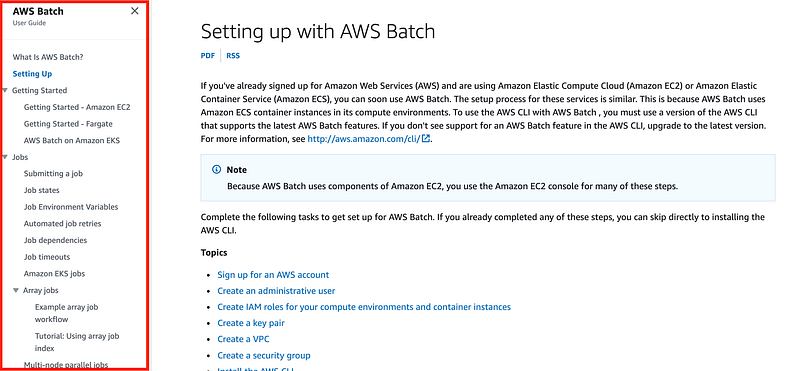
A Google search leads me to this API reference:
I also found this nice intro post by Dougal Ballantyne. It looks like there’s nothing Batch-specific in this container, which is pretty cool.
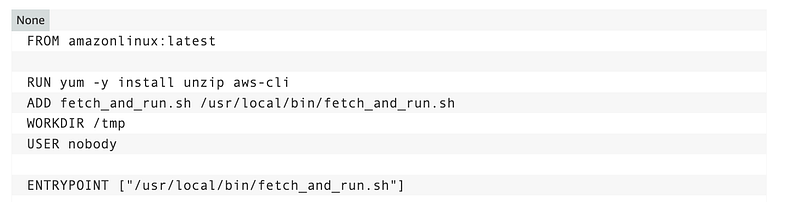
The difference will be that what was my function script will become my entrypoint script that executes when the container runs.
Also, I’ll probably start with a different base image from AWS because I don’t need the Lambda Runtime in there. Recall that you can view and pull base containers from the AWS ECR image gallery.
I did stumble upon this section on container definition properties as well.
Forgive me but the AWS Batch documentation is super long and involved and I’m just looking for the basics so not reading all of that before I start.
I would suggest that some of it is redundant and should be moved to the appropriate service to simplify the batch documentation — like how IAM policies work.
Perhaps a link to the IAM pages that describe policies followed by a link to AWS Batch Actions and links to the various SDK and CLI actions and CloudFormation resources would be less wordy.
IAM Actions for AWS Batch:
CLI Actions for AWS Batch:
CloudFormation for AWS Batch:
Passing Parameters to an AWS Batch Job
I was passing a GitHub repository and a code into my Lambda function. How can I pass parameters into an AWS Batch job? I see information about using environment variables but I do not want to do that if I can avoid it. I simply want to pass in a parameter and then clear it out. AWS specifically states that you should not pass sensitive data in plain text environment variables.
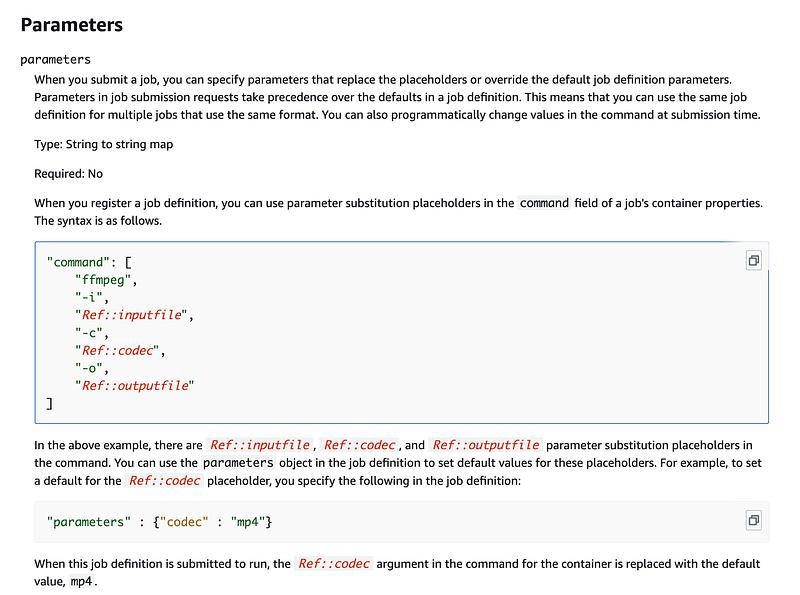
We can pass parameters to batch jobs using the job definition parameters:
If you want to submit a job to the queue with the AWS command line you can override the parameters:
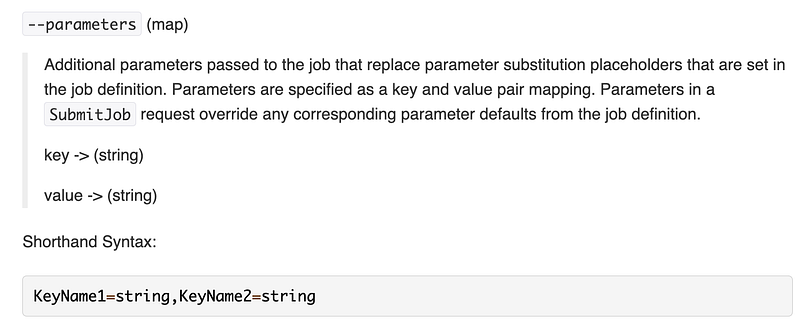
I found a better example on Stack Overflow:
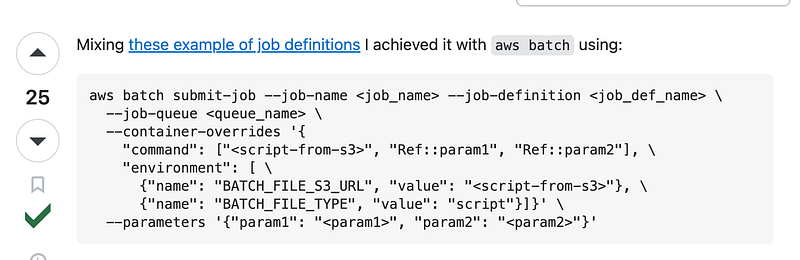
I presume you can do this from the AWS Console as well. We’ll try it with our repo and code parameters.
However, I’m wondering about the path those parameters take in the AWS environment at the moment. If I’m not comfortable with that, I can think of a more complex solution but we’ll start with something simple.
What I want to know is this whether my parameters are exposed, unencrypted, anywhere in this flow:
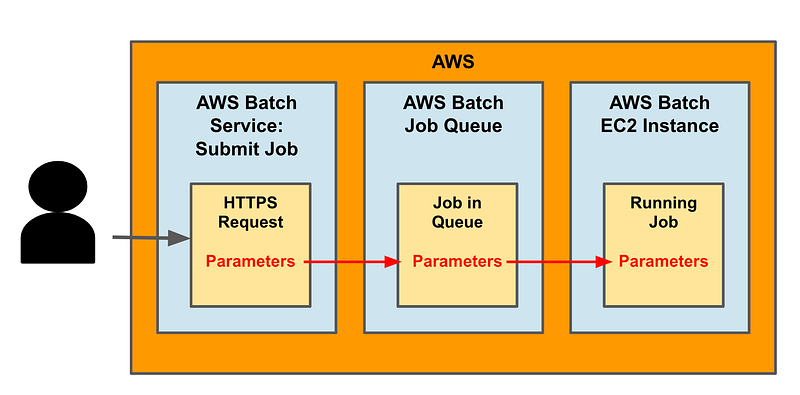
Even if they are encrypted, I would prefer to use my own customer-managed KMS key with strict permissions to protect any sensitive data.
Why? Consider the Oktapus attack and how it affected Twilio:
Consider the data flow.
- I submit the parameters over HTTPS via a private VPC endpoint.
- Hopefully the request is transferred via a private IP address (we’ll test that in a future post.)
- Is the transfer of my parameters sent over an encrypted network internally at AWS between the AWS Batch service and he job queue?
- Can I encrypt the data at rest in the job queue with my own customer-managed KMS key?
- When the job submission request transfers from the job queue to the code that executes the job in AWS Batch, is the traffic encrypted at that point?
- Can I encrypt the host on which the job is running with my own customer managed key?
- Are the parameters passed to the job encrypted in transit as they pass from whatever is triggering the container to the container or are they visible on the host at that point?
Let’s see what we can find out.
Encryption with KMS Keys
We will need to grant the batch job access to our Sandbox KMS key the same way we did for our Lambda function to decrypt the container from ECR.
There is not a way to specify a KMS key directly on the compute resources, job definition, or queue you spin up to run your jobs in the CloudFormation configuration.
I showed you how to deploy an EC2 instance with a Customer-Managed KMS key here:
AWS Batch supports launch templates to achieve encryption on the hosts running your containers.
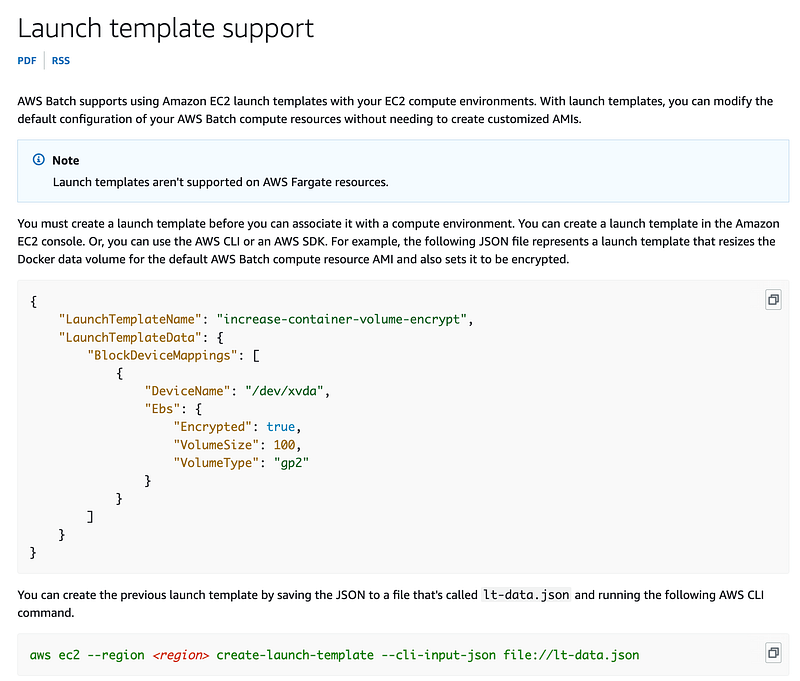
You use the Launch Template CloudFormation Resource to configure the above.
Wouldn’t it be nice if you could simply specify a KMS key ID for all of this and if the documentation stated that the key was used to encrypt your EC2 instance, including the boot volume, containers, job definitions, job queue, and schedule configuration? #awswishlist
The infrastructure security documentation is a little light in regards to my other questions i the last section.
It generically links to the AWS Security home page which is not very helpful.
At this point, I’m not super comfortable with passing MFA codes through this infrastructure that are not protected with a customer managed key for anything super sensitive, but I’m only pulling code from a GitHub repo that is public anyway. I’ve also got some nework restrictions in place which should help. In the end, I’ll probably take some additional steps to protect codes used in Batch jobs.
Compliance
According to the compliance documentation, AWS Batch is PCI, HIPAA, and SOC compliant as well as some other regulations.
Implications of the above on my current architecture
My current plan is to submit the AWS token as a parameter to the batch job. However, there is a lot of uncertainty about the path that code takes to reach the batch job. Before I go into some complex solution to solve that problem, I want to see if this approach even works. I’m going to try to run a container and use the approach I was attempting in AWS Lambda in AWS Batch instead and see if it works, with the adjustments and additional resources mentioned above.
Follow for updates.
Teri Radichel | © 2nd Sight Lab 2023
About Teri Radichel:
~~~~~~~~~~~~~~~~~~~~
⭐️ Author: Cybersecurity Books
⭐️ Presentations: Presentations by Teri Radichel
⭐️ Recognition: SANS Award, AWS Security Hero, IANS Faculty
⭐️ Certifications: SANS ~ GSE 240
⭐️ Education: BA Business, Master of Software Engineering, Master of Infosec
⭐️ Company: Penetration Tests, Assessments, Phone Consulting ~ 2nd Sight Lab
Need Help With Cybersecurity, Cloud, or Application Security?
~~~~~~~~~~~~~~~~~~~~~~~~~~~~~~~~~~~~~~~~~~~~~~~~~~~~~~~~~~~~~
🔒 Request a penetration test or security assessment
🔒 Schedule a consulting call
🔒 Cybersecurity Speaker for PresentationFollow for more stories like this:
~~~~~~~~~~~~~~~~~~~~~~~~~~~~~~~~~~~~~~~~~~~~~~~~~~~~~~~~~~~~~
❤️ Sign Up my Medium Email List
❤️ Twitter: @teriradichel
❤️ LinkedIn: https://www.linkedin.com/in/teriradichel
❤️ Mastodon: @teriradichel@infosec.exchange
❤️ Facebook: 2nd Sight Lab
❤️ YouTube: @2ndsightlab


