
Everything You Want to Know About React Refs
Taking a look at Refs, callback refs, forwarding refs, and ImperativeHandles

Ever felt lost when you’ve come across these terms in React: ref, callback ref, forwarding ref, and imperativeHandle? I know I have.
At the beginning of React history there was string ref, then came callback ref — but still things were not right. From React 16.3, the React team decided to introduce and promote createRef, keep callback ref, and deprecate string ref. Eleven months later, React 16.8 came, with revolutionary Hooks. We ended with additional useRef and useImperativeHandle.
A ref is a way to access a DOM element or a React element. We are empowered with refs, callback refs, forwarding refs, and imperativeHandle.
So when should we use refs? We should not use them as long as we can resist. How ironic!
- The React team has said, “Avoid using refs for anything that can be done declaratively.”
- They emboldened the title, “Don’t Overuse Refs.”
- They emphasized again, “When possible, we advise against exposing DOM nodes, but it can be a useful escape hatch.”
OK — a useful escape hatch!
React document states that there are a few good use cases for refs:
- Managing focus, text selection, or media playback.
- Triggering imperative animations.
- Integrating with third-party DOM libraries.
For these few good use cases, let’s explore refs.
The Use Case
We use this use case as an example: There is a read-only input field with initial text: highlight and copy me. Next to it is a copy button.

If the button is clicked, the input field content is highlighted and the text is copied to the clipboard.

React.createRef
React.createRef is designed for class components. Usually, it’s called in a constructor to initialize a ref, and then the generated ref is passed to a DOM element or a React element.
Let’s take a look at this code:
At line 7, we create a ref and assign it to this.textInput. From line 8’s output, we can see the initial value of this.textInput on the developer console.
Object {
  current: null
}
After the component is mounted, this.textInput.current is assigned to the input element. Clicking the Copy button can trigger line 13’s output:
"<input type='text' readonly='' value='highlight and copy me'>"Now we understand why createRef generates an object with the property current. This allows us to keep the same reference to the object and yet have the current assigned to the referenced element or component.
When the component unmounts, this.textInput.current will be assigned back to null. ref updates happen before componentDidMount or componentDidUpdate lifecycle methods.
From line 13’s output, we can see that there is no ref prop in the this.textInput.current element. ref, similar to key, is a reserved attribute for React’s internal use.
With the magic of this.textInput.current, we’re able to highlight the input by line 14 and send it to the clipboard by line 15.
React.useRef
React.useRef, equivalent toReact.createRef, is designed for functional components. The following code does the same thing, but it’s much cleaner and more condensed.
What are the differences between createRef and useRef?
createRefcreates an object withcurrentassigned tonull. Every invocation ofcreateRefwill generate a new object. It is perfect for a class component’s constructor, which is only invoked once. However, it is not for a functional component. Regenerating an object for each rendering is not a good use, but it works.useRefcreates an object with a customizable initial value. Only the first invocation ofuseRefwill generate a new object. This object’scurrentvalue is kept during a functional component’s lifecycle, unless it is reassigned to a new value. It is designed for a functional component.
React.useRef() generates:
  Object {
    current: undefined
}React.useRef(null) generates:
Object {
current: null
}React.useRef('abc') generates:
Object {
current: "abc"
}- Although
React.createRef’scurrentis mutable, it’s meant for React’s internal use. React.useRef’s usage is beyond arefattribute — it’s used to hold any mutable value, similar to aninstancevariable.
Have you encountered this React warning?
Warning: Can’t perform a React state update on an unmounted component.
The following example resolves this issue with useRef. mounted is initialized to true at line three and the value is kept while the component is mounted. When the component is unmounted, useEffect’s clean-up function will set it to false by line 11. Then, setState commands are guaranteed to not be executed with the condition on line six after the component is unmounted.
React.useRef does not notify its content changes. Mutating the .current property will not trigger a re-render. In case you want to run some code when React attaches or detaches a ref to a DOM node, callback refs can be used for this type of usage.
Callback Refs
When React team deprecated string ref, they kept callback ref. A callback ref is a function. It gives more fine-grain control over when refs are set and unset. With a function, we can store the input reference to textInput directly, without the mutable holder current. Similar to createRef and useRef, the callback ref will be invoked when a component mounts and be set to null when the component unmounts.
The following is a callback ref implementation for a class component:
The following is a callback ref implementation for a functional component:
Callback refs are not recommended — they would be called twice during updates if it’s an inline callback.
If the ref callback is defined as an inline function, it will get called twice during updates, first with null and then again with the DOM element. This is because a new instance of the function is created with each render, so React needs to clear the old ref and set up the new one. You can avoid this by defining the ref callback as a bound method on the class, but note that it shouldn’t matter in most cases.
Forwarding Refs
A real project is complicated. Instead of using the input element directly, we may end up with a component library — MyTextInput. The previous React.useRef example is modified as follows:
We click the copy button and discover a few problems:
- The input field content is not highlighted.
- The text is not copied to the clipboard.
- There is an error on the developer console:
textInput.current.select is not a function. - Line 12 outputs
initialRef, instead ofMyTextInput.
These issues are caused by the fact that React doesn’t assign current with a non-DOM element. ref should not be set for MyTextInput — instead, it should be set for the input element at line three. To fix this problem, we need a forwarding ref.
React team defines this as follows: Ref forwarding is a technique for automatically passing a ref through a component to one of its children.
Therefore, when MyTextInput gets a ref, it needs to call React.forwardRef (line one) to pass down ref to its children:
Line 2 outputs MyTextInput’s props value, which doesn’t include ref:
Object {
  readOnly: true,
  type: "text",
  value: "highlight and copy me"
}
Line 3 outputs ref’s initial value, where current is null:
Object {
  current: null
}
Line 14 outputs the assigned textInput.current:
<input type='text' readonly='' value='highlight and copy me'>With the help of a forwarding ref, our example works with a library component, MyTextInput.
Here is an example that is based on the Create React App, and uses Highcharts charting library to create a 3D scatter chart that can be rotated.
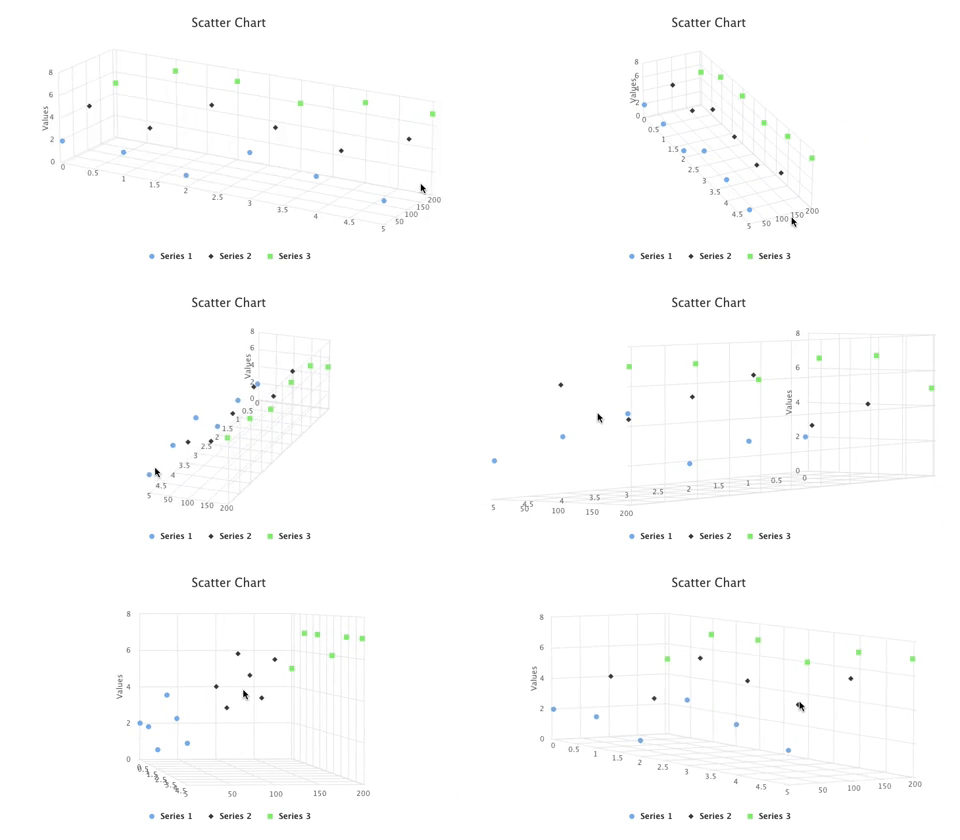
This is the modified src/App.js, where the ref, chartRef, is created at line 64, forwarding to the child component, Scatter3D at line 65.
The child component, src/Scatter3D.js, has a forwarding ref at line 10, which is instantiated at line 69.
Interestingly, a useRef value cannot be used as a dependency, but a ref prop can (line 66).
React.useImperativeHandle
React.useImperativeHandle is not even named with someRef, but it’s still part of the ref family.
- React team defines it as follows, “
useImperativeHandlecustomizes the instance value that is exposed to parent components when usingref.” - Once again, they say, “As always, imperative code using refs should be avoided in most cases.”
Let’s take a look at this ref feature.
React.useImperativeHandle(ref, createHandle, [deps]) is used inside forwardRef. It provides the fine control over the ref:
- Expose limited DOM methods (such as select, focus, click, etc.) to callers.
- Override the existing DOM methods.
- Provide normal methods to callers
Here is the example of React.useImperativeHandle implementation:
React.useImperativeHandle’s code is from line 4 to line 12. It has two methods, select and log. select is a DOM method for the input element. It’s chosen to be overridden and exposed to callers. log is a normal method. It prints out the message on the developer console: log is invoked inside MyTextInput.
From line 24’s output, we can see the current object is no longer an input element. Instead, it’s an object containing available methods:
Object {
  log: () => {
    console.log('log is invoked inside MyTextInput');
  },
  select: () => {
    childRef.current.select();
    console.log('Special select is called');
  }
}
At line 25, textInput.current.log() invokes the log method. At line 26, textInput.current.select() invokes the customized select method. Let’s comment out from line 5 to line 8. Clicking the Copy button will not make the input field content highlighted and the text is no longer copied to the clipboard. That is because the select method is no longer exposed.
Practically, you may not need useImperativeHandle for a real React project.
Conclusion
We have explained refs, callback refs, forwarding refs, and imperativeHandle. React is an evolving language. New things emerge to provide more power to developers.
Stay Hungry. Stay Foolish. Let’s wait for future’s whatever refs!
Thanks for reading.
Want to Connect?

If you are interested, check out my directory of web development articles.


