
Monitoring Multiple Kubernetes Clusters
Here at THG we manage Kubernetes clusters for multiple teams. In order to effectively monitor these clusters, we use a single Prometheus instance in each of our datacenters.
Prometheus is an open source monitoring tool that Kubernetes supports out of the box, exposing metrics about cluster health and operations on endpoints in the Prometheus format. Prometheus also supports using the Kubernetes REST API as a source to discover additional metric targets that are running inside the cluster.
Cluster Authentication
First thing we need to do is create a service account that the Prometheus instance will use to authenticate with the cluster.
In order to configure what the service account can access, you’ll need to setup a clusterrole and clusterrolebinding. Here is the clusterrole that gives Prometheus read access to each of the resources that we are interested in scraping.
Once we create the clusterrole, we’ll need to bind it to the service account by running kubectl create clusterrolebinding prometheus-querier -clusterrole=prometheus-querier -serviceaccount=kube-system:prometheus
Now that we’ve configured our cluster, we need to configure the Prometheus instance.
Prometheus Configuration
Prometheus has an example configuration for scraping Kubernetes; however, it’s meant to be run from inside the cluster and assumes default values that won’t work outside of the cluster.
Inside the cluster, this is all the configuration required to discover all of the nodes to scrape.
In order to make this work outside of the cluster, we need to point towards the token associated with the service account we created earlier along with the CA (certificate authority) of the cluster and the address of the Kubernetes REST API.
This will allow the Prometheus instance to construct the list of targets that it needs to scrape, but we also need to add the bearer token and CA file to the overarching job so it is able to successfully scrape the metrics.
Now that we’re able to make the requests to the cluster, we need to do some relabelling so the Prometheus instance is able to construct the correct external URL to reach the target on.
This relabel config loads every label against the respective node as a Prometheus label, rewrites the target address to the address of the API server and changes the metric path to use the proxy endpoint on the Kubernetes API.
At the same time, we also add a new static label to every metric that identifies the cluster, so we can easily distinguish between metrics belonging to different clusters. The final configuration looks like this
With this configuration in place, we still need to alter the config for scraping the other targets, node-cadvisor, pods and services. For scraping the cadvisor metrics, all we need to do is duplicate the above config and change the metrics path to /api/v1/nodes/${1}/proxy/metrics/cadvisor . For pods we need to use the following relabel config:
This configuration will filter the list of all running pods and only scrape those with prometheus.io/scrape=true set as an annotation and then constructs the scrapable address using additional annotations that allow us to configure the port and path of the metrics endpoint.
The service configuration is almost identical but constructs a slightly different address using the service annotations.
Configuration Generation/Management
Now that we have all of this in place, we need a way of automatically generating this config for each cluster that we want to scrape, since writing this manually would take far to long. Prometheus doesn’t support loading configuration from a directory. It, instead, requires that it is all present in a single file so lets use Ansible to generate the file for us.
Ansible has a module that allows multiple files to be assembled into a larger single file called “assemble” which will make supporting multiple different scrape types much easier. Handily, it also supports a validation step that we can use to verify that our configuration is correct before we overwrite our previous one. By rewriting our configuration changes above into templates we can output one per cluster into a directory and then combine them into a single file.
We now have a functional Prometheus instance, and you should now see a list of targets from the cluster being scrapped automatically.
As part of our cluster setup we install two components into the cluster that give us some additional metrics:
- Kube State Metrics which exposes metrics about the internal state of the various resources inside the cluster
- Node Exporter which exposes basic machine level metrics from each host in the cluster
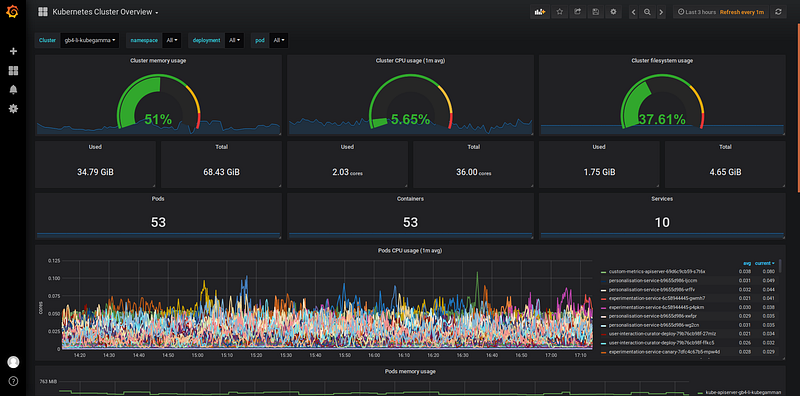
Now that this is all in place, every time we spin up a new cluster all we need to do is regenerate our Prometheus configuration, and we automatically scrape all the metrics from our new cluster!
We’re recruiting
Find out about the exciting opportunities at THG here: