
Monitoring BERT Model Training with TensorBoard
Gradient Flow and Update Ratios

In the previous article, we explained all the building components of the BERT model. Now we are going to train the model monitoring the training process in TensorBoard, looking at the gradient flow, updates-parameters ratios, loss and evaluation metrics.
Why would we like to monitor gradients flow and updates ratios instead of simply looking at the loss and evaluation metrics? When we start the model training on a big amount of data, we might run many iterations before realising, looking at the loss and evaluation metrics that the model is not training. Here, looking at the gradients magnitude and updates ratio we can immediately spot that something is wrong which saves us time and money.
Data preparation
We will use 20newsgroups dataset (License: Public Domain / Source: http://qwone.com/~jason/20Newsgroups/) from sklearn in this example with 4 categories : alt.atheism, talk.religion.misc, comp.graphics and sci.space. We tokenize the data with BertTokenizer from the transformers library and wrap them into BertDataset class which inherits from torch.utils.data.Dataset allowing to batch and shuffle the data and conveniently load them into the model.
categories = ['alt.atheism', 'talk.religion.misc', 'comp.graphics', 'sci.space']newsgroups_train = fetch_20newsgroups(subset='train', categories=categories)
newsgroups_test = fetch_20newsgroups(subset='test', categories=categories)X_train = pd.DataFrame(newsgroups_train['data'])
y_train = pd.Series(newsgroups_train['target'])X_test = pd.DataFrame(newsgroups_test['data'])
y_test = pd.Series(newsgroups_test['target'])BATCH_SIZE = 16max_length = 256
config = BertConfig.from_pretrained("bert-base-uncased")
config.num_labels = len(y_train.unique())
config.max_position_embeddings = max_lengthtrain_encodings = tokenizer(X_train[0].tolist(), truncation=True, padding=True, max_length=max_length)
test_encodings = tokenizer(X_test[0].tolist(), truncation=True, padding=True, max_length=max_length)class BertDataset(Dataset):def __init__(self, encodings, labels):
self.encodings = encodings
self.labels = labelsdef __getitem__(self, idx):
item = {key: torch.tensor(val[idx]).to(device) for key, val in
self.encodings.items()}
item[‘labels’] = torch.tensor(self.labels[idx]).to(device)
return itemdef __len__(self):
return len(self.labels)train_dataset = BertDataset(train_encodings, y_train)
test_dataset = BertDataset(test_encodings, y_test)train_dataset_loader = DataLoader(train_dataset, batch_size=BATCH_SIZE, shuffle=True)
test_dataset_loader = DataLoader(test_dataset, batch_size=BATCH_SIZE)for d in train_dataset_loader:
print(d)
break# output :
{'input_ids': tensor([[ 101, 2013, 1024, ..., 0, 0, 0],
[ 101, 2013, 1024, ..., 1064, 1028, 102],
[ 101, 2013, 1024, ..., 0, 0, 0],
...,
[ 101, 2013, 1024, ..., 2620, 1011, 102],
[ 101, 2013, 1024, ..., 1012, 4012, 102],
[ 101, 2013, 1024, ..., 3849, 2053, 102]], device='cuda:0'),
'token_type_ids': tensor([[0, 0, 0, ..., 0, 0, 0],
[0, 0, 0, ..., 0, 0, 0],
[0, 0, 0, ..., 0, 0, 0],
...,
[0, 0, 0, ..., 0, 0, 0],
[0, 0, 0, ..., 0, 0, 0],
[0, 0, 0, ..., 0, 0, 0]], device='cuda:0'),
'attention_mask': tensor([[1, 1, 1, ..., 0, 0, 0],
[1, 1, 1, ..., 1, 1, 1],
[1, 1, 1, ..., 0, 0, 0],
...,
[1, 1, 1, ..., 1, 1, 1],
[1, 1, 1, ..., 1, 1, 1],
[1, 1, 1, ..., 1, 1, 1]], device='cuda:0'),
'labels': tensor([3, 0, 2, 1, 0, 2, 2, 1, 1, 0, 1, 3, 3, 0, 2, 1], device='cuda:0')}TensorBoard usage
TensorBoard allows us to write and save for future analysis different types of data, including images and scalars. First of all let’s install tensorboard with pip:
pip install tensorboard
To write to TensorBoard we will be using the SummaryWriter from torch.utils.tensorboard
from torch.utils.tensorboard import SummaryWriter# SummaryWriter takes log directory as argument
writer = SummaryWriter(‘tensorboard/runs/bert_experiment_1’)To write scalars, we use:
writer.add_scalar(‘loss/train’, loss, counter_train)
The counter_train variable is needed to know the step number at which something was written to TensorBoard. To write an image, we will use the following:
writer.add_figure(“gradients”, myfig, global_step=counter_train, close=True, walltime=None)Model training
Now let’s look at our training function
out_every variable controls how often to write to TensorBoard, measured in number of steps. We can also evaluate more often than after each epoch using step_eval variable. Gradients flow and updates ratios figures are returned from plot_grad_flow and plot_ratios functions respectively.
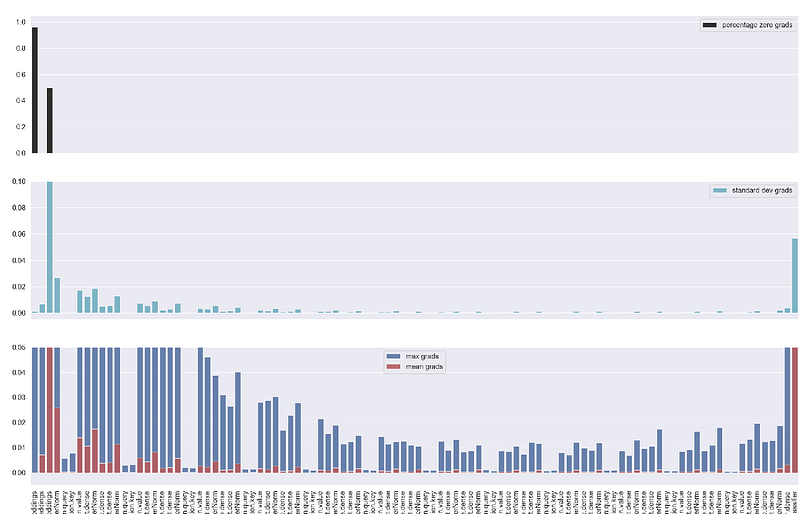
plot_grad_flow we pass the model’s parameters and for better visualisation we can decide to skip some of the layers with skip_prob parameter. We write mean, max and standard deviations of the gradients of each layer, ignoring bias layers as they are less interesting. You can remove that part on the 17th line if you want to display bias's gradients as well. We also display the percentage of zero gradients in each layer. It’s important to highlight, as BERT uses GeLU rather than ReLU activation function this last plot might be less useful, but if you are using a different model with ReLU which suffers from dying neurons problem, displaying the percentage of zero gradients is actually helpful.
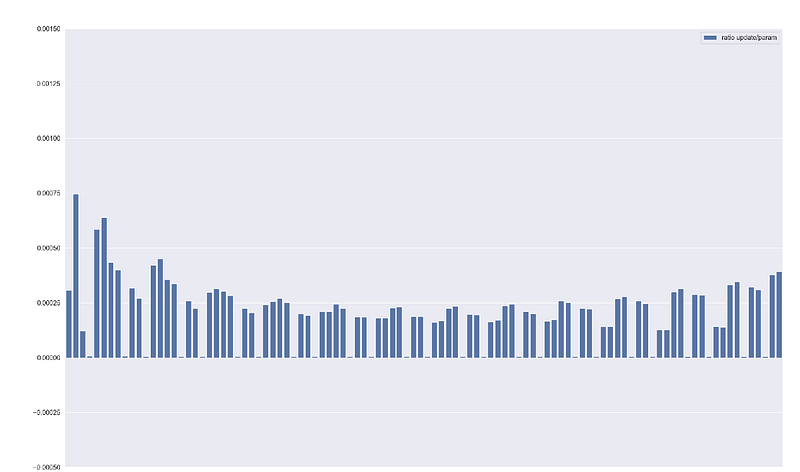
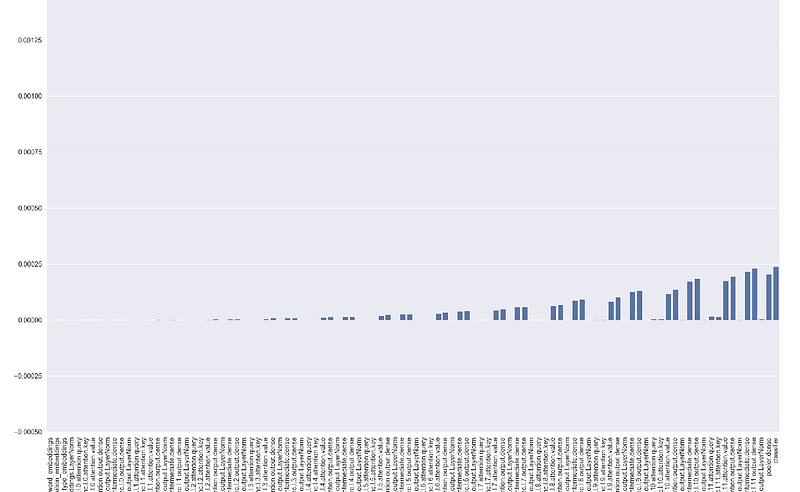
plot_ratios function displays the update / parameter ratio for each parameter which is a standardized measure as the update is divided by the parameter value and helps to understand how your neural network is learning. As a rough heuristic, this value should be around 1e-3, if lower then learning rate might be too low, otherwise too high. Also here you can reduce the layers displayed through skip_prob parameter.
During the model training you can start TensorBoard using the following command :
tensorboard --samples_per_plugin images=100 --logdir bert_experiment_1Otherwise, you can create a .bat file (on Windows) for a quicker launch. Create a new file, for example run_tensorboard with .bat extension and copy paste the below command modifying path_to_anaconda_env, path_to_saved_results and env_name accordingly. Then click on the file to launch TensorBoard.
cmd /k “cd path_to_anaconda_env\Scripts & activate env_name & cd path_to_saved_results\tensorboard\runs & tensorboard — samples_per_plugin images=100 — logdir bert_experiment_1”Defining samples_per_plugin images = 100 we display all the images in this task, otherwise by default TensorBoard will only display some of them.
Results
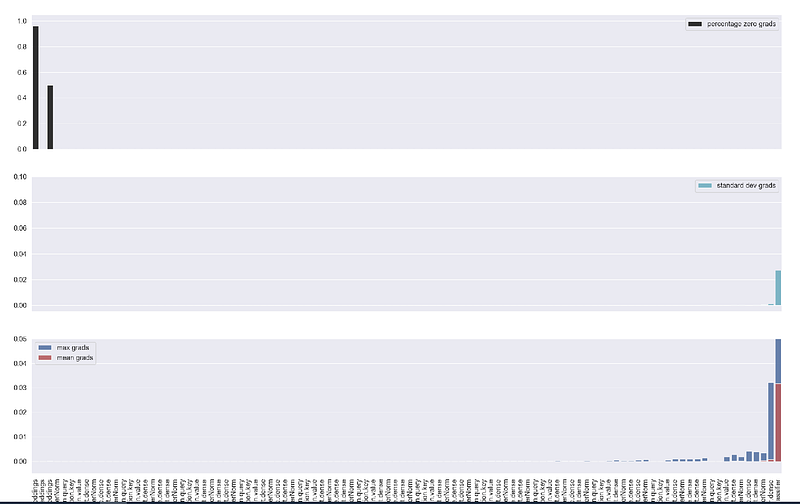
Monitoring these plots we can spot quickly if something is going not as expected. For example, if gradients are zero for many layers you might have a vanishing gradient problem. Similarly, if ratios are very low or very high you might want to dig deeper immediately without waiting until the end of the training or several epochs of training.
For example, looking at the ratios and the gradients on step number 240 with the below configuration we can see that things look good and our training is proceeding well — we can expect good results at the end.
EPOCHS = 5
optimizer = AdamW(model.parameters(), lr=3e-5, correct_bias=False)
total_steps = len(train_dataset_loader) * EPOCHS
scheduler = get_linear_schedule_with_warmup(
                   optimizer,
                   num_warmup_steps= 0.7 * total_steps,
                   num_training_steps=total_steps
                                            )
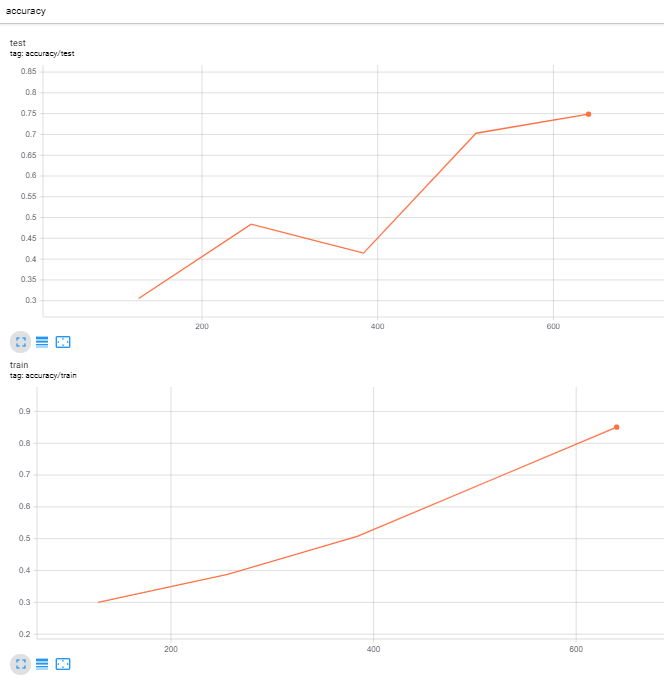
Indeed the final results are :
While if we change the schedule setting to this:
scheduler = get_linear_schedule_with_warmup(
 optimizer,
 num_warmup_steps= 0.1 * total_steps,
 num_training_steps=total_steps
 )
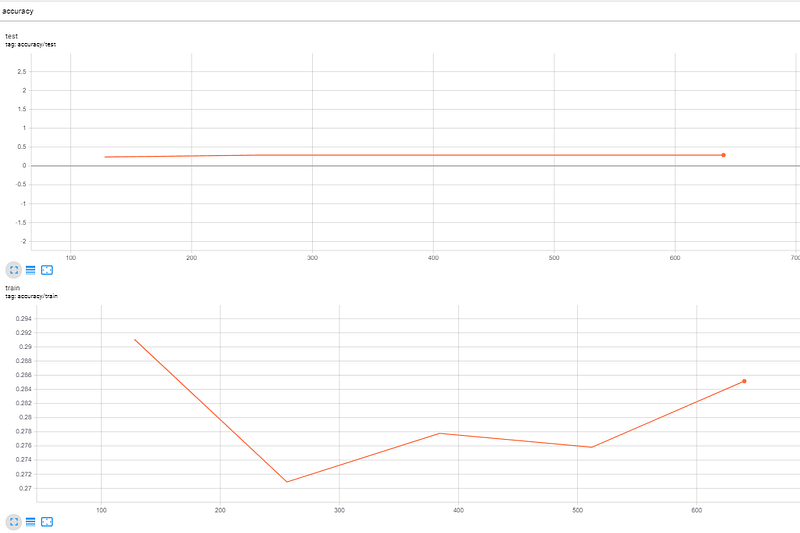
We notice at 180th step from the graphs that the model is not learning and we can stop the training to investigate further. In this case setting num_warmup_steps to 0.1 * total_steps makes the learning rate decrease and become very small shortly after the start of the training, and we end up with vanishing gradients which do not propagate back to first layers of the networking stopping effectively the learning process.
You can find the full code in this GitHub repo to try and experiment yourself.
Conclusions
After reading this and previous articles you should have all the tools and understanding of how to train Bert model in your projects! Things I described here are some of the ones you want to monitor during training, but TensorBoard offers other functionalities like Embeddings Projector that you can use to explore your embedding layer and many more that you can find here.


